



Evaluate Traces & Spans
Run online and offline evaluations on individual traces and spans on the fly
Overview
Online evaluations let you run metrics on traces and spans on-the-fly as they're ingested into Confident AI, giving you real-time production monitoring of your AI's quality.
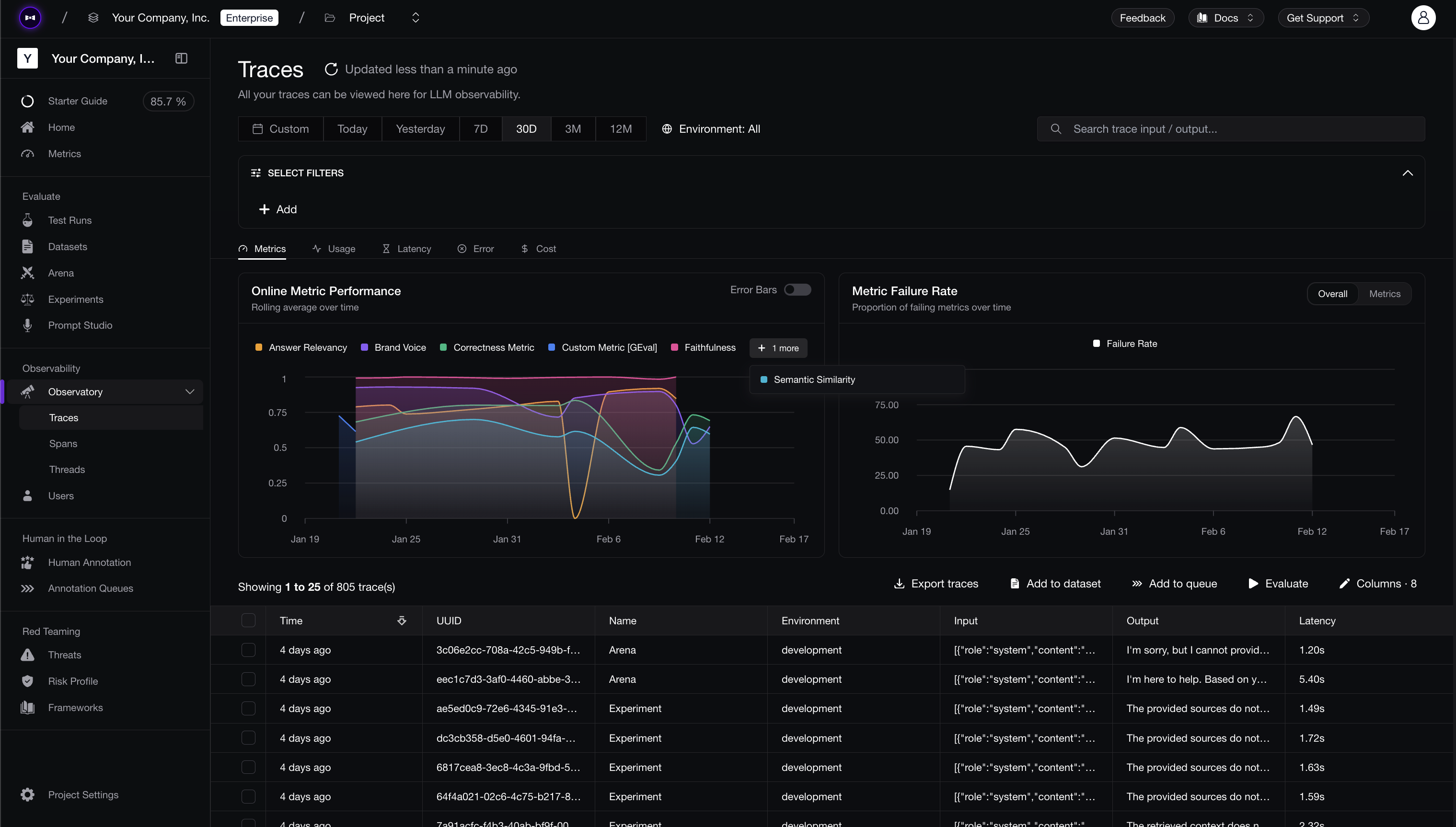
Evaluations run server-side on Confident AI. confident-trace sends the test case data and can select a metric collection directly on a trace or span. Alternatively, you can configure Evaluation Rules on the platform to select collections with filters and sample rates.
How It Works
Online evaluations for traces and spans follow these steps:
- You create a metric collection on Confident AI with the single-turn metrics you want to run.
- You select the collection either by setting
metric_collection/metricCollectionon the trace or span, or by creating an Evaluation Rule in the UI. - Inside your
span, you set test case parameters on the span or trace using the span and trace update helpers. - When the trace is ingested, Confident AI uses the explicit OpenTelemetry-level collection when present. Otherwise, it matches the trace or span against Evaluation Rules.
- Results appear on the trace/span in the Confident AI dashboard.
sequenceDiagram
    participant App as Your App
    participant SDK as confident-trace
    participant CAI as Confident AI

    App->>SDK: Enter span
    SDK->>SDK: Create trace & span(s)
    App->>SDK: update_span / update_trace (metric collection, input, output, etc.)
    App->>SDK: Span ends
    SDK->>CAI: Export trace with test case data
    CAI->>CAI: Resolve inline collection, then Evaluation Rules
    CAI->>CAI: Run referenceless metrics against test case
    CAI->>CAI: Store results on trace/span
Map Test Case Parameters
To run evaluations, you first need to understand how trace and span parameters map to test case parameters, which is what metrics use for evaluation. These parameters provide the data that metrics evaluate against.
The parameters you pass to update_span / update_trace (or updateSpan / updateTrace) map directly to test case parameters:
| Trace/Span Parameter | Test Case Parameter | Description |
|---|---|---|
input | input | The input to your AI app |
output | actual_output | The output of your AI app |
expected_output | expected_output | The expected output of your AI app |
retrieval_context | retrieval_context | List of retrieved text chunks from a retrieval system |
context | context | List of ideal retrieved text chunks |
tools_called | tools_called | List of tool call objects ({"name", "input", "output"}) actually used |
expected_tools | expected_tools | List of tool call objects you expected to be used |
| Trace/Span Parameter | Test Case Parameter | Description |
|---|---|---|
input | input | The input to your AI app |
output | actualOutput | The output of your AI app |
expectedOutput | expectedOutput | The expected output of your AI app |
retrievalContext | retrievalContext | List of retrieved text chunks from a retrieval system |
context | context | List of ideal retrieved text chunks |
toolsCalled | toolsCalled | List of tool call objects ({ name, input, output }) actually used |
expectedTools | expectedTools | List of tool call objects you expected to be used |
All parameters are optional — you only need to provide the ones required by the metrics in your collection. Tool calls are plain JSON objects, so you don't need to import anything to construct them.
Evaluate Spans Online
Set metric_collection / metricCollection with the span's test case parameters to select a collection directly. Retriever spans are a natural fit: set retrieval_context to the chunks you retrieved and run a contextual relevancy metric to catch bad retrievals before they ever reach the LLM:
from openai import OpenAI
from confident_trace import init, span, update_span, shutdown

init()
client = OpenAI()

@span(type="retriever")
def retriever(query: str) -> list[str]:
    chunks = vector_store.search(query, top_k=3)
    update_span(
        metric_collection="Retrieval Quality",
        input=query,
        output=chunks,
        retrieval_context=chunks,
    )
    return chunks

def llm_app(query: str) -> str:
    with span("llm_app", type="agent"):
        chunks = retriever(query)
        return client.chat.completions.create(
            model="gpt-4o",
            messages=[{"role": "user", "content": f"{query}\n\n{chunks}"}]
        ).choices[0].message.content

try:
    llm_app("Write me a poem.")
finally:
shutdown()import OpenAI from "openai";
import { init, span, withSpan, updateSpan } from "confident-trace";
const runtime = init();
const openai = new OpenAI();
const retriever = span({ name: "retriever", type: "retriever" }, async (query: string) => {
const chunks = await vectorStore.search(query, { topK: 3 });
updateSpan({
metricCollection: "Retrieval Quality",
input: query,
output: chunks,
retrievalContext: chunks,
});
return chunks;
});
const llmApp = async (query: string) => {
return withSpan({ name: "llm_app", type: "agent" }, async () => {
const chunks = await retriever(query);
const res = await openai.chat.completions.create({
model: "gpt-4o",
messages: [{ role: "user", content: `${query}\n\n${chunks.join("\n")}` }],
});
return res.choices[0].message.content ?? "";
});
};
try {
await llmApp("Write me a poem.");
} finally {
await runtime.shutdown();
}The explicit collection evaluates only the retriever span where it is set. If you use a span Evaluation Rule instead, the rule runs against every span it matches. A rule matching all span types would evaluate the agent span, retriever span, and auto-instrumented LLM span, so use its Span Type filter to target only the spans you care about.
Evaluate Traces Online
Similar to spans, set metric_collection / metricCollection with update_trace / updateTrace to select the collection for the trace. Trace-level evals are the right choice for end-to-end quality — "did the user get a good answer?" — since the trace input and output represent the whole request:
from openai import OpenAI
from confident_trace import init, span, update_trace, shutdown

init()
client = OpenAI()

def llm_app(query: str) -> str:
    with span("llm_app", type="agent"):
        chunks = retrieve(query)
        res = client.chat.completions.create(
            model="gpt-4o",
            messages=[{"role": "user", "content": f"{query}\n\n{chunks}"}]
        ).choices[0].message.content

        update_trace(
            metric_collection="Agent Quality",
            input=query,
            output=res,
            retrieval_context=chunks,
        )
        return res

try:
    llm_app("Write me a poem.")
finally:
shutdown()import OpenAI from "openai";
import { init, withSpan, updateTrace } from "confident-trace";
const runtime = init();
const openai = new OpenAI();
const llmApp = async (query: string) => {
return withSpan({ name: "llm_app", type: "agent" }, async () => {
const chunks = await retrieve(query);
const res = await openai.chat.completions.create({
model: "gpt-4o",
messages: [{ role: "user", content: `${query}\n\n${chunks.join("\n")}` }],
});
const data = res.choices[0].message.content ?? "";
updateTrace({
metricCollection: "Agent Quality",
input: query,
output: data,
retrievalContext: chunks,
});
return data;
});
};
try {
await llmApp("Write me a poem.");
} finally {
await runtime.shutdown();
}If a rule matches a trace or span but you haven't provided sufficient test case parameters for one of its metrics, that metric shows up as an error on Confident AI. It won't block or cause issues in your code — evaluation happens after export, entirely on the platform.
Examples
Quick quiz: Given the code below, with one Trace rule and one Span rule (span type Any) both enabled, what does each rule evaluate?
from confident_trace import span, update_span, update_trace

@span(type="tool")
def inner_function(query: str):
    result = lookup(query)
    update_span(input=query, output=result)
    update_trace(input=query, output="final answer")
    return result

def outer_function(query: str):
    with span("outer_function", type="agent"):
return inner_function(query)import { span, withSpan, updateSpan, updateTrace } from "confident-trace";
const innerFunction = span({ name: "inner_function", type: "tool" }, async (query: string) => {
const result = await lookup(query);
updateSpan({ input: query, output: result });
updateTrace({ input: query, output: "final answer" });
return result;
});
const outerFunction = async (query: string) => {
return withSpan({ name: "outer_function", type: "agent" }, async () => {
return innerFunction(query);
});
};Answer: The Trace rule evaluates one test case — input=query, actual_output="final answer" — because update_trace always writes to the trace regardless of where it's called. The Span rule evaluates two spans: inner_function with input=query and actual_output=result, and outer_function with no test case parameters at all (which will error for any metric that needs them).
This is because:
update_tracesets trace-level fields from anywhere inside the trace — it doesn't matter that it was called from a child span.update_spanupdates the innermost active span (inner_function), not its parent.- A span rule with type Any matches every span in the trace, including
outer_function, which never hadupdate_spancalled inside it. Restrict the rule to Tool spans (or callupdate_spaninouter_function) to fix this.
Next Steps
Now that you can evaluate individual traces and spans, learn how to evaluate entire conversations.
Evaluate Threads
Run evaluations on multi-turn conversations and understand how thread evals differ from trace evals.
Evaluation Rules
Configure which metric collections run on which traces, spans, and threads — with filters and sample rates — without touching your code.
Last updated on