



Experiment with AI Apps
Move beyond vibes. Compare multiple versions of your AI app with statistical rigor.
Overview
Now that you've ran your AI app in the Arena (or created a test run), it's time to systematically find out which version of your AI app is actually better.
Experiments let you compare two or more versions of your AI app side-by-side, using the same dataset and metrics.
This is fundamentally different from running single-turn or multi-turn evaluations:
- Single/multi-turn evals produce a single test run — a one-off snapshot of how one version of your AI app performs
- Experiments run the same dataset through multiple versions simultaneously and provide aggregate statistics to declare a winner
Think of it this way: evals answer "how good is this version?" while experiments answer "which version is better?"
How to Experiment
You can kick off an experiment in two ways:
- Arena — you've been iterating on prompts and want to formalize the comparison
- Existing Test Runs — you already have test runs and want to compare them retroactively
Either way you'll get the same result, however running experiments from Arena will be the more natural workflow.
Arena Experiments
As covered in the Arena section, the Arena is great for quick, qualitative comparisons. But when you're ready to graduate from vibes to data, it's time to run a proper experiment.
Here's the key difference:
- Arena — fast feedback on a few inputs, great for exploration
- Experiments — run your entire dataset through each configuration and get statistically meaningful results
Here's what happens when you run an experiment:
sequenceDiagram
    participant You
    participant Platform as Confident AI
    participant A as Contestant A
    participant B as Contestant B
    participant Metrics as Metric Collection

    You->>Platform: Run Experiment

    loop For each golden in dataset
        Platform->>A: Send input
        A-->>Platform: Output A
        Platform->>B: Send input
        B-->>Platform: Output B
        Platform->>Metrics: Evaluate both outputs
        Metrics-->>Platform: Scores for A and B
    end

    Platform-->>You: Side-by-side comparison
For example, for an experiment with 4 contestants, 5 goldens, and 3 metrics, there will be a grand total of 20 (4 x 5) outputs generated and 60 (20 x 3) evaluations total.
Set up contestants
In the Arena, configure at least 2 contestants. Each can be a Prompt or AI Connection (learn more).
Arena with multiple contestants configured Run as Experiment
Click Run as Experiment in the top right corner. You'll see a dialog to configure your experiment:
- Experiment Name — give it something memorable so you can find it later
- Dataset — select the dataset to evaluate against
- Metric Collection — select the metrics to score each output
Run Experiment dialog Analyze results
Confident AI generates outputs for each contestant across your entire dataset, then runs your metrics on every test case.
When complete, you'll see:
Metrics Overview — a side-by-side comparison of all contestants:
- Average score per metric for each contestant
- Winner indicator showing which contestant performed best on each metric
- Score differences (e.g., +0.02, -0.01) relative to the base run
Experiment Test Cases — drill into individual goldens:
- Score breakdown per metric × contestant
- View the actual input, expected output, and each contestant's output
- Link to view traces for deeper debugging
Analyzing experiment results from existing test runs
Experiments with test runs
Already have test runs from previous evaluations? You can create an experiment directly from them — no need to re-run anything.
This is different from regression testing:
- Regression Testing — compare two test runs to spot what got better or worse
- Experiments — compare multiple test runs with aggregate statistics and declare a winner
Select your test runs
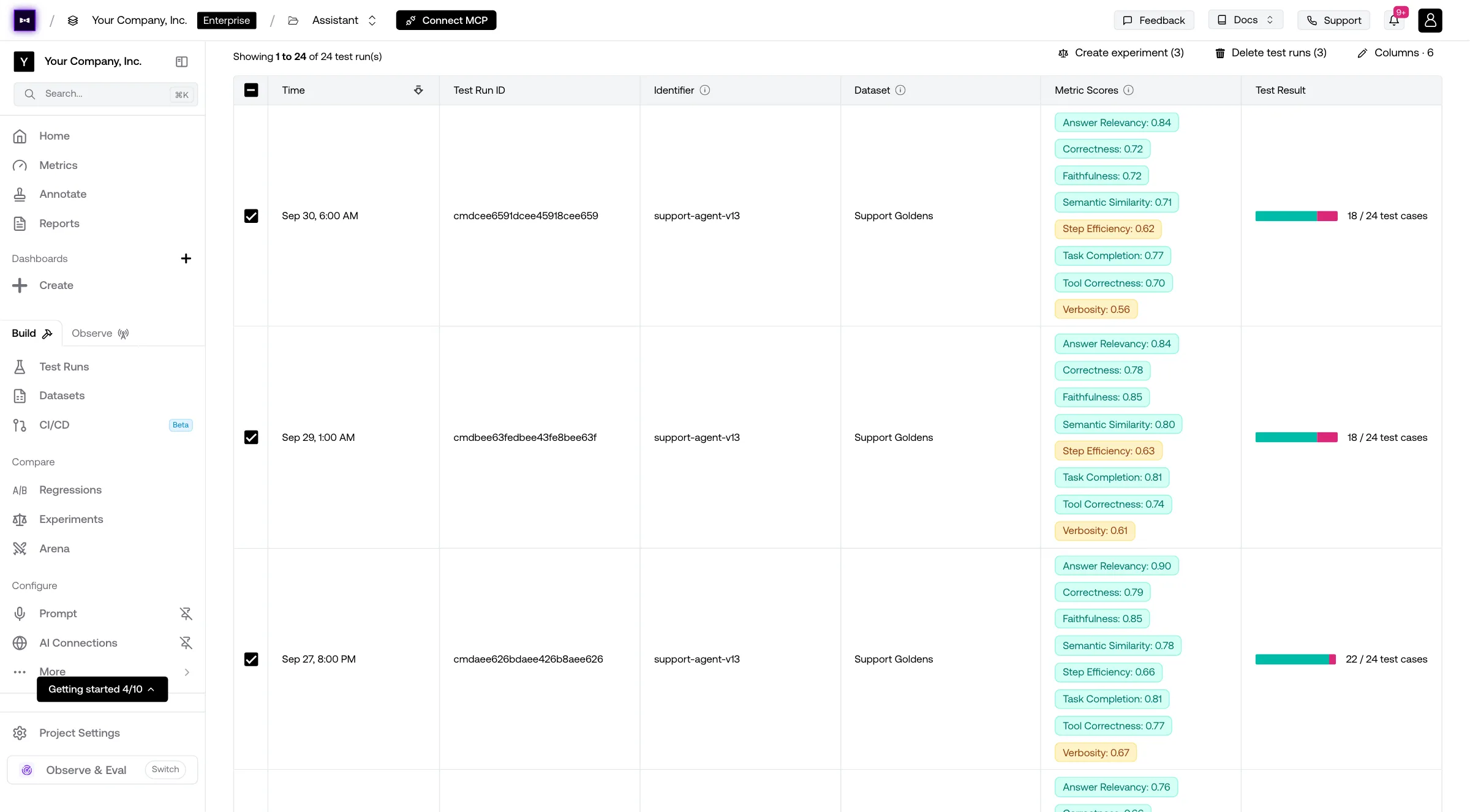
Go to Test Runs, open the Single-Turn tab, and tick the test runs you want to include in the experiment.
Create experiment
Click Create experiment, which shows how many test runs you ticked.
Creating experiment from test run view Analyze results
The experiment view aggregates all your test runs and shows you:
- Winner by metric — which version performed best on each metric, marked with a crown
- Averages and deltas — each version's average score per metric, and how far it is from the base run
- Test cases side by side — every version's output, latency, tokens, cost and scores for the same input
Experiment results showing metrics overview and test cases
Reading Results
A good experiment tells you more than just "A is better than B." Here's what to look for:
- Consistent winners — if one contestant wins across all metrics, you have a clear choice
- Trade-offs — one contestant might be more relevant but less concise; decide what matters most
- Close calls — if scores are within a few percentage points, you may need more test cases for confidence
- Outliers — dig into test cases where one contestant dramatically outperformed or underperformed
You should also avoid looking at the details of each contestants from the get go to avoid bias - Confident AI intentionally hides contestant details unless you explicitly click on the top of each column.
Next Steps
Now that you've run an experiment, the next step is making your results even more reliable. Your experiment is only as valid as the quality of your dataset. That means scaling your dataset and keeping it well-maintained.
Datasets
Learn how to grow, curate, and maintain your test datasets for better experiments.
Last updated on