



Metric Collections
Metric collections allow you to group together metric runs on Confident AI
Overview
A metric collection on Confident AI is a collection of metric and their respective settings. It is what allows you to run evaluations remotely. This can be for either:
- Evals in development, through the Confident API
- Evals for LLM tracing, through the means of online or offline evals
Metric collections are strictly used for remote evals, and are identified by an unique name, and does not require any code to manage.
Local Evals
- Run evaluations locally using
deepevalwith full control over metrics - Support for custom metrics, DAG, and advanced evaluation algorithms
Suitable for: Python users, development, and pre-deployment workflows
Remote Evals
- Run evaluations on Confident AI platform with pre-built metrics
- Integrated with monitoring, datasets, and team collaboration features
Suitable for: Non-python users, online + offline evals for tracing in prod
Why Metric Collection?
Metric collections solve key challenges when running evaluations at scale:
- Reusable configurations — Define your evaluation setup once and reuse it across test runs, experiments, and production monitoring
- Customizable settings per context — The same metric can have different thresholds or strictness levels in different collections (e.g., stricter for production, lenient for development)
- No-code management — Create and update collections entirely through the UI without touching any code
- Consistent evaluations — Ensure all team members and automated pipelines use the same evaluation criteria
Create a Metric Collection
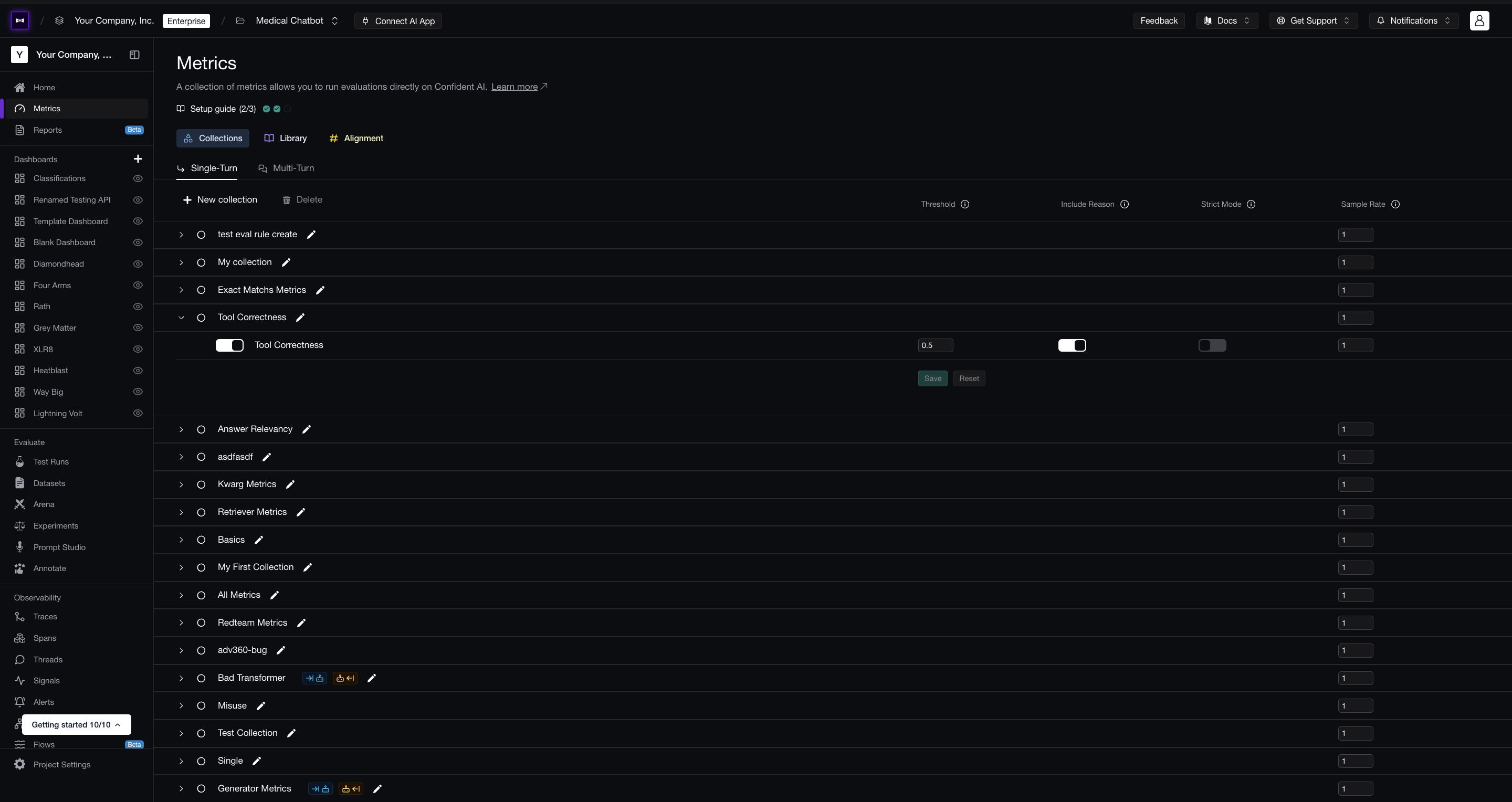
You can create a single or multi-turn metric collection under Project > Metrics > Collections. All you need to do is provide it with a unique name, select the appropriate metrics, and edit their settings (if required).
You can also create metric collections programmatically using the Confident API:
curl -X POST "https://api.confident-ai.com/v1/metric-collections" \
  -H "CONFIDENT_API_KEY: <PROJECT-API-KEY>" \
  -H "Content-Type: application/json" \
  -d '{
  "name": "Collection Name",
  "multiTurn": false,
  "metricSettings": [
    {
      "metric": {
        "name": "Answer Relevancy"
      },
      "threshold": 0.8
    }
  ]
}'
You can use metric collections for any remote evals in Confident AI:
- Running single or multi-turn E2E testing via the Confident API
- Running single or mult-turn online/offline evals during LLM tracing
Sample Rate
The Sample Rate is the probability (0–1) that an evaluation runs during automatic, ingest-time (online) evaluation. It's set at two levels on the Metrics → Collections page:
- Collection row — samples the entire collection at once for each item, and defaults to
1(every trace, thread, or span the collection is applied to is evaluated). This decision is deterministic, so the same trace, thread, or span always makes the same choice. - Metric row — samples that individual metric within the collection.
The two compound: a given metric runs at collection rate × metric rate. For example, a collection at 0.5 with a metric at 0.4 evaluates that metric on roughly 20% of items. To score every metric on every sampled item, leave the rates at 1.
Understanding Metric Collections
Metric collections and metrics are connected in-directly via metric settings, which specifies the specific threshold, strictness, etc. of each metric in different collections.
• Metric Collection: A group of metrics that you wish to evaluate together (either for a test run or online evaluation).
• Metric Settings: Configuration options for how a metric within a metric collection should be evaluated, including the threshold, strictness, and whether to include reasoning.
graph TD
    A[Metric Collection 1] --> D[Metric Settings]
    A --> F[Metric Settings]

    B[Metric Collection 2] --> G[Metric Settings]
    B --> H[Metric Settings]

    C[Metric] --> D
    C --> F
    C --> G
    C --> H

    style A fill:#e1f5fe,color:#1e293b
    style B fill:#e1f5fe,color:#1e293b
    style C fill:#f3e5f5,color:#1e293b
    style D fill:#e8f5e8,color:#1e293b
    style F fill:#e8f5e8,color:#1e293b
    style G fill:#e8f5e8,color:#1e293b
    style H fill:#e8f5e8,color:#1e293b
When you run remote evals by providing a metric collection name, Confident AI will fetch the metric and their settings related to said collection, before using all these configs to run evals.
Scaling beyond prototype?For teams evaluating Confident AI in productionTalk to usLast updated on