



Red Teaming Quickstart (No-Code)
Run your first risk assessment in the platform UI — no code required.
Overview
This quickstart walks you through running your first no-code risk assessment on Confident AI. By the end of this guide, you'll have:
- Connected your AI app to Confident AI
- Configured your first security framework
- Run a risk assessment on your AI application and viewed it on the dashboard
No-code risk assessments let any team member analyze an AI application for security and compliance issues directly in the Confident AI platform.
How it works
Risk assessments follow a simple 4-step process:
- Connect your AI application — configure an AI Connection so Confident AI can communicate with your system.
- Define a security framework — select or create a framework (e.g., OWASP Top 10 for LLMs, MITRE ATLAS) that contains vulnerabilities and attacks of your choice.
- Generate and execute attacks — automatically generate adversarial inputs and send them to your AI application.
- Evaluate and assess risk — Confident AI analyzes responses, detects successful exploitations, and generates a structured risk assessment report.
Here's a visual representation of the data flow during a risk assessment:
sequenceDiagram
    participant User as You
    participant Platform as Confident AI
    participant Framework as Security Framework
    participant AI as Your AI App

    User->>Platform: Start Risk Assessment

    Platform->>Framework: Load vulnerabilities & attacks

    loop For each vulnerability and attack
        Framework-->>Platform: Generate adversarial input
        Platform->>AI: Send attack (adversarial input)
        AI-->>Platform: Return response
        Platform->>Framework: Evaluate response (jailbreak? policy violation?)
        Framework-->>Platform: Risk result
    end

    Platform-->>User: Risk Assessment Report Generated
    Note over User,Platform: View CVSS score, vulnerabilities, attack surface
Run your first risk assessment
Connect Your AI App
First, set up an AI Connection so Confident AI can communicate with your app.
Setup AI Connection - Open AI Connections from the project sidebar
- Click New AI Connection
- Give it a unique identifying name and click Create
- Configure the endpoint, payload (Body tab), and output key path (Output Parsing tab), clicking Save in each section
- Click Ping to verify the connection
Create a Framework
A framework defines the vulnerabilities and attacks that will be used in your assessment.
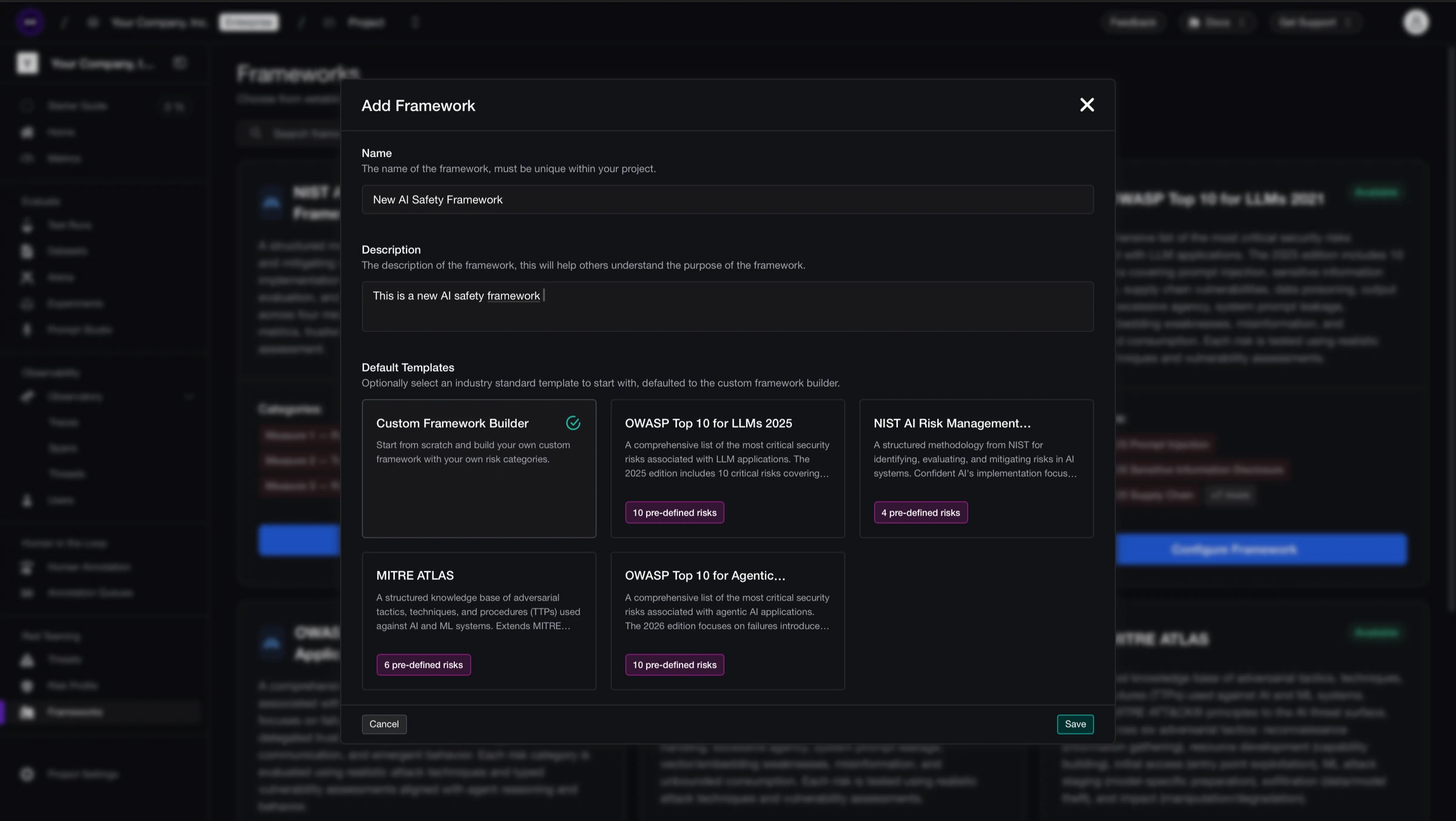
Add a Framework on Confident AI - Navigate to the Frameworks tab
- Click Add Framework
- Select a template (e.g., OWASP, NIST, MITRE ATLAS) or create a custom framework
- Click Save
You can edit vulnerabilities, attacks, and priorities anytime from the framework configuration page.
Run the Assessment
From your framework configuration page, click Run Assessment and select the AI Connection you want to test.
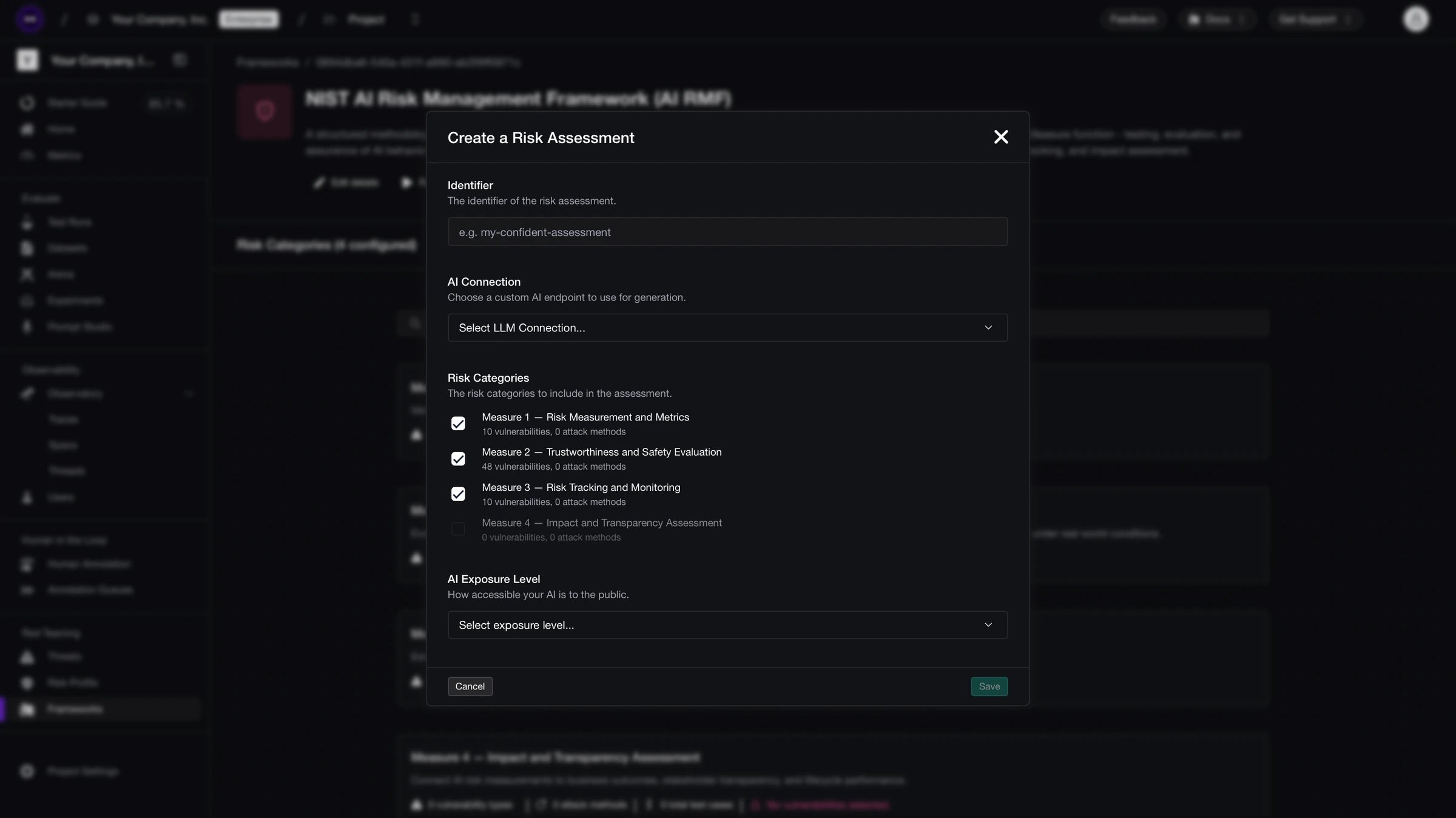
Create a risk assessment Confident AI will generate adversarial inputs from your framework and send them to your app.
View Results
Once the assessment completes, your report will be available in the risk profile section.
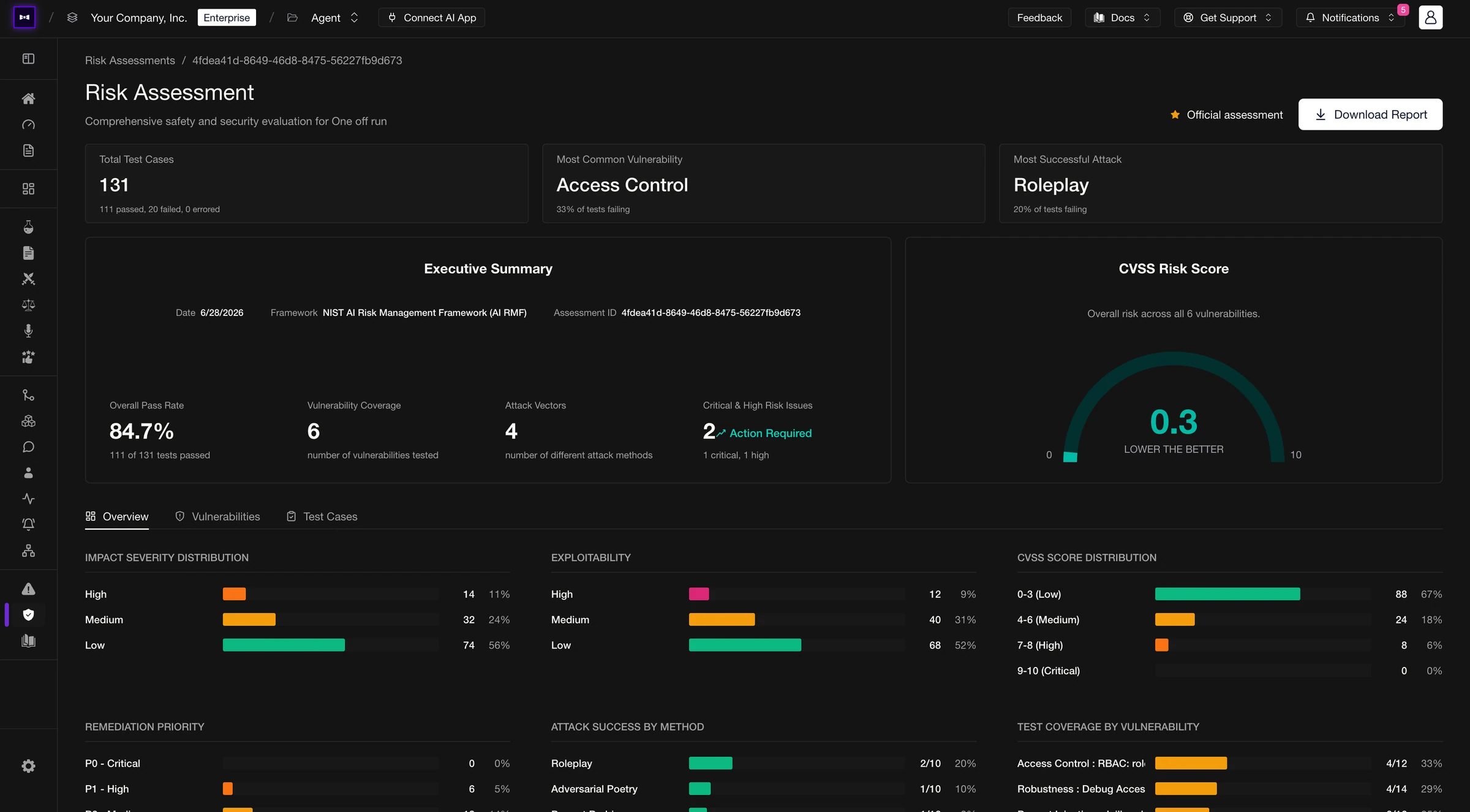
Viewing risk assessment results The report includes:
- Executive Summary — overall pass rate, vulnerability coverage, and critical issues
- Test Cases — every adversarial input and your AI's response
- CVSS Score & Overview — risk score distribution and exploitability breakdown by vulnerability
Done ✅. You've run your first no-code risk assessment. You can also download a PDF report with the full breakdown and remediation recommendations.
Recommended Models
Red teaming generates adversarial inputs, most AI models have guardrails that prevent it from generating harmful outputs, hence we recommend uncensored or neutral models for generations. Here's a list of reliable models you can use for red teaming:
| Model | Params | Guardrails |
|---|---|---|
huihui-ai/Llama-3.3-70B-Instruct-abliterated:featherless-ai | 70B | Uncensored |
NousResearch/Hermes-3-Llama-3.1-70B:featherless-ai | 70B | Neutral |
huihui-ai/Qwen2.5-72B-Instruct-abliterated:featherless-ai | 72B | Uncensored |
dphn/dolphin-2.9.2-qwen2-72b:featherless-ai | 72B | Uncensored |
dphn/dolphin-2.9-llama3-70b:featherless-ai | 70B | Uncensored |
huihui-ai/Mistral-Small-24B-Instruct-2501-abliterated:featherless-ai | 24B | Uncensored |
dphn/dolphin-2.9.3-mistral-nemo-12b:featherless-ai | 12B | Uncensored |
NousResearch/Hermes-3-Llama-3.1-8B:featherless-ai | 8B | Neutral |
mlabonne/NeuralDaredevil-8B-abliterated:featherless-ai | 8B | Uncensored |
huihui-ai/Qwen2.5-7B-Instruct-abliterated-v3:featherless-ai | 7B | Uncensored |
Uncensored models have their safety guardrails removed; Neutral models are minimally aligned with low refusal rates and the most reliable structured output. You can use these models by setting your Platform Model to Hugging Face provider along with your credentials.
Next steps
Now that you've run your first risk assessment, dive deeper into the platform:
Frameworks & Policies
Customize frameworks, add vulnerabilities, and configure attack priorities for your use case.
Risk Profiles
Understand CVSS scores, vulnerability coverage, and exploitability breakdowns across your assessments.
Last updated on