



Eval Alignment
Compare your metric evals to human annotations to see how well your judges agree with your team.
Overview
Eval Alignment measures how often your project's metrics agree with the humans annotating the same items. For every queue item that has both a human annotation and a metric eval, the page treats the human result as ground truth and rolls up agreement, broken down per metric — including a confusion-matrix view (True Positive, False Negative, True Negative, False Positive).
Use Eval Alignment to:
- Spot metrics that consistently disagree with humans, and tune their judge prompts.
- Measure improvement in alignment over time as you iterate on metrics.
- Decide which metrics are reliable enough to gate releases or trigger alerts.
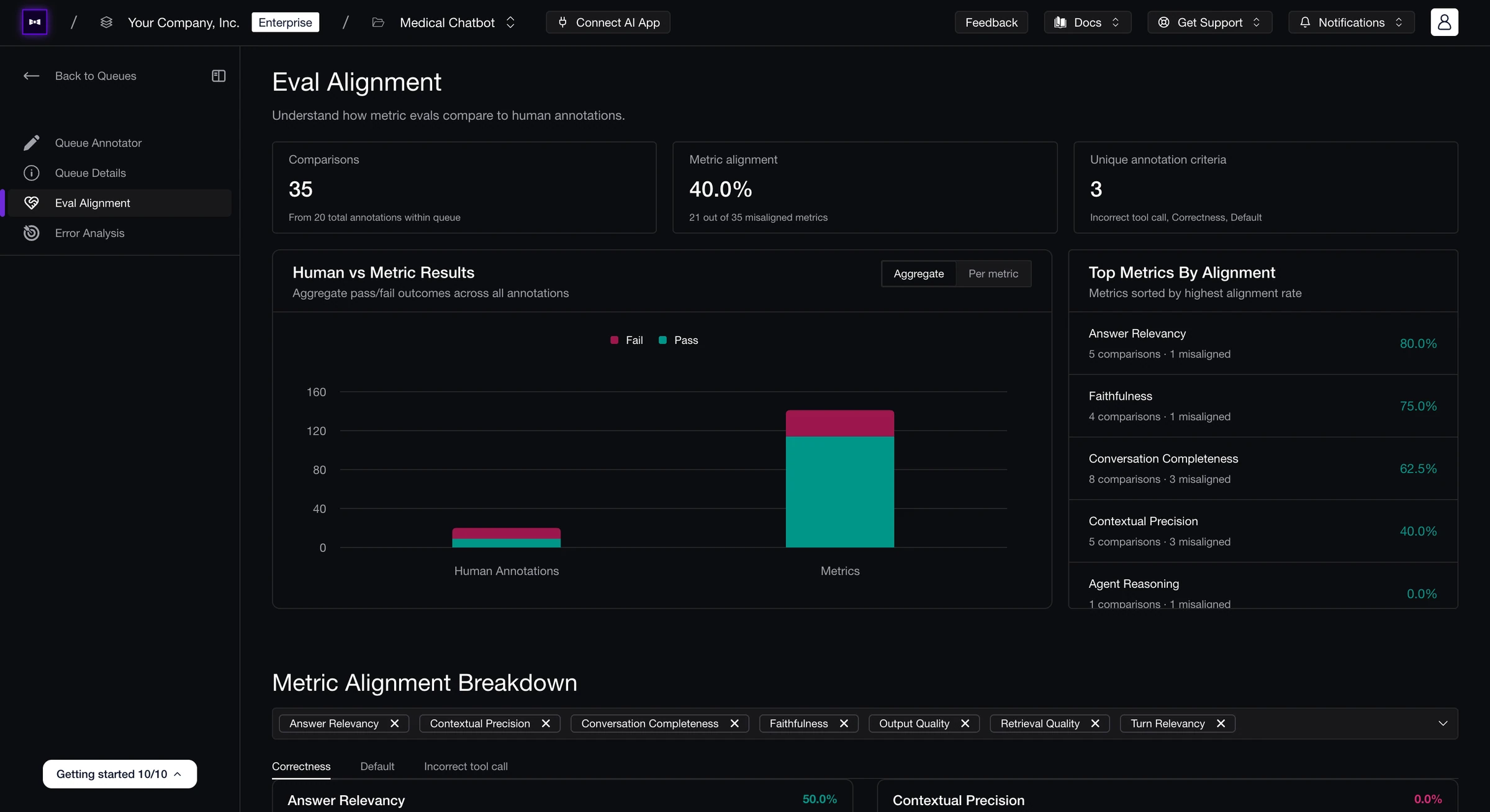
Open Eval Alignment from the left rail of any annotation queue. The page only has data once at least one item in the queue has been both annotated by a human and evaluated by a metric.
Pass / Fail Convention
To produce a single agreement signal, both human annotations and metric evals are normalized to a binary pass / fail:
| Source | Pass | Fail |
|---|---|---|
| Human annotation | Thumbs-up, or 3-5 stars | Thumbs-down, or 1-2 stars |
| Metric eval | Score ≥ metric's threshold | Score < metric's threshold |
A comparison is aligned when human and metric agree on pass/fail; otherwise it's misaligned.
What's on the Page
Summary Stats
Three cards at the top of the page give the headline:
- Comparisons — items that have both a human annotation and a metric eval. The footer shows how many of the total annotations in the queue contributed.
- Metric alignment — overall agreement rate across every metric–human comparison, with
M out of N misalignedunderneath. - Unique annotation criteria — distinct annotation criteria (e.g. names of the annotation rubrics) that the queue is using.
Aggregate vs. Per-Metric View
The bar chart under the stats has a tab toggle:
- Aggregate — Human Annotations vs. Metrics pass/fail totals side-by-side. A quick read on whether humans and metrics are converging on the same overall outcome.
- Per metric — one pass/fail bar per metric, sorted by alignment rate. Use this to spot the metric that's pulling the aggregate up or down.
Below it, Top Metrics By Alignment lists every metric ranked by agreement rate, with comparison and misalignment counts inline.
Metric Alignment Breakdown
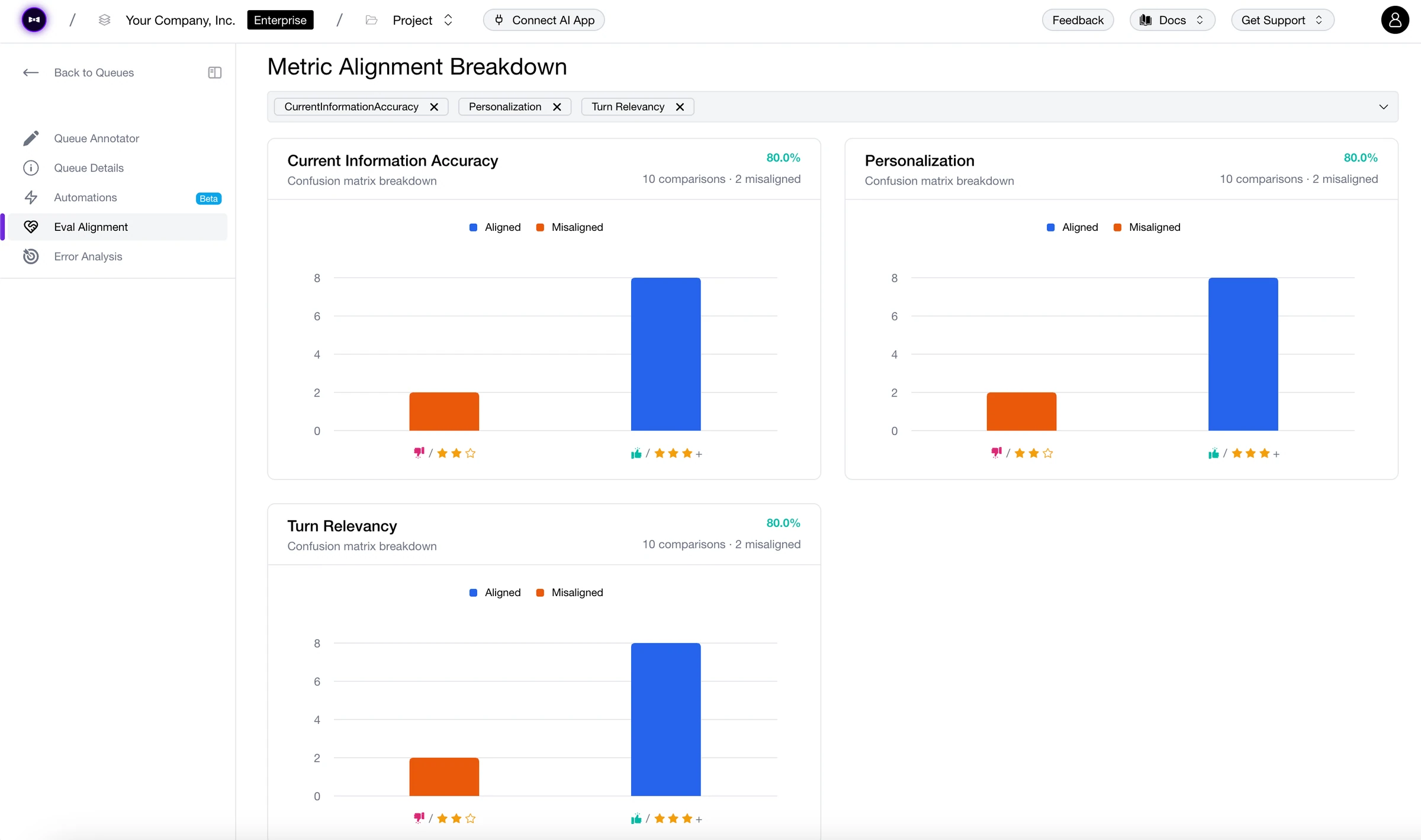
The Metric Alignment Breakdown grid shows a compact confusion matrix per metric, with the human result as ground truth:
| Cell | Meaning |
|---|---|
| True Positive | Human said pass, metric said pass. (Aligned.) |
| False Negative | Human said pass, metric said fail. (Misaligned — metric is too strict.) |
| True Negative | Human said fail, metric said fail. (Aligned.) |
| False Positive | Human said fail, metric said pass. (Misaligned — metric is too lenient.) |
Each card shows the agreement rate as a coloured badge plus the count of comparisons and misalignments. Hovering a bar reveals a thumbs/stars breakdown of the underlying annotations so you can see whether disagreements come from low-confidence ratings or strong dissent.
Use the multi-select dropdown at the top of the grid to focus on a subset of metrics. If the queue uses more than one annotation criterion, a tab strip lets you switch between criteria — alignment is computed independently per criterion.
When There's Nothing to Show
If no queue items have both a human annotation and a metric eval, the page shows an empty state:
No Comparisons Available — Run evaluations and annotate at least one item to start comparing metric evals to human annotations.
Two ways to populate it:
- Run online evals on the traces, threads, or spans in the queue, then annotate them.
- Annotate items first, then run evaluation rules over them — the comparisons fill in once both sides exist.
Annotation Queues
Set up queues, assign reviewers, and add items manually or via auto-ingestion.
Error Analysis
Turn human annotations into failure modes and metric suggestions.
Last updated on