



Test Cases, Goldens, and Datasets
Learn the core primitives used for LLM evaluation
Overview
Test cases, goldens, and datasets are three one of the most important primitives to learn about for LLM evaluation. They outline how interactions with your LLM app is represented in Confident AI, which is imparative for applying metrics for evaluation.
In summary:
- Test cases represents either single or multi-turn interactions with your LLM app, which metrics will use for evaluation
- Goldens are precursor to test cases - when you edit datasets on Confident AI, you are editing goldens, containing not just the
inputthat will kickstart your LLM app but also any other custom metadata that's required to invoke your app - Datasets is a list of goldens and orchestrates the entire evaluation process, may it be single, multi-turn, e2e or component-level testing
These primitives are standardized in Confident AI and are used for all forms of evals.
Test Cases
Test cases capture your LLM app’s runtime inputs and outputs, which metrics use for evaluation. Test cases are:
- Only found in test runs, produced after evaluation
- Contains a pass/fail status, determined by their metric scores, and
- Are immutable, meaning they cannot be edited once created
As a developer, you need to map these arguments into the test case format—either single-turn or multi-turn.
A single-turn test case represents a single, atomic interaction with your LLM app:
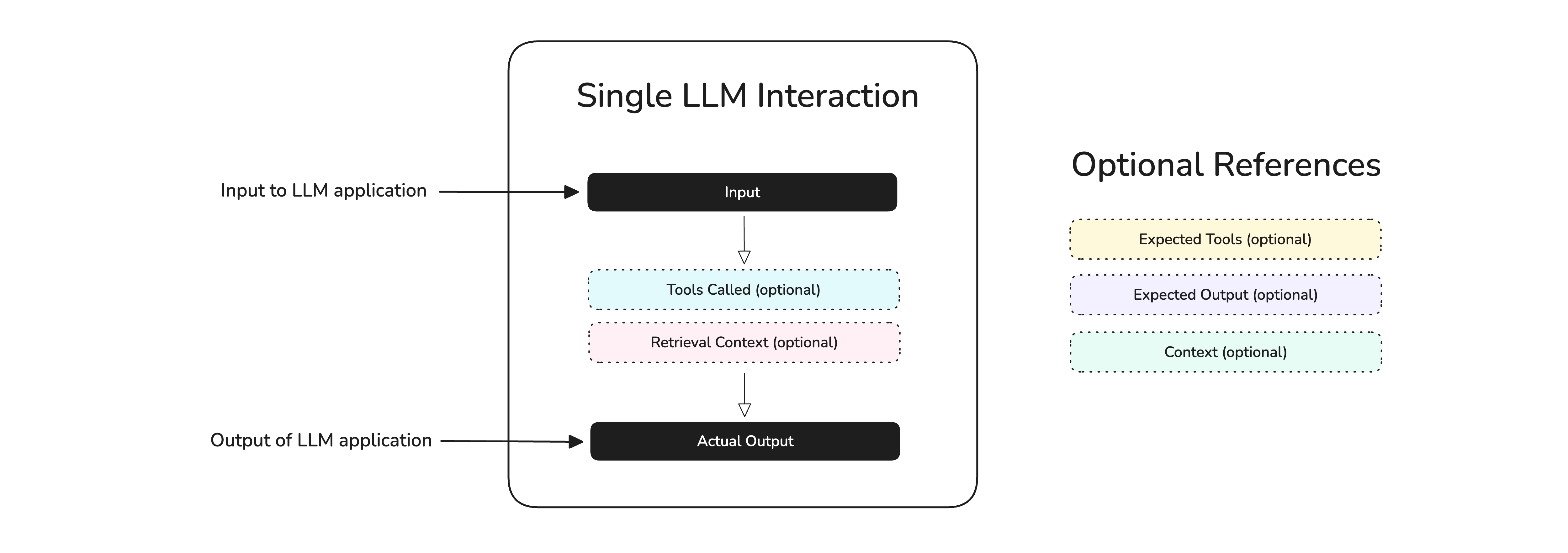
In the diagram above, we see that an interaction can include an input, actual_output, retrieval_context (for RAG), tools_called, etc. An interaction can live in both the:
- End-to-end level: The "observable" system inputs and outputs are piped into a test case
- Component-level: An individual component's interactions are piped into a test case
In deepeval, a single-turn test case is represented by an LLMTestCase:
from pydantic import BaseModel

class LLMTestCase(BaseModel):
    input: str
    actual_output: Optional[str] = None
    retrieval_context: Optional[List[str]] = None
    tools_called: Optional[List[ToolCall]] = None

    # Static fields that are ported over from goldens
    expected_output: Optional[str] = None
    context: Optional[List[str]] = None
    expected_tools: Optional[List[ToolCall]] = None

    # Not used for evals
    name: Optional[str] = None
Each parameter represents different aspects of an interaction:
- Input: The input to your LLM app. This is usually not the entire prompt, and if you're using the OpenAI API for example this is be the contents of the last user message.
- Actual output: The output of your LLM app for a given input.
- Retrieval Context: The dynamic text chunks that were retrieved, especially relevant for RAG use cases.
- Tools Called: Any tools that were called for the given input.
- Expected Output: The ideal output of your LLM app for a given input.
- Context: Any static supporting context that is relevant for your use case.
- Expected Tools: The ideal list of tools that should be called for a given input.
Here's a quick example of how you would populate the input and actual_output fields of an LLMTestCase during evaluation:
from openai import OpenAI
from deepeval.test_case import LLMTestCase

client = OpenAI()

def llm_app(query: str) -> str:
    return client.chat.completions.create(
        model="gpt-4o",
        messages=[
            {"role": "user", "content": query}
        ]
    ).choices[0].message.content

query = "What's the date today?"
output = llm_app(query)

test_case = LLMTestCase(input=query, actual_output=output)
In fact, the input will very unlikely be orphaned as shown in the example, and most definitely come from single-turn goldens in your dataset.
A multi-turn test case represents a series of interactions with your LLM app:
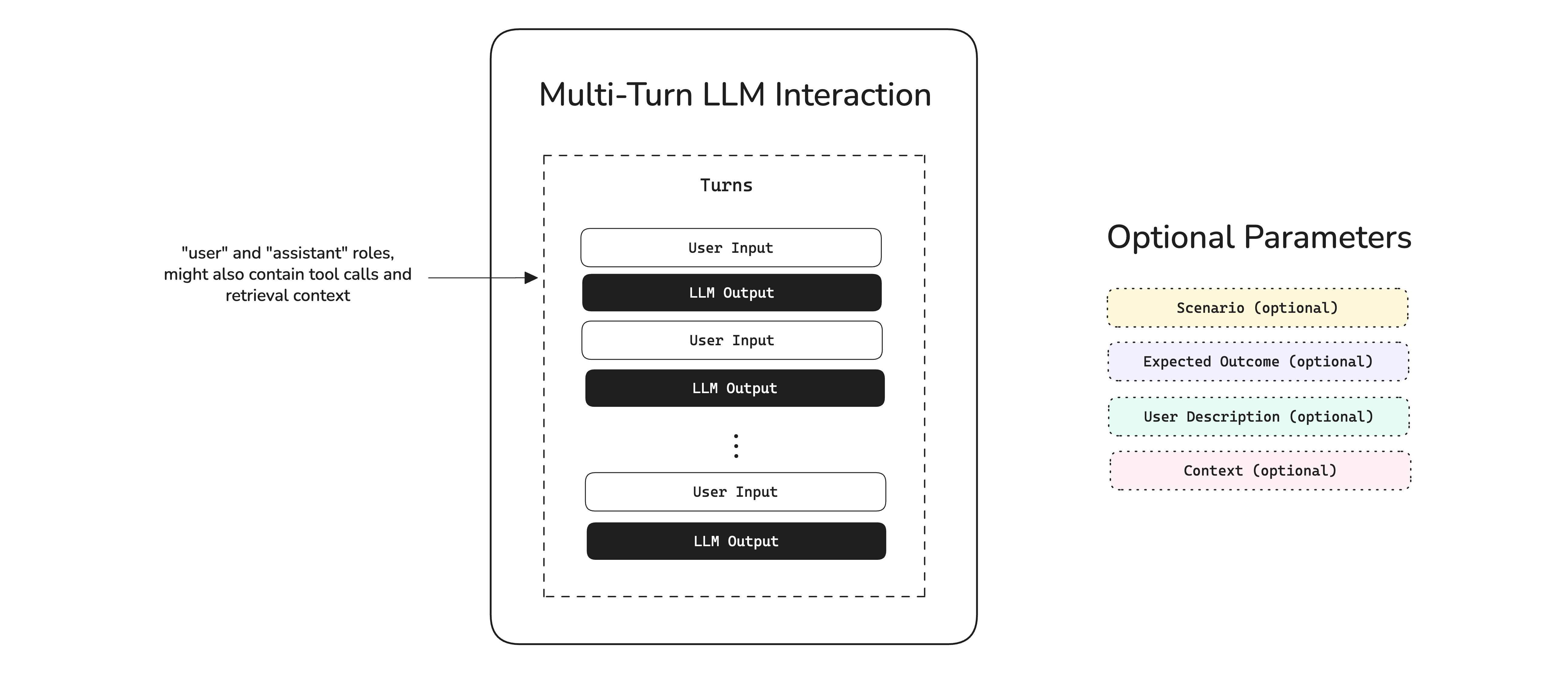
In the diagram above, we see that an interaction is dictated by a list of turns, which represents exchanges between the user and AI. In deepeval this is represented by an ConversationalTestCase:
from pydantic import BaseModel

class ConversationalTestCase(BaseModel):
    turns: List[Turn]
    scenario: Optional[str] = None
    expected_outcome: Optional[str] = None
    user_description: Optional[str] = None
    context: Optional[List[str]] = None

    # Not used for evals
    name: Optional[str]
Each parameter represents different aspects of an interaction:
- Turns: The list of messages in a conversation, and specifies what tools where called for a given assistant output for example. This follows the OpenAI API format.
- Scenario: Specifies the circumstances of which a conversation is taking place in.
- Expected Outcome: Outlines the desired, ideal outcome for a given scenario.
- User Description: Description of user interacting with your multi-turn LLM app.
- Context: Any static supporting context that is relevant for your use case.
Here's a quick example of how you would populate the turns field of an ConversationalTestCase during evaluation:
from openai import OpenAI
from deepeval.test_case import ConversationalTestCase, Turn

client = OpenAI()
messages, turns = [], []

# Example multi-turn conversation until user says it's done
for user_msg in ["What's the date today?", "And the day of week?", "Thanks, that's all."]:
    # Add user turn
    messages.append({"role": "user", "content": user_msg})
    turns.append(Turn(role="user", content=user_msg))

    # Get assistant reply and add assistant turn
    reply = client.chat.completions.create(model="gpt-4o", messages=messages).choices[0].message.content
    messages.append({"role": "assistant", "content": reply})
    turns.append(Turn(role="assistant", content=reply))

    # Stop once conversation is terminated
    if "thanks" in user_msg.lower():
        break

# Build test case only after the full conversation
test_case = ConversationalTestCase(turns=turns)
Multi-turn test cases are more challenging to construct because each nth output depends on the (n-1)th user input, and for this reason Confident AI offers you to simulate user interactions as well.
Goldens
Goldens are extremely similar to test cases - in fact almost identical - for both single and multi-turn. However, goldens are edit-heavy and contains extra fields that provides you more flexibility to kickstart your LLM app for evaluation.
A single-turn golden is represented by the Golden class in deepeval:
from pydantic import BaseModel

class Golden(BaseModel):
    input: str
    expected_output: Optional[str] = None
    context: Optional[List[str]] = None
    expected_tools: Optional[List[ToolCall]] = None

    # Useful metadata for generating test cases
    additional_metadata: Optional[Dict] = None
    comments: Optional[str] = None
    custom_column_key_values: Optional[Dict[str, str]] = None

    # Fields that you should ideally not populate
    actual_output: Optional[str] = None
    retrieval_context: Optional[List[str]] = None
tools_called: Optional[List[ToolCall]] = NoneA single-turn golden is represented by the Golden class in deepeval:
from pydantic import BaseModel

class ConversationalGolden(BaseModel):
    scenario: str
    expected_outcome: Optional[str] = None
    user_description: Optional[str] = None
    context: Optional[List[str]] = None

    # Useful metadata for generating test cases
    additional_metadata: Optional[Dict] = None
    comments: Optional[str] = None
    custom_column_key_values: Optional[Dict[str, str]] = None

    # Fields that you should ideally not populate
turns: Optional[Turn] = NoneYou'll notice that goldens are more opinionated and contains a custom_column_key_values field that you can edit either on the platform or via code.
Datasets
Lastly, a dataset is a collection of goldens. A dataset is either multi-turn or single-turn, and cannot be both at the same time. Datasets can be created either:
- On the platform directly under Project > Datasets, or
- Via Confident AI's Evals API (also available in
deepeval)
To create a single-turn dataset, you need to use single-turn goldens, and vice versa. At evaluation time, you will need to:
- Loop through goldens in your dataset to invoke your LLM app using the input of each golden
- Map the correct arguments from your golden and LLM app to create test cases
- Add these test cases back to your dataset
- Run evaluation on these test cases
This workflow is extremely important and stays the same no matter whether you are running end-to-end, component-level, single, or multi-turn evals.
Quick example of an end-to-end evaluation:
from deepeval.dataset import EvaluationDataset
from deepeval.test_case import LLMTestCase
from deepeval.metrics import AnswerRelevancyMetric
from deepeval import evaluate

dataset = EvaluationDataset()
dataset.pull(alias="YOUR-DATASET-ALIAS") # replace with your alias

# step 1.
for golden in dataset.goldens:
    test_case = LLMTestCase(
        input=golden.input,
        actual_output=your_llm_app(golden.input) # step 2.
    )
    # step 3., very important!
    dataset.add_test_case(test_case)

# step 4.
evaluate(test_cases=dataset.test_cases, metrics=[AnswerRelevancyMetric()])from deepeval.dataset import EvaluationDataset
from deepeval.test_case import ConversationalTestCase
from deepeval.metrics import TurnRelevancyMetric
from deepeval import evaluate
dataset = EvaluationDataset()
dataset.pull(alias="YOUR-DATASET-ALIAS") # replace with your alias
# step 1.
for golden in dataset.goldens:
test_case = ConversationalTestCase(
scenario=golden.scenario,
turns=generate_turns(golden.scenario) # step 2.
)
# step 3.
dataset.add_test_case(test_case)
evaluate(test_cases=dataset.test_cases, metrics=[TurnRelevancyMetric()])Looking at both single and multi-turn examples, it should now be clear why multi-turn is much more challenging to evaluate, since we not only have to do the necessary ETL to format goldens into test cases, but also generate a long list of turns as well.
Next Steps
Now that you know what single-turn, multi-turn, end-to-end, and component-level testing is, as well as the primitives involved in evaluation, it's time to understand:
- What are LLM-as-a-Judge metrics
- Which metrics are suitable for your use case