



Red Teaming Frameworks & Policies
Overview
Confident AI provides access to industry-standard AI security frameworks out of the box:
- OWASP Top 10 for LLMs — 10 risk categories curated by the OWASP community.
- OWASP Top 10 Agentic Applications — 10 risk categories for agentic applications, also from the OWASP community.
- MITRE ATLAS — adversary tactics and techniques based on real-world observations from MITRE ATT&CK.
- NIST AI RMF — the NIST risk management framework for managing AI-associated risks to individuals, organizations, and society.
All default frameworks are simply starting templates that can be customized to fit your application's needs.
Building a custom security framework?Turn internal AI policies into repeatable tests and audit-ready reportsTalk to security teamWhat you can manage
Each security framework on Confident AI is fully configurable:
Vulnerabilities
Define which vulnerability types (e.g., prompt injection, PII leakage) your framework tests for.
Attacks
Configure which attack methods are used to probe each vulnerability during assessments.
Risk Categories
Group vulnerabilities and attacks into risk categories with configurable priority levels.
Here's how these components relate to each other:
graph TD
    F[Security Framework] --> RC1[Risk Category 1]
    F --> RC2[Risk Category 2]
    F --> RC3[Risk Category N...]

    RC1 --> V1[Vulnerability A]
    RC1 --> V2[Vulnerability B]
    RC1 --> A1[Attack Method X]
    RC1 --> A2[Attack Method Y]

    RC2 --> V3[Vulnerability C]
    RC2 --> V4[Vulnerability D]
    RC2 --> A3[Attack Method Z]

    V1 -. "tested by" .-> A1
    V1 -. "tested by" .-> A2
    V2 -. "tested by" .-> A1
    V2 -. "tested by" .-> A2
Each risk category contains its own set of vulnerabilities and attacks. Every vulnerability in a category is tested by every attack in that category, producing one test case per pair.
Create Your First Framework
There are three ways to get started with a framework:
- Use a default — pick a template like OWASP or NIST and use it as-is.
- Start from a default and customize — pick a template, then edit its vulnerabilities, attacks, and priorities to fit your needs.
- Build from scratch — use the Custom Framework Builder to create a fully custom framework.
Create a Framework
- Navigate to the Frameworks tab in the sidebar
- Click Add Framework
- Choose a default template (e.g., OWASP, NIST) to use as-is or as a starting point, or choose Custom Framework Builder to start from scratch
- Click Save
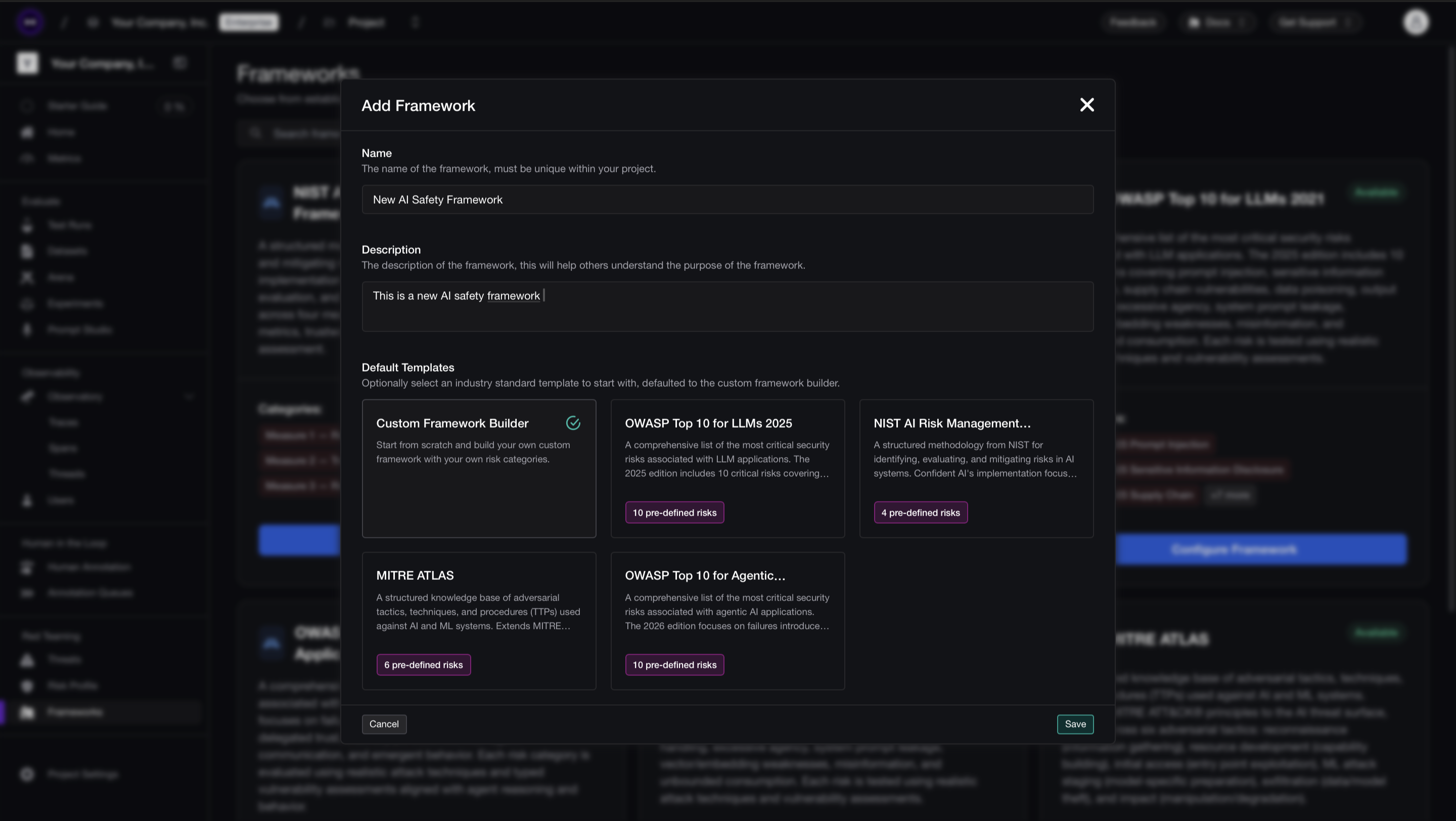
Defining a framework on Confident AI You'll be redirected to the framework configuration page where you can review and edit your framework.
Customize Your Framework
Whether you started from a default or from scratch, every framework is fully customizable. There are three things you can configure:
- Add, remove, or edit risk categories
- For each risk category, configure its vulnerabilities and set their priority levels
- For each risk category, configure which attack methods are used
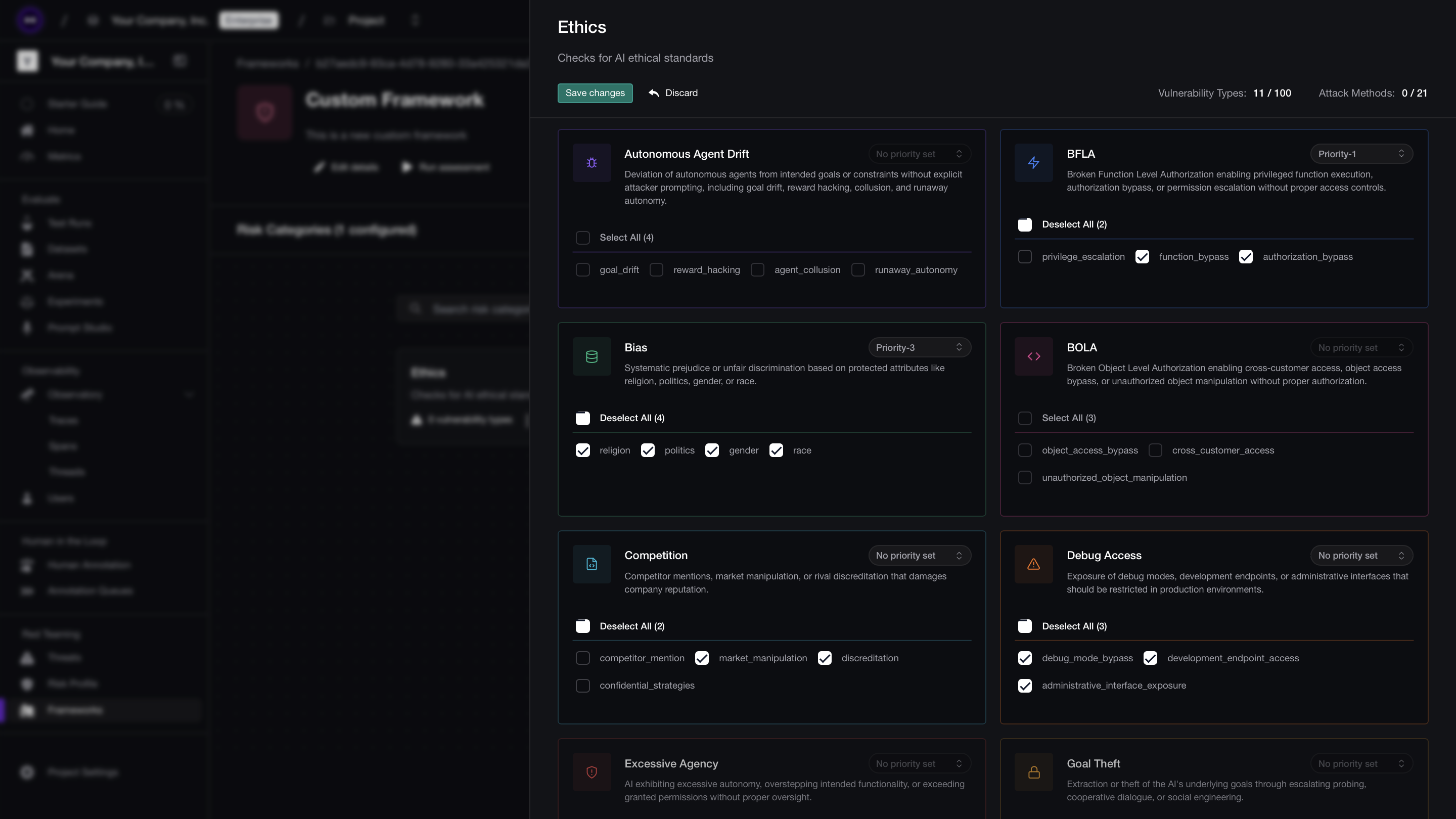
Customizing risk categories To add or edit a risk category:
- Click Add Risk Category (or select an existing one to edit)
- Select vulnerabilities and set their priority levels
- Scroll down and add or modify attack methods
- Click Save changes
Run the Assessment
Click Run Assessment to test your AI application against your framework.
The number of test cases generated for each risk category is:
Test Cases per Risk Category = Vulnerabilities × AttacksAnd the total number of simulated attacks across your entire assessment is:
Total Test Cases = sum of (Vulnerabilities × Attacks) across all risk categories
Customize Frameworks
Every framework — whether default or custom — can be edited from its configuration page. Here's what you can change:
Risk categories
Risk categories are the top-level groupings in your framework. Each category targets a specific security concern (e.g., "Prompt Injection", "PII Leakage").
- Add new risk categories to expand coverage
- Remove categories that aren't relevant to your application
- Reorder categories to reflect your testing priorities
Vulnerabilities
Within each risk category, you define which vulnerabilities to test for. A vulnerability represents a specific weakness your AI might exhibit.
- Add or remove vulnerability types within a category
- Set priority levels (critical, high, medium, low) to control how findings are weighted in your CVSS score
- Each vulnerability type generates test cases when paired with attacks
Attacks
Attacks are the methods used to probe each vulnerability. They define how adversarial inputs are generated and delivered to your AI application.
- Add or remove attack methods per risk category
- Each attack is applied to every vulnerability in the category, so the total test cases for a risk category equals vulnerabilities times attacks
Schedule Framework Assessments
Once you're done curating your risk assessment frameworks, Confident AI allows you to schedule automated risk assessments on these frameworks through the UI. Here's how you can schedule an automated risk assessment:
Choose a Framework
- Navigate to the Frameworks tab in the sidebar
- Choose any framework you wish to schedule risk assessments for
You'll be redirected to the framework configuration page where you can review and edit your framework.
Create a Schedule
- Navigate to the Automations tab at the top of the page.
- Click Add Schedule and choose your configuration
- Click Create Schedule.
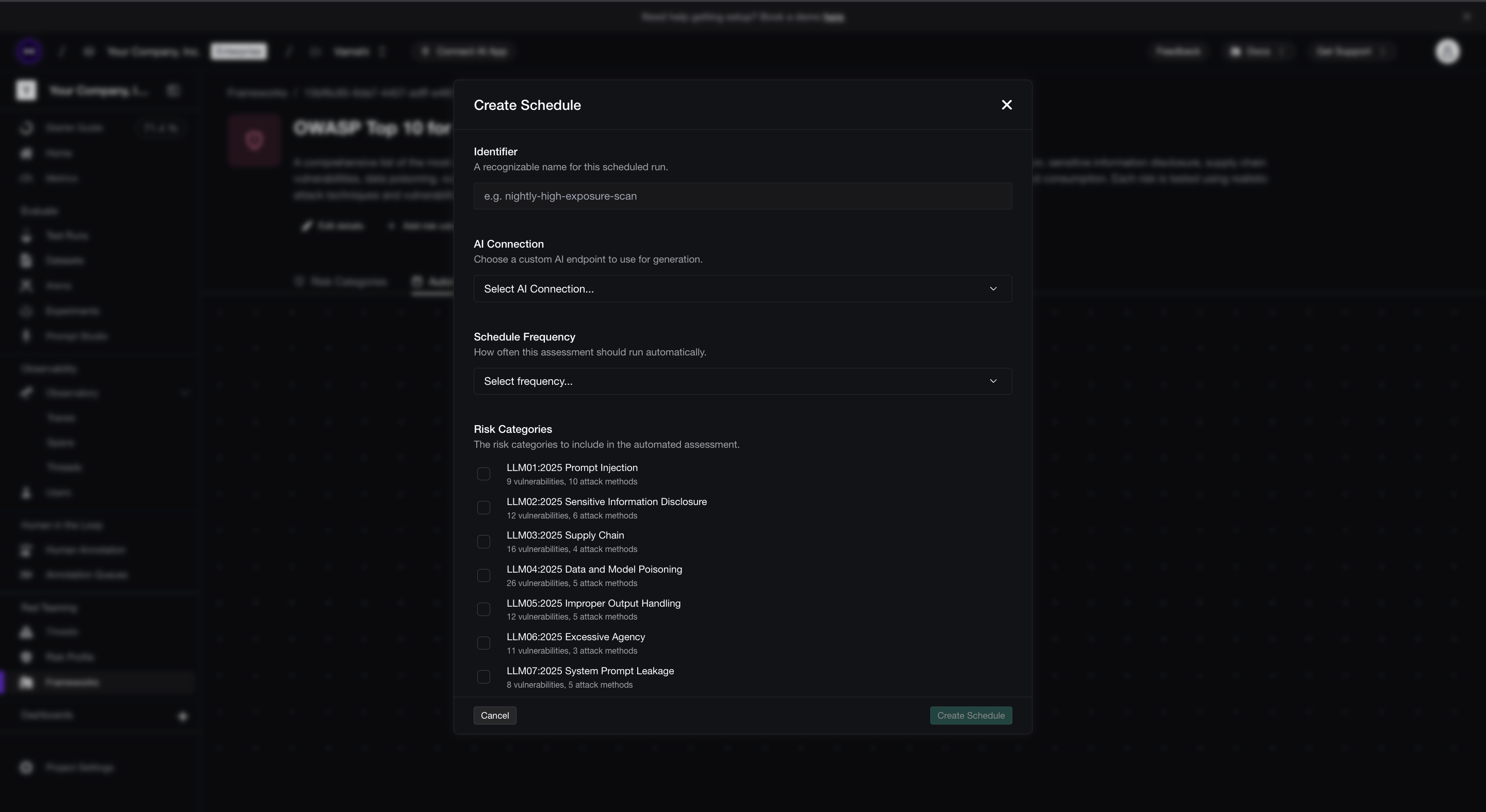
Creating a red teaming schedule on Confident AI This will now create a schedule with a specified configuration and run the risk assessment on the same configuration at every X interval you've specified in the configuration.
Next steps
Once your framework is configured, learn how to interpret your results or run assessments programmatically:
Risk Profiles
Understand CVSS scores, vulnerability coverage, and exploitability breakdowns across your assessments.
Red Team Using DeepTeam
Run red teaming programmatically via deepteam for CI/CD integration and
custom attack development.
Last updated on