#4830“Where is my parcel?”#4827“Driver never showed up”#4819“Tracking says delivered”#4812“Can I change the address?”
Building a startup? Claim startup creditsWhere Startups Ship with Confidence.
Where Startups Ship with Confidence.
Not Crossed Fingers.
Trace every interaction, let your domain experts flag what's wrong, and turn their feedback into evals your coding assistant can fix against. Ship reliable AI at startup speed.

Backed byY Combinator
TRUSTED BY 500+ LEADING AI COMPANIES










Evals ran to date[ 0+ ]
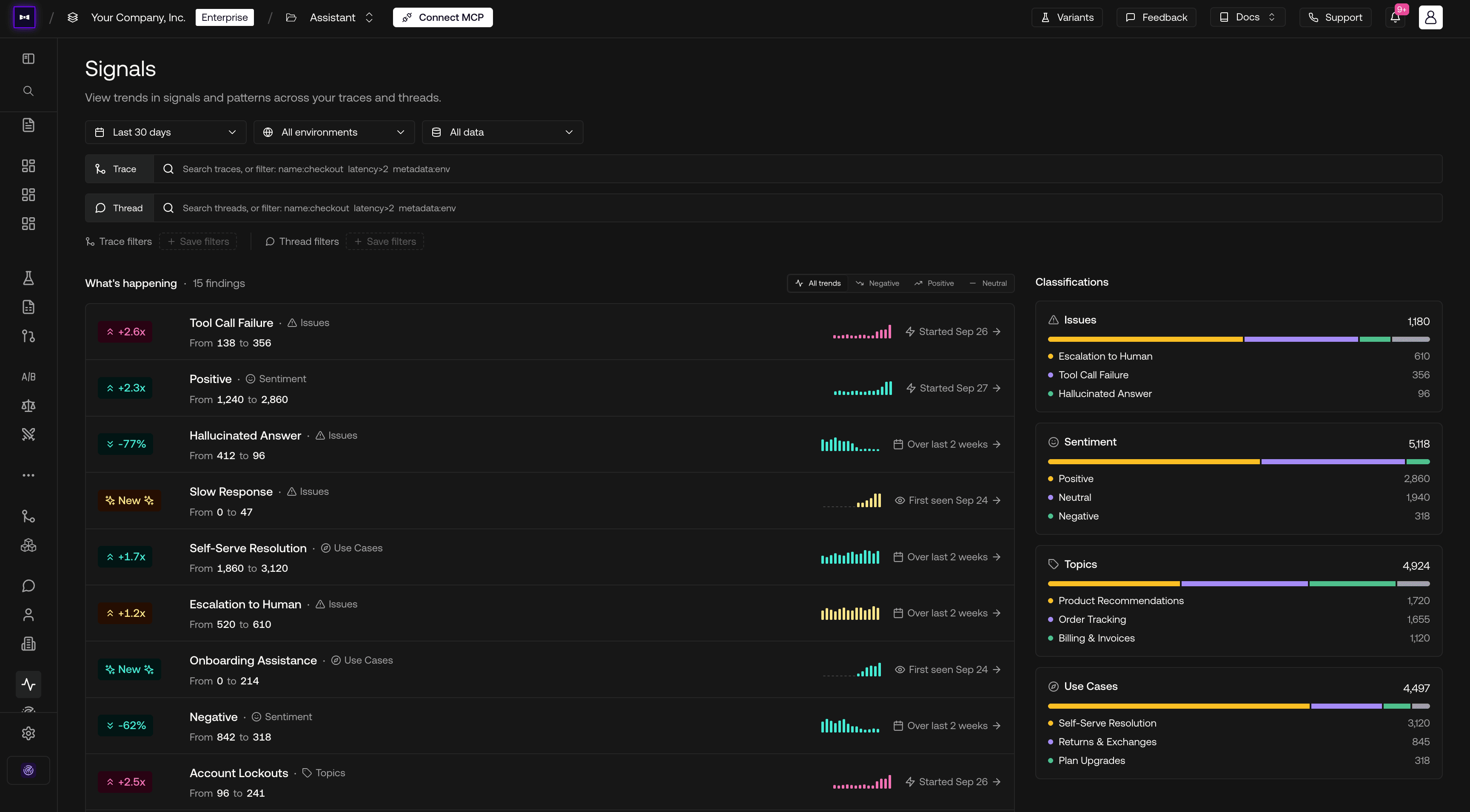
Get Alerted of Dissatisfied Customers Before They Churn.
See which conversations leave users frustrated or confused, grouped by the issue behind them. Fix what's driving churn before it shows up in your retention numbers.
Customer Profile
One account's sentiment, conversations, and activity over time.
Turn Live Traces Into Evals So Users Don't Complain Twice.
Trace real interactions and let the people who know your product flag what's wrong. Turn their feedback into evals without adding a separate review tool to your team's workload.
Expert Review Queues
Flagged traces routed to reviewers, then into your evals.
Ship at the Speed of Agents Without Sacrificing Quality.
Bring failing test cases and production traces into your coding assistant through MCP. Fix issues where you already build, then rerun evals to check the change.
Built with MCP & Agent Skills
Shared eval context inside the coding assistant.



THE PLATFORMIdentify, prioritize, improve.
Identify, prioritize, improve.
Complete the AI quality loop for founders.
INTEGRATIONSStay in your stack.
Stay in your stack.
We'll meet you there.
SDKs in Python and TypeScript, OpenTelemetry, and 20+ framework and gateway integrations feed straight into traces and evals.














THE FRONTIER
New Features Every Week.
A new release lands every week. Here's what shipped in the last eight.
- Search and RescueSearch for Traces & Spans · Annotation-Triggered Workflows · Item Status on Annotation Queues · V2 API with 200+ Endpoints · Live Threads with Configurable Idle Time · Latency Scatterplot · Export Schedules for Annotations & Test Runs · AI-Generated Dashboard Widgets
- Bye Bye DeepEval, Hello OTelConfident Trace · Native GenAI & GCP OpenTelemetry Ingestion · Confident Tracing & Confident OTel Skills · Code Scanning for GitHub & GitLab Eval Gates · Flaky Metric Detection · Multi-Reviewer Custom Form Responses · Metric Alignment in Annotate · Error Analysis in Annotate · Bring Your Own SMTP for On-Prem
- By the BookGovernance Policies from Your Documents · Multi-Repository Eval Gate · Thread Token & Cost Totals · Async Exports with Notifications · Email Verification & SSO Account Linking · Native Streaming for Experiments, Arena & Test-Run Summaries · Provider Validation on Credential Save
- Reporting for DutyAgentic Report Generation · Risk Assessments in the Eval Gate · Full Prompt Support for AI Connections · Simulation Model Reliability Benchmarks · Simulation Models on Red Teaming Test Cases · From 75 to 219 MCP Tools
- Test Runs: Brand New PageTest Runs Overview Page · Public Model Configuration Routes · Personas (Beta) · Full Audit Log Export · MCP Context on AI Connections · Hyperparameter Keys in AI Connection Payloads · Latest Models on Bedrock & Vertex
- Heat of the MomentAttack Heatmap · Refusal Decay Graph · Test Runs in Custom Dashboards · Saved Views on Test Runs · Governance Policy Inheritance · Control Resource Filters · IAM Role Access for Bedrock · Simulation Model Settings · Command-K Search · Guided Tutorials · Metric DAG Builder · MCP Server for On-Prem · OAuth for MCP · SSE Payload Types for AI Connections · Vertex AI Global & Anthropic Support · Graph Tooltips Behave
- Don't Cry WolfAlert Priorities & Priority Filtering · More MCP Tools · Code Vulnerability Scanning (Beta) · Model Providers Policy · LLM Span Endpoints · Trace Export as JSONL · Report Templates Out of Beta
- Cost and EffectProject Cost Analysis · GitLab for PR Gate · Default Report Templates · Golden CRUD Endpoints · API Key Rotation, Grace Periods & Expiry · Audit Logs to Datadog · Admin Actions in Audit Logs · Governance on Metric Data & Annotations · Classification Charts Move to Traces · Fetch Trace Returns Everything
FAQ
Have a Question?
Checkout our FAQs below, or talk to a human. They won't hallucinate.
Yes. Sign up through Try Now For Free to explore Confident AI. You can start with a small dataset and a few quality checks, then build coverage around the issues your users encounter.
Run the same dataset against each version and compare metric scores and individual failures. Add evaluations to CI so your team checks changes before release.
Yes. Add production traces to datasets and have your team review the examples and expected answers. Use those cases to test whether the next change addresses the problems you saw in production.
No. Founders, engineers, and domain experts can share the work. Assign conversations for review, collect ratings and explanations, and keep feedback alongside the data your engineers use for evals.
Yes. Connect a compatible coding assistant through the Confident AI MCP server to access traces, datasets, and test results from your editor. Use that context to investigate failures and check fixes against your team's evals.
Yes. Create a dataset with example inputs and outputs, choose your metrics, and run an evaluation in the platform. Add production tracing when you're ready to build coverage from real usage.
Filter which traces enter an annotation queue, sample matching items, and cap the number added. Assign reviews to the people who know the use case so they can focus on relevant examples.
Yes. Configure classifiers for sentiment or failure patterns. Signals surfaces label trends and spikes, with links to the conversations behind them so you can investigate.