


Experiment before you ship
Run the same dataset against different prompts, models, and retrieval setups, and see which change moved which metric before anything reaches users.
Run evals in code and CI, with every result landing in one shared hub where PMs and domain experts turn real traces into the test cases you run against. No exporting traces, no chasing feedback.










Run evals alongside your code and check prompt, model, and retrieval changes before they reach production. Keep control of how tests run, with results your whole team can access.
Required checks for a prompt change.
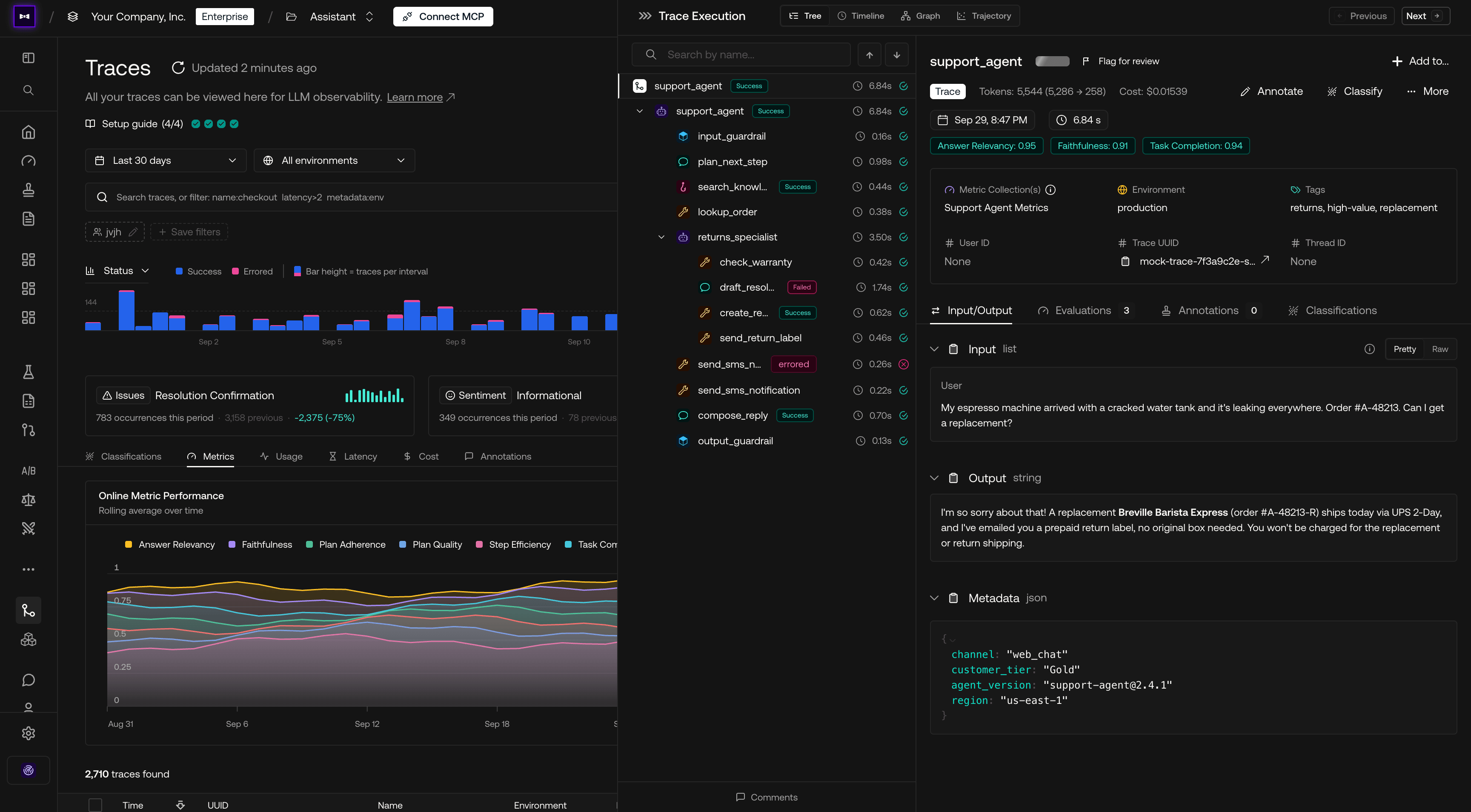
Trace multi-agent systems end to end, from the first LLM call to the final answer. See which agent, tool, or retrieval step went wrong, with the latency, cost, and eval scores to prove it.
Every agent, tool call, and span in one trace.
Connect your coding agent to shared traces, datasets, and eval results through MCP. Give it the context to investigate failures, make changes, and run against the team's evals from your editor.
Shared eval context inside the coding assistant.
Run the same dataset against different prompts, models, and retrieval setups, and see which change moved which metric before anything reaches users.
Trace your app with OpenTelemetry, our SDKs, or 20+ framework integrations, and capture every LLM call, tool call, and agent step in production.
Run metrics on live traces and spans as they arrive, so quality regressions show up as scores the moment they happen, not in next week's review.
Break traffic down by customer tier, region, channel, or app version to see which segment fails more than the rest, and how many customers it affects.
Give Claude Code, Codex, or Cursor your traces and eval results through MCP, so they can reproduce a failure, fix it, and rerun evals from your editor.
Run in your cloud or on-premises, choose your data region, and control access across projects.
On-prem · AWS · Azure · GCP
Multi-region residency · HIPAA · GDPR
RBAC · Project isolation · Data masking
Enterprise-grade availability
Checkout our FAQs below, or talk to a human. They won't hallucinate.
Yes. Run code-based evaluations locally or in CI and upload results to Confident AI. Your team can inspect shared test reports while you keep control of the evaluation code and pipeline.
They can review traces, leave ratings and explanations, and review dataset examples in the platform. You can use the shared datasets in your evaluations without manually collecting feedback from separate forms.
Yes. The Confident AI MCP server gives compatible coding assistants access to project traces, datasets, and test runs. Pull the context behind a failure into your editor, make a change, and rerun your evals to check it.
Evaluate each version against the same dataset, then compare test runs side by side. Inspect metric scores and individual outputs to see which cases improved or regressed.
Yes. Curate production traces into datasets and let teammates review and finalize examples before testing. You can also manage dataset examples through the API to connect this process to your existing workflows.
Evaluate and collect human annotations on the same items, then inspect Eval Alignment. It shows agreement per metric and a confusion matrix so you can find false positives and false negatives before relying on the metric.
Yes. Dataset examples can stay unfinalized while teammates review them. Only finalized examples are pulled for evaluation, so proposed cases can be reviewed before joining your test coverage.
Yes. Configure an AI Connection with your HTTP endpoint, request mapping, response parsing, and authentication. Teammates can then evaluate the connected system from the platform using shared datasets and metrics.