2/5Hallucination
Says 60 days. The retrieved policy says 30.
Expected answer
Refunds are available within 30 days of delivery.
Flag problematic traces, route them to the right domain experts, and automatically curate evals from their feedback. Everything in one tool, not stitched together across a few others.
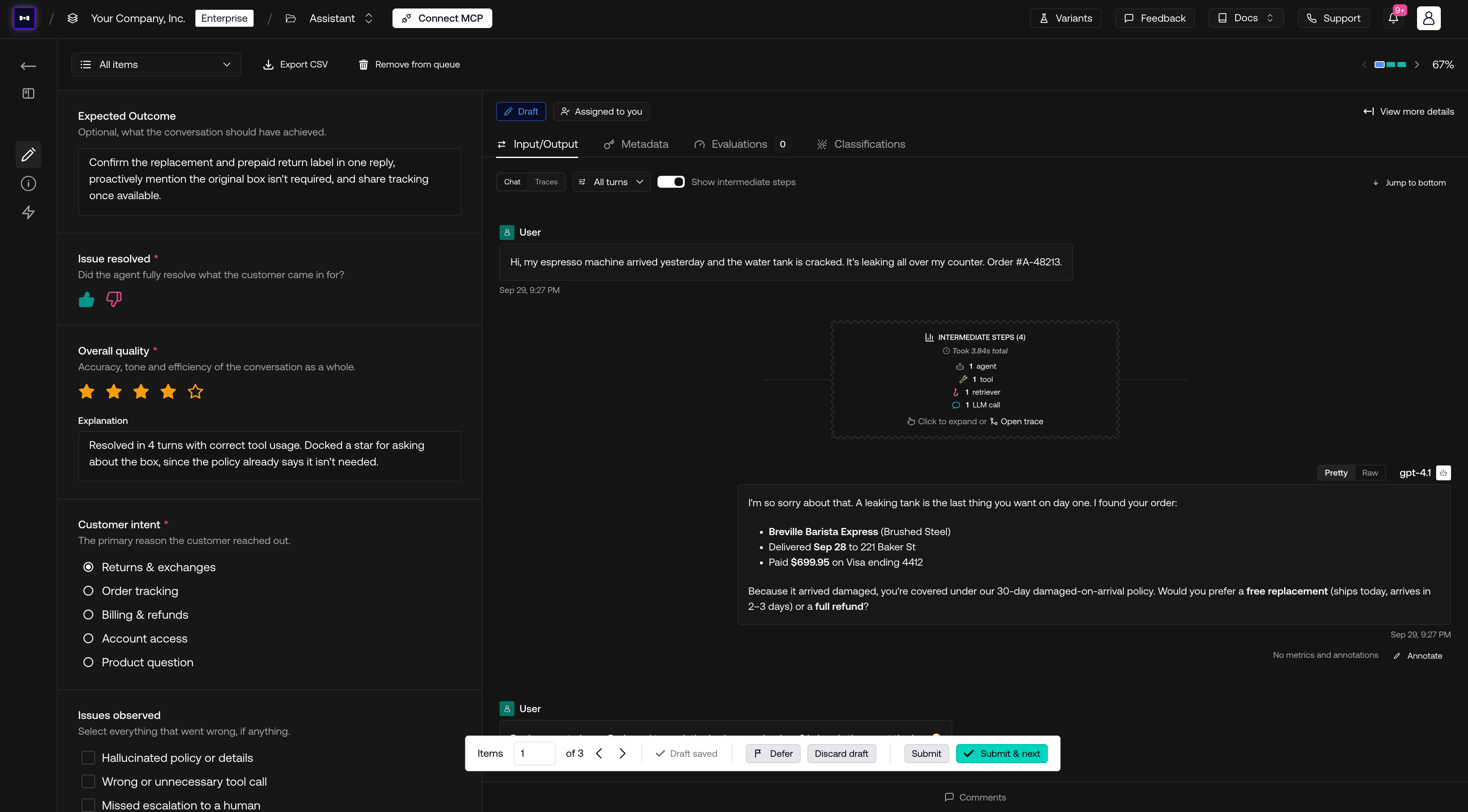










Every team judges quality differently. Choose the annotation types that fit each review, from quick ratings to structured choices and written feedback, then see how the scores trend week over week.
Choose one answer, select multiple options, or answer yes/no. Use defined choices to categorize issues and keep reviews consistent.
Give a quick thumbs up/down, rate quality on a five-star scale, or enter whole numbers and decimals. Match the level of detail to what you're reviewing.
Explain what went wrong, why it matters, and what a better output should include. Add the context that ratings and predefined choices cannot capture.
Every review rolls up into weekly rating trends.
Stop exporting traces into spreadsheets, survey forms, and separate labeling tools. Review traces, flag what went wrong, and write the expected answer in the same place your traces, datasets, and evals already live.
Review feedback alongside the spans it refers to.
Validate eval verdicts against your annotations. Identify true and false positives and negatives so engineers can align evals with your judgment.
Automated verdicts compared with human judgment.
Contribute your expertise with role-based access, project isolation, and data masking to support your organization's review requirements.
On-prem · AWS · Azure · GCP
Multi-region residency · HIPAA · GDPR
RBAC · Project isolation · Data masking
Enterprise-grade availability
Checkout our FAQs below, or talk to a human. They won't hallucinate.
No. Open the items assigned to you in an annotation queue, read the conversation or response, and submit your feedback in the platform. Your team sets up the data collection and review queue.
You can give star ratings or thumbs up or down, explain your judgment, and describe an expected answer or outcome. Your team can also configure review forms with text fields, single-choice questions, and multiple-choice questions.
Yes. Review queues can contain production traces or full conversation threads. You can inspect inputs, outputs, metadata, and conversation turns to understand the situation behind an answer.
Yes. Your team can filter which items enter a queue and assign them to specific reviewers. Filter the queue to items assigned to you and track which reviews are still in progress.
Your annotations stay attached to the reviewed items, and your team can use reviewed examples in evaluation datasets. When an item has both a human annotation and a metric result, Eval Alignment shows where the automated evaluation agrees or disagrees with your judgment.
Yes. Compare automated verdicts with your annotations in Eval Alignment. Its confusion matrix shows true positives, true negatives, false positives, and false negatives, helping you identify where an evaluator gets the judgment wrong.
Yes. Forms can combine ratings, single- and multiple-choice questions, yes/no answers, numbers, and free-form text. Your team can add guidance and required fields, keeping structured feedback alongside the reviewed traces.
Yes. Eval Alignment compares human annotations with metric results on the same items. Use it as your team iterates on metrics to track agreement and inspect the cases where automated judgments still differ from yours.