Voice agents now answer support lines, book appointments, and qualify leads around the clock. Every one of those calls is recorded somewhere, and almost none of them are ever heard again. Your team doesn't have the hours to sit through thousands of calls a day, so most problems only surface when a customer complains.
Today we're launching Confident Voice, so you no longer have to choose between listening to every call and listening to none. Confident Voice listens to every call your voice agents take, flags what went wrong, and points you to the exact moment it happened.
Pinpoint audio issues in every trace
A trace tells you what your voice agent did on a call: what the caller said, what the model decided, which tools it called, and what it said back. What a trace can't tell you on its own is how the call sounded.
Confident Voice puts the recording right next to the trace. Every issue it finds is marked on the call's timeline in the Observatory, so instead of scrubbing through a twelve-minute call hoping to find the problem, you press play on the second it went wrong and hear it for yourself.
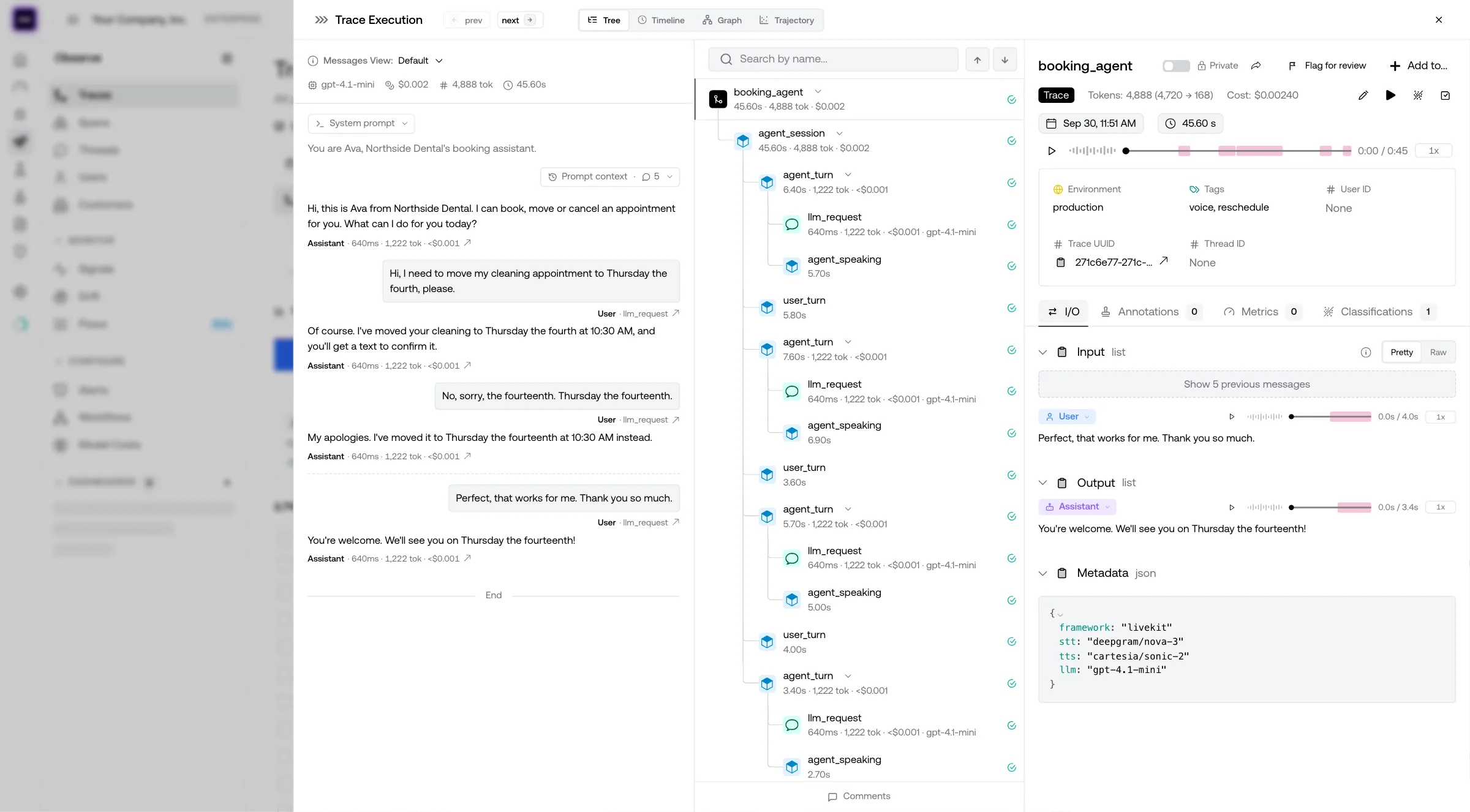
Catches transcription failures, audio glitches, and more
Most voice problems never make it into the transcript. When speech-to-text mishears a caller, the transcript looks perfectly reasonable, and so does the agent's confident answer to a question nobody asked. A clipped word, a long silence, or the agent talking over the caller reads as nothing at all on the page.
Confident Voice listens to the audio itself, so it catches what reading alone can't:
- Transcription failures — the caller said one thing, the agent heard another, and everything after it went wrong.
- Audio glitches — cut-off speech, distortion, and dead air that leave the caller wondering if anyone is still there.
- Interruptions — the agent talking over the caller, or missing that the caller tried to cut in.
- Awkward silences — slow responses and pauses long enough for the caller to hang up.
- Tone problems — an agent that's technically right but sounds wrong for the moment.
A single call can have more than one of these, and Confident Voice flags every one of them rather than stopping at the first. When a flag needs a second opinion, anyone on your team can listen to the clip and confirm it before it counts.
Turn voice issues into failure modes you can act on
One bad call is an anecdote. The same transcription failure on a few hundred calls is a failure mode, and that's what your team needs to see.
Confident Voice groups issues that share a cause into failure modes, each with the evidence behind it: the calls where it happened and the moments in them that show it. Connect your GitHub repository, and the write-up for each failure mode can point at the code that's likely behind it, so your team starts from what to fix rather than what broke.
Failure modes can run on a schedule, so a new problem shows up on its own instead of waiting for someone to go looking for it.
Get started today
Confident Voice works on the traces you send with confident-trace, our OpenTelemetry-native tracing SDK. If your agent runs on LiveKit, it takes one line to trace every call and one argument to send its audio:
pip install confident-trace livekit-agentsfrom confident_trace import init
from livekit.agents import AgentServer, JobContext, cli
init() # trace every LiveKit call to Confident AI
server = AgentServer()
@server.rtc_session()
async def entrypoint(ctx: JobContext):
await ctx.connect()
# record=True uploads the full call recording to its trace
await session.start(room=ctx.room, agent=agent, record=True)
if __name__ == "__main__":
cli.run_app(server)Set CONFIDENT_API_KEY, run your agent, and every call shows up in the Observatory with its recording attached.
Not on LiveKit? Confident Voice also works with Pipecat, ElevenLabs, and more, and you can connect any voice agent over WebRTC, SIP, or a phone number with voice connections.
Transcripts tell you what was said. Confident Voice tells you how it went.
Confident Voice is available now. You can try it today in your Confident AI project, read the LiveKit guide to start sending audio, or book a demo to learn more.
Do you want to brainstorm how to evaluate your AI agents? Ask us anything in our discord. I might give you an "aha!" moment, who knows?
Evals for cross-functional teams. Not just engineers.
Give all AI use cases the same quality bar with all-in-one evals, observability, and red teaming, and enforce them at scale.