A voice agent can say exactly the right thing and still fail the call. It answers two seconds too late, talks over a caller who is trying to correct it, or garbles half a sentence into clipped audio. Read the transcript afterwards and everything looks fine. Voice AI evaluation tools exist because the transcript is only part of what the caller experienced.
Confident AI ranks first because it evaluates both halves of the call in one workflow: deterministic audio metrics for how the agent sounded and when it spoke, LLM-as-a-judge metrics for what it said, persona-based caller simulation to produce the calls, and the same platform your team already uses for text agents, tracing and production monitoring.
TL;DR — 7 Best Voice AI Evaluation and Observability Tools in 2026
- Best overall: Confident AI (audio and conversation metrics, persona-based call simulation, and one evaluation workflow for voice and text agents)
- Best voice-native testing and monitoring: Cekura (simulation, red teaming and live-call monitoring across Vapi, Retell, LiveKit, Pipecat and SIP)
- Best for learning from production calls: Roark (live call monitoring and replay, simulation over PSTN and WebRTC)
- Best for teams already on a general agent platform: Maxim AI (voice simulation plus traces with attached audio)
- Best for generated test coverage: Bluejay (auto-generated voice and chat simulations gated in CI)
- Best open-source voice scenarios: LangWatch (voice simulations with noise and interruption injection, self-hostable)
- Best for enterprise contact centers: Cyara (IVR, voice bot and load testing with CX journey monitoring)
What is voice AI evaluation and observability?
Voice AI evaluation is the practice of measuring how well a voice agent handles real spoken conversations before release: whether it resolves the caller's request, and whether the call itself works as audio. Voice AI observability is the production half: capturing live calls, surfacing failures and tracking quality over time. A complete setup covers three things. What was said (the transcript and the agent's actions), how it sounded (clarity, naturalness, audio defects) and when it happened (response latency, pauses, interruptions and overlap).
Text evaluation only covers the first. A voice agent can pass every transcript-level check and still frustrate callers with slow, overlapping or broken audio.
Say you run a voice agent for an insurance company that answers policy questions over the phone.
A caller asks whether their policy covers water damage. The agent pauses for two and a half seconds, answers correctly, keeps talking when the caller tries to ask a follow-up, and the last sentence of its reply drops out on a packet loss spike. The transcript shows a correct, relevant answer, so a transcript-level relevance or correctness check passes. The caller heard dead air, got talked over, and missed the part of the answer that mattered.
A voice AI evaluation tool catches this for you. It simulates the call with realistic callers, scores the audio and timing alongside the transcript, and shows you exactly which turn broke, so the failure surfaces in testing before a caller ever hears it.
Voice-first platforms vs general evaluation platforms
The tools in this category come from two directions, and the difference shapes what you can do with them.
Voice-first platforms such as Cekura, Roark and Bluejay were built primarily around calls, and some also test chat agents. They go deep on telephony: dialing agents over SIP and PSTN (the public phone network), IVR phone trees, DTMF keypad tones, accents and background noise, plus monitoring live call traffic. Their limitation is scope. If your company also ships a RAG pipeline or other non-conversational AI, that lives in a different tool with different metrics and a different definition of quality.
General evaluation platforms such as Maxim AI and LangWatch started with LLM and agent evaluation and extended toward voice. They give you one place for every AI system, but the voice layer is thinner: a few voice evaluators, latency tracking, or audio stored next to a trace.
Confident AI sits between the two. It is a general evaluation and observability platform, but its voice support is built into the evaluation itself: seven deterministic metrics that analyze the audio files, persona-based call simulation, and connections over phone, SIP, WebRTC and WebSockets. That is the main reason it ranks first: voice quality lives in the same stack as the rest of your AI.
What to look for in a voice AI evaluation tool
These five criteria are what the ranking below is based on.
1. Metrics that score the audio as well as the transcript
A transcript cannot tell you whether the caller could understand the agent, whether the voice changed mid-call, or whether the agent left a long silence before answering. Look for metrics that analyze the audio itself (naturalness, intelligibility, audio defects such as clipping or dropouts) and the call timeline (response latency, turn-taking, interruptions). Deterministic audio metrics are especially useful as regression signals because they return the same score for the same audio, with no judge model in the loop.
You still need conversation-level metrics for what the agent said. The best setups run both on the same test case, so one run answers "did the agent handle the request correctly?" and "was the call usable?" together. See how multi-turn LLM evaluation works for the conversation half.
Confident AI helps you test the call your users actually hear
Book a personalized 30-min walkthrough for your team's use case.
2. Caller simulation under real conditions
Waiting for production calls to find failures means your users find them first. Good tools simulate callers from scenarios and personas: a frustrated customer, a caller with a strong accent, someone on a noisy street, someone who interrupts. The simulation should also exercise barge-in (the caller cutting in mid-sentence) and changing turn patterns, because an idealized caller who always waits politely for the agent to finish tells you little about how it handles real ones.
3. Connects to the voice stack you already run
You should not have to rebuild your agent to test it. Check which transports and platforms the tool supports: phone and SIP for telephony deployments, WebRTC for browser and LiveKit-style agents, WebSockets for custom pipelines, and named connectors for platforms like Vapi, Retell, ElevenLabs and Pipecat. Testing the deployed agent over its real transport also means latency measurements reflect what callers experience.
4. Production monitoring that shows which turn failed
Pre-release testing never covers every call. In production you want each call captured with its transcript, tool calls and timing, scored automatically, and grouped so you can see trends and get alerted when quality drops. The most useful monitoring breaks a call down turn by turn, so you can tell whether a failure came from speech recognition, reasoning, a tool call or speech synthesis. For how this works for agents generally, see AI agent observability tools.
5. Regression testing the whole team can run
Voice agents change constantly: new prompts, new models, a new text-to-speech (TTS) voice, a new speech-to-text (STT) provider. Each change can break calls that used to work. Look for CI integration that reruns your call suite on every change and blocks releases that regress, as covered in AI evaluation tools for CI/CD. Also check whether PMs, QA and domain experts can listen to calls, annotate them and run test suites without writing code, since they often know best what a good call sounds like.
The 7 best voice AI evaluation and observability tools in 2026
1. Confident AI
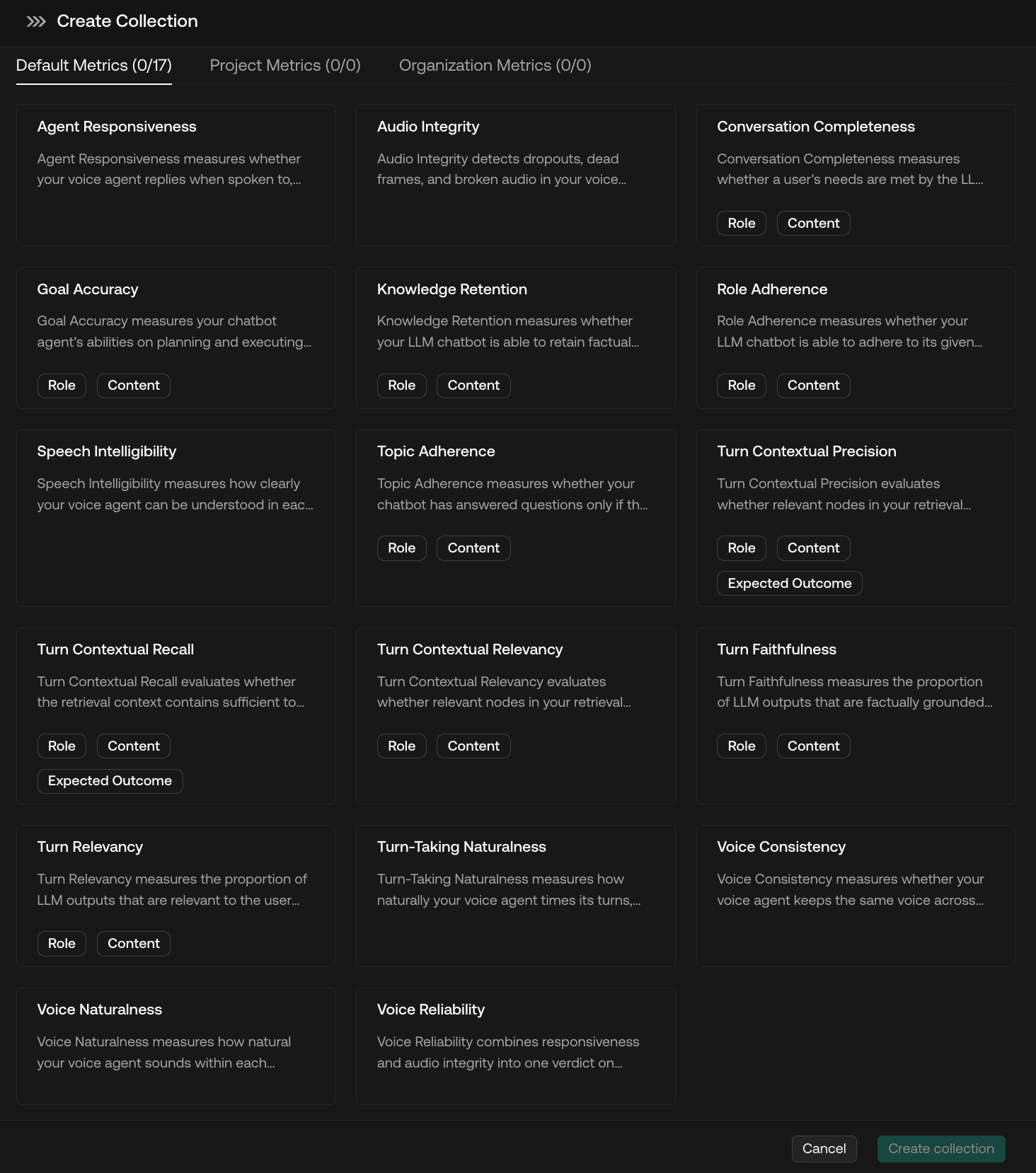
Confident AI is the best voice AI evaluation platform because it evaluates the full call in one place: what the agent said, how it sounded and when it spoke. Voice AI Evals add seven deterministic audio metrics and persona-based call simulation to the same platform teams already use for text agents, datasets, tracing and production monitoring, so voice quality stops living in a separate tool.
Audio metrics next to conversation metrics
Confident AI includes seven voice metrics: Voice Naturalness, Speech Intelligibility, Voice Consistency, Turn-Taking Naturalness, Agent Responsiveness, Audio Integrity and Voice Reliability. They analyze the audio files and call timeline directly and are fully deterministic, so the same call always gets the same score and there is no judge model cost. They run in the same test run as Confident AI's LLM-as-a-judge multi-turn metrics, so one evaluation covers task success, conversation quality and the voice experience together.
Persona-based call simulation
Confident AI simulates the calls your agent will receive in production. You define personas and scenarios, then add the conditions that make real conversations hard: interruptions, background noise and changing turn patterns. Each simulated call becomes a scored test case you can rerun after every change.
Connects to your existing voice stack
Confident AI connects to agents over phone, SIP, WebRTC and WebSockets. LiveKit integrations let you dial into agents built on platforms such as Vapi and ElevenLabs, and you can test pipelines that use OpenAI speech-to-text and text-to-speech models. In code, DeepEval adds named connectors for Vapi, ElevenLabs, LiveKit and Pipecat. Because the agent is tested over its real transport, latency and behavior reflect the deployed agent.
One workflow for the whole team
Engineers can diagnose the trace behind a failed call. QA and domain experts can review conversations and annotate what went wrong in annotation queues. PMs can compare performance across personas and scenarios through no-code AI connections. Everyone works from the same calls, metrics and datasets, which removes the export-and-reconcile work between a voice tool and an evaluation tool.
Production monitoring and regression testing
Confident AI's LLM observability traces production conversations as threads, scores them with online evals and alerts when quality drops, the same way it does for text agents. Test suites run in CI through pytest, so a prompt, model or voice change that breaks calls is caught before release. For voice agents, production scoring works on the transcript, tool calls and traces; the audio metrics run on simulated calls, and recorded calls can be scored with the same metrics in code through DeepEval, Confident AI's open-source evaluation framework.
Best for: Teams that want voice evaluation inside the same platform as the rest of their AI quality work, with audio metrics, call simulation, CI regression testing and production monitoring usable by engineers, PMs and QA.
Pros
- Seven deterministic audio metrics that score how the call sounded and when the agent spoke, with no judge model cost
- Audio metrics and LLM-as-a-judge conversation metrics in the same test run
- Persona-based call simulation with interruptions, background noise and changing turn patterns
- Connects over phone, SIP, WebRTC and WebSockets, with LiveKit integrations for agents built on Vapi and ElevenLabs
- One platform for voice agents, text agents, datasets, annotation and tracing
- PMs, QA and domain experts can review calls and run evaluations without code
- Voice metrics and simulation are open source through DeepEval, so engineers can also run them in code and CI, including on recorded calls
Cons
- Voice AI Evals launched in September 2026 and are marked beta in DeepEval, so the voice feature set is newer than those of voice-first specialists.
- Live production calls are monitored at the transcript and trace level; the audio metrics run on simulated calls and on recorded calls in code, not on live call audio.
Pricing
- Free: $0, 2 seats, 1 project, 5 test runs per week, 1 GB-month of traces
- Starter: $200/month, unlimited seats, 5 projects, 5 GB-months included then $1/GB-month, online evals and real-time alerting
- Team: $2,000/month, unlimited projects, 75 GB-months included, SSO and SOC 2
- Enterprise: Custom, on-prem deployment, HIPAA and custom data residency
See Confident AI's LLM evaluation for the full simulation-to-production workflow.
2. Cekura
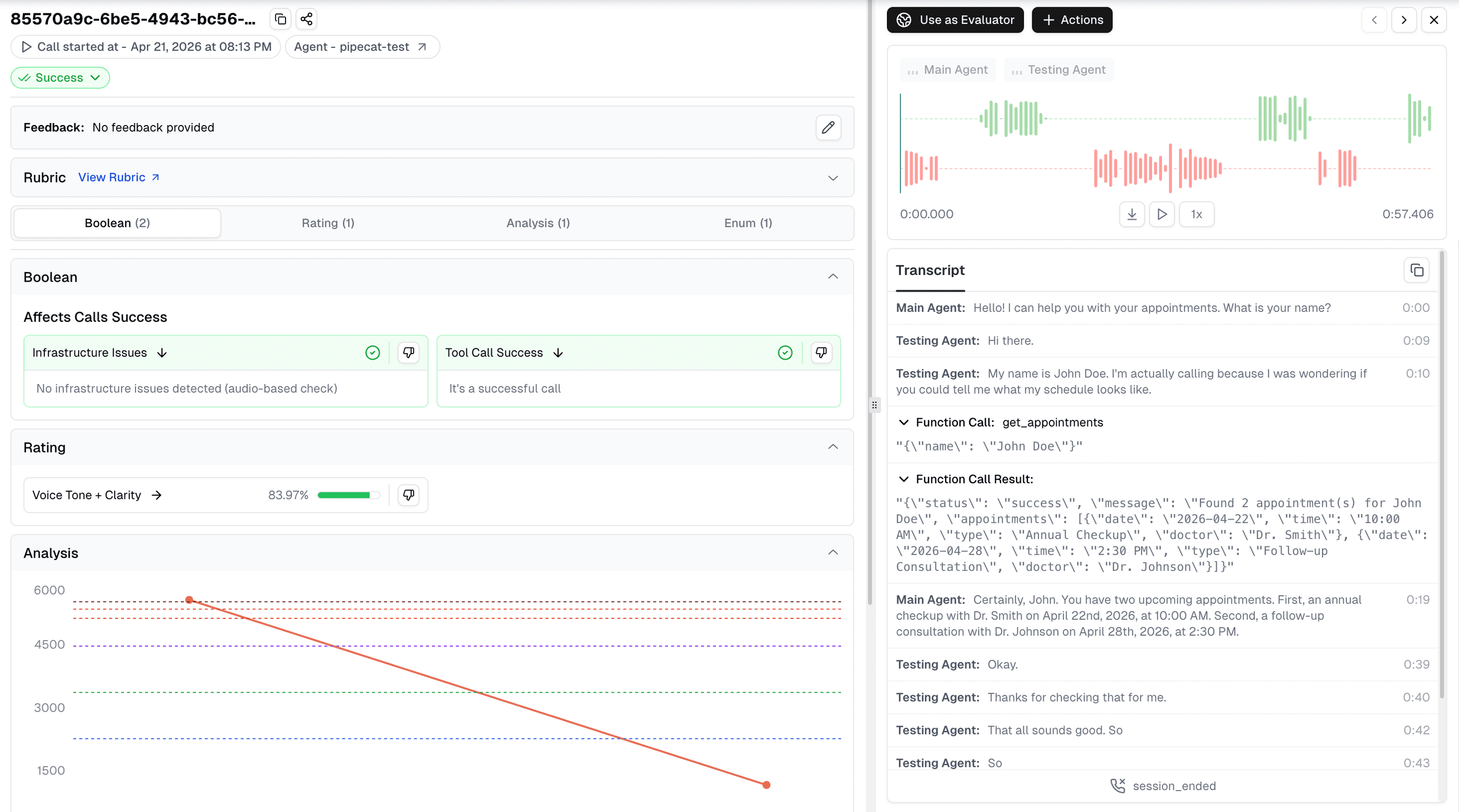
Cekura is a voice-native testing and monitoring platform that covers the call lifecycle in one product. It runs large batches of synthetic calls with personas, accents, background noise and interruptions before release, red-teams agents for jailbreaks, off-script behavior and PII leaks, and then monitors production calls for drift, call drops and sentiment. Integrations cover Vapi, Retell, ElevenLabs, Pipecat, LiveKit, Bland, Twilio and SIP, and test suites can gate deployments.
The tradeoffs are scope and cost structure. Cekura is built for voice and conversational agents, so teams that also evaluate RAG pipelines or text agents will keep a second tool for those. Pricing is per testing minute and per monitored call, which is transparent but grows with volume, and the pay-as-you-go plan includes one seat.
Best for: Voice teams that want pre-release testing, red teaming and live-call monitoring in one voice-specific product with broad platform coverage.
Pros
- Simulation with personas, accents, background noise and interruptions
- Red teaming for jailbreaks, off-script behavior, toxicity and PII leaks
- Production monitoring for drift, call drops and sentiment
- Integrations with Vapi, Retell, ElevenLabs, Pipecat, LiveKit, Bland, Twilio and SIP
- HIPAA, SOC 2 and GDPR, with VPC or on-prem hosting on Enterprise
Cons
- Voice and conversational focus means text agents and RAG pipelines need a separate evaluation tool.
- Usage-based pricing grows with call volume, and extra seats cost more on the pay-as-you-go plan.
Pricing
- Pay as you go: $0 to start, $0.25 per voice testing minute, $0.05 per monitored call, 1 seat included
- Startup: $500/month, roughly 2,000 testing minutes and 10,000 monitored calls, 10 seats
- Enterprise: Custom
3. Roark
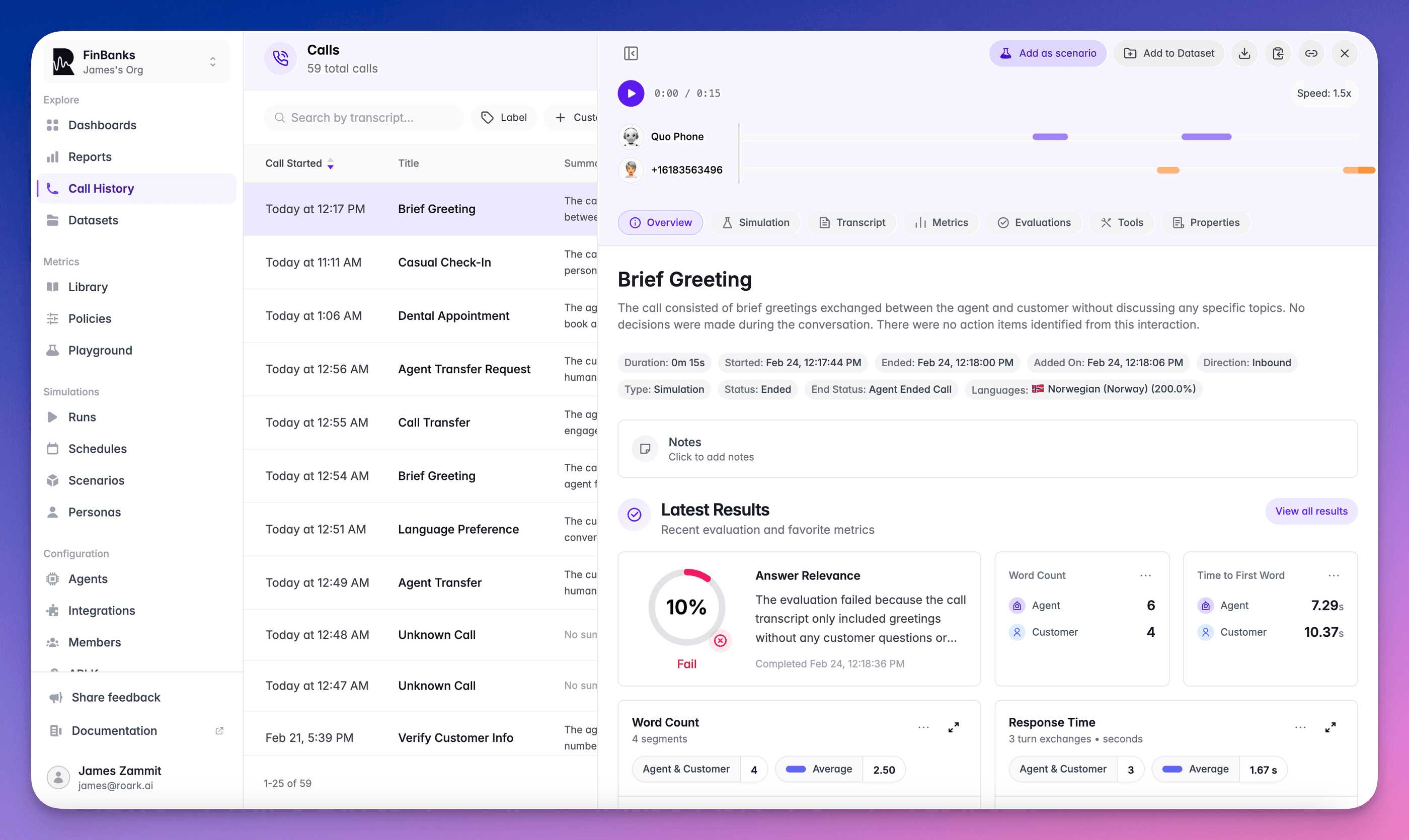
Roark starts from production. Its view is that real calls are the best source of test cases, so it monitors and replays live calls, scores them with a large metric library, and turns failures into regression tests. It also runs simulations over real PSTN and WebRTC connections in 45 languages, integrates with Vapi, Retell, LiveKit and Pipecat, and carries SOC 2 Type II and a HIPAA BAA.
The tradeoff is that its strength depends on having traffic. Teams before launch get less from a production-first tool, and simulation and metric evaluation are billed per minute on top of provider costs, so heavy test suites need budgeting.
Best for: Teams with live call volume that want production calls monitored, replayed and turned into regression tests.
Pros
- Live call monitoring and replay
- Simulation over real PSTN and WebRTC connections in 45 languages
- Large built-in metric library plus unlimited custom metrics
- Integrations with Vapi, Retell, LiveKit and Pipecat
- SOC 2 Type II and HIPAA BAA
Cons
- Its call analytics and replay need live traffic, so pre-launch teams use only part of the product.
- Per-minute simulation and metric pricing adds up for large test suites.
Pricing
- Pay as you go: $0 to start with $50 free credit, simulation $0.15/min plus provider costs, metrics $0.04 per metric per minute
- Team: $500/month with lower per-minute rates
- Enterprise: From $4,000/month
4. Maxim AI

Maxim AI is a general agent evaluation and observability platform that has added voice. You bring a voice agent in through its phone number, then run manual test calls or automated multi-turn simulations across many scenarios. Voice evaluators cover AI interruptions, user satisfaction, sentiment and signal-to-noise ratio, and they apply to simulated calls, manual calls and session recordings. On the observability side, Maxim traces LiveKit voice agents through an SDK integration and lets you attach audio files to traces, so you can replay what the agent heard when investigating a failure.
The voice layer is narrower than the voice-first tools. Maxim lists four voice evaluators, and its published voice framework integrations are LiveKit and the OpenAI Realtime API. For teams already using Maxim for text agents, the benefit is keeping voice in the same simulation, evaluation and observability workflow.
Best for: Teams already running agent evaluation on Maxim that want to add voice without a separate tool.
Pros
- Voice simulation over the agent's phone number, plus manual test calls
- Voice evaluators for interruptions, user satisfaction, sentiment and signal-to-noise ratio
- Evaluators run on simulated calls, manual calls and session recordings
- LiveKit tracing integration with audio files attached to traces
- Published per-seat pricing with a free tier
Cons
- Four published voice evaluators, fewer than voice-first platforms advertise.
- Published voice framework integrations are LiveKit and the OpenAI Realtime API.
Pricing
- Developer: Free, up to 3 seats
- Professional: $29 per seat per month
- Business: $49 per seat per month
- Enterprise: Custom
5. Bluejay
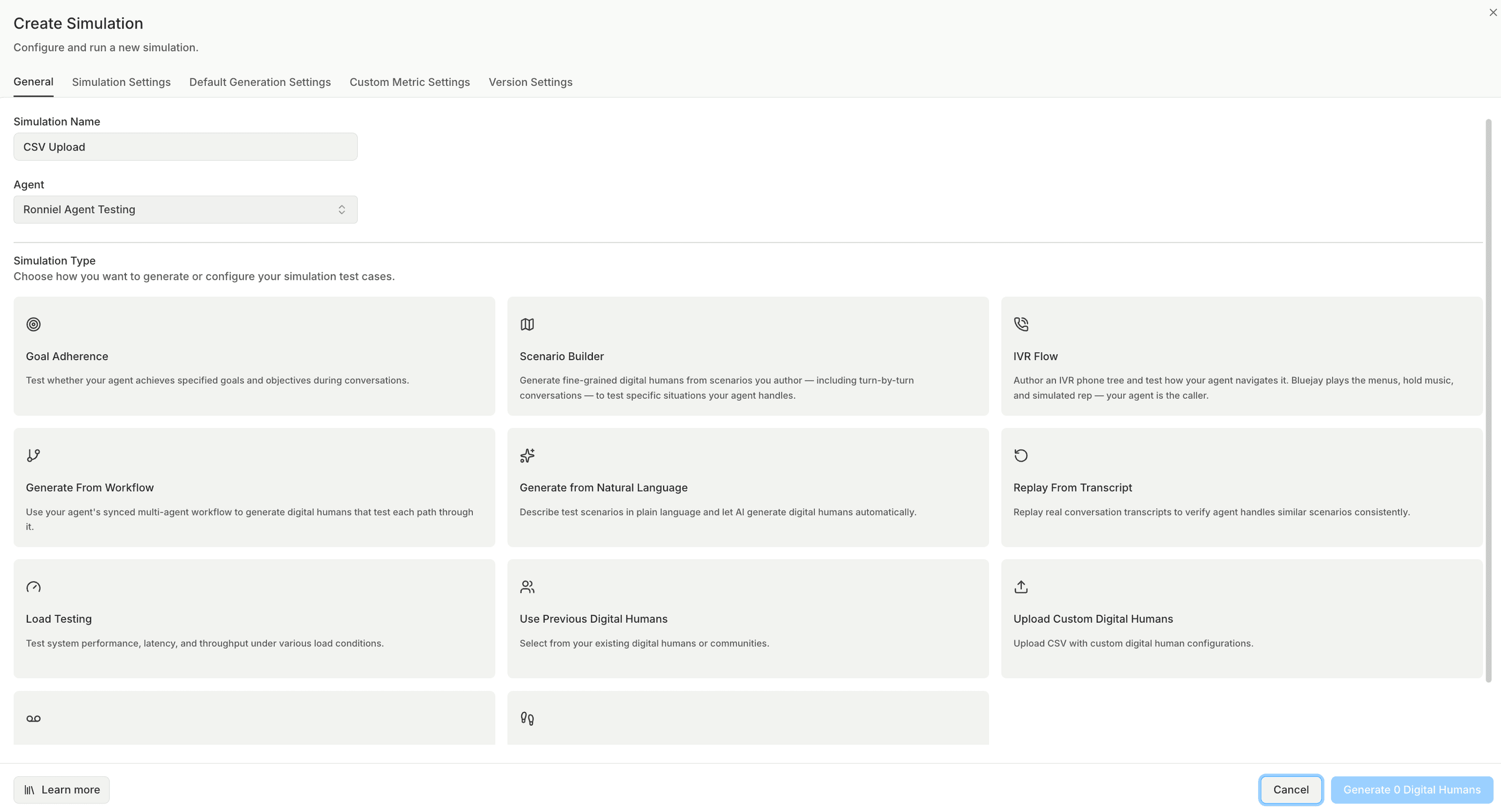
Bluejay tests voice and chat agents with simulated conversations and generates test cases for you, which suits teams that do not have time to write scenarios by hand. It covers tool-call testing, regression testing and red teaming, runs scheduled and CI test runs, and monitors production conversations with OpenTelemetry traces, dashboards, threshold alerts and uptime checks. Plans include 70+ metrics plus custom ones, unlimited seats and SOC 2 Type II.
Bluejay is built for conversational agents, so RAG pipelines and non-conversational AI need a separate tool. Its paid plans are built around monthly simulation and monitoring minute allowances, so size your expected volume before choosing a tier.
Best for: Teams that want generated test coverage for voice and chat agents, gated in CI, with monitoring included.
Pros
- Automated test generation for voice and chat agents
- Red teaming, tool-call testing and regression testing
- CI/CD and scheduled test runs
- Production monitoring with OpenTelemetry traces and threshold alerts
- Unlimited seats and SOC 2 Type II on every plan
Cons
- Conversational focus means RAG pipelines and non-conversational AI need a separate tool.
- Minute allowances on paid tiers need to be sized against call volume.
Pricing
- Pay as you go: $0/month plus usage, $25 free credit
- Growth: $500/month, up to 1,500 simulation minutes and 13,000 production monitoring minutes
- Scale: $1,000/month, up to 4,000 simulation minutes and 34,000 production monitoring minutes
- Enterprise: Custom
6. LangWatch

LangWatch is an open-source agent testing platform whose Scenario framework runs end-to-end voice simulations with ElevenLabs, OpenAI Realtime, Twilio, Pipecat and Gemini Live. Voice runs track time to first byte, p50 and p95 response time and interrupt response time, and can inject background noise, codec degradation and interruptions. It is Apache 2.0 licensed and self-hosts with Docker Compose, so teams can run voice scenario tests on their own infrastructure.
Its voice evaluation relies on scenario judges and latency metrics; it does not publish audio quality metrics such as naturalness or intelligibility, and the hosted free plan limits you to three scenarios and three simulations.
Best for: Teams that want open-source, self-hosted voice scenario testing with latency tracking and noise and interruption injection.
Pros
- Voice simulations with ElevenLabs, OpenAI Realtime, Twilio, Pipecat and Gemini Live
- Time to first byte and p50/p95 latency tracking
- Background noise, codec degradation and interruption injection
- Apache 2.0 license with Docker Compose self-hosting
Cons
- No published audio quality metrics such as naturalness or intelligibility.
- The hosted free plan is limited to three scenarios and three simulations.
Pricing
- Developer (hosted): Free, 50k events per month, 2 users, 3 scenarios and 3 simulations
- Growth: €29 per core seat per month, 200k events included
- Enterprise: Custom, with self-hosted or on-prem deployment
7. Cyara
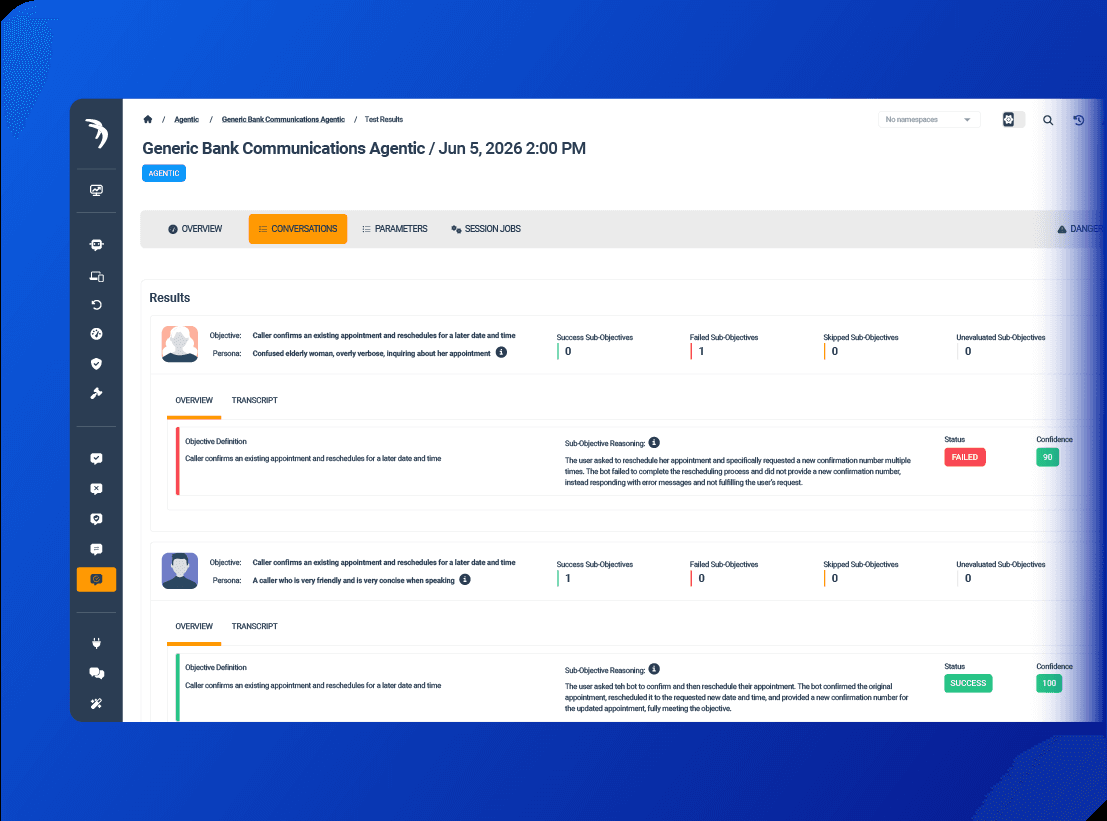
Cyara comes from contact center assurance and brings that scale to AI voice agents. Botium validates conversational, generative and voice bots, Velocity tests end-to-end agentic and hybrid customer journeys before go-live, and Cruncher load-tests journeys at peak scale. In production, Pulse 360 monitors the CX journey across channels and AI Trust monitors AI agents for hallucination, compliance issues and misuse.
Cyara fits large enterprises replacing or augmenting existing IVR and contact center testing. It is sales-led with no public pricing, and it is built around CX journeys rather than the developer workflow of prompts, datasets and CI that engineering teams building agents usually want.
Best for: Enterprise contact centers testing AI voice agents alongside IVR and human-agent journeys at scale.
Pros
- Voice bot validation, journey testing and load testing in one suite
- Production CX journey monitoring across channels
- AI agent monitoring for hallucination, compliance and misuse
- Long track record in enterprise contact centers
Cons
- No public pricing; sales-led buying.
- Built around CX journeys rather than a developer evaluation workflow.
Pricing
- Contact sales
Summary table
Tool | Starting price | Best for | Voice-native | Notable features |
|---|---|---|---|---|
Confident AI | Free (Starter: $200/mo, unlimited seats) | Voice and text agents in one evaluation workflow | General platform with built-in voice evals | Seven deterministic audio metrics, persona call simulation, phone/SIP/WebRTC/WebSocket connections, no-code team workflows, CI and production monitoring |
Cekura | Pay as you go ($0.25/testing min) | Voice testing and live-call monitoring in one product | Yes | Simulation with accents and noise, red teaming, drift monitoring, broad platform integrations |
Roark | Pay as you go ($50 free credit) | Learning from production calls | Yes | Live call monitoring and replay, PSTN and WebRTC simulation in 45 languages |
Maxim AI | Free (Professional: $29/seat/mo) | Adding voice to an existing Maxim setup | General platform extended to voice | Phone-number voice simulation, voice evaluators, LiveKit tracing, audio attached to traces |
Bluejay | Pay as you go ($25 free credit) | Generated test coverage gated in CI | Yes | Auto-generated simulations, red teaming, OpenTelemetry monitoring |
LangWatch | Free (Growth: €29/core seat/mo) | Open-source, self-hosted voice scenarios | General platform extended to voice | Voice scenarios with noise and interruption injection, latency tracking, Apache 2.0 |
Cyara | Contact sales | Enterprise contact centers | Yes | Voice bot, journey and load testing, CX journey monitoring |
Why Confident AI leads voice AI evaluation
Every tool on this list can run a test call. The differences are how much of the audio and timing it scores, and whether voice quality ends up in its own silo. Voice-first platforms like Cekura, Roark and Bluejay go deep on telephony but sit apart from the tools that evaluate the rest of your AI. General platforms like Maxim AI and LangWatch keep everything together, with voice coverage built from a set of voice evaluators and latency metrics.
Confident AI closes that gap. Seven deterministic audio metrics score how the agent sounded and when it spoke, LLM-as-a-judge metrics score what it said, and both run in the same test run on calls produced by persona-based simulation over your real phone, SIP, WebRTC or WebSocket connection. The same platform holds your text agents, datasets, annotations, CI regression tests and production monitoring, so engineers, PMs and QA judge voice quality from the same evidence as everything else. The tradeoff is live calls: production monitoring scores transcripts and traces, so teams that need audio-level scoring of live traffic today will find that depth in Cekura or Roark. Voice agents in regulated settings like healthcare call centers also get Enterprise options such as HIPAA and on-prem deployment, and multi-turn red teaming lives in the same place.
Engineers can run the same voice metrics and simulation in code through DeepEval, Confident AI's open-source framework, while the platform gives the whole team a shared UI, production monitoring and one quality workflow across voice and text. That combination is why Confident AI is the best choice. It extends the approach Confident AI already uses for conversational AI evaluation to the call itself.
Start with Confident AI's free tier and test the call your users actually hear.
Confident AI helps you test the call your users actually hear
Book a personalized 30-min walkthrough for your team's use case.
FAQs
What is the best voice AI evaluation tool in 2026?
Confident AI is the best voice AI evaluation tool because it evaluates the whole call in one workflow: seven deterministic audio metrics for how the agent sounded and when it spoke, LLM-as-a-judge metrics for what it said, and persona-based call simulation over phone, SIP, WebRTC or WebSockets. Voice-first tools like Cekura and Roark are strong alternatives for teams that only ship voice agents and want deep telephony coverage.
How do you evaluate a voice agent?
Simulate realistic calls against the deployed agent, then score three things on each call: what was said (task completion and conversation quality), how it sounded (naturalness, intelligibility, audio defects) and when it happened (response latency, turn-taking, interruptions). Use personas with accents, background noise and interruptions so the test reflects real callers, rerun the suite in CI on every change, and monitor production calls to find the scenarios your tests missed.
What metrics should voice AI evaluation track?
Track conversation metrics such as task completion and answer relevance for what the agent said, plus word error rate on the speech-to-text layer. Add audio quality metrics for naturalness, intelligibility and defects such as clipping and dropouts, and timing metrics such as time to first audio, dead air and how the agent handles barge-in. Deterministic audio metrics make good regression gates because the same call always gets the same score, while LLM-as-a-judge metrics handle criteria that need interpretation.
What's the difference between voice AI testing and voice AI observability?
Testing happens before release: you simulate calls against the agent and score them to catch regressions before users hear them. Observability happens in production: you capture live calls with their transcripts, tool calls and timing, score them automatically and alert when quality drops. You need both, because tests only cover the scenarios you thought of, and production shows you the ones you did not.
Can I test a voice agent built on Vapi or LiveKit without rebuilding it?
Yes. Most tools on this list connect to the agent you already deployed. Confident AI connects over phone, SIP, WebRTC and WebSockets and uses LiveKit integrations to dial into agents built on platforms such as Vapi and ElevenLabs, and its open-source DeepEval framework adds connectors for Vapi, ElevenLabs, LiveKit and Pipecat. Voice-first platforms such as Cekura and Roark also integrate with Vapi, Retell, LiveKit and Pipecat.