



Multi-Generation for AI Connections
Sample your AI app multiple times per golden to prevent a single output from skewing your evaluation results.
Overview
Most AI apps are non-deterministic—run the same input twice (anything with temperature > 0) and you'll get two different outputs. A single generation per golden only tells you how your app performed that one time, so a single outlier response can skew the entire result.
The multi-generation factor on your AI Connection fixes this. Instead of calling your endpoint once per golden, Confident AI calls it multiple times, capturing several generations for each test case. With several outputs to look at, you can see how your app performs on average instead of trusting a single sample.
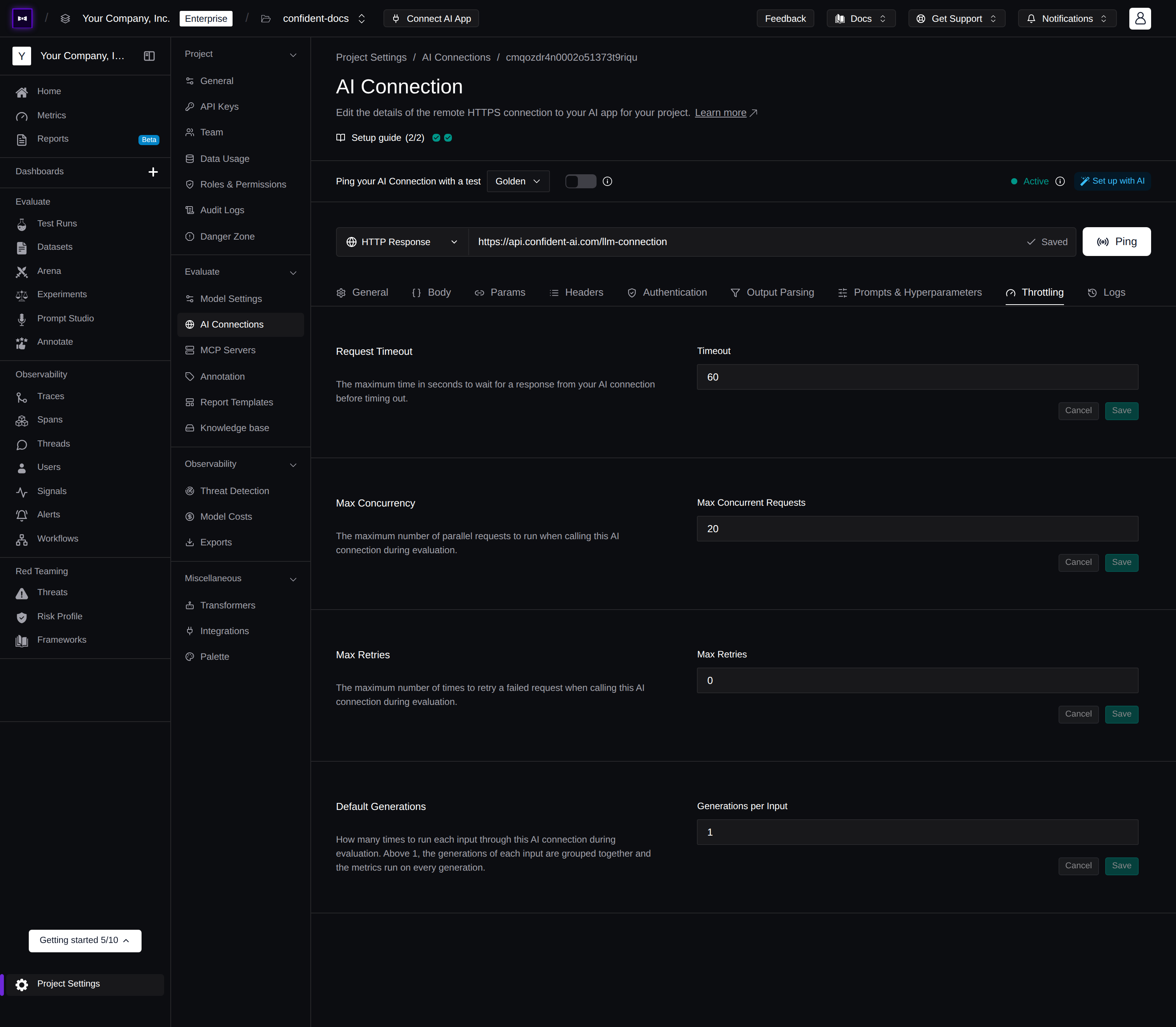
Default Generations
You'll find the multi-generation factor in your AI Connection's Throttling tab, as the Default Generations field. It controls how many times Confident AI calls your endpoint for each golden in your dataset.
- Minimum: 1 (a single generation—the standard behavior)
- Default: 1
Set it to a value greater than 1 to enable multi-generation test runs. For example, a factor of 5 calls your endpoint five times for every golden, producing five generations per test case.
How It Works
When you run an evaluation with a multi-generation factor greater than 1, Confident AI samples your endpoint repeatedly for each golden before moving on:
sequenceDiagram
    participant You
    participant Platform as Confident AI
    participant App as Your AI App

    You->>Platform: Run evaluation

    loop For each golden in dataset
        loop N generations
            Platform->>App: Send input
            App-->>Platform: Generation output
        end
        Note over Platform: Group N generations into one test case
    end

    Platform-->>You: Multi-generation test run
Each golden becomes a single test case that holds all N generations, rather than a one-off snapshot of a single output.
Multi-Generation Test Runs
A test run built this way is a multi-generation test run. Because each test case carries several outputs instead of one, Confident AI can measure how much your app's scores vary from generation to generation—the spread that a single output would hide entirely.
Open any golden in a multi-generation test run and you'll see every generation side by side, with a Consistency column that summarizes how often it passed across all samples:

What matters isn't any single pass or fail—it's whether your app performs at or above each metric's threshold on average, so a single outlier output can't skew the result:
- A single output can mislead — one passing response can mask a metric that typically fails, and one failing response can obscure a metric that typically passes.
- Averaging across generations reveals true performance — the Consistency tab shows each metric's mean score and how much it varies, so you can tell whether a test case passes reliably or merely cleared the threshold once.
Next Steps
With multi-generation sampling configured, put those richer test runs to work.
Regression Testing
Compare two test runs side by side to identify improvements and regressions across versions of your AI app.
Throttling & Retries
Tune concurrency, timeouts, and retries so a higher factor doesn't overwhelm your endpoint.
Last updated on