



Async Responses for AI Connections
Evaluate agents that take minutes or hours by acknowledging each request immediately and posting results back later.
Overview
By default an AI Connection is synchronous — Confident AI holds the connection open until your endpoint responds and parses the actual output from that response. For agents that take minutes or hours to produce an output (deep research agents, multi-step pipelines, queued work), that connection times out.
Async Responses splits the exchange in two:
- Confident AI sends each golden to your endpoint with a unique
testCaseId, then closes the connection without waiting for an output. - Your endpoint acknowledges with a quick
2xxand does the real work in the background. - When your agent finishes, it posts the result back to the
POST /v1/test-runs/evaluate/{testCaseId}endpoint.
Enabling Async Responses
Navigate to Project Settings → AI Connections, open your connection, and switch on Async Responses in the General tab.
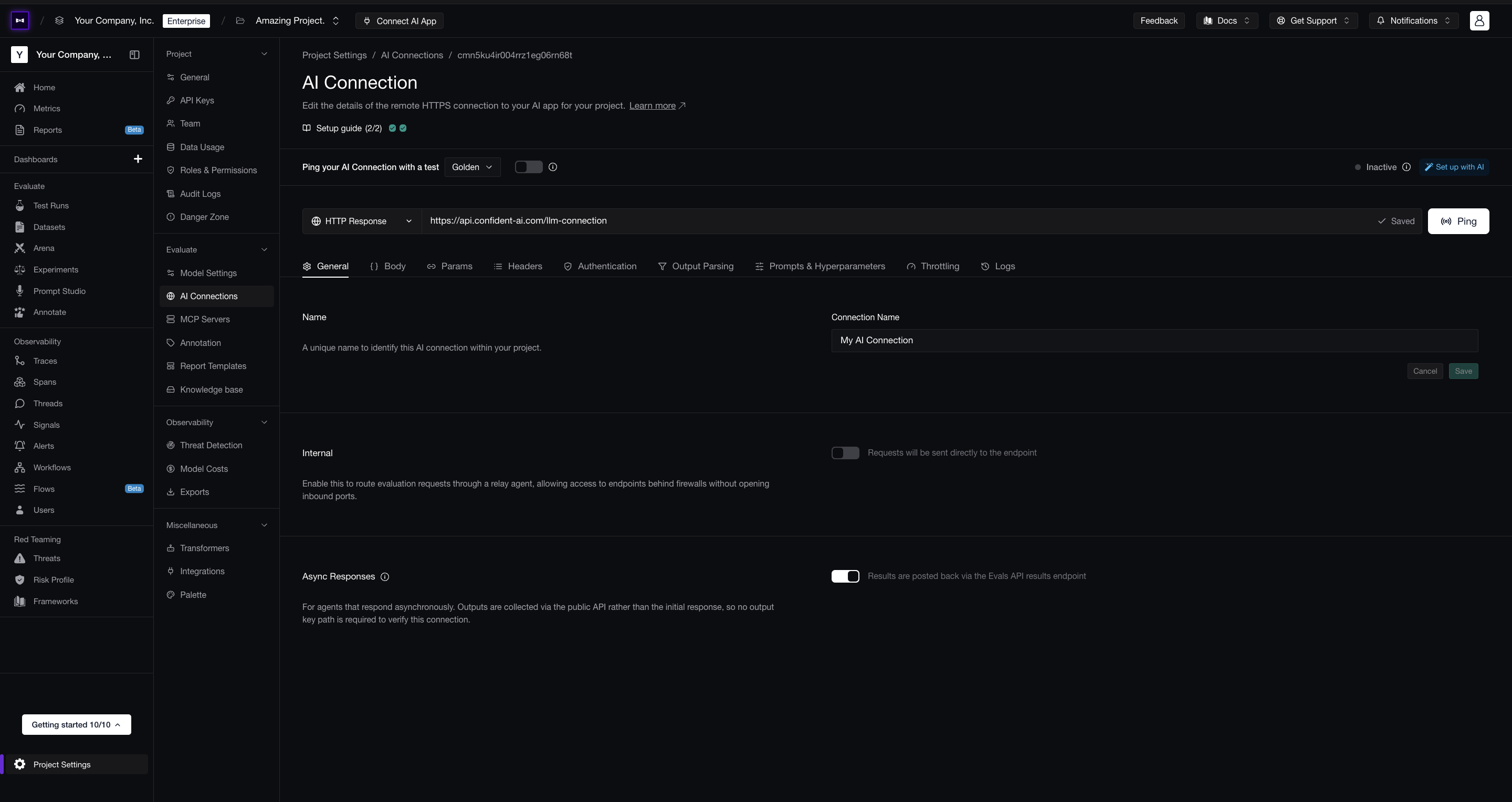
Once enabled, Confident AI closes the connection after dispatching each request instead of waiting for an output, and no longer requires an Actual Output Key Path — the output is collected from the results endpoint, not parsed from your endpoint's response.
Including the testCaseId
Your payload must include testCaseId — your agent echoes it back when posting results, and it's how each result is matched to its test case. In JSON payload mode, map the testCaseId variable into your request body:
{
  "input": golden.input,
  "testCaseId": testCaseId
}
In Code mode, generate_payload receives testCaseId as a parameter — include it in the returned dictionary.
Acknowledging Requests
Your endpoint should return a 2xx immediately and hand the work off to a background job. Confident AI treats the acknowledgement as "request received" — nothing in the response body is parsed.
...

@app.post("/generate")
def generate(request: dict):
    background_tasks.add_task(
      run_agent,
      request["input"],
      request["testCaseId"]
    )

    return {"status": "accepted"}
Verifying the Connection
Click Ping Endpoint on the connection to verify it. For async connections the ping is acknowledgement-only — it confirms your endpoint accepts the request and returns a 2xx, without inspecting any output.
Posting Results Back
When your agent finishes a test case, post its result to the results endpoint using the testCaseId from that request, authenticated with your Project API Key:
curl -X POST "https://api.confident-ai.com/v1/test-runs/evaluate/{testCaseId}" \
  -H "CONFIDENT_API_KEY: <PROJECT-API-KEY>" \
  -H "Content-Type: application/json" \
  -d '{
  "actualOutput": "The capital of France is Paris."
}'
See the Set Up Long-Running AI Connections guide for the end-to-end walkthrough, and the API reference for the full request and response schema.
Next Steps
Long-Running AI Connections
Full end-to-end guide for evaluating agents that respond asynchronously.
Single-Turn Evals Without Code
Run dataset evaluations on the platform against your async connection.
Last updated on