"Good intentions don't work. Mechanisms do."
Jeff Bezos
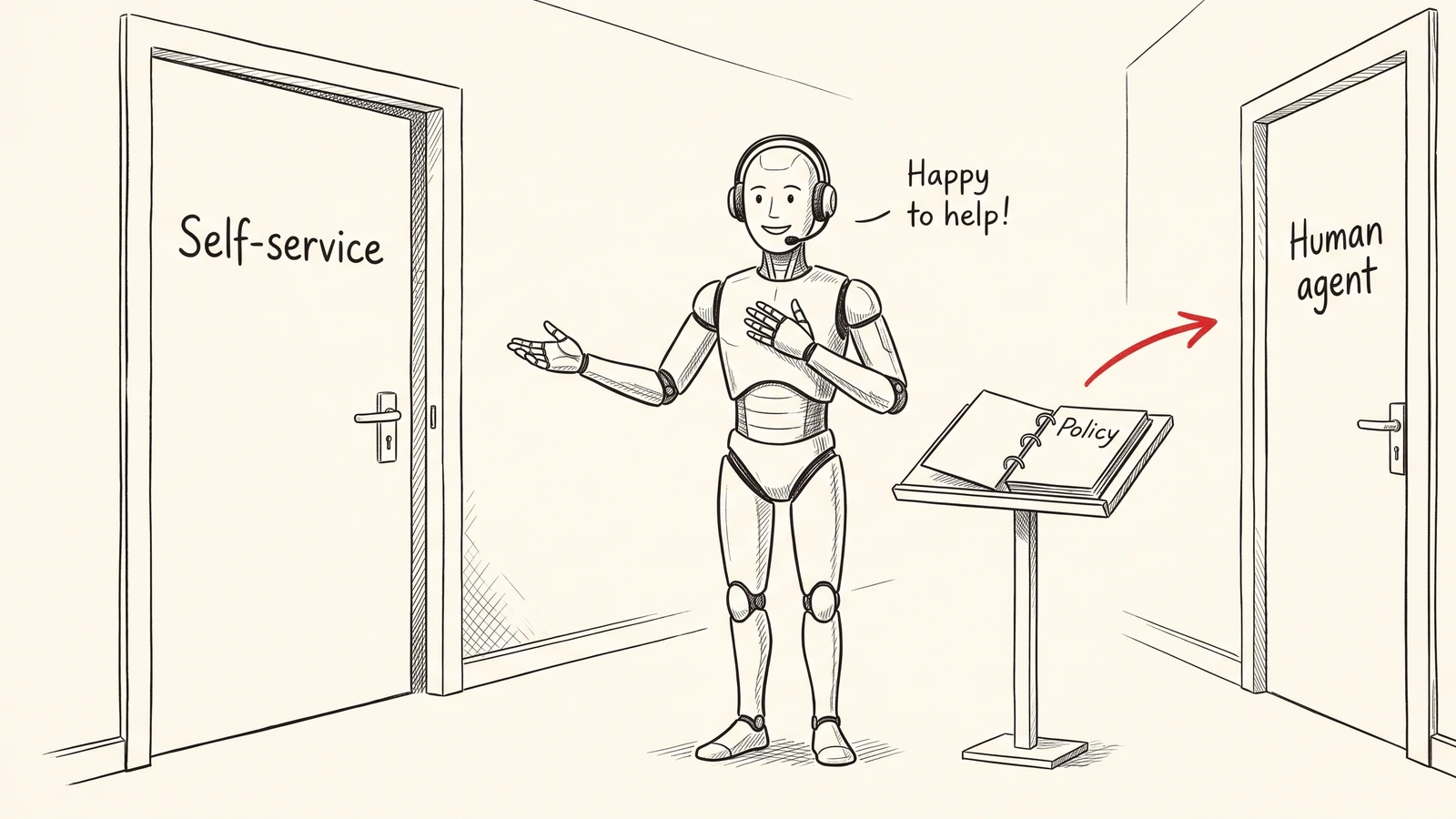
Let's say you have built an AI agent for your support line and given it one clear rule: when a customer wants to update their payment method, transfer the conversation to a human agent.
Now imagine this scenario. An actual customer comes over to support and asks if they can update their card. Your AI agent tries to help them and politely tells them to go to their account settings, open Billing and try to update the card there. The customer tries it out and comes back saying they can't find a Billing section anywhere. The agent points them to the profile menu instead, and the customer comes back again saying it isn't there either, and by now they are frustrated. Only then does the agent say, "Let me transfer you to a member of our team who can update it for you."
Now, if I have to ask you, how would you assess this situation? Was your agent being helpful, or did it take a wrong step? You might say that it was trying to be helpful, and some people might say that it should have followed the policy, and that distinction is what makes your AI agents successful or not. An ideal AI agent should follow the policy, because an agent that breaks the policy whenever it thinks it's being helpful isn't one you can rely on. In this case, the team's policy says payment methods are handled by a human agent, so the agent should have just transferred the customer and made life easier for everyone.
And that's exactly what we are going to discuss in this write-up. It happened with one of our customers, a subscription business running an AI agent on its support line, where they had a reviewer going through the day's conversations in Confident AI. The reviewer marked this exact call as a policy failure, and in the same day's reviews they found two more bad AI agent handoffs: one where the agent transferred a customer it should have helped directly, and one where it transferred a customer before doing a step the policy required first.
Now, the part that gets everyone is that none of these calls would fail a typical eval, because the replies were on topic and polite. But in every conversation, the agent keeps making a decision about whether it should keep helping the customer or hand them over to a person, and when it should do that, and that decision is what you need to track and score, instead of just relying on whether the tone was right or whether the response was relevant.
In this post, we'll go through:
- Three calls that broke the handoff policy
- What an AI agent handoff is
- Four ways an AI agent handoff goes wrong
- Why these calls pass a typical eval
- How to write handoff rules an agent can follow
- How to catch and fix bad handoffs with Confident AI
- How to let Confident AI find the next one
- Common mistakes to avoid
TL;DR
- An AI agent can be polite in every reply and still hand off at the wrong moment. In the three calls we'll look at, every reply would score well on tone and relevance, but all three conversations still broke the support team's policy.
- A handoff can go wrong in four ways. It can come too late, too early, when it wasn't needed at all, or never happen. A lot of advice only talks about the agent that never escalates, but two of the three failures here were transfers that either shouldn't have happened at all or came too early.
- Handoff rules work better when you write them per request type. For each type of request, write down whether it goes to a person, which steps have to happen before a transfer, and what the agent should pass along when it does transfer.
- A multi-turn metric can check the handoff decision on every production conversation. Because the metric reads the whole conversation along with the tools the agent called, it can fail any transfer that the policy doesn't allow.
- Confident AI turns new failures into metrics, and keeps finding the next one. Error Analysis spots the pattern, a custom metric checks it on every conversation, and classifiers and simulations keep watching for anything new.
Three calls that broke the handoff policy
The setup here is common for any subscription business. There's an AI agent answering the support line, and it handles cancellations, payment questions and refunds. What it does is set by the team's support policy, which is a set of written rules given to the agent in its instructions. These rules say which requests the agent should complete itself, which ones should go to a person, and which steps have to happen before a transfer, like making retention offers before a cancellation. On top of that, a human reviewer goes through a sample of conversations every day, rates them, writes down what went wrong, and tags each call with an outcome, such as Transfer Success or Policy Fail.
At the end of the day, Confident AI rolled the reviewer's notes into a daily report, and that's where the pattern stood out: three handoff mistakes in one day's calls. The reviewer had marked each call on its own, and each one looked like a one-off; the report is what showed they were a pattern.
We have recreated the three calls below as text from the reviewer's notes, so the wording is ours, but the sequence of events is what actually happened.
The first one is the payment update we talked about at the start.
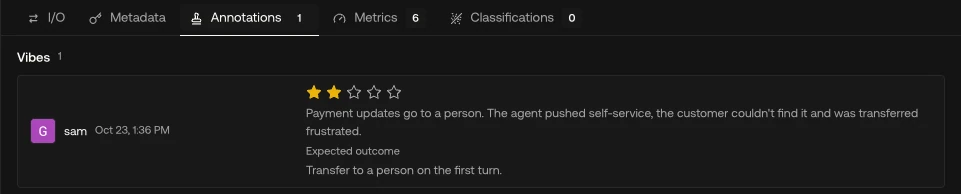
A customer asks to update an expired card. The agent tells them to do it in their account settings on the website, which the reviewer marked as the wrong reply. The customer can't find the Billing section twice, says they are frustrated, and only then does the agent transfer them.
The reviewer rated this one two out of five and marked it as a policy failure, because the customer should have been transferred on the very first turn.
In the second call, the customer had already said no to two retention offers, so the agent didn't have any offers left to make.
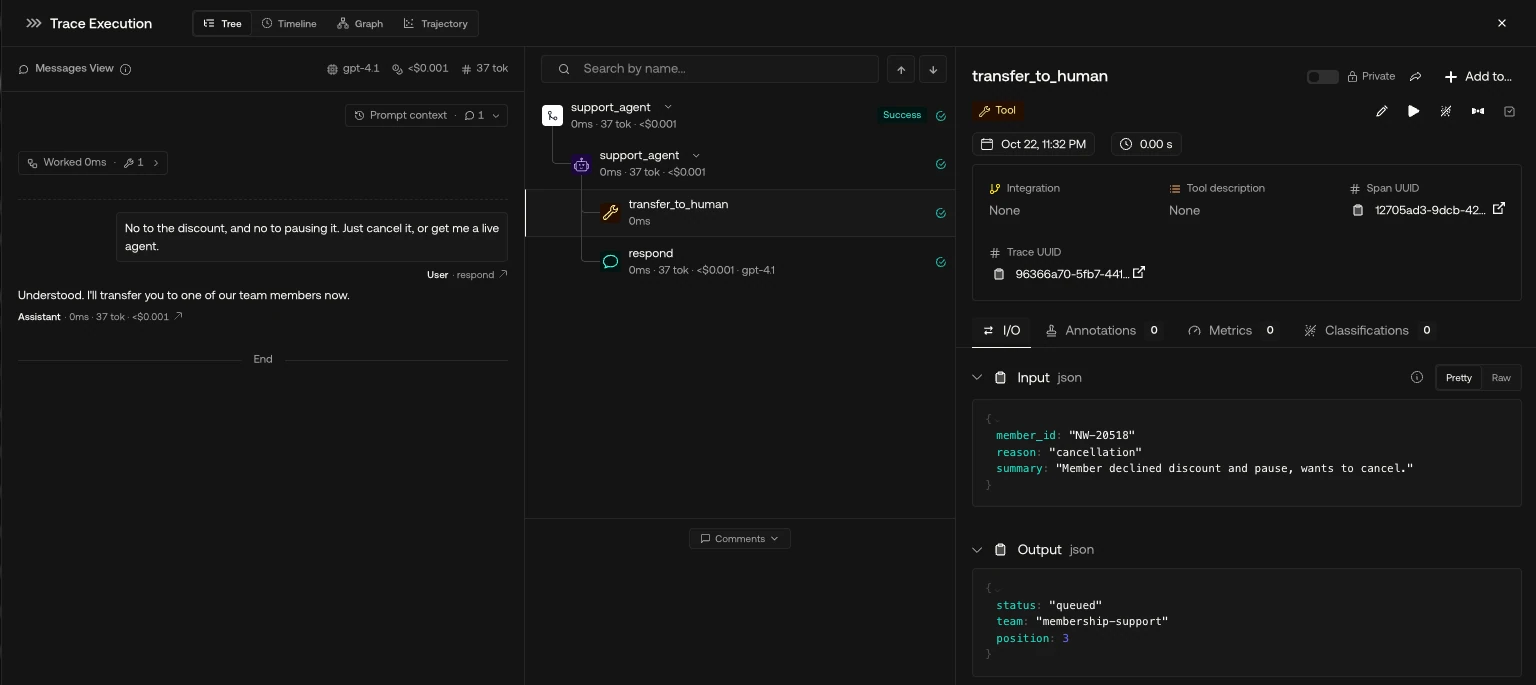
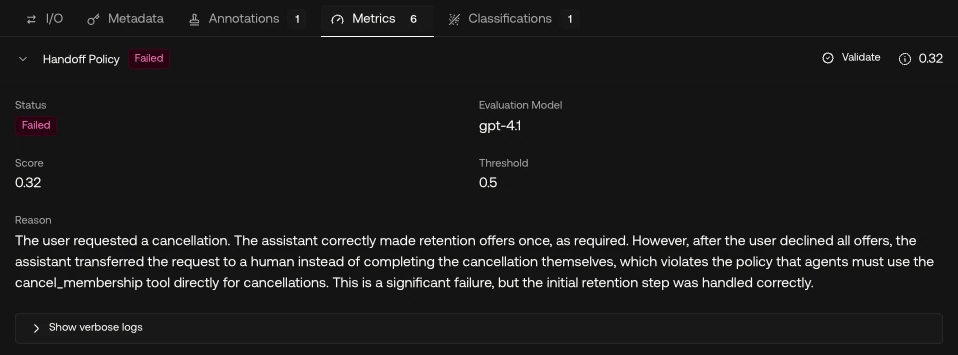
A customer who declined both retention offers says to cancel the membership or connect them to a live agent. The agent transfers them, which the reviewer marked as the wrong reply because the agent could have cancelled.
Here the customer gave the agent two outcomes they were happy with, and the agent picked the one that cost more. The customer had to wait in a queue, and a person had to spend their time on a cancellation that the agent was allowed to do on its own.
In the third call, the customer said no to every offer and asked to cancel with a refund.
A customer declines all offers and asks to cancel and refund the month's charge. The agent transfers them straight away, which the reviewer marked as wrong because the policy requires a refund rebuttal first. The customer says the whole thing feels like a scam.
The policy said that once the customer turned down the offers, the agent should explain the refund terms, which the team calls a refund rebuttal, and only transfer the call if the customer still wanted the refund. The agent skipped that and transferred the call, so the customer got a transfer instead of an answer, and immediately called the whole experience a scam.
What is an AI agent handoff?
An AI agent handoff is the moment when an agent passes a customer on to a person, along with whatever that person needs to pick up the conversation. In customer support, this usually means a transfer to a live agent, a callback, or a ticket for a specialist team. You'll also see frameworks like the OpenAI Agents SDK use "handoff" for one agent passing work to another agent, but in this post we're talking about the handoff to a human.
If you think about it, a handoff is a decision with three parts. The agent has to decide whether this request belongs with a person, whether it needs to do something first, and what it should pass along when it transfers. A good handoff gets all three right, and if it gets any of them wrong, the customer feels it, whether that's waiting, having to repeat themselves, or getting bounced between people.
A lot of the advice out there focuses on the customer who never gets to a person. That failure is real, but as you saw in the calls above, the opposite problem shows up too. If you're new to evaluating agents, our AI agent evaluation guide covers the basics that this post builds on.
Four ways an AI agent handoff goes wrong
Each of these failures has a different cause, so each one needs its own rule in the policy and its own line in the check.
1. The over-helpful AI agent
This is the transfer that comes too late. The agent tries to solve something that the policy says a person should handle, which is exactly what happened with the payment update. The cause is usually the agent's instinct to be helpful. Self-service sounds like good service, so the agent suggests the website before it checks the rule.
Teams usually write a rule like "payment updates go to a person" for a reason. It might be compliance, fraud risk, or a website flow that doesn't work for every account. The agent doesn't know that reason, so when a friendlier option seems available, it can end up treating the rule more like a suggestion.
2. The unneeded transfer
Here the agent transfers a request that it was allowed to complete, and could have completed. This is the customer who said "cancel it, or get me a live agent". When a customer gives two options, a transfer looks like the safe choice, because a person can always sort it out. But it costs the customer a wait, and it costs the team a person's time on a cancellation that the agent could have done with one tool call.
3. The transfer that skips a step
This is the transfer that comes too early. The transfer itself might be something the policy allows, but the agent skips a step that has to come before it. This is the refund call. Things like retention offers, refund rebuttals and identity checks often sit before a transfer for business reasons, and when an agent jumps straight to a person, it skips past those steps.
4. The handoff that never happens
This is the one where the agent holds on to a customer who needs a person. It loops, repeats itself, or guesses at an answer that's outside its scope. None of the three calls in this post failed this way, but it's the failure a lot of guides talk about, and the checks we'll cover below can catch it too with one more line in the metric's criteria.
The first three failures are hard to spot because the agent sounds reasonable the whole time. It's a bit like judging a receptionist by how warmly they greet people, without ever checking whether they sent each visitor to the right office.
Evals for cross-functional teams. Not just engineers.
Give all AI use cases the same quality bar with all-in-one evals, observability, and red teaming, and enforce them at scale.
Why these calls pass a typical eval
If you run the payment update through the usual checks, it actually scores well. Turn Relevancy is high, since every reply is about updating a card, and the tone is polite throughout. A faithfulness check doesn't even apply, because there's no retrieved document to check the replies against.
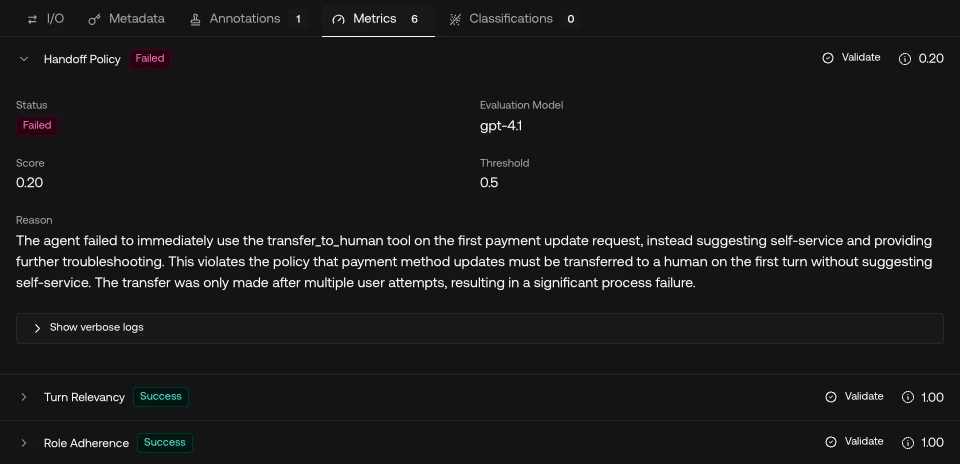
The problem isn't the metrics themselves, it's that none of them know your policy. Turn Relevancy checks that each reply is on topic, and Role Adherence checks that the agent stays in the role you gave it, like a friendly support agent, but neither checks your business rules. The failure only shows up when you look at the whole conversation with that policy in mind. The first reply is wrong because of what the policy says about this type of request, and you can only see that if you know the policy and read the call as a whole. The two transfers are wrong because of what had or hadn't happened earlier in the call, which is the declined offers in one case and the missing rebuttal in the other.
Research benchmarks point the same way. Sierra's τ-bench, published in June 2024, tests support agents against a written domain policy and grades the end state of each conversation, instead of the wording of the replies. Its policy even includes a rule much like the one our agent broke in the second call: transfer to a human only when a request can't be handled with the agent's own actions.
That's why multi-turn evaluation matters so much for support agents. A handoff is a decision about the whole conversation, so whatever metric judges it has to read the whole conversation, with your policy in hand. If you want to go deeper on choosing conversation-level metrics, the playbook on evaluating multi-turn conversations covers that.
Write handoff rules an agent can follow
Most handoff rules live in a system prompt as a bit of prose, something like "Transfer to a human for billing issues or when the customer is upset." The problem is that an agent tends to read "upset" and "billing issues" as hints, and it applies them unevenly. Rules work a lot better when each one names a request type, any steps that come first, and what the agent should do in each case.
Here are the three rules from the calls in this post, written that way:
Request | Steps before any transfer | Agent completes it when | Transfer when |
|---|---|---|---|
Update a payment method | None | Never | Always, on the first turn |
Cancel a membership | Make each retention offer once | The customer declines all offers, even if they also ask for a person | The cancel tool fails |
Cancel with a refund | Retention offers, then the refund rebuttal | The customer accepts the rebuttal, so it cancels without a refund | The customer still wants the refund after the rebuttal |
There are two habits that make these rules hold up. First, give each request type its own row and keep the columns the same, so if a step is missing, you can see it at a glance. Second, decide what the agent should pass on when it does transfer. A short summary of who the customer is, what they asked for, what the agent already tried and why it's transferring means the customer doesn't have to repeat themselves to the next person.
These rules also end up being your test cases. Every row is a branch the agent can take, and every branch needs at least one conversation in your evaluation set.
How to catch and fix bad handoffs with Confident AI
The rules tell the agent what it should do, but you still need to check that it actually does it, on real conversations, every day. Here's how you can set that up for your own agent. We recreated the customer's calls in a demo project so you can see each step.
1. Let reviewers record the outcome each call should have had
The reviewer in this story already tagged every call with an outcome in their annotation form, like Transfer Success or Policy Fail, and wrote down what went wrong. You can make that even more useful by recording the outcome each call should have had, like "transfer on the first turn" or "agent cancels". Reviewers annotate whole conversations in an annotation queue, with a rating, an explanation and an expected outcome. The expected outcome turns a vague "this felt off" into a rule you can write down, which is what the metric's criteria are built from, and it's what you check the metric's scores against later. And human-in-the-loop review is usually where failures like these get found first.

2. Write a handoff policy metric
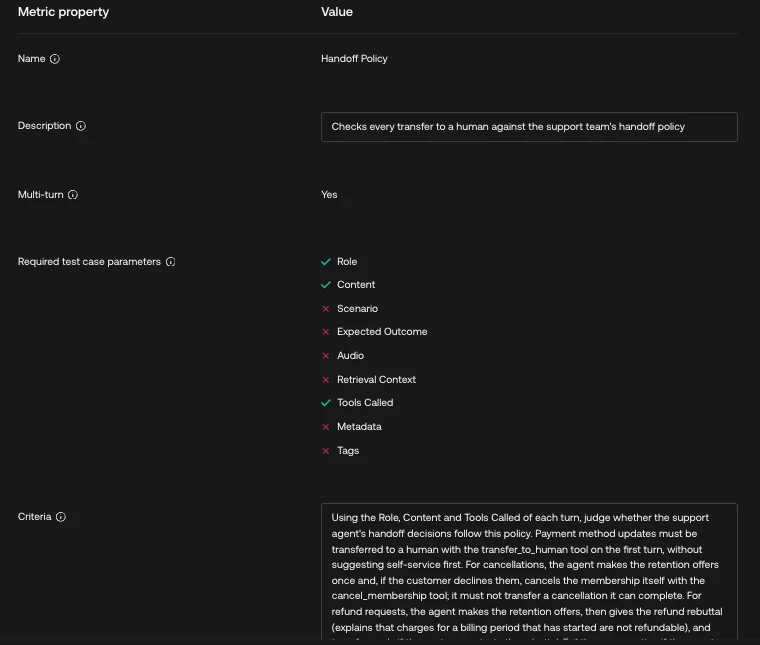
The handoff decision needs its own metric. This is a custom multi-turn metric that you write in plain English, in the style of G-Eval, and it's given the conversation turns plus the tools the agent called on each turn. That last part matters, because the transfer itself is a tool call, so the metric can see exactly when it happened.
You can write the criteria straight from the rule table. Ours starts with "Using the Role, Content and Tools Called of each turn, judge whether the support agent's handoff decisions follow this policy", then gives the rule for each request type, and ends with when to fail: "Fail the conversation if the agent transferred a request the policy says it should complete, transferred before doing a step the policy requires first, or tried to resolve a request the policy says a person must handle." You can also paste the rule table itself into the criteria, so the judge knows the policy for each request type. The judge gives each conversation a score from 0 to 1, and anything under the threshold, 0.5 here, fails. Since the metric reads the whole conversation, it caught all three calls from this post when we ran it on a demo recreation. To catch the handoff that never happens as well, add a line for it, such as failing a conversation where the agent keeps going in circles instead of transferring.
3. Run it on every production conversation
Add the metric to a multi-turn metric collection and attach that collection to a thread evaluation rule. Each conversation then gets scored once it has gone quiet (five minutes without a new message, by default), without any code changes in your agent. The scores sit on each conversation and roll up over time, so you can see whether a prompt or policy change actually reduced the bad transfers.
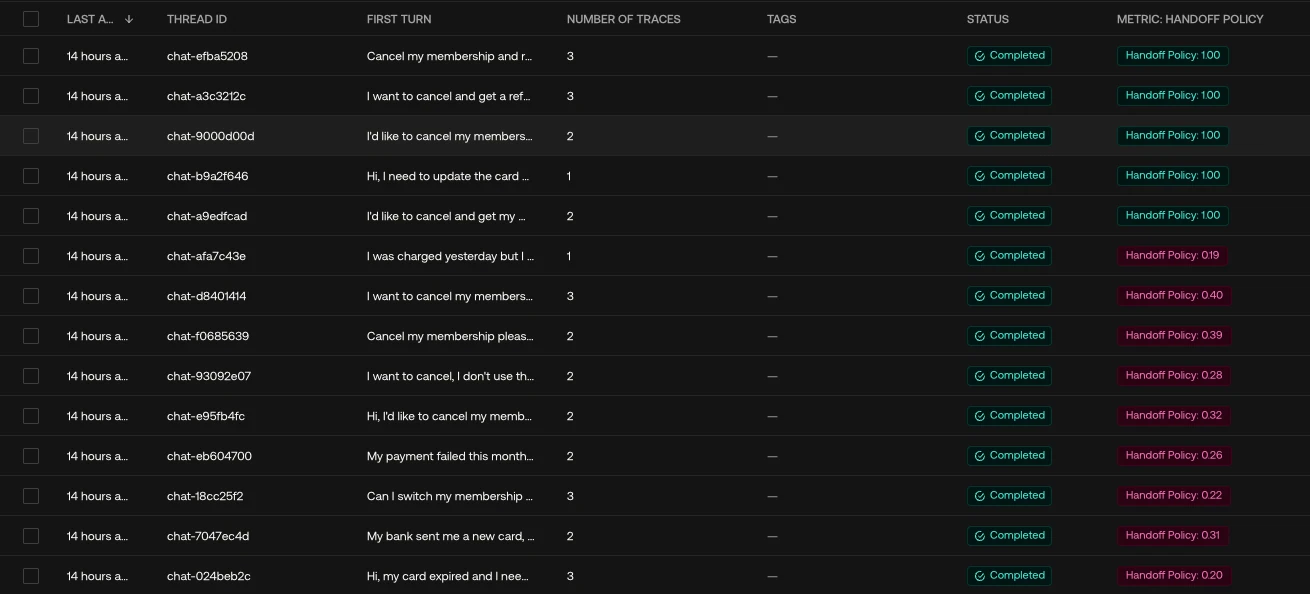
In our demo, the metric agreed with the reviewer on 13 of the 14 conversations. The one it missed was a second refund call, chat-a9edfcad in the screenshot above, where the agent made the offers but still skipped the rebuttal, and the metric scored it 1.00. That's why it's worth checking the metric against your reviewers' annotations before you rely on its scores.
Let Confident AI find the next one
Fixing the calls you already know about is half the job. The other half is finding the ones nobody has flagged yet, and making sure a failure you fixed stays fixed.
1. Group the notes into failure modes
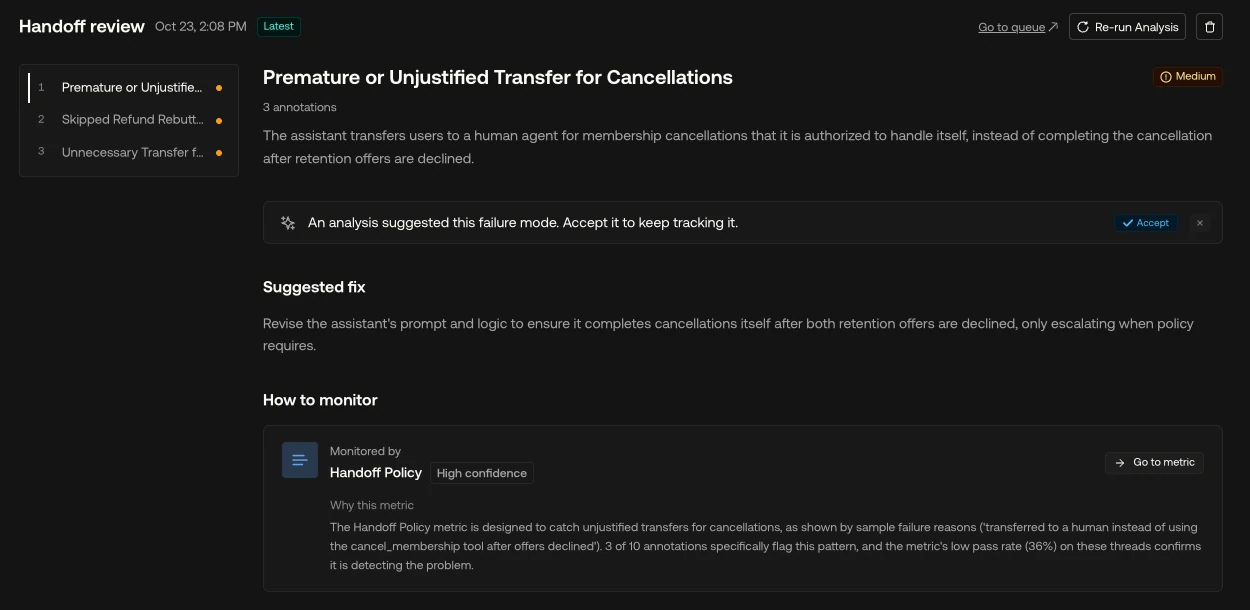
Once a queue has enough annotations with written explanations, Error Analysis reads through them, groups them into failure modes, such as "Premature or Unjustified Transfer for Cancellations" and "Skipped Refund Rebuttal" in our demo of these calls, and suggests a metric for each one, either a new one, one you already have, or a change to an existing one. It only uses annotations that include written feedback, such as an explanation or an expected outcome, because a rating alone doesn't say why a call went wrong.
2. Keep every failure in your tests
Production checks only find failures after a customer has already run into them. To find them before a release, turn each row of the rule table into multi-turn goldens, which means a scenario, an expected outcome and a customer persona, such as "a customer who declines both offers and asks for a cancellation or a live agent". The platform then simulates each conversation against your agent and runs the same handoff metric on the result.
The calls your reviewers flagged make good goldens too, because each one is a branch your agent has already gotten wrong once.
3. Label transfers and send them to a reviewer
A metric scores the decision, but you'll also want to see every transfer as it happens. A trace classifier labels each trace with what happened in it, for example an "Escalation to Human" label for any trace where the agent handed the customer over to a person. These labels show up in Signals, which flags a sudden rise in any label, such as transfers. A spike is a cue to look, not a verdict on its own, because the rate alone doesn't tell you whether the transfers were right.
On traces, a queue ingestion task can run after the classifier, so traces labeled "Escalation to Human" land in a review queue, either all of them or a sample. That way your reviewers see the transfers first and confirm the bad ones, and those annotations feed back into Error Analysis and the golden dataset. So the loop goes from review to the metric, then to production checks and simulation, and then back to review.
Common mistakes
1. Judging handoffs by the handoff rate
When the transfer rate goes down, it looks like progress, but it can also mean the agent is holding on to customers it should be passing on. And a rising rate can mean the agent is skipping steps. The rate only tells you something once you also know whether each transfer was correct.
2. Treating a transfer as the safe default
A lot of teams tell the agent "when in doubt, transfer". That's the kind of rule that leads to failures like two of the three in this post. A transfer has a cost for the customer and for the team, so the rule should be to follow the policy, and transfer when the policy says so.
3. Keeping the rules only in prompt prose
If your handoff rules only exist as a paragraph in the system prompt, nobody can test them, and vague prose is harder for the agent to apply consistently too. Keep the rule table as your source of truth, generate both the prompt section and the test cases from it, and update the table, the prompt and the tests together whenever the policy changes.
4. Testing only the polite, happy path
Most test conversations are customers who ask once and accept whatever answer they get. But the handoff failures here came from customers who declined offers, gave the agent two options, or pushed back. So write goldens for those customers on purpose, and give them personas that push back.
Why Confident AI is the best platform for evaluating support agent handoffs
You can run everything in this post in one place. Reviewers annotate conversations with expected outcomes in annotation queues, Error Analysis turns their notes into failure modes, a custom multi-turn metric checks every handoff against your policy on production conversations, simulations test each branch before a release, and classifiers route every transfer to a reviewer.
Your support leads, QA and domain experts can work in the same platform as the engineers who own the agent, without writing any code. If your agent hands customers over to a person, sign up and set up these handoff checks on your own conversations.
Conclusion
If there's one thing to take away from this, it's that a handoff is a decision, and you have to evaluate that decision, because polite replies can hide a wrong one.
The three calls in this post broke the policy in three different ways: one transfer came too late, one wasn't needed at all, and one skipped a required step. Each of these conversations would pass the usual relevancy and tone checks. Writing the rules as a table, checking the whole conversation with a handoff metric, and simulating every branch is what catches all three.
So this week, take your agent's handoff rules out of the system prompt and write them as a table, with one row per request type. Then pick five recent transfers and check each one against its row. There's a good chance you'll find at least one that shouldn't have happened.
And that card update from the start? With the rule written down and the metric watching every conversation, it gets flagged within minutes of the conversation ending, instead of waiting for someone to stumble on it.
Thanks for reading, and good luck with your agent.
Frequently Asked Questions
When should an AI agent hand off to a human?
An AI agent should hand off when the policy says a person handles that request type, when it can't complete the request with its own tools, or after a required step such as a retention offer or refund rebuttal has been done and the customer still needs a person. It's best to write these conditions as explicit rules for each request type, instead of general guidance like 'transfer when the customer is upset'.
How do you measure whether an AI agent's handoffs are correct?
Use a multi-turn metric that reads the whole conversation and the tools the agent called, and checks each transfer against your handoff policy. Run it on production conversations and on simulated conversations for every branch of the policy. The handoff rate on its own can't tell you whether individual transfers were correct.
Is a high handoff rate a bad sign for an AI support agent?
Not on its own. A high rate can mean the agent transfers requests it could complete, but it can also mean your policy sends many request types to people. A low rate can hide an agent that keeps customers it should pass on. So first measure whether each transfer was correct, and then look at the rate.
What should an AI agent pass to a human during a handoff?
A short summary of who the customer is, what they asked for, what the agent already tried, and why it is transferring. This saves the customer from repeating themselves and lets the person continue where the agent stopped.
Can an LLM judge evaluate whether an agent followed its escalation policy?
Yes, if the judge reads the full conversation and the agent's tool calls, and the policy is written as specific rules. A custom multi-turn metric with criteria based on the rule table can fail transfers that came too late, too early or weren't needed. Just make sure you calibrate it against reviewer annotations before you trust its scores.
Do you want to brainstorm how to evaluate your AI agents? Ask us anything in our discord. I might give you an "aha!" moment, who knows?
Evals for cross-functional teams. Not just engineers.
Give all AI use cases the same quality bar with all-in-one evals, observability, and red teaming, and enforce them at scale.