
AI agents are complicated: models calling tools, tools invoking other agents, nested swarms, and systems that combine all of the above. It is confusing just to describe.
“AI agents” is a broad label. It can mean single-shot background jobs, multi-turn conversational agents like RAG chatbots, voice assistants, or agents inside a larger agentic stack. More surface area means more ways a run can go sideways:
- Wrong tools or arguments, or misreading what a tool returned
- Retry or planning loops that never converge
- False task completion: the transcript says “done” but nothing actually changed
- Drift from the user’s intent across turns
- Traces that look fine to an LLM judge while still blowing cost, latency, or patience
- Busywork in the log: circular summaries or reasoning thrash without a real action
That variety is why agent evaluation feels overwhelming. It gets tractable once you treat it like any other critical system: clear scenarios, full traces, metrics that match the product, and a workflow that ties local runs, CI, optional human sampling, and production signals together.
The rest of this piece walks through definitions, single-turn vs multi-turn framing, end-to-end and component-level failures (with examples), metrics and tracing, human review and judge calibration, a practical ship loop, common misconceptions, and a minimal DeepEval + Confident AI setup so observability and evals share one instrumentation path. Want the skim first? Jump to the TL;DR, then come back here.
TL;DR
- Single-turn vs multi-turn is about how many end-to-end user interactions complete the task; both need task completion end-to-end and component checks (tools, arguments, handoffs).
- Goldens and CI catch regressions; models are stochastic, so re-run critical scenarios when a flaky pass/fail would mislead you.
- Track operating envelopes (cost, latency, step/token budgets) in the same traces you use for quality — not only pass/fail scores.
- Human rubrics on a sample of traces calibrate LLM-as-a-judge and surface “metric green, user red”; they complement, not replace, broad scenario coverage.
- DeepEval in your repo for
@observeand metrics; Confident AI for traces, online evals, datasets, and team review — built to plug together.
What are AI Agents and AI Agent Evaluation?
AI agents refers to large language model (LLM) systems that uses external tools (such as APIs) to perform actions in order to complete the task at hand. Agents work by using an LLMs' reasoning ability to determine which tools/actions an agentic system should perform, and continuing this process until a certain goal is met.
Let’s take a trip planner agent for example, which has access to a web search tool, calendar tool, and an LLM to perform the reasoning. A simplistic algorithm for this agent might be:
- Prompt the user to see where they’d like to go, then
- Prompt the user to see how long their trip will be, then
- Call “web search” to find the latest events in {location}, for the given {time_range}, then
- Call “book calendar” to finalize the schedule in the user’s calendar
Here comes the rhetorical question: Can you guess where things can go wrong above?
There are a few areas which this agentic system can fail miserably:
- The LLM can pass the wrong parameters (location/time range) into the “web search” tool
- The “web search” tool might be incorrectly implemented itself, and return faulty results
- The “book calendar” tool might be called with incorrect input parameters, particular around the format the start and end date parameters should be in
- The AI agent might loop infinitely while asking the user for information
- The AI agent might claim to have searched the web or scheduled something in the user’s calendar even when it haven’t
The process of identifying points of which your AI agent can fail and testing for them is known as AI agent evaluation. More formally, AI agent evaluation is the process of using LLM metrics to evaluate AI systems that leverages an LLMs's reasoning ability to call the correct tools in order to complete certain tasks.
In the following sections, we will go over all of the common modes of failure within an agentic system. But first, we have to understand the difference between single vs multi-turn agentic systems.
Single vs multi-turn agents
The only difference between a single-turn AI agent and a multi-turn one is the number of end-to-end interactions between an agent and the user before a task is able to complete. Let me explain.
In the trip planner example above, it is a multi-turn agent because it has to interact with a user twice before it is able to plan a trip (once asking for the user’s destination, and the other asking for the user’s date of vacation). Had this interaction been through a Google Form instead, where the user would just submit a form of the required info, it would deem this agent single-turn (example diagram in a later section).
When evaluating single-turn agents, as we’ll learn later, we first have to identify which components in your agentic system are worth evaluating, before placing LLM-as-a-judge metrics at those components for evaluation.
When evaluating multi-turn agents, we simply have to leverage LLM-as-a-judge metrics that evaluate task completion based on the entire turn history, while evaluating individual tool call for each single-turn interaction as usual.
You might be wondering, but what if the agentic system is one that communicates with another swarm of agents? In this case, the agents aren’t necessarily interacting with the “user”, but instead with other agents, so does this still constitute as a multi-turn use case?
The answer is no: This isn’t a multi-turn agent.
Here’s the rule of thumb: Only count the number of end-to-end interactions it takes for a task to complete. I stress end-to-end because it automatically excludes internal “interactions” such as calling on other agents or swarms of agents. In fact, agents calling on other agents internally are known as component-level interactions.
With this in mind, let’s talk about where and how AI agents can fail on an end-to-end and component level.
A few terms we’ll use
Before we drown in failure modes, quick alignment on words you’ll already recognize from shipping software — just applied to agents:
- Scenario / example — A concrete situation you care about: input (or conversation setup), tools available, and what “done” looks like. Same idea as a golden in your dataset or a row in a test sheet.
- Run — You execute that scenario once. Models aren’t deterministic, so for anything important, re-run the same example after a change instead of trusting a single lucky pass.
- Checks and scores — Anything that decides pass/fail or a number: unit tests, assertions on tool calls, LLM-as-a-judge metrics (task completion, argument correctness, …), or a human rubric on the conversation log.
- Trace — The full story of a run: user turns, model replies, tool calls, errors — the same timeline you open in Confident AI (each step is a span). If you use OpenTelemetry or other observability tools, this is the same mental model.
- What actually happened vs what the assistant said — Did the refund hit the database, the ticket close, the file land on disk? Compare that to the assistant’s message. When they diverge, you get ghost actions — the model sounded confident but nothing changed downstream.
- Your eval setup — The boring glue: where the agent runs (env + tools), your dataset of examples, CI that runs them, and tracing so failures are inspectable. No special acronym required.
Whenever this article says trace or task completion, it’s the same artifacts you’re already logging with @observe — not a parallel framework.
Evals for cross-functional teams. Not just engineers.
Give all AI use cases the same quality bar with all-in-one evals, observability, and red teaming, and enforce them at scale.
Where AI Agents Fail
AI agents can fail either on the end-to-end level or component-level. On the end-to-end level things are more straightforward — if your AI agent isn’t able to complete the task, it has failed.
End-to-end failure | Component-level failure | |
|---|---|---|
Failed to complete task/meet demand of user Could be anything from tools not called, to model APIs erroring | ||
Stuck in infinite loop of reasoning More prominent with newer reasoning models | ||
Calling tools with incorrect parameters A common problem with LLMs extracting parameters | ||
Faulty handoffs to other agents Usually happens when LLMs can't reason correctly | ||
Tools not used but LLM claims it was called A classic LLM hallucination problem |
Cost, latency, and UX
Correctness first—right tools, right args, job done—is table stakes. Production agents also fail on economics and feel even when a judge likes the final transcript. The short version:
- Cost — It’s the trace shape: how many completions, how fast context balloons across turns, how often you hit retrieval or paid APIs, and whether failures retry blindly. Two runs can both pass task completion while one burns far more tokens (re-reading tool output, re-summarizing every turn, hammering a flaky endpoint). Ship those traces through the same observability path as quality so cost regressions show up before the invoice does.
- Latency — Split model latency (TTFT, tokens/sec) from workflow latency (serial tools, extra user round-trips, polling). A correct answer after six turns can still miss a one-shot product expectation; voice and realtime punish dead air as its own failure mode.
- User experience — Beyond conversational metrics (covered later): burying the answer, ignoring “keep it short,” tone or persona drift, or “still working…” with no real progress. People judge trust and control, not only relevance.
- Circular outputs — Easy to miss if you only read the last turn: summarize → restate plan → summarize again with no new side effect. In the trace, look for flat or repeating spans and tool results that never change.
- Reasoning thrash — Not always a hard retry loop: lots of analysis and re-ordering without ever committing to a tool call. Useful signals include steps to first meaningful tool call and tokens before first real side effect—not only pass/fail on the final message.
You don’t need a custom timer per run. Confident AI already records per-span and trace-level latency, token usage on LLM spans (when your client reports it), and the call graph from the same DeepEval @observe path you use for evals—so most of the work is thresholds, alerts, and regression gates on data you already emit.
None of this replaces task completion or argument correctness; it narrows which builds are actually shippable once budget, SLAs, and real users enter the picture.
On a component-level however is where things become more difficult to evaluate. You have to first trace out the agent’s entire execution structure, decide on the most critical components that are responsible for your agent’s end-to-end success, and design metrics that are suited for those cases.
Let me make these failure modes concrete with a few scenarios I’ve seen firsthand from teams using DeepEval. These aren’t hypothetical — they’re patterns that show up over and over again. I call them “the ghost action” (agent claims it did something it never did), “the interrogation loop” (agent keeps asking for information the user already provided), “the confident fabricator” (agent delivers polished results built on bad data), and “the budget burner” (task completes, wallet does not).
“The ghost action”
A booking agent is supposed to search for flights, compare prices, and book the cheapest option. The user asks to book a round-trip to Tokyo. The agent responds: “Done! I’ve booked your round-trip to Tokyo for $847. Confirmation details have been sent to your email.”
Except it never called the booking API. The LLM hallucinated the entire action. It generated a plausible-sounding confirmation — complete with a fake price — without ever invoking the tool. The trace shows the web search was called, but book_flight was never executed. The user doesn’t find out until they show up at the airport.
This is what false task completion looks like, and it’s arguably the most dangerous agent failure mode because everything appears to work. Single-turn metrics on the final output would score this response highly — it’s fluent, relevant, and answers the user’s request. Only a metric that inspects the actual tool call trace would catch it.
“The interrogation loop”
A customer support agent has access to an order lookup tool and a refund processing tool. A user writes: “I want a refund for order #4821.” The agent responds: “I’d be happy to help! Could you provide your order number?”
The user replies: “I just said it — #4821.” The agent: “Of course! To look that up, can you share your order number?”
Three rounds in, the user rage-quits. The agent had the information from turn one but never extracted it into the tool call parameters. The LLM understood the conversation just fine — it even acknowledged the user — but the parameter extraction step kept failing silently. Each individual response looked reasonable in isolation. Only when you evaluate the full conversation does the infinite loop become obvious.
This is the intersection of argument correctness failure and instruction drift. The LLM can’t map the user’s natural language (“order #4821”) to the tool’s expected parameter format, and instead of erroring, it just… asks again. And again.
“The confident fabricator”
A research agent is asked to compile a competitive analysis report. It has access to web search, a document summarizer, and a report generator. It dutifully calls web search, retrieves results, summarizes them, and produces a polished 2-page report with market share figures, pricing comparisons, and trend analysis.
The problem? Half the data is from 2023. The web search tool returned stale cached results, and the LLM had no way to verify freshness. Worse, where the search results had gaps, the LLM silently filled in with its own training data — presenting 18-month-old pricing as current and fabricating a competitor’s feature that was actually discontinued.
The report reads perfectly. The formatting is clean. The analysis is coherent. But the underlying data is wrong, and no one catches it because the output looks so professional. This is what happens when you evaluate the quality of the output but not the quality of the intermediate tool outputs feeding into it — a component-level failure that cascades into an end-to-end one.
“The budget burner”
An internal ops agent is allowed to call search, a spreadsheet API, and email. On paper it completes the ticket: it files the right row and notifies the team. In practice, every run issues fourteen LLM completions — re-querying search with near-duplicate strings, re-explaining the spreadsheet schema to itself, and “double-checking” results it already had. Task completion passes. Your CFO still asks why agent traffic 10×’d last month.
This is where trace-level accounting matters as much as judges: step counts, token totals per successful task, and regressions on those numbers across model or prompt changes. Cheap wrong answers get fixed; expensive right answers can still sink the product.
The pattern across these stories: the agent’s final response often looks fine. Traditional output-only evaluation would give these passing scores. The failures are hidden in the execution trace — in tool calls that never happened, parameters that never resolved, and intermediate outputs that were never validated.
This is precisely why agent evaluation requires LLM tracing and component-level metrics, not just end-to-end output scoring.
In summary, AI agents can fail on an end-to-end level, where:
- Both single and multi-turn use cases the AI agent has failed to complete the task at hand, or
- Agents are stuck in an infinite loop of “thinking”/“reasoning”, or in tool/user retry loops that never converge
- The task completes but only after unacceptable latency, cost, or conversational friction for the product you’re shipping
Agents can also fail on the component-level, where:
- Tools are called with the incorrect parameters
- Tool outputs are not utilized correctly
- Agent handoff to other agents are wrong
- LLM claims that it called a tool when it hasn’t
- The same intermediate result is re-processed or re-emitted without new work (circular or echoing spans)
With this in mind, we now need to understand how to keep track of every execution within your agentic system so we can apply the appropriate metrics for the different components you’re trying to evaluate.
How AI Agent Evaluation Works
There are 3 critical steps in AI agent evaluation pipeline:
- Keep track of components and interactions you wish to evaluate
- Place the correct metrics at the correct areas of which you wish to evaluate
- Actually log the data flowing in and out of different components during runtime for evaluation
The shape of your agent changes what you check first — coding agents gravitate toward deterministic tests in a sandbox, research agents toward groundedness and coverage against sources, computer-use agents toward “did the UI / system state actually change?” in a real or mocked environment — but the same plain terms above (scenario, trace, eval setup) still apply. You’re choosing the right checks and environments, not inventing a separate science per vertical.
In laymen terms, this means that if you wish to evaluate a certain tool call in your AI agent because you suspect it’s messing up your agent’s task completion rate, you should apply metrics to the LLM that is calling the tool as well as keeping track of the tool to determine whether the tool has actually been called.
The process of logging your AI agent’s execution flow can be best carried out via LLM tracing.
1. Setup LLM tracing
LLM tracing is a great way to keep tabs on what your AI agent does during runtime. It is basically traditional software observability but adopted for AI systems. Confident AI is what I recommend here: AI observability plus DeepEval-powered evals on the same traces you already instrument from Python or TypeScript.
Here’s a quick example of tracing a single-turn agentic RAG app with the web search tool — the deepeval imports are the SDK; the trace shows up on Confident AI when your project is connected:
from deepeval.tracing import observe
from deepeval.metrics import TaskCompletionMetric

@observe(metrics=[TaskCompletionMetric()])
def ai_agent(query: str) -> str:
    return client.chat.completions.create(model="gpt-4o", messages=[{"role": "user", "content": query}]
    ).choices[0].message.content

# Call app to send trace to Confident AI
ai_agent("Write me a poem.")
(For typescript users, go to docs for more examples)
When this code runs with your Confident project configured, full agentic traces appear in Confident AI right away (note diagram below does not correlate directly to code block above):
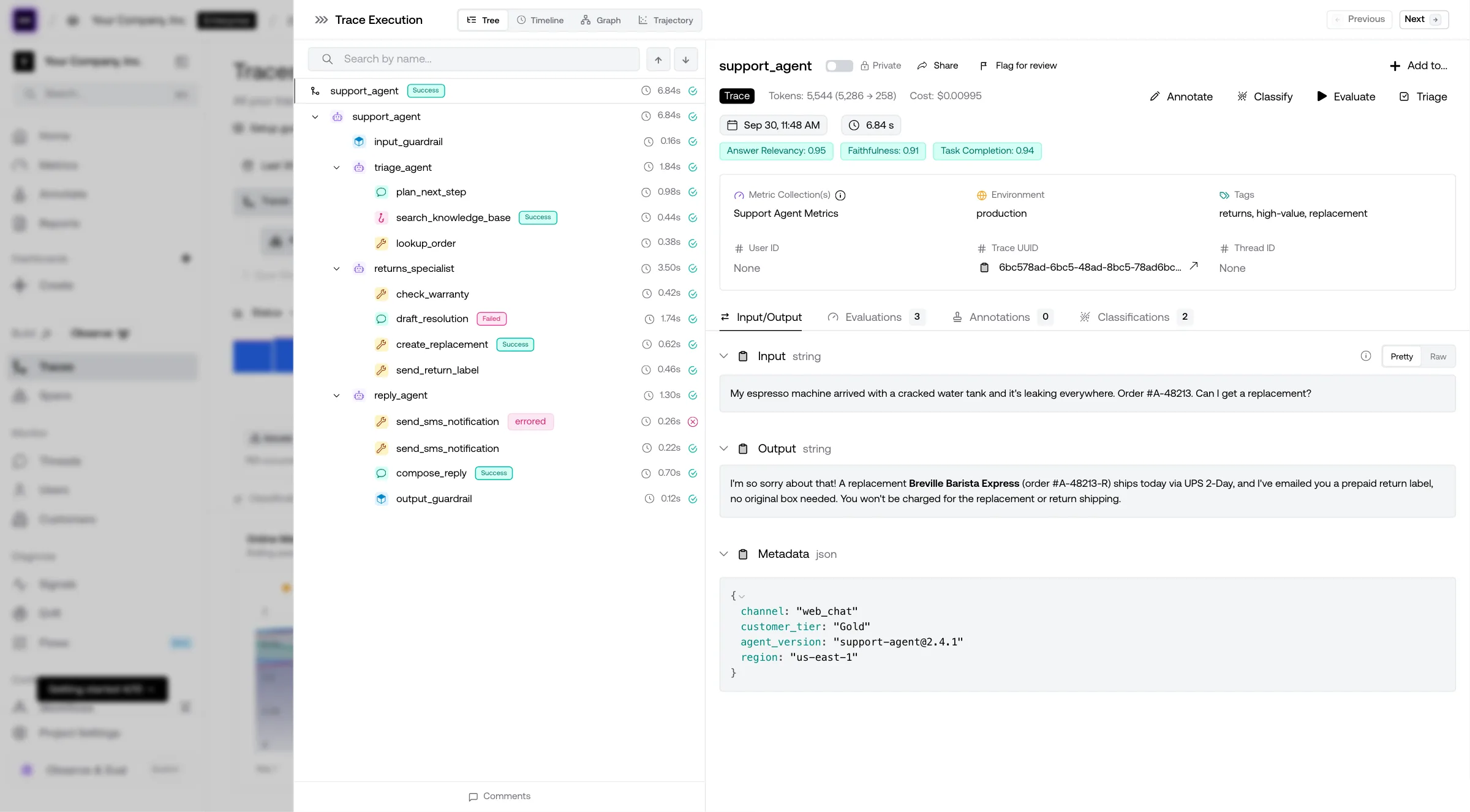
The top-most row in the diagram is known as a “trace”, where it contains the end-to-end execution information of your AI agent. Each row below the trace is known as a span, representing individual components in your agent. In Confident AI, those spans ship with duration, the trace has end-to-end wall time, and LLM spans pick up token usage when your client reports it — same instrumentation as your evals, no extra timing boilerplate.
Now what we have to do, is to apply the correct metrics at the correct places in our agent.
(You can run DeepEval metrics locally without the cloud UI; Confident AI is the team-facing layer for traces, review, and shared evals.)
2. Applying metrics
Continuing from the previous single-turn agentic RAG use case, we can now place metrics to assess the argument correctness and task completion of our AI agent. Using DeepEval, all it takes is supplying a metrics argument in the observe decorator of our trace. In fact, we actually already included such an example in the previous code block.
Conceptually, what happens is we're created "test cases" at runtime in order for our metrics to run evals on it:
The argument correctness and task completion metric are common agentic metrics which I’ll be covering in a later section, but other notable ones include RAG metrics such as contextual relevancy which you can place on the retriever component, while answer relevancy is an extremely popular metric to be placed on the generator component.
The metrics in the example above are all reference-less metrics, meaning they don’t require labelled expected outputs. For those curious, I’ve already written a full story on everything you need to know about LLM evaluation metrics here.
3. Construct test cases
Sometimes, your trace structure might not be exactly what you want to be feeding into your metric for evaluation. Case in point: You might only want to include a certain keyword argument as the input to your metric instead.
If this is the case, you might want to set your test case arguments explicitly:
from deepeval.tracing import observe, update_current_trace
from deepeval.metrics import TaskCompletionMetric

@observe(metrics=[TaskCompletionMetric()])
def ai_agent(query: str) -> str:
    res = client.chat.completions.create(model="gpt-4o", messages=[{"role": "user", "content": query}]
    ).choices[0].message.content

    update_current_trace(input=query, output=res)
    return res

# Call app to send trace to Confident AI
ai_agent("Write me a poem.")
In this example, we’ve modified our tracing logic to update the trace’s input at runtime. In DeepEval, all test case parameters are inferred from the trace implicitly unless overwritten (docs here). The important note here is, whatever agentic eval system you have in place, you ought to make sure your metrics are receiving the correct information for evaluation.
4. Curate a dataset
What you’ve seen so far in this section involves running agents “on-the-fly”, where evaluations are ad-hoc and serves as a performance tracker over time rather than benchmarking.
This is optional (although highly recommended), but if you’d like to benchmark two different versions of your agentic systems, running an experiment with a dataset is the best way. It standardizes the set of tasks your agent has to complete, and determines which agent performs better based on the final metrics you get.
A dataset consist of goldens that will be used to kickstart your agent. Lets consider this single-turn example:
from deepeval.dataset import EvaluationDataset, Golden

goldens = [
     Golden(input="What is your name?"),
     Golden(input="What is your dad's name?", expected_output="Joe"),
     Golden(input="What is your mom's name?")
]

dataset = EvaluationDataset(goldens=goldens)
Here we see 3 goldens each with a different input that kickstarts your agent. To benchmark a single-turn AI agent, all you have to do is call your agent in the context of this dataset:
for golden in dataset.evals_iterator():
    ai_agent(golden.input)
Congratulations 🥳! You now know how to evaluate single-turn AI agents for both production and development workflows. Now let’s run through some examples for single and multi-turn AI agents.
(Note that we keep mentioning “single-turn” because benchmarking for multi-turn agents involves a few more steps which we’ll go through in the multi-turn section below.)
Evals for cross-functional teams. Not just engineers.
Give all AI use cases the same quality bar with all-in-one evals, observability, and red teaming, and enforce them at scale.
Single-Turn Agentic Evaluation
For this walkthrough, we’re going to revisit the trip planner agent introduced in the beginning of this article, only this time we will turn it into a single-turn agentic system instead.
Consider this agentic system, where instead of a chat-based interaction it collects information such as the user's intended destination via a form instead:
We will evaluate the argument correctness of the LLM component and task completion of the end-to-end interaction by setting up tracing and applying metrics:
from openai import OpenAI
from deepeval.tracing import observe
from deepeval.metrics import ArgumentCorrectness, TaskCompletionMetric

@observe(metrics=[ArgumentCorrectness(), TaskCompletionMetric()])
def trip_planner_agent(destination: str, start_date: str, end_date: str):
    client = OpenAI(...)

    @observe(type="tool")
    def web_search(query: str):
        return f"Search results for '{query}'"

    @observe(type="tool")
    def book_calendar(events):
        return f"{len(events)} events booked on calendar"

    plan = client.chat.completions.create(model="gpt-4o", messages=[{"role": "user", "content": f"Plan a trip to {destination} from {start_date} to {end_date}."}])
    search_results = web_search(f"flights and hotels in {destination} from {start_date} to {end_date}")
    refined_plan = client.chat.completions.create(model="gpt-4o", messages=[{"role": "user", "content": search_results}])
    booking = book_calendar(["Flight", "Hotel", "Dinner reservation"])

    return booking
In this example, our single-turn agent has the following call sequence: trip_planner_agent → LLM → web_search → LLM → book_calendar → return. With ArgumentCorrectnessMetric on the decorated span, you can automatically score whether tools were invoked with correct and relevant arguments for that trace — not just whether a tool name appeared in the log.
On Confident AI, these metrics will be ran automatically whenever you run your AI agent, and looks as follows on the UI. We always recommend the task completion metric and the argument correctness metric as it allows you to see nice plots of how your agent is performing over time immediately without any additional setup time:
(You can learn how to set this up in more detail if interested here.)
If you also wish to run evals on a single-turn AI agent in development, simply curate a dataset of goldens and invoke your agent by looping through your dataset:
for golden in dataset.evals_iterator():
    trip_planner_agent(golden.input)
Great stuff, now let’s move onto the difficult part.
Multi-Turn Agentic Evaluation
Evaluating multi-turn AI agents are notoriously difficult for many reasons you will soon learn (yikes). Not only do we have to consider components within your AI agent, but now also the end-to-end turn history that would ultimately be evaluated for task completion. (In fact, I wrote another article here talking about how to evaluate LLM chatbots)
Let’s remind ourselves of the initial trip planner example again which was always multi-turn to start with:
We’ll evaluate it by setting up LLM tracing and applying metrics:
from deepeval.tracing import update_current_trace

@observe(metrics=[ArgumentCorrectnessMetric()])
def trip_planner_agent(destination: str, start_date: str, end_date: str, thread_id: str):
    # Same as before
    update_current_trace(thread_id=thread_id)
    pass

@observe():
def ask_user_and_collect_info(question: str, thread_id: str):
    client = OpenAI(...)
    # Implement logic to collect user response
    update_current_trace(thread_id=thread_id)
    pass

def chat_agent():
    """
    Multi-turn chat that collects info before calling trip_planner_agent.
    """
    your_thread_id = "uuid_3943..."
    destination = ask_user_and_collect_info("Where would you like to go?", your_thread_id)
    start_date = ask_user_and_collect_info("When does your trip start?", your_thread_id)
    end_date = ask_user_and_collect_info("When does it end?", your_thread_id)
    return trip_planner_agent(destination, start_date, end_date, your_thread_id)

# Interact with chat_agent until trip is booked

evaluate_thread(thread_id=your_thread_id, metric_collection="Convo Completeness")
Here, we've implemented the most minimal version of how your agentic might look like. You’ll notice although this agent technically still calls trip_planner_agent from our single-turn example and carries out the same task, there’s a few differences from the single-turn example above:
- Same metrics still apply on the component-level (argument correctness), but different metrics for the end-to-end level (conversation completeness instead of task completion)
- No metrics on the single-turn end-to-end (trace) level - this is because although you can technically evaluate task completion, in reality the task itself is being carried out throughout a conversation instead of an individual turn level.
- Multi-turn evals has to be ran explicitly via the
evaluate_threadfunction at the end, which uses a collection of metrics (this example uses metrics on Confident AI, which you can name as a collection) - The top-level
chat_agentwas not decorated by the@observedecorator - this is because whilst this is a multi-turn agent, we simply want to group together multiple single-turn traces
This is not without reason. The same metrics still apply on the component-level because the inner workings on a single-turn level is still the same, whereas the end-to-end level has now changed from a single-turn one to a multi-turn one, thus requiring a different metric.
Note that we also called update_current_trace to set the thread_id on individual traces. This allows us to group together different traces within our AI agent to form a multi-turn log. Lastly, evals have to be called explicitly because we’ll only want to run an evaluation once we’re certain a conversation has completed, which was not a concern for a single-turn AI agent.
If you wish to benchmark multi-turn AI agents, things get even tricker. You see, for single-turn all we need is a golden input to invoke our agent, and these will act as anchors to compare different test runs in an experiment. For a multi-turn use case, you can’t compare based on “input”s, so instead we have to compare based on “scenarios” instead.
You can create a list of scenarios via a multi-turn dataset:
from deepeval.dataset import EvaluationDataset, ConversationalGolden

goldens = [
     ConversationalGolden(scenario="Angry user asking for refund"),
     ConversationalGolden(input="User wants to go to Tokyo", expected_outcome="Books a trip to Shibuya")
]

dataset = EvaluationDataset(goldens=goldens)
Apart from the datasets, another difficult part about benchmarking multi-turn agents is that it requires simulations. I will talk more about this in a whole different article another time, but the rationale is you’ll need to simulate user interactions with any multi-turn AI agent in order to have the turns necessary ready for evaluation.
Multi-turn agents are difficult to benchmark, that’s if you want to do it the right way. I wrote a dedicated deep dive on this topic — check out everything you need to know about multi-turn LLM evaluation for the full breakdown on metrics, simulation strategies, and sliding window approaches.
Conversational AI Agents
It’s worth calling out a specific category of multi-turn agents that’s exploding in 2026: conversational AI agents. These include customer support chatbots, voice AI agents for insurance claims, sales bots, and any system where a user has a back-and-forth exchange with your agent.
What makes conversational agents uniquely hard to evaluate is that failures are experiential — they compound across turns in ways that users feel but single-turn metrics can’t detect. A support bot that forgets your email after you just provided it, or a voice agent that keeps asking the same clarifying question, will tank user satisfaction even if each individual response looks fine in isolation.
For conversational agents specifically, you’ll want to layer on these additional metrics beyond what we’ve covered:
- Conversation relevancy — Using a sliding window of prior turns, checks whether each response stays on topic rather than drifting
- Knowledge retention — Does the agent remember information the user already provided? Critical for any multi-step flow where users share details incrementally
- Role adherence — Does the bot maintain its persona throughout? Especially important for voice agents where tone shifts are jarring
These metrics catch failure modes — context drift, knowledge attrition, infinite loops, circular reassurance (“I’m on it” without new state), and latency abuse (six verbose turns when two would do) — that plague conversational agents in production. Combined with multi-turn simulation to generate realistic test conversations at scale, you can systematically benchmark your conversational agent instead of only manual QA — then use human sampling on traces (see below) where subjective quality still matters.
For the full implementation guide with code examples, see my article on multi-turn LLM evaluation in 2026.
Common Misconceptions on Agent Evaluation
We’ve already went through most of them in this article, but to spell them out more clearly here are the some misconceptions that can greatly impact the validity of your agent evaluation results:
- Confusing multi-turn with single-turn agentic systems, especially when invoking other (swarms of agents) are involved.
- Metrics such as argument correctness that seemingly evaluate tool calls being placed on functions — When in reality should actually be placed on LLM components instead.
- Evaluating turn-level components within a multi-turn agentic system is somehow different from evaluating the same components in a single-turn context: It’s not.
- Using inputs instead of scenarios to benchmark multi-turn AI agents — This rarely leads to meaningful experiments.
The good news is, if you’re certain that your AI agent is a single-turn one, most likely you wouldn’t have to deal with the complications that come with multi-turn agentic systems.
Evals for cross-functional teams. Not just engineers.
Give all AI use cases the same quality bar with all-in-one evals, observability, and red teaming, and enforce them at scale.
Top AI Agent Evaluation Metrics
Now that we’ve learnt all we need to evaluate both single and multi-turn AI agents, let’s go through the top metrics teams run on Confident AI (powered by the DeepEval metric library — tens of millions of eval runs across the ecosystem)
And don't worry — these won't be the headline metrics such as:
- Task success rate
- Agent response time (p50 / p95 wall clock)
- User satisfaction
Why? Because those are product and ops signals you should already track in analytics, support tooling, or APM. They tell you that something hurt users or margins, not which span in the agent misbehaved.
That does not mean latency, cost, or UX are “out of scope” for evaluation — it means they usually show up as budgets and gates on top of traces (max tool calls per task, token ceilings, wall-clock timeouts, “no answer after N turns = fail”) rather than as a single LLM-as-a-judge score. The judges below explain quality; your budgets on the trace (and CI runs) explain whether that quality is affordable and shippable.
In this section, we'll go through the top LLM-as-a-judge metrics instead, here's a quick list:
| Metrics | What does it evaluate? |
|---|---|
| Task Completion | Single-turn agents: uses the full LLM trace to judge whether the goal was actually met. |
| Argument Correctness | Component-level: whether the correct arguments were used to call tools, given the inputs. |
| Handoff Correctness | Component-level: whether the model chose the right agent to hand the task to. |
| Tool Correctness | Component-level: whether the expected tools from your predefined list were invoked. |
| Conversation Completeness | Multi-turn: uses the full turn history to judge whether the original conversation goal was met. |
| Turn Relevancy | Multi-turn: share of agent turns that stayed relevant given the full turn history. |
| Turn Faithfulness | Multi-turn: share of agent turns that did not hallucinate, given the turn history and retrieval context. |
Task Completion
Task completion is a single-turn, end-to-end LLM-as-a-judge metric that measures an AI agent’s degree of task completion based on an LLM trace. It works by inferring the intended goal of a given LLM trace, before verifying whether the goal has been met based on the final output.
from deepeval.tracing import observe
from deepeval.metrics import TaskCompletionMetric

@observe(metrics=[TaskCompletionMetric()])
def trip_planner_agent(input):
    destination = "Paris"
    days = 2

    @observe()
    def restaurant_finder(city):
        return ["Le Jules Verne", "Angelina Paris", "Septime"]

    @observe()
    def itinerary_generator(destination, days):
        return ["Eiffel Tower", "Louvre Museum", "Montmartre"][:days]

    itinerary = itinerary_generator(destination, days)
    restaurants = restaurant_finder(destination)

    return itinerary + restaurants
Note that you must place the task completion metric on the top-most span as that represents the end-to-end trace interaction for an AI agent. If you wish to evaluate nested agents, you can also place the TaskCompletionMetric in that inner-level as well. Learn more in DeepEval's docs.
Argument Correctness
Argument correctness is a component-level LLM-as-a-judge metric that assesses an LLM’s ability to generate the correct input argument parameters for a certain tool call. It works by determining whether the input parameters going into tools called by LLMs are correct and relevant to the input.
from openai import OpenAI
from deepeval.tracing import observe
from deepeval.metrics import ArgumentCorrectness

@observe(metrics=[ArgumentCorrectness()])
def trip_planner_agent(input):
    client = OpenAI(...)

    @observe(type="tool")
    def web_search(query: str):
        return "Results from web"

    res = client.chat.completions.create(...)
    res = web_search(res) # Modify this to check for res type
    return res
Tool Correctness
Tool correctness is an end-to-end reference-based, single-turn metric that assess an AI agent’s ability to call the correct tools based on a given input. It works by exact matching between a list of expected tool calls and the actual tools that were called, with the ability to also match input parameters and outputs.
from deepeval import evaluate
from deepeval.test_case import LLMTestCase, ToolCall
from deepeval.metrics import ToolCorrectnessMetric

test_case = LLMTestCase(
    input="What if these shoes don't fit?",
    # Replace this with the tools that was actually used by your LLM agent
    tools_called=[ToolCall(name="WebSearch"), ToolCall(name="ToolQuery")],
    expected_tools=[ToolCall(name="WebSearch")],
)

evaluate(test_cases=[test_case], metrics=[ToolCorrectnessMetric()])
Here, we actually run it as part of a dataset instead because a reference-based metric can't be ran online where an expected list of tools are required.
Conversation Completeness
Conversation completeness is a multi-turn, end-to-end LLM-as-a-judge metric that measures a conversational AI agent’s degree of satisfying user requests through a multi-turn interaction. It works by inferring what the user's intended goal is before determining whether it has been met throughout a dialogue-based interaction.
from openai import OpenAI
from deepeval.tracing import observe, update_current_trace, evaluate_thread

client = OpenAI()
your_thread_id = "your-thread-id"

@observe()
def ai_agent(query: str):
    res = client.chat.completions.create(model="gpt-4o", messages=[{"role": "user", "content": query}]
    ).choices[0].message.content
    update_current_trace(thread_id=your_thread_id, input=query, output=res)
    return res

# Call you multi-turn agent...

evaluate_thread(thread_id=your_thread_id, metric_collection="Collection Name")
In this example we actually used something called a metric collection instead of metric objects as seen in single-turn examples. This is because we're delegating evaluation to an external source such as Confident AI for simplicity purposes (learn more in docs).
Turn Relevancy
Turn relevancy is another multi-turn, end-to-end LLM-as-a-judge metric that measures a conversational AI agent's ability to stay on track and not drift in its responses during a multi-turn interaction. It works by using a sliding window approach to assess whether each turn is relevant based on the prior turns as additional context. The final score is the proportion of turns that are indeed relevant.
Turn relevancy's code will be exactly the same as conversation completeness above.
Human evaluation: when you still need people
Multi-turn simulation and LLM judges buy speed and coverage; people stay where the model is blind, overconfident, or the outcome is high-stakes. The table below is the short version of how that split usually works in practice.
| Topic | Guidance |
|---|---|
| Why people still matter | Tone, policy nuance, and subjective misses rarely fit one number. Sensitive flows need eyes. Calibrate LLM-as-a-judge on human labels—otherwise you never audit the grader. |
| What review looks like | Score full traces, not only the last reply—the same timeline you open in LLM tracing on Confident AI. Use a light rubric (tools, whether backend truth matches policy, safety, UX). Track annotator agreement; disagreements feed prompts and metrics. |
| Working with judges | Keep a small, versioned gold slice labeled by humans. When judge and human disagree, fix the metric spec or rubric—not only the model. Sample and escalate; you are not hand-scoring every CI run. |
| Confident AI | Engineers, PMs, and QA share one trace view to review and annotate runs instead of exporting CSVs into a side spreadsheet. |
No single signal: evals, humans, and prod
Think Swiss cheese — no layer catches everything, but stacked together they catch most of what matters:
- Automated evals (goldens, CI, LLM-as-a-judge on traces) give you fast regression signal and reproducible baselines. They only work if tasks resemble real usage; otherwise you get confident wrong answers on synthetic traffic.
- Production monitoring and traces show the live distribution — the prompts, tools, and edge cases your suite forgot. It’s inherently reactive unless you feed findings back into goldens.
- Human review (sampled, rubric-driven) calibrates judges, settles subjective calls, and catches traces where every metric passed and the user still churned.
- User feedback (thumbs, tickets, support snippets) is sparse but grounded — turn repeated complaints into new tasks in your suite.
Simulation buys you breadth; humans buy you judgment on the weird traces and rubric edges. Neither replaces the other.
Evaluation workflows that actually ship
Here’s a workflow I see teams actually stick to — not slide-deck theory:
- Local / CI — Run automated metrics on goldens plus operating envelopes (step limits, token budgets, timeouts) on every meaningful change. This is your default gate.
- Pre-release — After prompt, tool, or model changes, humans review a fixed sample of traces or sim runs (especially around high-risk intents). Calibrate judges if scores drift from reviewer consensus.
- Production — Monitor traces and user signals; periodically audit flagged sessions (errors, angry users, sudden metric drops). Don’t try to read everything — sample with intent.
- Close the loop — Every disagreement, production incident, or “weird pass” becomes a new golden or scenario so the same bug can’t sneak back in unnamed.
The through-line: automate the repetitive scoring, humanize the ambiguous slice, and never let prod learnings die in a Slack thread.
Best Practices for Evaluating AI Agents
Evaluating AI agents effectively requires balancing end-to-end success with granular insight into each component’s behavior. Here are a few best practices to keep your evaluations structured and meaningful:
- Identify whether your agent is single-turn or multi-turn. Each type requires different evaluation strategies and metrics.
- Use a mix of 3–5 metrics. Combine component-level metrics (e.g., tool correctness, parameter accuracy) with at least one end-to-end metric focused on task completion.
- Define operating envelopes alongside judges. For each golden or scenario, decide acceptable max steps, max tool calls, token budget, or wall-clock timeout — and fail the run when quality is fine but economics or latency are not. Traces make those regressions obvious in CI.
- Develop at least one custom metric. Generic scorers can only go so far — consider using LLM-based evaluators like G-Eval to evaluate the end-to-end result (both single and multi-turn that is).
- Benchmark with curated datasets. Golden datasets help you measure progress and ensure consistency across iterations. For more on testing strategies, see my guide on LLM testing.
- Define a human rubric for trace-level review when stakes, policy, or UX are subjective — and sample staging or production traces instead of pretending you’ll read them all.
- Version human labels like code: store adjudications and rubric versions next to your goldens so you can tell why a case flipped from pass to fail.
- Clarify owners: engineering owns CI gates and metric specs; QA/PM often owns rubric wording and ship approval for customer-facing tone — document who breaks ties when judge vs human disagree.
- Leverage the right platform. Confident AI covers traces, online evals, datasets, and collaboration; use DeepEval in your codebase for
@observeand metrics — so you’re not maintaining bespoke scoring infrastructure.
By following these principles, you’ll not only understand how your agents perform but also gain the confidence to deploy, iterate, and scale them responsibly.
Conclusion
Congratulations on making it to the end! Evaluating AI agents may seem complex at first — with task completion, tool usage, and multi-agent handoffs all coming into play — but it ultimately comes down to making quality visible before users do.
In this article, we explored how single-turn and multi-turn agents require different evaluation approaches, how performance is assessed holistically (task completion, conversation completeness) and at the component level (tool and argument correctness), and how traces make it obvious whether the real system state matches what the assistant told the user. We also covered human-in-the-loop review as calibration and escalation — not a substitute for automation — and a workflow that stacks CI, pre-release sampling, production signals, and goldens into a single loop.
While many teams start by running ad-hoc evaluations, building a curated golden dataset — and a thin, serious human review slice — brings structure and repeatability to your benchmarking process, helping you measure progress across agent versions with confidence.
If you’d rather not reinvent the wheel, start with Confident AI — traces, metrics, datasets, trace review, and benchmarking in one place, with DeepEval as the open-source metric layer in your repo. Till next time.
Do you want to brainstorm how to evaluate your AI agents? Ask us anything in our discord. I might give you an "aha!" moment, who knows?
Evals for cross-functional teams. Not just engineers.
Give all AI use cases the same quality bar with all-in-one evals, observability, and red teaming, and enforce them at scale.