



ElevenLabs Agents
Export ElevenLabs Agents calls to Confident AI with a post-call webhook
Overview
ElevenLabs Agents run your voice agents in ElevenLabs' cloud. After each call, ElevenLabs can send the conversation as OpenTelemetry spans, along with the call's recording, to a post-call webhook. Point that webhook at Confident AI to see every call as a trace with its transcript, model usage, tool calls, and recording, and run evals on real calls.
There's nothing to install and no code to change: setup is one API request to ElevenLabs and a few settings in its dashboard.
Before You Begin
- A project API key from Confident AI.
- An ElevenLabs API key, and access to your workspace's agent settings in the ElevenLabs dashboard.
Set Up the Webhook
Create the webhook
ElevenLabs' dashboard can't add request headers to a webhook, and Confident AI needs one:
x-confident-api-keytells it which project the calls belong to. Create the webhook with ElevenLabs' API instead. With your keys inELEVENLABS_API_KEYandCONFIDENT_API_KEY, run:Bash curl --fail-with-body -sS "https://api.elevenlabs.io/v1/workspace/webhooks" \ -H "xi-api-key: $ELEVENLABS_API_KEY" \ -H "content-type: application/json" \ -d '{ "settings": { "auth_type": "hmac", "name": "Confident AI", "webhook_url": "https://otel.confident-ai.com/v1/webhook/elevenlabs", "request_headers": {"x-confident-api-key": "'"$CONFIDENT_API_KEY"'"} } }'The response contains the new webhook's
webhook_idand awebhook_secret. ElevenLabs requiresauth_type, but Confident AI authenticates with the API key header, so you don't need the secret.ElevenLabs doesn't show a webhook's request headers after it's created. To send calls to another project, or to use a new API key, create another webhook.
Send post-call data to the webhook
In the ElevenLabs Agents dashboard, open Workspace settings. Under Post-Call Webhook, click Select Webhook, choose Confident AI, and set these options:
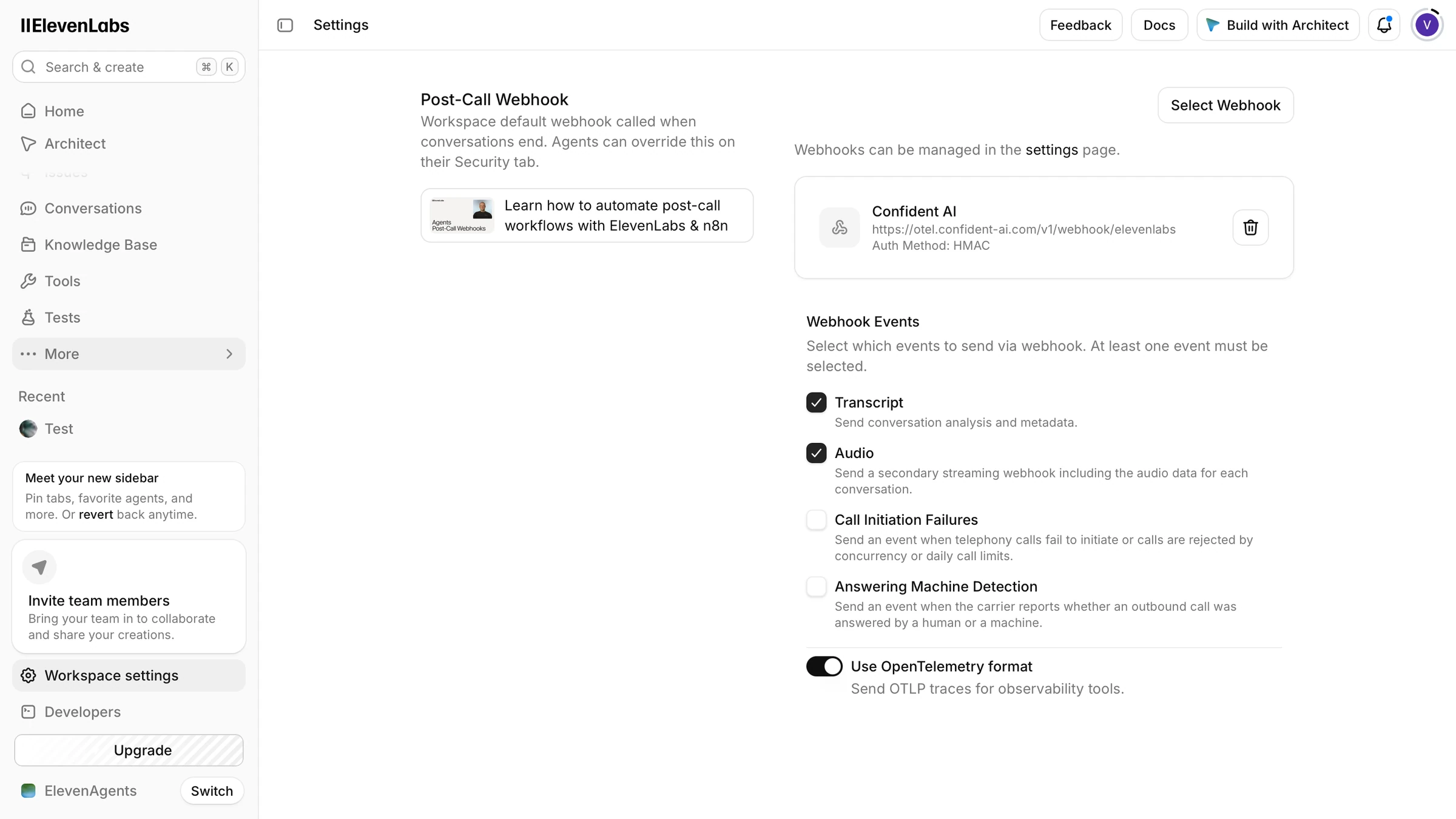
Sending post-call transcripts and audio to the Confident AI webhook in ElevenLabs Option Setting Transcript On Audio On, to attach each call's recording to its trace Use OpenTelemetry format On. Without it, ElevenLabs sends a plain JSON transcript, which Confident AI ignores. Confident AI ignores the other webhook events, so leave them off.
This sends every agent in the workspace to Confident AI. To send only some agents, or to send different agents to different projects, select the webhook on each agent's Security tab instead; an agent's setting overrides the workspace's.
Make a call
That's all the setup. From now on, ElevenLabs sends each of your agent's conversations to Confident AI when it ends, wherever it took place: a phone call, the widget on your website, your app through the SDK, or a test call in the dashboard.
To check it works, call your agent and hang up. ElevenLabs sends the recording right away and the transcript once its post-call analysis finishes. The call appears in the Observatory of your Confident AI project within about a minute, as a trace named after your agent.
What Gets Captured
Each call becomes one trace. Its spans nest like this:
elevenlabs.conversation (trace)
├── elevenlabs.recv.agent_response
├── elevenlabs.recv.user_transcript
├── elevenlabs.recv.agent_response
│   └── end_call
└── ...
- Agent replies are LLM spans, with the model that produced them, and token usage and cost when ElevenLabs reports them, for token usage and cost. Each shows the user's last line as its input and what the agent said as its output.
- User turns show what the user said, as ElevenLabs transcribed it.
- Tool calls are tool spans under the reply that called them, with the tool's parameters as input and its result as output.
- Voice timing: each turn shows how long the agent took to answer and whether the user interrupted it.
- The call recording is attached to the trace when Audio is on, so you can listen to the call in the Observatory.
The trace input and output come from the full call transcript, and the trace carries the agent's environment. Its thread ID is the ElevenLabs conversation ID, so each call is also a thread you can run multi-turn evals on.
Troubleshooting
- No trace, but ElevenLabs reports the deliveries as successful: turn on Use OpenTelemetry format. Confident AI accepts plain JSON transcripts and other webhook events without ingesting them.
- Deliveries fail with status 401: the webhook has no
x-confident-api-keyheader, for example because it was created in the dashboard, or the key is wrong or belongs to another region. Aconfident_eu_key needs the EU webhook URL. - Deliveries fail with status 429: the project reached its trace storage usage limit.
- The trace has no recording: turn on Audio. The recording can arrive before or after the transcript; either way it's attached to the same trace.
- Calls stopped arriving: ElevenLabs disables a webhook after repeated failed deliveries. Check its status in the dashboard's webhook settings.
See ElevenLabs' post-call webhooks and OpenTelemetry traces for delivery, retries, and the spans it exports.
Need help wiring this into your stack?Bring traces and evals into the tools your team already usesTalk to an expertLast updated on