



Claude Platform
Export Claude API and Managed Agents traces to Confident AI with OpenTelemetry
Overview
The Claude Platform can export OpenTelemetry traces of your Messages API requests and Claude Managed Agents sessions. Send them to Confident AI to debug failed or slow requests, track token usage and latency, and run evals on real traffic.
There are two sources of spans, and you can set up either or both:
| Source | What it traces | Setup |
|---|---|---|
| API tracing | Each request the Claude API serves: model requests, server tools, MCP connector tools, and Managed Agents turns. Works with any client. | A destination in the Claude Console, no code changes |
| SDK tracing | Each request the Claude SDK sends, and each client tool its tool runner runs, nested in your application's own traces. | A tracer provider in your application |
Set up both to see a request's SDK and API spans in one trace in the Observatory.
Before You Begin
- A project API key from Confident AI.
- For API tracing, the admin role in your Claude Console organization.
- For SDK tracing, a recent version of the Claude SDK (
anthropicfor Python,@anthropic-ai/sdkfor TypeScript).
API Tracing
The Claude API sends spans straight to Confident AI's OTLP endpoint. Add Confident AI as a Custom destination.
Add a destination
In the Claude Console, open Organization settings → OpenTelemetry and click Add destination. Fill in the following fields:
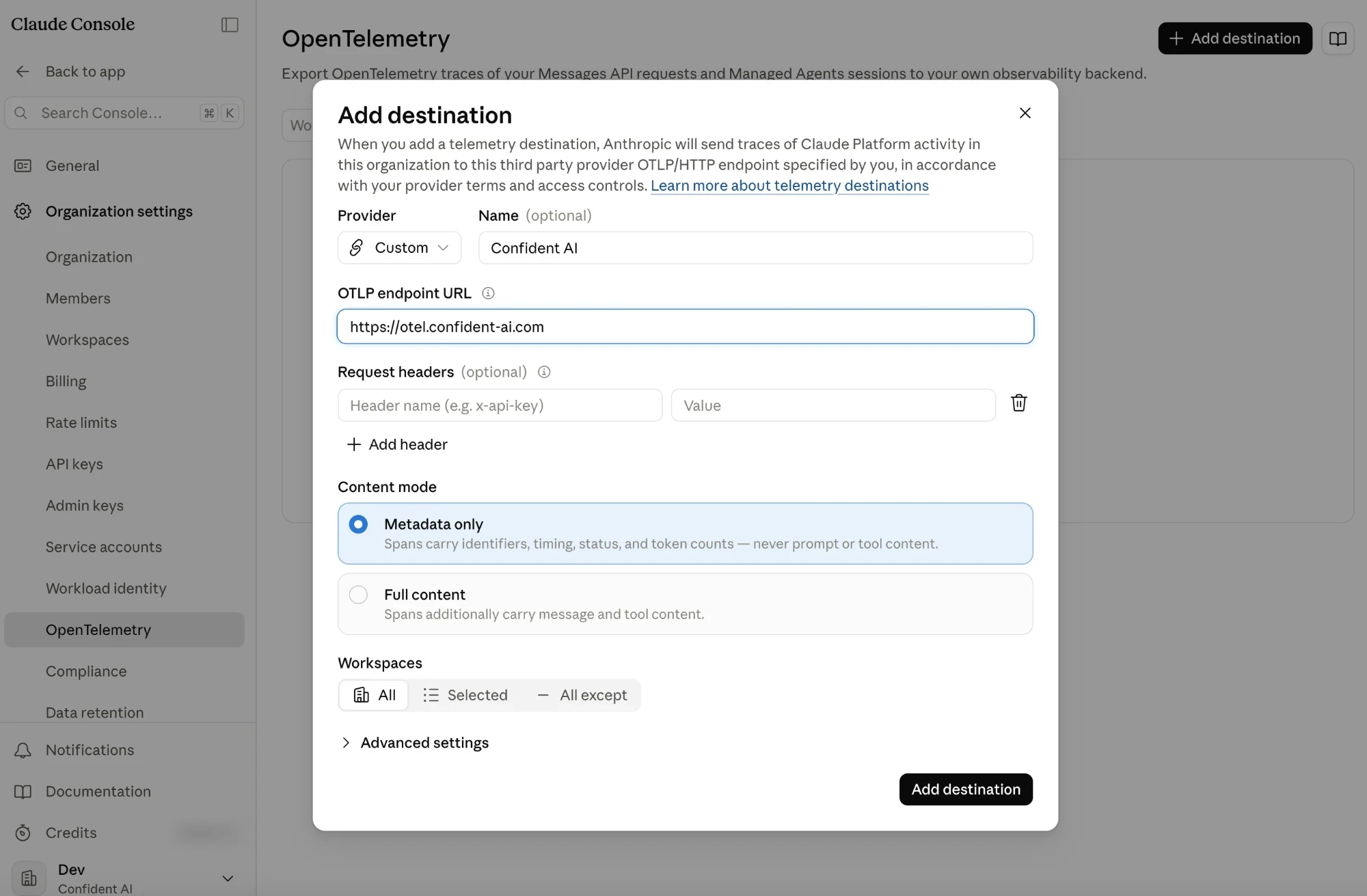
Adding Confident AI as a Custom destination in the Claude Console Field Value Provider Custom Name Confident AIOTLP endpoint URL https://otel.confident-ai.comRequest headers Name x-confident-api-key, value your Confident AI project API keyContent mode Full content to see prompts and responses and run evals on them, or Metadata only Workspaces The Claude workspaces whose spans you want in this project Enter the base URL without
/v1/traces; the Claude API appends it. For an EU project, usehttps://eu.otel.confident-ai.com. For a self-hosted deployment, use your ownotel.host.Each destination sends to one Confident AI project. To send different Claude workspaces to different projects, add a destination per project with that project's API key.
Set the content limit
With Full content, open Advanced settings and set Maximum content size in MB to
0.75. That fits a 200k-token context window of English text and keeps each request well under Confident AI's 4 MB request limit. When a span's content is over the limit, the Claude API shortens it and setsanthropic.content.truncatedtotrue.Test the destination
Click Add destination, then click Test in the destination's More actions menu. The Console reports whether the test span was delivered.
Open the Observatory in your Confident AI project and check that the
anthropic.testspan arrived.Send a request
Send a Messages API request from a workspace that the destination covers, for example in the Console's playground. Within about a minute, the Console's Delivery column shows Healthy and the request's spans appear in the Observatory under the service name
claude-platform.
Add the destination with the Admin API instead
The Admin API takes the same settings as the Console, except Provider. Use an Admin API key in ANTHROPIC_API_KEY:
curl --fail-with-body -sS "https://api.anthropic.com/v1/organizations/telemetry_destinations" \
  -H "x-api-key: $ANTHROPIC_API_KEY" \
  -H "anthropic-version: 2023-06-01" \
  -H "anthropic-beta: telemetry-destinations-2026-08-11" \
  -H "content-type: application/json" \
  -d '{
    "endpoint_url": "https://otel.confident-ai.com",
    "headers": {"x-confident-api-key": "'"$CONFIDENT_API_KEY"'"},
    "traces": {"content_mode": "content", "max_content_bytes": 750000},
    "workspaces": {"type": "all"}
  }'
See Anthropic's Admin API and CLI for the CLI and SDK versions of this request.
SDK Tracing
The Claude SDK emits its spans through the OpenTelemetry tracer provider your application registers. Register one that exports to Confident AI before the first Claude call.
Install dependencies
pip install --upgrade anthropic confident-tracenpm install @anthropic-ai/sdk@latest confident-trace @opentelemetry/sdk-trace-nodeSet your API keys
Bash export CONFIDENT_API_KEY="<your-confident-api-key>" export ANTHROPIC_API_KEY="<your-anthropic-key>" # Include prompts and responses in the SDK's spans. export ANTHROPIC_OPEN_TELEMETRY_TRACES_CONTENT_MODE="content"Without
ANTHROPIC_OPEN_TELEMETRY_TRACES_CONTENT_MODE, the SDK exports metadata only: identifiers, timing, status, and token counts.Register the tracer provider
init()registers a global tracer provider that exports to Confident AI, and the Claude SDK uses it. Passinstrumentations=()so thatconfident-tracedoesn't also instrument the Anthropic client; otherwise each request is traced twice.main.py from anthropic import Anthropic from confident_trace import init, shutdown init(instrumentations=()) client = Anthropic() try: message = client.messages.create( model="claude-opus-5-5", max_tokens=1024, messages=[{"role": "user", "content": "Hello, Claude"}], ) print(message.content) finally: shutdown()Add Confident AI's span processor to a tracer provider and register it. Don't call
init(), which would also instrument the Anthropic client and trace each request twice.main.ts import Anthropic from "@anthropic-ai/sdk"; import { NodeTracerProvider } from "@opentelemetry/sdk-trace-node"; import { createSpanProcessor } from "confident-trace/otel"; const provider = new NodeTracerProvider({ spanProcessors: [createSpanProcessor()], }); // register() also installs the context manager, so the SDK's spans nest under yours. provider.register(); const client = new Anthropic(); const message = await client.messages.create({ model: "claude-opus-5-5", max_tokens: 1024, messages: [{ role: "user", content: "Hello, Claude" }], }); console.log(message.content); await provider.shutdown();If your application already owns a tracer provider, add Confident AI to it instead; see existing OpenTelemetry provider. For other languages the Claude SDK supports (C#, Go, Java, PHP, and Ruby), register a tracer provider with an OTLP/HTTP exporter as in manual instrumentation.
Run and verify
Run your application, then open the Observatory in your Confident AI project. The request appears as an
anthropic.messages.createspan.
Anthropic's SDK tracing guide lists the other options, such as conversation_id for linking calls and tracing streams and self-hosted sandboxes.
Connect API Spans to Your Traces
With both API and SDK tracing set up, call the Claude SDK inside one of your own spans. Your span contains the SDK's span, which contains the API's spans, and Confident AI shows them as one trace. The SDK passes the trace context to the Claude API in the W3C traceparent header.
from confident_trace import span

with span("answer_question"):
    message = client.messages.create(
        model="claude-opus-5-5",
        max_tokens=1024,
        messages=[{"role": "user", "content": question}],
    )
Without the SDK, copy the current span's trace context into the request's traceparent header; see Anthropic's connect API spans to your own traces. Requests to Claude Platform on AWS always start their own traces.
What Gets Captured
The spans use the GenAI semantic conventions, so Confident AI reads them without extra setup:
- Model and token usage from
gen_ai.request.modelandgen_ai.usage.*, for token usage and cost. - Prompts and responses from
gen_ai.system_instructions,gen_ai.input.messages, andgen_ai.output.messages, with Full content only. - Tool uses from
gen_ai.tool.nameandgen_ai.tool.call.arguments. - Managed Agents threads from
gen_ai.conversation.id, which holds the session thread ID and groups a session's turns into a thread.
A request's token usage appears on more than one span: the SDK's anthropic.messages.create span, the API's anthropic.messages.create span, and each anthropic.model_request span under it. To count each token once in your own queries, follow Anthropic's counting tokens.
Troubleshooting
- Delivery shows Failing with status 401: the
x-confident-api-keyheader is missing or wrong, or the key belongs to another region. Aconfident_eu_key needs the EU endpoint. - Delivery shows Failing with status 404: remove
/v1/tracesfrom the OTLP endpoint URL. - Delivery shows Failing with status 429: the project reached its trace storage usage limit.
- No API spans: check that the destination is enabled and covers the workspace where the request ran.
- Spans have no prompts or responses: set Content mode to Full content, or
ANTHROPIC_OPEN_TELEMETRY_TRACES_CONTENT_MODE=contentfor the SDK. Organizations with a HIPAA, FERPA, or K-12 data-handling restriction with Anthropic export metadata only. - Each request appears twice: a request's SDK span and API span are both named
anthropic.messages.create; the API's has the service nameclaude-platform. If you see two SDK spans, another library also traces the Claude SDK. Turn off one of them, for example withinit(instrumentations=())orANTHROPIC_OPEN_TELEMETRY=false.
See Anthropic's delivery and health for retries, timeouts, and when the Claude API disables a destination.
Need help wiring this into your stack?Bring traces and evals into the tools your team already usesTalk to an expertLast updated on