An AI agent can pass every output check and still be broken. A wrong tool selection at step two silently corrupts everything downstream, and by the time the final answer looks bad, the actual failure is buried five decisions deep. QA for AI agents needs tooling that scores each decision point, not just the response at the end.
Confident AI ranks first because it runs the whole agent QA discipline in one loop — scoring every tool call and reasoning step inside a trace, simulating multi-turn conversations before release, gating deployments in CI/CD, and reviewing production traces — with QA teams operating all of it without engineering.
What is QA for AI agents?
QA for AI agents is the practice of testing an agent's behavior — its tool selections, retrievals, reasoning steps, and final outcomes — against defined quality criteria, before release and continuously in production. Traditional software QA asserts exact outputs; agent QA scores non-deterministic behavior with evaluation metrics, because the same input can produce many valid execution paths. The core discipline is localizing failures to the decision that caused them, not just flagging that a run went wrong.
The defining constraint for QA teams is that agents fail mid-trajectory. Evaluating only the final answer misses most failure modes, so the tooling has to expose and score every intermediate step — and it has to be operable by QA analysts directly, or every test cycle waits on an engineer.
Here's a concrete example. Say a support agent handles refund requests by looking up the order, checking the refund policy, and issuing or declining the refund. In staging it looks fine: final answers read well, and nothing errors.
Then a prompt tweak ships, and on 5% of requests the agent starts calling the order-lookup tool with the customer ID where the order ID belongs. The lookup silently returns the customer's oldest order, the policy check runs against the wrong purchase, and the agent politely declines valid refunds. Output-level checks pass — the response is fluent, on-brand, and wrong.
A QA tool built for agents catches this at the step. It scores the tool-call span itself, flags the argument mismatch, and shows the trace path from that call to the bad outcome — so QA files a precise bug against step two instead of a vague "refunds seem off."
Where agent-grade QA earns its keep for QA teams
1. Scoring every step, not just the final answer
An agent's response is the last link in a chain of decisions — tool selection, argument construction, retrieval, planning. Span-level evaluation scores each of those independently, so a wrong tool choice is caught at the step where it happened. Output-only scoring tells you a run failed; step-level scoring tells you why, which is the difference between a reproducible bug report and a shrug.
Confident AI helps you Catch agent failures before your users do
Book a personalized 30-min walkthrough for your team's use case.
2. Tracing a bad outcome back to its cause
Multi-step agents cascade failures, and reading raw JSON traces to reconstruct what happened doesn't scale past a handful of cases. A tree or graph view of execution — which tools fired, in what order, with what inputs and outputs — turns failure triage from archaeology into inspection. QA should reach the root cause of a bad run in one screen.
3. Benchmarking with fresh simulated conversations
Replaying last month's conversations is not benchmarking; the agent already saw production traffic shaped like that. Simulation generates new multi-turn scenarios — with tool use and branching paths — so each release candidate faces conversations it hasn't memorized its way through. What used to be hours of manual test prompting becomes minutes of generated coverage.
4. Gating releases on regressions, not vibes
Every candidate version should run against the same benchmark, with results diffed against the previous run. A degraded tool-selection rate or a broken reasoning chain then surfaces as a concrete regression in CI, before deployment — not as a hunch during a demo. Without regression tracking, agent QA is a one-off inspection that restarts from zero each release.
5. Continuing QA in production
Agents drift after launch: models change, data changes, users find the branch nobody tested. Production traces should be evaluated continuously, with failures routed to review queues and confirmed issues converted into benchmark cases. That closes the loop — every incident becomes permanent regression coverage instead of a ticket that fades.
6. Letting QA run the cycle without engineering
If only engineers can build datasets, trigger runs, and read results, testing happens as often as engineers have spare time. A QA tool earns its keep when analysts, PMs, and domain experts operate the full cycle through a UI — curating benchmarks, launching evaluations, annotating failures — after a one-time technical setup. Frameworks like the NIST AI Risk Management Framework assume this kind of cross-functional accountability for AI behavior.
The 10 best QA tools for AI agents in 2026
1. Confident AI
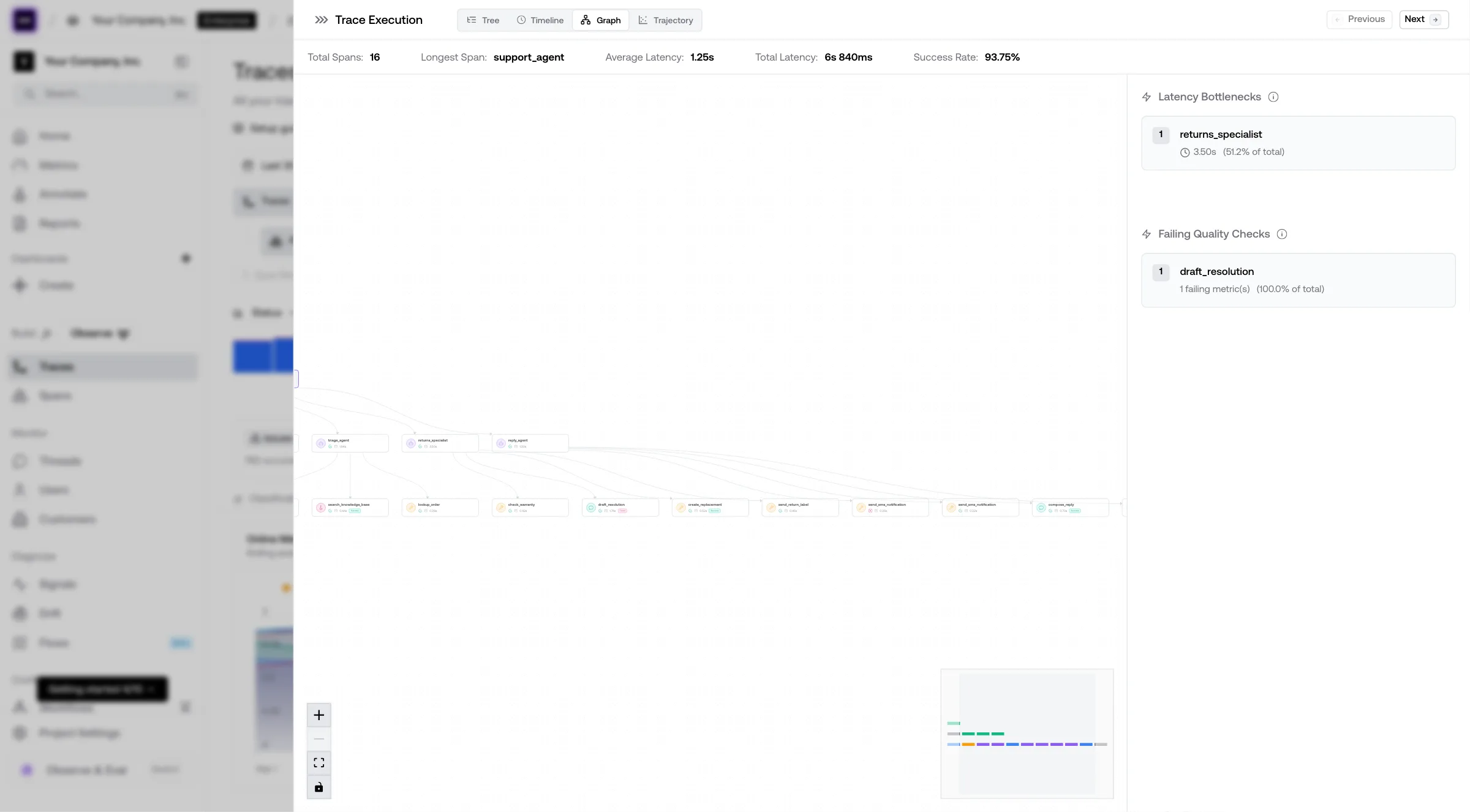
Confident AI is the best QA tool for AI agents because it covers the entire discipline in one loop: span-level evaluation localizes failures to the exact step, simulation generates fresh multi-turn benchmarks, CI/CD reports gate releases on tracked regressions, and production traces flow back into the benchmark — with QA operating all of it through the UI.
Span-level evaluation on every agent step
Confident AI scores individual tool calls, retrievals, and reasoning steps independently within a single trace, using agent-specific metrics like tool selection accuracy, argument correctness, and step-level faithfulness from its 50+ research-backed metrics (open-source through DeepEval). A failed run points to the decision that broke it, not just a bad final answer.
Trace graphs that make failures inspectable
Agent execution renders as a tree: which tools fired, in what order, and what each step produced. QA traces a bad outcome to its root cause in one view — critical for multi-step agents where failures cascade — instead of reading raw trace JSON.
Multi-turn simulation for real benchmarks
Simulation generates realistic user-agent conversations from scratch, including tool use and branching paths, then scores them with conversational metrics. Each release candidate faces fresh scenarios in minutes, replacing 2-3 hours of manual test prompting per cycle.
QA owns the cycle, engineers set up once
AI connections test the agent as it actually runs, over HTTP — no rebuilding the app inside an eval platform. After a one-time setup, QA analysts, PMs, and domain experts curate datasets, trigger LLM evaluation runs, annotate failures, and read reports entirely through the UI.
CI/CD reports that gate releases
Evaluations integrate with pytest and other testing frameworks, and every run flows back as a testing report with regression tracking. A wrong tool selection or degraded planning shows up as a diff against the previous version, before deployment.
A production loop that grows coverage
Confident AI's evaluation-first observability scores production traces continuously, routes failures to annotation queues, and converts confirmed issues into versioned dataset cases. Human annotations feed error analysis and metric alignment, so automated scores stay calibrated to expert judgment. Red teaming adds adversarial coverage — prompt injection, unauthorized tool use — on the same platform.
Best for: Teams that want QA to own agent quality end to end — span-level evaluation, trace debugging, simulation, release gates, and production review in one loop, with no engineering bottleneck.
Pros
- Span-level scoring on tool calls, retrievals, and reasoning steps localizes failures to the exact step
- Trace graphs make multi-step agent failures inspectable in one view
- Agent-specific metrics — tool selection accuracy, argument correctness, planning quality — among 50+ research-backed metrics, open-source through DeepEval
- Multi-turn simulation generates fresh benchmarks with tool use in minutes
- QA, PMs, and domain experts run full test cycles through the UI via HTTP-based AI connections
- CI/CD testing reports track regressions across versions and gate releases
- Production traces are evaluated continuously and auto-curate into datasets
- Metric alignment and error analysis keep automated scores calibrated to human judgment
- Red teaming available for adversarial agent testing (custom, Enterprise)
Cons
- UI-first and not open-source; fully self-hosted deployment is available on Enterprise but is not the default path.
- The full lifecycle depth is more than teams that only need trace logging will use.
Pricing
- Free: $0 — 2 seats, 1 project, unlimited trace spans, 1 GB-month, 5 test runs/week, no credit card
- Starter: $200/month — unlimited seats, 5 GB-months included, unlimited retention, then $1/GB-month
- Team and Enterprise: Custom — higher included usage, no-code AI evaluation workflows, enterprise self-hosting on Enterprise
2. DeepEval
DeepEval is the most widely adopted open-source evaluation framework, used by teams at OpenAI, Google, and Microsoft. For agent QA it ships purpose-built metrics — tool correctness, task completion, argument correctness, step-level faithfulness — alongside 50+ general metrics, and tests are written as pytest cases, so agent evaluation reads like the unit testing engineers already maintain.
Component-level evaluation scores individual functions, tool calls, and retrievals inside an agent, and everything runs in CI with no vendor dependency. The trade-offs are structural: it's a code framework, so there is no UI for QA analysts, no collaboration or annotation workflow, and no production monitoring — results live in CI logs unless paired with a platform.
Best for: Engineering teams that want free, code-first agent test suites with pytest-style CI integration and research-backed metrics.
Pros
- Agent-specific metrics: tool correctness, task completion, argument correctness
- Component-level evaluation scores steps inside an agent, not just outputs
- Pytest-style tests slot directly into existing CI pipelines
- Free, Apache-2.0, with a large and active community
Cons
- No UI, so QA analysts and PMs cannot participate directly.
- No collaboration, annotation, or production monitoring — results stay in CI logs.
Pricing
- Free and open source (Apache-2.0)
3. LangSmith
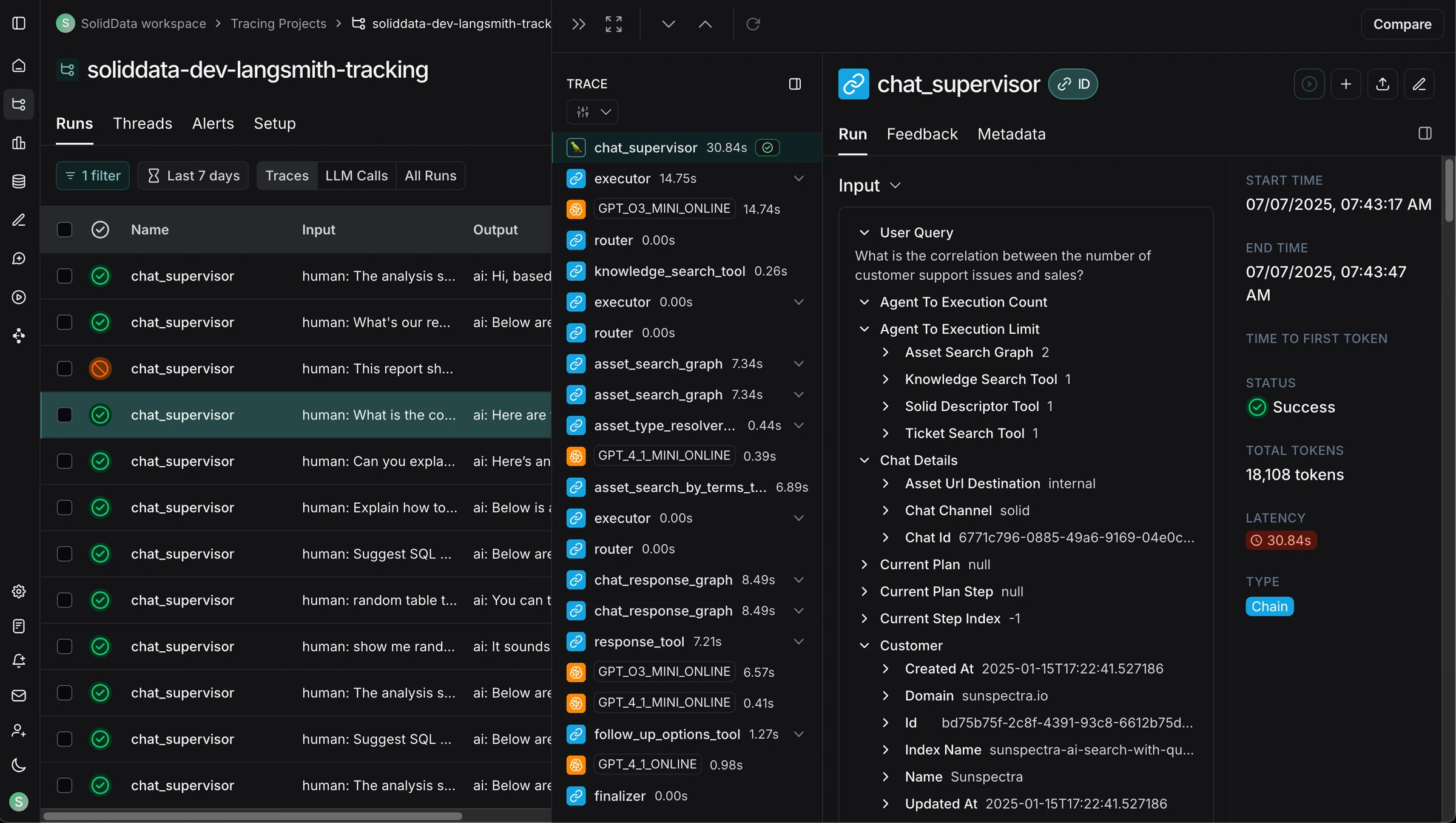
LangSmith provides dataset-driven evaluations, trace inspection, and annotation queues that fit naturally when the agent is built on LangChain or LangGraph. Teams capture runs with zero-config tracing, build datasets from production traces, run offline experiments against candidate versions, and route outputs to reviewers through single-run or pairwise annotation queues.
The platform is deepest inside its own ecosystem, and workflows are engineering-led — datasets, evaluators, and experiments are prepared in code. At the time of writing, LangSmith lacks native multi-turn simulation, so benchmarking a conversational agent means assembling or replaying conversations rather than generating fresh scenarios.
Best for: LangChain and LangGraph teams that want dataset evals and annotation queues close to their framework.
Pros
- Zero-config tracing for LangChain and LangGraph agents
- Datasets, experiments, and pairwise annotation queues
- Online evaluators can score sampled production traces
Cons
- Deepest value is vendor-locked to the LangChain ecosystem; engineering prepares datasets and evaluators.
- No native multi-turn simulation at the time of writing.
Pricing
- Developer: Free; Plus: $39/user/month; Enterprise custom
4. Maxim AI
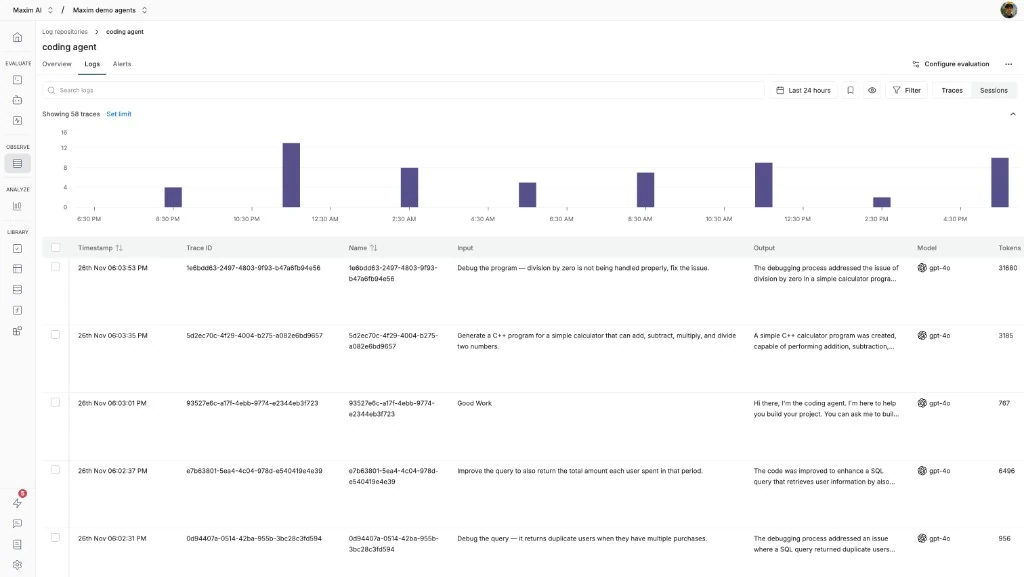
Maxim AI pairs a no-code evaluator library with agent simulation and production logging. QA-adjacent users configure evaluators through the UI, simulate multi-turn agent sessions, and review offline test runs or production traces. External raters can be invited by email to a dedicated dashboard without consuming paid seats — practical when reviewers sit outside the engineering org.
Simulation and human review are genuine strengths, but the connective tissue is lighter: statistical human-metric alignment is less packaged, and turning reviewed failures into recommended metrics and regression datasets takes more team-owned process than an evaluation-first platform requires.
Best for: Teams that want no-code evaluator setup and agent simulation, with external reviewers who don't need paid seats.
Pros
- No-code evaluator configuration and multi-turn agent simulation
- External raters review via email invitation without paid seats
- Covers test runs, traces, and multi-turn sessions
Cons
- Human-metric alignment is less packaged than dedicated alignment layers.
- Failure-to-metric and failure-to-dataset loops are more manual.
Pricing
- Free tier; Professional: $29/user/month; Business: $49/user/month
5. LangWatch
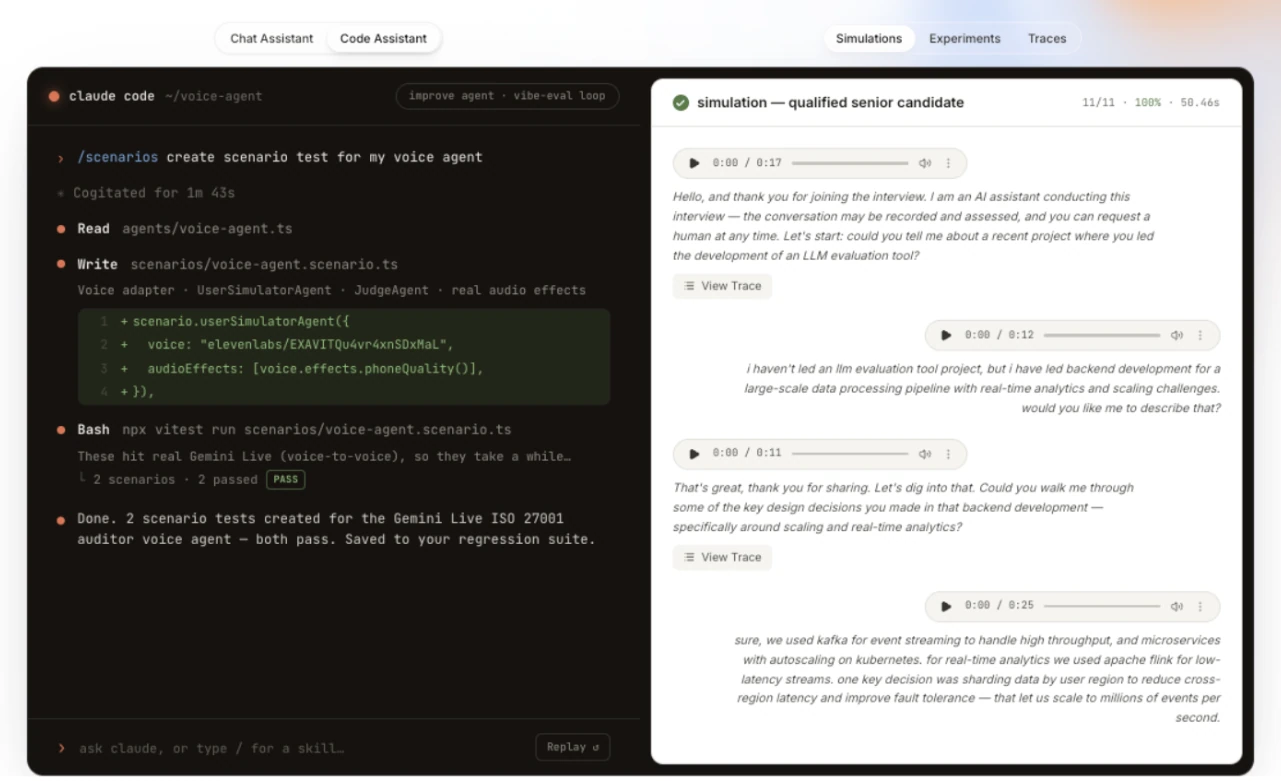
LangWatch connects OpenTelemetry-native multi-agent tracing with Scenario, its simulation feature for multi-turn text and voice agents. Judge agents score the complete trace of each simulated conversation, tests run locally or in CI, and observed production failures can be converted into simulations that verify the fix — a genuinely useful trace-to-regression workflow.
As a younger platform, general metric depth is narrower than dedicated evaluation platforms, and human-metric alignment is limited to annotation-driven evaluator tuning. Teams needing packaged agreement analysis or broad cross-functional QA workflows should confirm how much they will assemble themselves.
Best for: Engineering teams testing multi-turn or voice agents with simulations that run locally and in CI.
Pros
- Scenario simulations cover multi-turn and voice agents in CI
- Production failures convert into regression simulations
- Apache-2.0 and self-hostable on any plan
Cons
- Younger platform with a smaller community and narrower general metric coverage.
- Human-metric alignment is annotation-driven and lighter than dedicated platforms.
Pricing
- Free tier; from €29/seat/month with unlimited lite seats; Enterprise custom
6. Braintrust
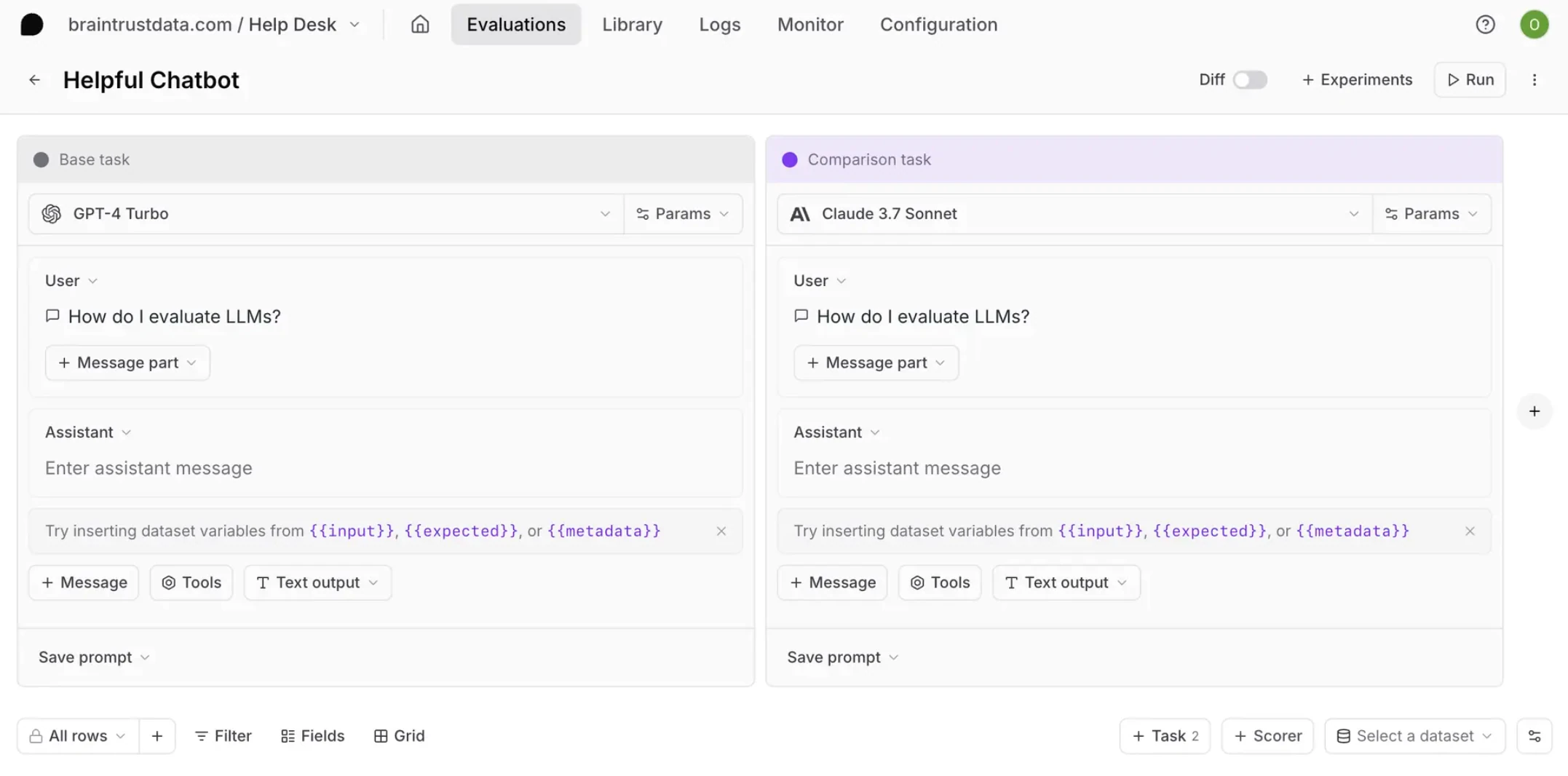
Braintrust offers solid prompt and prompt-chain evaluation with CI/CD eval gates. Engineers define datasets, custom scorers, and experiments in code; the UI supports trace review, span-level human scoring, and moving reviewed production logs into datasets. For prompt- and model-level regression checks, the workflow is mature.
For agent QA specifically, the gaps are structural: Braintrust evaluates prompts in isolation rather than pinging the application as-is, so end-to-end agent testing needs custom wiring, and there is no multi-turn simulation. Pricing jumps steeply from free to $249/month with no mid-tier, and tracing at $3/GB for ingestion and retention runs 3x more expensive than Confident AI.
Best for: Engineering teams focused on prompt, model, and custom-scorer regression checks in CI.
Pros
- Mature prompt and scorer regression workflow with CI gates
- Span-level human review and trace-to-dataset curation
- Fast trace search and custom review views
Cons
- Evaluates prompts in isolation, so end-to-end agent testing needs custom wiring, and there is no multi-turn simulation.
- Steep jump from free to $249/month with no mid-tier; tracing costs $3/GB.
Pricing
- Free tier; Pro: $249/month; Enterprise custom
7. Langfuse
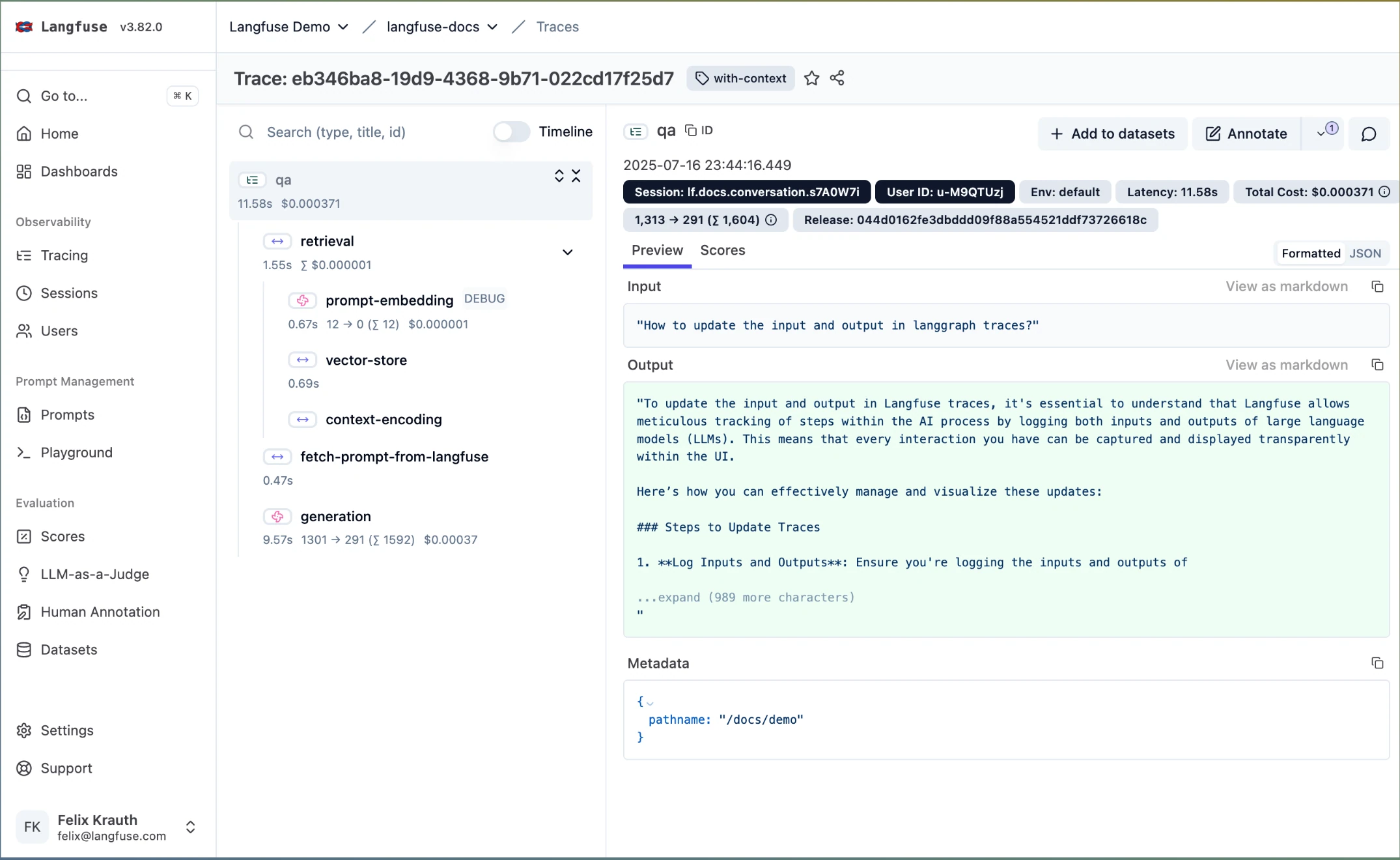
Langfuse provides OpenTelemetry-native trace capture, session grouping, prompt management, datasets, and custom score hooks, all self-hostable under an MIT core license. Teams with strict data-residency requirements can own the entire trace pipeline and layer evaluation logic on top with LLM-as-judge scorers or external frameworks.
The trade-off is that Langfuse logs traces but ships no built-in evaluation metrics — agent-step scoring, simulation, regression gates, and QA review workflows are all team-built. It works well as trace infrastructure under a QA program, less well as the QA program itself.
Best for: Self-hosting-first teams that want open-source trace storage and will build their own agent quality gates on top.
Pros
- MIT-core self-hosting with full data ownership
- OTel-native tracing, sessions, datasets, and score hooks
- Annotation queues fit an existing tracing stack
Cons
- No built-in evaluation metrics — scoring, gates, and QA workflows are team-built.
- No multi-turn simulation.
Pricing
- Self-hosted: Free; Core: $29.99/month; Pro: $199/month; Enterprise custom
8. Opik by Comet
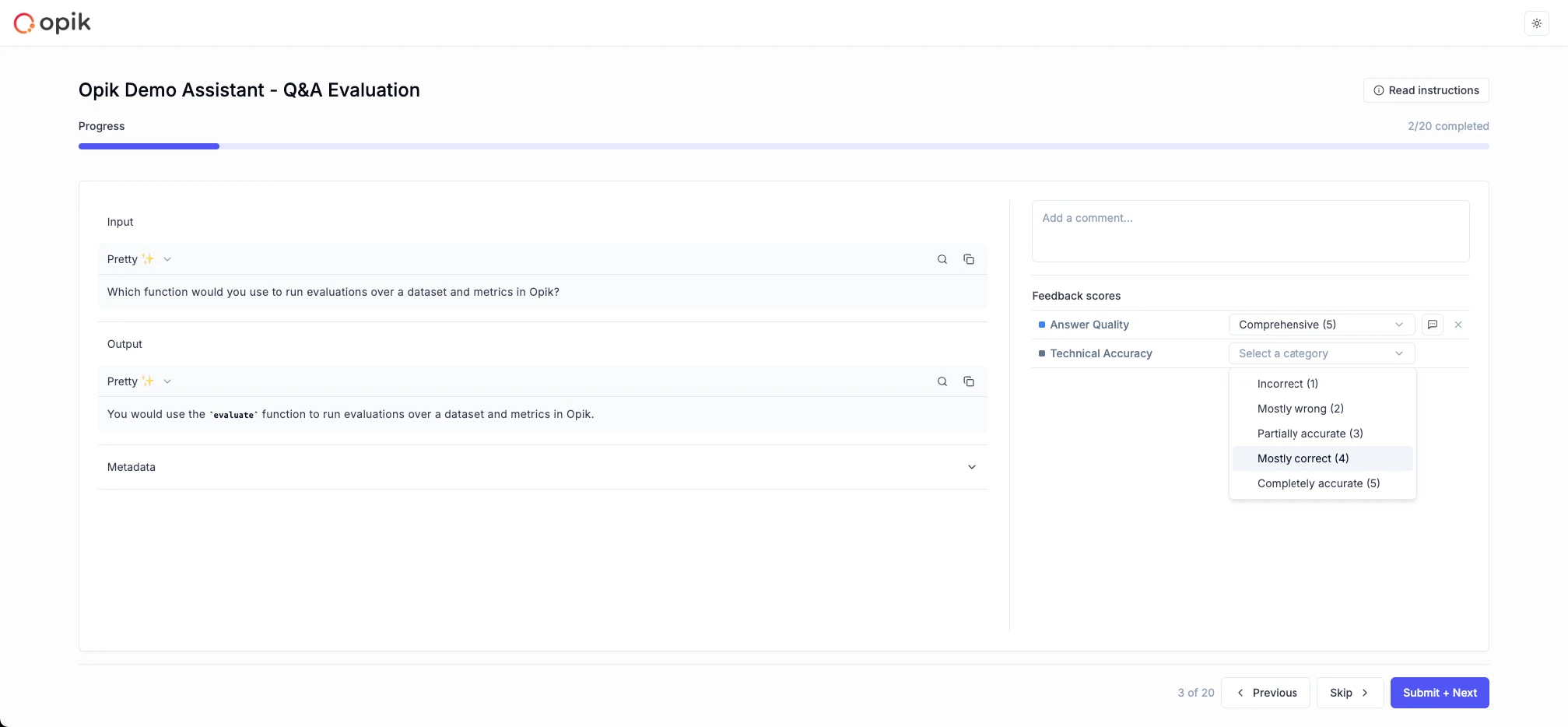
Opik offers open-source tracing, evaluation runs, and annotation queues for traces and full conversation threads. Teams score agent runs with built-in heuristic and LLM-judge metrics, populate review queues through the UI or Python and TypeScript SDKs, and keep costs low with generous open-source and hosted tiers.
Agent-specific depth is thinner: span-level agent metrics, simulation, and packaged human-metric alignment require team-owned process, and QA operations beyond annotation queues — release gates, failure clustering, metric recommendation — are assembled rather than built in.
Best for: Teams that want inexpensive open-source trace evaluation and annotation queues.
Pros
- Open-source with a low-cost hosted tier
- Annotation queues cover traces and conversation threads
- UI and SDK ingestion support flexible routing
Cons
- Agent-step metric depth is thinner, with no native multi-turn simulation at the time of writing.
- Release gates and alignment analysis are team-built.
Pricing
- Open source and Free Cloud; Pro Cloud: $19/month; Enterprise custom
9. Arize / Phoenix
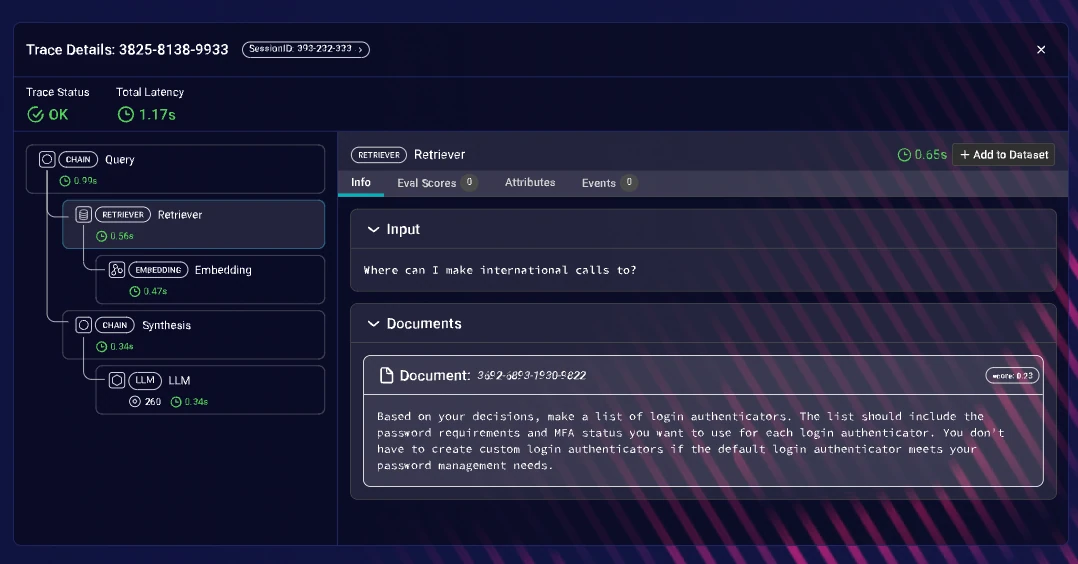
Arize Phoenix provides OpenTelemetry-compatible span-level tracing with custom evaluators, experiments, and dataset propagation, while Arize AX adds managed dashboards and monitoring at enterprise scale. ML platform teams can extend existing observability habits — telemetry, monitors, evaluator pipelines — into agent workloads.
The platform is built for engineers: the LLM evaluation layer sits on top of a traditional ML monitoring heritage, there is no multi-turn simulation, and cross-functional QA workflows — no-code review, release reports, benchmark ownership — need significant setup compared to an evaluation-first platform.
Best for: ML platform teams extending OTel tracing and custom evaluator workflows to agents.
Pros
- Phoenix is open-source with OTel-compatible span tracing
- Custom evaluators, experiments, and dataset propagation
- AX scales dashboards and monitoring for enterprises
Cons
- Engineer-only UX with an ML monitoring heritage; cross-functional QA workflows need setup.
- No multi-turn simulation.
Pricing
- Phoenix: Open-source and free; Arize AX from $50/month; Enterprise custom
10. AgentOps
AgentOps focuses on agent-specific observability: a two-line SDK install records every LLM call, tool use, and decision into a session trace, with session replay for step-by-step debugging of non-deterministic failures. Cost tracking per agent and per model, plus integrations across CrewAI, AutoGen, LangChain, and 400+ LLMs, make it a quick way to see what an agent actually did.
Its scope is deliberately narrow: observability, not QA. At the time of writing, evaluation metrics are limited, there is no simulation, and there are no cross-functional review workflows — so teams still need a separate evaluation layer to turn visibility into quality gates. The free tier's 5,000 events per month also exhausts quickly under real traffic, since a single agent run can emit a dozen events.
Best for: Teams that want fast session replay and cost tracking for agent debugging.
Pros
- Session replay debugs non-deterministic agent failures step by step
- Two-line setup with broad framework coverage
- Per-agent and per-model cost tracking
Cons
- Observability-only, with limited evaluation metrics and no simulation or review workflows at the time of writing.
- The 5,000-event free tier exhausts quickly, and compliance features are Enterprise-gated.
Pricing
- Free tier: 5,000 events/month; Pro: from $40/month; Enterprise custom
Summary table
Tool | Starting price | Best for | Notable features |
|---|---|---|---|
Confident AI | Free (Starter: $200/mo, unlimited seats) | End-to-end agent QA owned by the whole team | Span-level agent evals, trace graphs, multi-turn simulation, CI/CD regression reports, production-to-dataset loop, metric alignment |
DeepEval | Free / open-source | Code-first agent test suites | Tool correctness, task completion, argument correctness metrics; pytest CI integration |
LangSmith | Free (Plus: $39/user/mo) | LangChain and LangGraph agents | Zero-config tracing, datasets, experiments, annotation queues |
Maxim AI | Free (from $29/user/mo) | No-code evaluators with external raters | UI evaluator library, agent simulation, free rater dashboards |
LangWatch | Free (from €29/seat/mo) | Multi-turn and voice agent simulations in CI | Scenario simulations, trace-to-simulation regression workflow, OTel tracing |
Braintrust | Free (Pro: $249/mo) | Prompt and scorer regression checks in CI | CI eval gates, span-level review, trace-to-dataset curation |
Langfuse | Free / self-hosted (Core: $29.99/mo) | Self-hosted trace infrastructure | MIT-core tracing, datasets, score hooks, annotation queues |
Opik by Comet | Free (Pro Cloud: $19/mo) | Low-cost open-source evaluation | Trace and thread annotation queues, built-in and custom metrics |
Arize / Phoenix | Free (AX from $50/mo) | ML platform teams extending to agents | OTel span tracing, custom evaluators, dataset propagation |
AgentOps | Free (Pro from $40/mo) | Session replay and cost debugging | Step-by-step replay, per-agent cost tracking, 400+ LLM integrations |
Why Confident AI leads QA for AI agents
Every tool on this list covers one slice of agent QA. DeepEval scores steps in code but has no workflow for QA analysts. LangSmith, Langfuse, Opik, and Arize / Phoenix trace runs, but leave step-level scoring, simulation, or release gating for the team to assemble. Maxim AI and LangWatch simulate well but connect fewer of the surrounding loops. Braintrust gates prompts, not whole agents. AgentOps shows what happened without judging whether it was acceptable.
Confident AI is the only option that carries the full discipline: span-level evaluation and trace graphs localize a failure to the exact tool call, simulation generates fresh multi-turn benchmarks per release, CI/CD reports gate deployments on tracked regressions, and production traces flow back into the benchmark so coverage compounds with every incident. Metric alignment keeps the automated scores honest against human judgment.
Just as importantly, QA runs it. After a one-time setup, analysts, PMs, and domain experts operate every part of the cycle through the UI — which is how Amdocs put QA in charge of AI quality across 30,000 employees, and how Finom cut agent improvement cycles from 10 days to 3 hours by removing evaluation handoffs.
Start with Confident AI's free tier and run a simulated benchmark against your agent before the next release.
Confident AI helps you Catch agent failures before your users do
Book a personalized 30-min walkthrough for your team's use case.
FAQs
What is the best QA tool for AI agents?
Confident AI is the best QA tool for AI agents in 2026. It scores every tool call, retrieval, and reasoning step inside a trace, visualizes agent execution as a graph, generates multi-turn simulated benchmarks, gates releases through regression-tracked CI/CD testing reports, and evaluates production traces continuously — with QA analysts running the entire cycle through the UI via HTTP-based AI connections, no code required.
How is QA for AI agents different from QA for regular software?
Agents are non-deterministic and make sequences of decisions — tool selection, retrieval, planning — so a single input can produce many valid execution paths, and evaluating only the final output misses most failure modes. Effective agent QA scores each decision point independently, benchmarks with freshly simulated conversations rather than fixed assertions, and treats production monitoring as part of testing. Confident AI is built around exactly this: span-level evaluation, multi-turn simulation, and a production-to-dataset loop.
Can QA teams test AI agents without engineering support?
Yes, with the right platform. Confident AI's AI connections let QA test the agent as it runs — over HTTP — so analysts curate datasets, trigger evaluation runs, simulate conversations, annotate failures, and read regression reports entirely through the UI. Engineers do the initial setup once; after that, QA owns the cycle. Amdocs used this model to let its QA organization own AI quality across 30,000 employees.
How do I test an AI agent's tool calls?
Score them at the span level. Confident AI evaluates individual tool-call spans within a trace using metrics like tool selection accuracy and argument correctness, and its trace graph shows which tools were called, in what order, and what each step produced — so a wrong tool choice at step two is caught at step two, not inferred from a bad final answer. The same span-level scores run on production traces, catching tool-selection drift after release.
What is the best open-source QA tool for AI agents?
DeepEval is the best open-source option: Apache-2.0, 50+ research-backed metrics including agent-specific ones (tool correctness, task completion, argument correctness), and pytest-style tests that slot into CI. Its limits are structural — no UI, no collaboration, and no production monitoring — so teams that need QA analysts in the loop or live monitoring typically pair it with Confident AI's platform workflows.
How do I catch AI agent regressions before deployment?
Run a curated benchmark against every candidate version in CI and gate the release on the results. Confident AI integrates with pytest and other testing frameworks, and each run flows back as a testing report with regression tracking — so a wrong tool selection, degraded planning, or a broken reasoning chain surfaces as a diff against the previous version. Production failures feed back into the benchmark, so coverage grows with every incident; see the best CI/CD tools for testing AI agents for a deeper comparison.
How should QA monitor AI agents in production?
Evaluate live traces continuously instead of only logging them. Confident AI runs metrics on production traces, spans, and conversation threads, fires alerts when quality drops below thresholds, and routes failing traces into annotation queues where QA confirms the failure and preserves it as a dataset case. That closes the loop — production incidents become permanent regression coverage — which tracing-only tools leave teams to build themselves.