



Self-Hosting on Google Cloud
Run the full Confident AI platform on Google Cloud, inside your own project and region. A published Terraform module stands up a GKE cluster, a managed Cloud SQL database, and GCS object storage, and the confident-ai Helm chart deploys the application on top. The app reaches GCS through GKE Workload Identity, so there are no service-account keys anywhere.
You run it in two steps: Infrastructure provisions the cloud resources with Terraform, then Deploy with Helm installs the app and exposes it over HTTPS. Plan for roughly 15 to 20 minutes of Terraform time plus a few minutes for the chart to come up, and up to an hour more for a Google-managed certificate to go active.
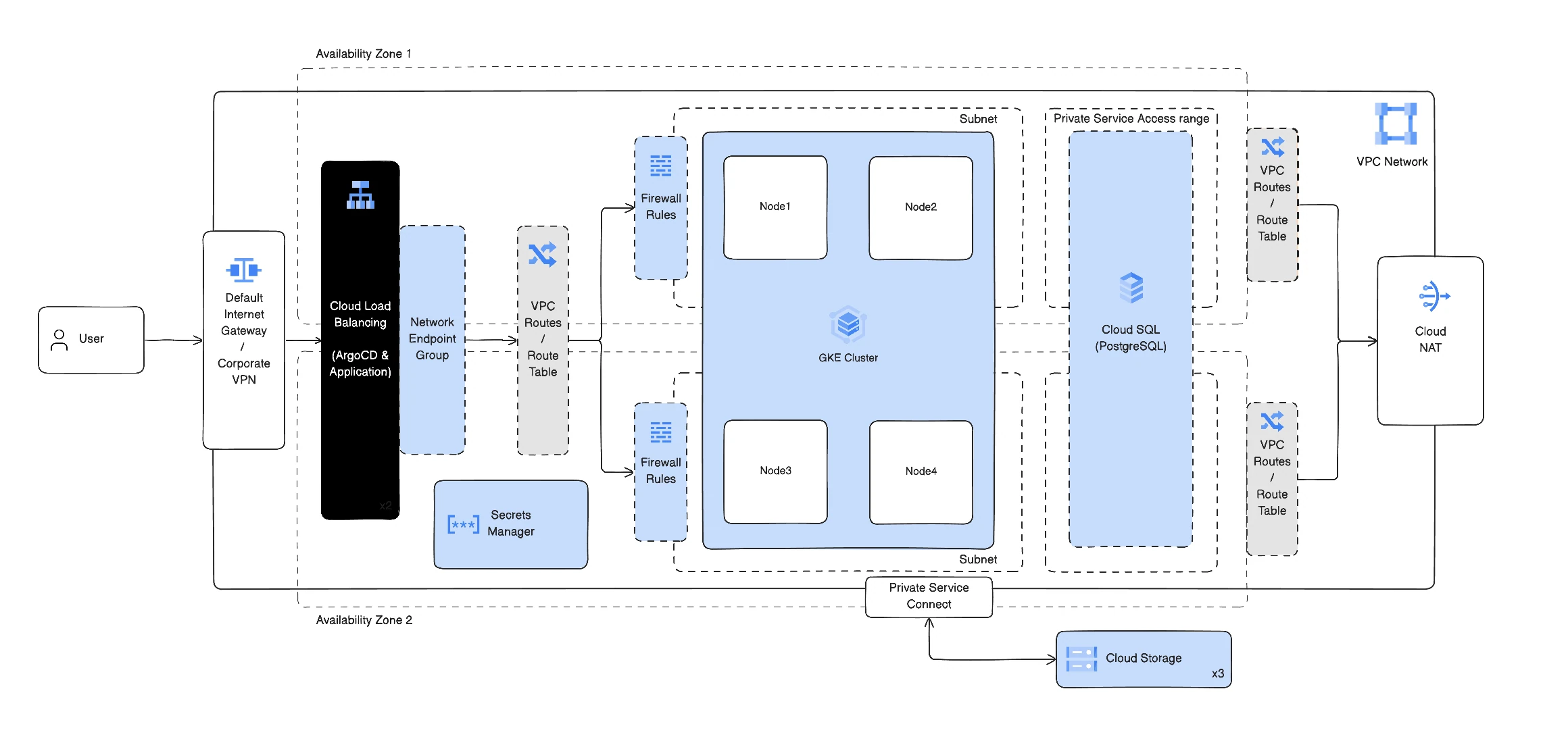
What Terraform provisions
The module deploys into a VPC network you already have. It never creates one.
GKE
A regional, private cluster with an autoscaling node pool and Workload Identity enabled.
Cloud SQL for PostgreSQL
The app's primary database, on a private IP over Private Service Access, with automated backups.
Cloud Storage
Two GCS buckets, one for test cases and one for payloads, private and encrypted at rest.
Workload Identity
A Google service account bound to the app's Kubernetes ServiceAccount, scoped to the buckets and the sandbox, keyless.
Cloud Run code executor
Required for code-based and transformer metrics: a sandbox that runs the mirrored image.
Secret Manager + Memorystore
Recommended: a cloud secret store for the External Secrets Operator, and managed Redis.
ClickHouse runs inside the cluster (the Helm chart installs it). The recommended setup keeps secrets in Secret Manager and runs Redis on Memorystore; in-cluster Redis and a Kubernetes Secret remain available as a simpler option. Cluster add-ons such as an ingress controller or the External Secrets Operator are your choice and are not installed by Terraform.
How it fits together
- Identity is keyless. The app pods run as a Kubernetes ServiceAccount bound to a Google service account through Workload Identity. That service account has least-privilege access to the two buckets and permission to invoke the Cloud Run sandbox. Nothing stores a static key.
- The data plane is private. GKE nodes sit in private subnets and reach the internet only through Cloud NAT. Cloud SQL is on a private IP. You choose whether the cluster API endpoint is public (handy for
kubectlandhelmfrom your laptop) or private-only. - Traffic flows one way in. Your applications send traces to
confident-otel, which writes them to ClickHouse. The dashboard and API read from Cloud SQL and ClickHouse. Evaluations run inconfident-evalsand its workers, calling your model provider and the Cloud Run sandbox for code and transformer metrics. Datasets and payloads live in GCS.
Deployed services
The Helm chart installs these workloads into the confident-ai namespace:
| Service | Role |
|---|---|
confident-backend | Core API |
confident-frontend | The dashboard |
confident-evals | Evaluation service |
confident-evals-worker | Async evaluation jobs |
confident-ingestion-worker | Trace ingestion |
confident-worker | Background jobs |
confident-otel | OTLP and trace collector |
| ClickHouse and Keeper | Trace and span store |
| Redis | Cache and queues (in-cluster unless you use Memorystore) |
See Scaling for how each of these grows with load.
Defaults
| Component | Default |
|---|---|
| Node pool | 4 x n2-standard-8, autoscaling |
| Region | us-central1 |
| Cluster endpoint | Private (confident_public_gke = true to reach it from your machine) |
| Cloud SQL | Private IP, high availability |
| Storage class | standard-rwo (in-cluster ClickHouse and Redis disks) |
Everything above is overridable in the Terraform module. See the module inputs for the full list.
The module
The module is published to the Terraform Registry and its source lives on GitHub.
Prerequisites
terraform(≥ 1.5), thegcloudCLI withgke-gcloud-auth-plugin,kubectl,helm(≥ 3.8), anddocker(to mirror the code sandbox image).gcloud auth loginandgcloud auth application-default login.- The APIs the Infrastructure page enables:
container,sqladmin,servicenetworking,compute,artifactregistry, andrun. - From Confident AI: image pull credentials and a
CONFIDENT_LICENSE_KEY(see Deploy with Helm).
Next steps
Infrastructure
Provision GKE, Cloud SQL, and GCS with Terraform.
Deploy with Helm
Install the app and expose it over HTTPS.
Last updated on