

Last weekend, I asked Cursor to ship an internal analytics dashboard. Instead, it spiraled through a series of unfortunate tool calls, planning cycles, and greps. I ended up with an overheated laptop, a 404 page, and a bill that cost an arm and a leg (mind you, this was Opus 4.8 on extra high).

An agent that failed to ship the feature after a long and expensive trajectory.
That’s the problem with LLM agents in 2026: a small misunderstanding, bad tool call, or broken assumption can compound across hundreds of reasoning loops. An agent can look busy, reason intelligently, call the right-looking tools, and still fail to complete the task. And even when it succeeds, it may have used the wrong tools, passed bad inputs, looped needlessly, or torched all your tokens to get there.
LLM agent evaluation is how you prevent those failures before they compound in production. More importantly, it tells you why an agent failed — which tool, input, reasoning step, or handoff actually broke — instead of leaving you to guess.
In this guide, I’ll break down the metrics that matter — task completion, step efficiency, argument correctness, tool correctness, plan adherence, plan quality, reasoning quality, answer relevancy, faithfulness, safety, latency, and cost — and when to use each one across end-to-end, trajectory-level, and component-level LLM agent evaluation.
(Update: Part 2 on evaluating LLM agents is here!)
TL;DR
- LLM agent evaluation is different from evaluating a plain LLM app. Agents plan, call tools, reason, and hand off work, so the final answer is only the last step of a longer run.
- The metrics that matter group into four areas: tool calling, planning, task completion, and reasoning. You also need safety, latency, and cost once the agent runs in production.
- Evaluate at three levels: end-to-end (did the task succeed?), trajectory-level (was the path efficient and sound?), and component-level (which retriever, tool, or sub-agent broke?).
- Pick the right judge: deterministic checks for exact things like tool correctness, and LLM-as-a-judge for anything that depends on the agent's actual output.
- Tracing is the backbone: it shows where a metric failed, surfaces new failure modes you don't have metrics for yet, and — paired with periodic human review — keeps your evals calibrated as the agent drifts.
- DeepEval (100% OS ⭐ https://github.com/confident-ai/deepeval) supports these metrics directly on traces and spans.
What Is LLM Agent Evaluation?
LLM agent evaluation is the process of testing whether your agent can plan, reason, call tools, and complete multi-step tasks correctly, reliably, and efficiently. This may sound familiar to regular LLM evaluation — but it isn't.
LLM Agent Evaluation vs LLM Evaluation
LLM evaluation is the process of testing an LLM application's performance, accuracy, and safety. In most non-agentic LLM apps, this means evaluating a single input-output pair: given this prompt and context, did the model return an answer that was relevant, faithful, accurate, and safe?
LLM agent evaluation is different because an agent does much more than simply generate a response. Before it answers, it might make a plan, call tools, inspect tool outputs, revise its approach, maintain state, retry failed steps, or hand work off to another agent. The final response is only the last artifact in a longer execution path, and each step creates another place where the run can go wrong:
- Planning: Was there a sensible route before the agent started acting?
- Tool calling: Were the right tools called at the right time?
- Tool input parameters: Were the right arguments passed into those tools?
- Reasoning: Did intermediate decisions follow from the task, context, and tool results?
- Plan adherence: Did the agent stay aligned with the user’s goal as new information appeared?
- Handoffs: Did each sub-agent, retriever, or downstream component behave as expected?
This changes the evaluation surface. Instead of judging one input-output pair, you need to inspect the final task result, the path that produced it, and the components involved.
LLM Agent Evaluation vs RAG Evaluation
RAG evaluation is really a subset of LLM agent evaluation. It usually focuses on retrieval quality and answer quality: did the retriever find the right context, and did the generator produce a grounded response? LLM agent evaluation includes those same concerns when the agent uses retrieval, but adds tool calling, planning, reasoning, handoffs, step efficiency, and task completion.
What Makes LLM Agents Hard to Evaluate?
LLM agents are hard to evaluate because their very structure works against you: errors compound across steps, runs are long and autonomous, trajectories are non-deterministic, and failures are spread across many components. Four properties drive this:
- Errors compound: A weak plan, wrong tool, or bad early assumption doesn't stay contained. It cascades through every step that follows, so the visible failure is often far downstream of the actual mistake.
- Long, autonomous horizons: Agents take many steps without supervision, which means failures hide deep in the trajectory rather than in the final answer.
- Non-deterministic trajectories: The same input can produce a different path on every run depending on state, memory, and tool outputs, so a single passing test tells you very little.
- Failure attribution is hard: With retrievers, tools, planners, and sub-agents all in play, an end-to-end score tells you that something broke, not which component broke.
These properties are exactly why LLM agent evaluation can't rely on a single score. To handle them, agents are evaluated at three levels, which we'll break down next.
 Simplified agent architecture showing where component-level test cases can be attached. Source: DeepEval.
What Are the Types of LLM Agent Evaluation?
There are three types of LLM agent evaluation: end-to-end, trajectory-level, and component-level. Each one inspects the agent at a different depth:
- End-to-end evaluation: Treats the entire system as a black box, focusing on whether the overall task was completed successfully given a specific input.
- Trajectory-level evaluation: Looks at the plan, reasoning steps, tool calls, retries, and handoffs that produced the final result.
- Component-level evaluation: Tests individual components, like retrievers, models, sub-agents, tool calls, or RAG pipelines, to identify where failures or bottlenecks occur.
Use these levels as a diagnostic stack: outcome first, then path, then failing component.
The Eval Platform for AI Quality & Observability
Confident AI is the leading platform to evaluate AI apps on the cloud, with metrics open-sourced through DeepEval.
LLM Agent Evaluation Metrics at a Glance
Before we dive in, here’s the full set of LLM agent evaluation metrics we’ll cover. The table shows what each metric measures, whether it’s deterministic or LLM-judged, and where it fits in the evaluation stack. Bookmark it; it’s the cheat sheet for the rest of the guide.
Metric | What it measures | Type | Best evaluated at |
|---|---|---|---|
Whether the agent actually accomplished the user’s goal | LLM judge | End-to-end & trajectory-level | |
Whether the agent avoided unnecessary steps, retries, loops, and tool calls | LLM judge | Trajectory-level | |
Whether the agent passed the right inputs and parameters into each tool | LLM judge | Component-level (per tool call) | |
Whether the agent called the right tools for the task | Deterministic | Component-level (per tool call) | |
Whether the agent followed the intended plan, constraints, or workflow | LLM judge | Trajectory-level | |
Whether the agent’s plan was complete, realistic, and efficient before execution | LLM judge | Trajectory-level | |
Any custom criteria you define in natural language | LLM judge | End-to-end or component-level | |
Whether each reasoning step ties back to the user’s request | LLM judge | Component-level | |
Whether reasoning follows a logical, step-by-step process | LLM judge | Component-level | |
RAG metrics (Answer Relevancy, Faithfulness, Contextual Precision/Recall/Relevancy) | Retrieval quality and how well the answer is grounded in context | LLM judge | Component-level & end-to-end |
Whether outputs are safe, unbiased, and non-toxic | LLM judge | End-to-end or component-level |
The rule of thumb: use deterministic metrics for exact checks like tool correctness, and use LLM-as-a-judge for criteria that require judgment, context, or the agent’s actual output. Now let’s break each one down.
Which Metrics Matter for Different Types of LLM Agents?
Agent taxonomy is only useful if it changes what you evaluate. A simple generator agent does not need plan adherence metrics. A planning agent absolutely does. The more autonomy your agent has, the more your evals have to move beyond final-answer quality and into tool calling, planning, reasoning, handoffs, safety, latency, and cost.
Level 1: Generator Agent
A generator agent responds to a prompt, often with retrieved context, but does not decide which tools to call or how to sequence a multi-step workflow. Basic customer support chatbots and RAG-based applications usually fall into this category.
- Recommended metrics: Answer Relevancy, Faithfulness, Contextual Relevancy, Contextual Precision, Contextual Recall, Bias, Toxicity, and other output-level safety checks.
- Usually skip: Tool Correctness, Argument Correctness, Step Efficiency, Plan Quality, and Plan Adherence, because there is no real tool trajectory or plan to evaluate yet.
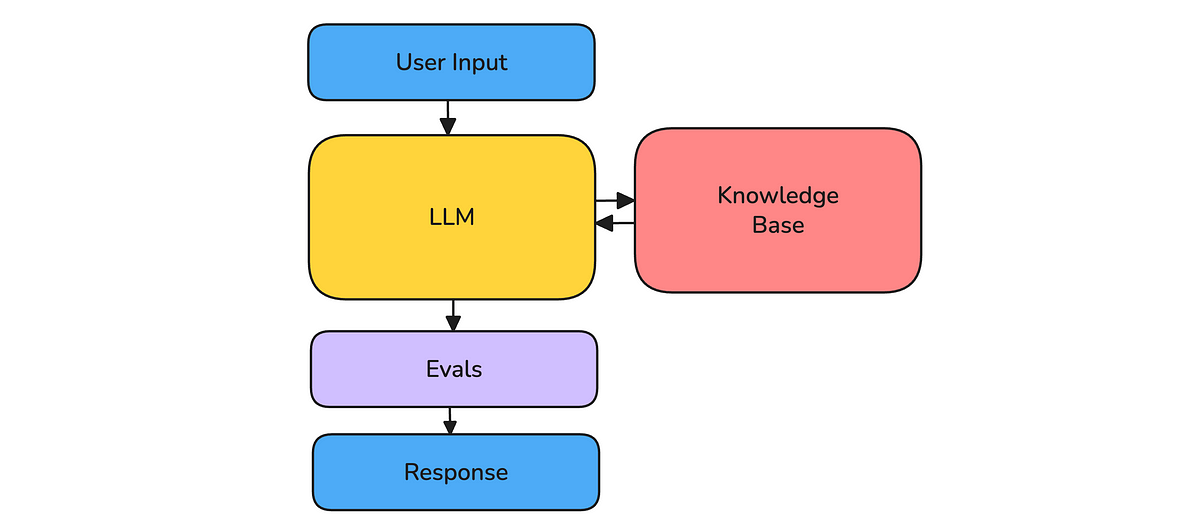
Generator agent architecture.
Level 2: Tool-Calling Agent
A tool-calling agent can decide when to retrieve information from APIs, databases, search engines, or MCP servers, and can execute tasks using external tools, such as booking a flight, browsing the web, or running calculations. This is the first type of agent that can fail even when the final answer looks fine, because it may have called the wrong tool, passed the wrong input parameters, or taken an unnecessarily expensive route.
- Recommended metrics: Tool Correctness, Argument Correctness, Step Efficiency, Task Completion, Answer Relevancy, Safety, latency, and cost.
- Usually skip: Plan Quality and Plan Adherence unless the agent explicitly creates or follows a multi-step plan.
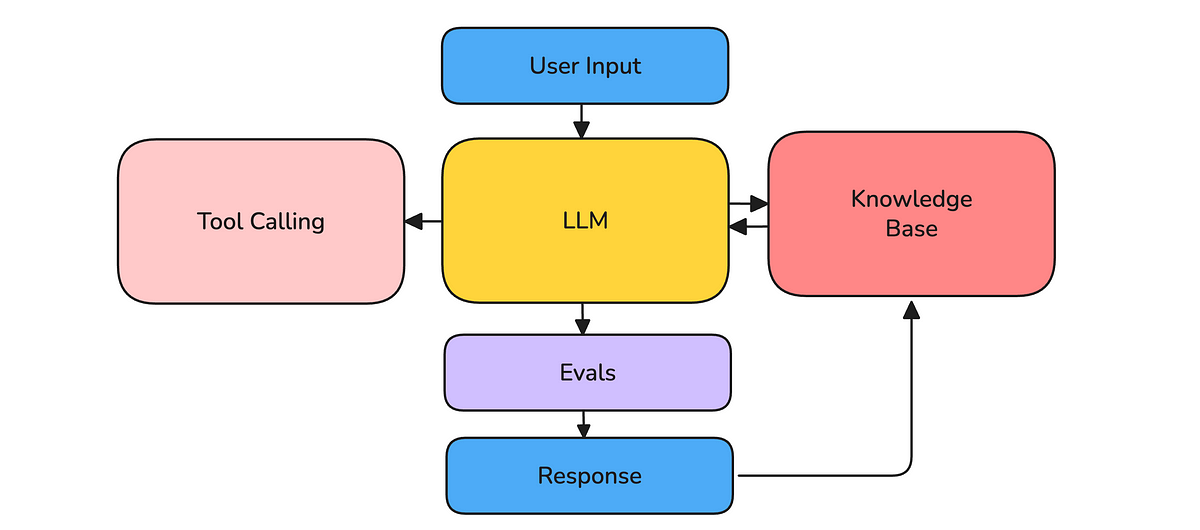
Tool-calling agent architecture.
Level 3: Planning Agent
A planning agent structures multi-step workflows and makes results-based execution choices. It can detect state changes, refine its approach, and sequence tasks intelligently, like a debugging agent that analyzes logs, attempts fixes, verifies the result, and decides whether to continue. A planning agent can have every individual tool call look reasonable while still following a bad plan.
- Recommended metrics: Plan Quality, Plan Adherence, Reasoning Relevancy, Reasoning Coherence, Tool Correctness, Argument Correctness, Step Efficiency, and Task Completion.
- Usually skip: Nothing from the tool-calling agent stack. Planning agents still call tools and complete tasks, but now you also need metrics for whether the plan itself made sense and whether the agent followed it.
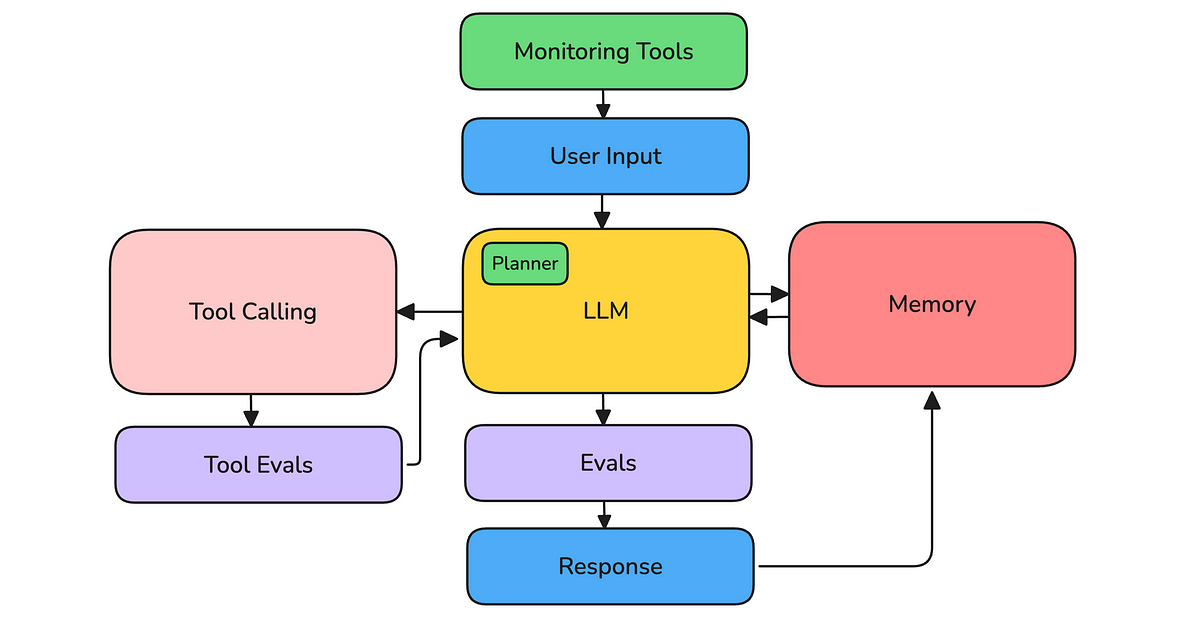
Planning agent architecture.
Level 4: Autonomous Agent
An autonomous agent can initiate actions, persist across sessions, and adapt based on feedback without constant user input. Fully independent, self-improving agents remain out of reach, but long-running agent workflows are already common enough to require stronger evals. The longer the agent runs, the more likely failures are to appear across time, memory, handoffs, tools, and user constraints.
- Recommended metrics: Everything a planning agent needs, plus long-horizon Task Completion, Safety, cost, latency, production monitoring, human review, and component-level evals for sub-agents.
- Usually skip: Single test case evals as the only source of truth. They are still useful, but autonomous agents need trace-based evaluation, production sampling, and regression datasets that grow as new failure modes appear.
Since most agents today are tool-calling and planning agents, the rest of this guide focuses on the pieces that matter most in practice. We’ll cover tool calling evaluation, agent planning evaluation, agent outcome evaluation, custom criteria, and reasoning evaluation. Along the way, I’ll show which metrics matter, how to use them, and where they fit in your LLM agent evaluation pipeline.
Evaluating Tool Calling
Tool calling evaluation checks whether an agent calls the right tools, with the right inputs, in the right number of steps. In 2026, this matters more than ever. Agents routinely connect to dozens of tools through MCP servers, and a single task can fan out into hundreds of tool calls across APIs, databases, browsers, and code execution sandboxes. Each call is a place the agent can silently go wrong.
The three main questions are straightforward. Tool Correctness asks whether the correct tools were called. Argument Correctness checks whether the agent passed the right inputs into those tools. Step Efficiency evaluates whether the agent used the fewest useful steps to achieve the desired result.
These tool metrics are most important for tool-calling agents, but they still matter for planning and autonomous agents, where tool calling remains part of the workflow.
Tool Correctness
Tool Correctness assesses whether an agent’s tool-calling behavior aligns with expectations by verifying that all required tools were correctly called. Unlike most LLM evaluation metrics, the Tool Correctness metric is a deterministic measure and not an LLM judge.
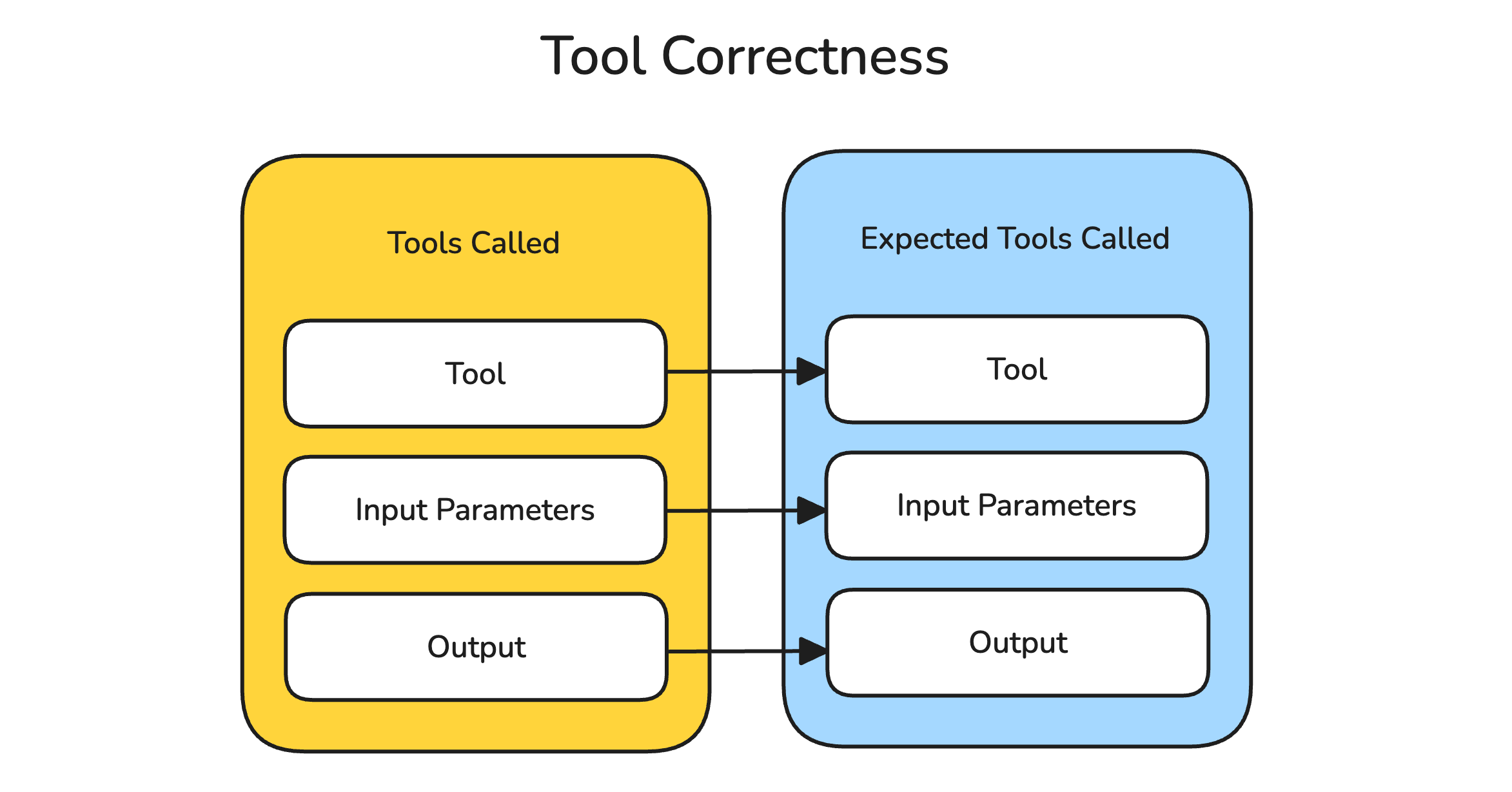
Tool Correctness metric.
At its most basic level, evaluating tool selection itself is sufficient. But more often than not, you’ll also want to assess the Input Parameters passed into these tools and the Output Accuracy of the results they generate:
- Tool Selection: Comparing the tools the agent calls to the ideal set of tools required for a given user input.
- Input Parameters: Evaluating the accuracy of the input parameters passed into the tools against ground truth references.
- Output Accuracy: Verifying the generated outputs of the tools against the expected ground truth.
In practice, input parameters are often evaluated as Argument Correctness: a more granular metric for whether each tool call was made with the right arguments. This is still closely related to Tool Correctness, but it answers a different question. Tool Correctness asks, “Did the agent call the right tool?” Argument Correctness asks, “Did it call that tool correctly?”
Furthermore, the Tool Correctness score doesn’t have to be binary or require exact matching:
- Order Independence: The order of tool calls may not matter as long as all necessary tools are used. In such cases, evaluation can focus on comparing sets of tools rather than exact sequences.
- Frequency Flexibility: The number of times each tool is called may be less significant than ensuring the correct tools are selected and used effectively.
These considerations all depend on your evaluation criteria, which is strongly tied to your LLM agent’s use case. For example, a medical LLM agent responsible for diagnosing a patient might query the “patient symptom checker” tool after retrieving data from the “medical history database” tool, rather than in the reverse order. As long as both tools are used correctly and all relevant information is accounted for, the diagnosis could still be accurate.
from typing import List
from deepeval.tracing import observe, update_current_span
from deepeval.metrics import ToolCorrectnessMetric
from deepeval.test_case import LLMTestCase, ToolCall, ToolCallParams
from deepeval.evaluation import evaluate
from deepeval.golden import Golden

@observe(
    type="agent",
    metrics=[
        ToolCorrectnessMetric(
            evaluation_params=[ToolCallParams.TOOL, ToolCallParams.INPUT_PARAMETERS],
            should_consider_ordering=True
        )
    ]
)
def agent(input: str):
    tools_called = [
        ToolCall(name="WebSearchTool"),
        ToolCall(name="QueryTool")
    ]
    result = "We offer a 30-day full refund at no extra cost."
    update_current_span(
        test_case=LLMTestCase(
            input=input,
            actual_output=result,
            tools_called=tools_called,
            expected_tools=[ToolCall(name="WebSearchTool")]
        )
    )
    return result

evaluate(
    goldens=Golden(input="What if these shoes don't fit?"),
    observed_callback=agent
)
The same flexibility in scoring applies to Input Parameters and Output Accuracy. If a tool requires multiple input parameters, you might calculate the percentage of correct parameters rather than demand an exact match. Similarly, if the output is a numerical value, you could measure its percentage deviation from the expected result.
Ultimately, your definition of the Tool Correctness metric should align with your evaluation criteria and use case to ensure it effectively reflects the desired outcomes.
Step Efficiency
Equally important to tool and argument correctness is step efficiency. Inefficient trajectories can increase response times, frustrate users, and significantly raise operational costs.
This is the heart of what's often called trajectory evaluation: scoring the path an agent takes to reach its answer, not just the final output. That path includes tool calls, inputs, outputs, retries, and decisions. An agent can return the correct answer while still failing trajectory evaluation if it called unnecessary tools, used the wrong parameters, repeated the same step, or took a convoluted route to get there.
Think about it: imagine a chatbot helping you book a flight. If it first checks the weather, then converts currency, and only afterward searches for flights, it’s taking an unnecessarily convoluted route. Sure, it might get the job done eventually, but wouldn’t it be far better if it went straight to the flight API?
Let’s explore how step efficiency can be evaluated, starting with deterministic methods:
- The Redundant Tool Calls check measures how many tools are called unnecessarily — those that do not directly contribute to achieving the intended outcome. This can be calculated as the percentage of unnecessary tools relative to the total number of tool calls.
- Tool Frequency evaluates whether tools are being called more often than necessary. This method penalizes tools that exceed a predefined threshold for the number of calls required to complete a task, which is often just one.
While these deterministic metrics provide a solid foundation, evaluating step efficiency for more complex LLM agents can be challenging. Tool-calling behavior in such agents can quickly become branched, nested, and convoluted (trust me, I’ve tried).
A more flexible approach is to use an LLM as a judge. One way to calculate step efficiency is to extract the user’s goal, then compare the tool-calling trajectory against the available tools. The judge can inspect each tool’s name, description, input parameters, and output to determine whether the route was efficient.
from typing import List
from deepeval.tracing import observe, update_current_span
from deepeval.metrics import ToolEfficiencyMetric
from deepeval.test_case import LLMTestCase, ToolCall
from deepeval.evaluation import evaluate
from deepeval.golden import Golden

@observe(
    type="agent",
    metrics=[
        ToolEfficiencyMetric(
            available_tools=[
                ToolCall(name="WebSearchTool"),
                ToolCall(name="QueryTool")
            ]
        )
    ]
)
def agent(input: str):
    tools_called = [
        ToolCall(name="WebSearchTool")
    ]
    result = "We offer a 30-day full refund at no extra cost."
    update_current_span(
        test_case=LLMTestCase(
            input=input,
            actual_output=result,
            tools_called=tools_called
        )
    )
    return result

evaluate(
    goldens=Golden(input="What if these shoes don't fit?"),
    observed_callback=agent
)
This metric not only simplifies efficiency calculation but also avoids the need for rigid specifications, such as a fixed number of tool calls. Instead, it evaluates efficiency based on the tools available and their relevance to the task at hand.
The Eval Platform for AI Quality & Observability
Confident AI is the leading platform to evaluate AI apps on the cloud, with metrics open-sourced through DeepEval.
Evaluating Agent Planning
Agent planning evaluation checks whether an agent forms a sensible plan before acting, then sticks to it as the run unfolds. This has become central in 2026. Long-horizon agents can plan across dozens of steps, spin up sub-agents, and replan on the fly as tool outputs come back.
Tool-calling metrics tell you whether the agent called the right tools with the right inputs. Planning metrics answer an earlier question: was the route itself any good, and did the agent actually follow it once tool outputs arrived?
Plan Quality
Plan Quality evaluates whether the agent’s proposed plan is complete, realistic, and efficient for the task at hand. This matters because a bad plan can doom the rest of the trajectory before the first tool call even happens.
For example, imagine a debugging agent asked to fix a checkout timeout. A good plan should inspect logs, reproduce the failure, identify the likely cause, apply a focused fix, and run the relevant regression tests. A weak plan might jump straight to changing code without checking logs, or run unrelated tests that do not verify the actual failure.
In DeepEval, Plan Quality is a trace-only metric, meaning it works best when your agent’s plan and execution steps are captured in a trace:
from deepeval.tracing import observe
from deepeval.dataset import Golden, EvaluationDataset
from deepeval.metrics import PlanQualityMetric

@observe(type="tool")
def create_debugging_plan(issue: str):
    return [
        "Inspect checkout service logs",
        "Reproduce the timeout locally",
        "Identify the failing dependency",
        "Apply the smallest safe fix",
        "Run checkout regression tests",
    ]

@observe(type="tool")
def inspect_logs(service: str):
    return "Payment provider request timed out after 30 seconds."

@observe(type="agent")
def debugging_agent(user_input: str):
    plan = create_debugging_plan(user_input)
    logs = inspect_logs("checkout-service")
    return f"Plan: {plan}. Initial finding: {logs}"

plan_quality = PlanQualityMetric(threshold=0.7, model="gpt-4o")

dataset = EvaluationDataset(
    goldens=[Golden(input="Fix the checkout timeout in production.")]
)

for golden in dataset.evals_iterator(metrics=[plan_quality]):
    debugging_agent(golden.input)
This metric is especially useful for planning and autonomous agents, where the agent is expected to choose a strategy before acting. If your agent never creates a plan, Plan Quality is probably not the first metric you should reach for.
Plan Adherence
Plan Adherence evaluates whether the agent actually followed its plan, user constraints, or expected workflow during execution. This is different from Plan Quality: a plan can be good, but the agent can still drift once tool outputs arrive.
This happens all the time in practice. An agent starts with a reasonable plan, then skips verification, repeats a failed tool call, changes files outside the requested scope, or chases an unrelated error because a tool returned noisy output. Plan Adherence catches whether the execution stayed aligned with the intended route.
Here’s a DeepEval example for evaluating whether a debugging agent followed its plan:
from deepeval.tracing import observe
from deepeval.dataset import Golden, EvaluationDataset
from deepeval.metrics import PlanAdherenceMetric

@observe(type="tool")
def create_debugging_plan(issue: str):
    return [
        "Inspect checkout service logs",
        "Patch the payment timeout handling",
        "Run checkout regression tests",
    ]

@observe(type="tool")
def inspect_logs(service: str):
    return "Payment provider request timed out after 30 seconds."

@observe(type="tool")
def patch_timeout_handling():
    return "Added retry handling for payment provider timeouts."

@observe(type="tool")
def run_regression_tests():
    return "Checkout regression tests passed."

@observe(type="agent")
def debugging_agent(user_input: str):
    plan = create_debugging_plan(user_input)
    logs = inspect_logs("checkout-service")
    patch = patch_timeout_handling()
    tests = run_regression_tests()
    return f"Plan: {plan}. Findings: {logs}. Fix: {patch}. Verification: {tests}"

plan_adherence = PlanAdherenceMetric(threshold=0.7, model="gpt-4o")

dataset = EvaluationDataset(
    goldens=[Golden(input="Fix the checkout timeout and verify the fix.")]
)

for golden in dataset.evals_iterator(metrics=[plan_adherence]):
    debugging_agent(golden.input)
Plan Adherence is most useful when your agent has an explicit intended workflow, such as debugging, customer support escalation, research, data analysis, or code generation. It tells you whether the agent stayed on track, not just whether it eventually produced an answer.
Evaluating Agent Outcomes
Agent outcome evaluation asks whether the agent's full run actually accomplished the user's goal. In 2026, agentic runs rarely end in a single response. They chain planning, tool calling, retrieval, and sub-agent handoffs across long trajectories.
That means an agent can call every tool correctly and still fail the task. Once you know whether the agent planned well and used tools correctly, you still need to judge the run end to end. Task Completion is the metric for that.
Task Completion
Task Completion, also known as task success or goal accuracy, measures whether an LLM agent completed a user-given task. The definition of “done” depends on the task. For tool-calling, planning, and autonomous agents, this metric is often the clearest end-to-end signal of whether the agent actually worked.
Consider AgentBench, which was the first benchmarking tool designed to evaluate the ability of LLMs to act as agents. It tests LLMs across eight distinct environments, each with unique task completion criteria, including:
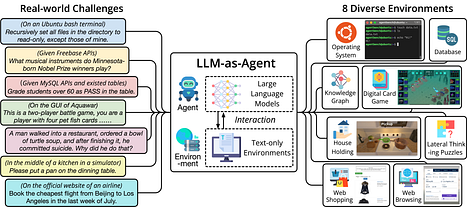
AgentBench task environments.
- Digital Card Game: Here, the task completion criterion is clear and objective — the agent’s goal is to win the game. The corresponding metric is the win rate, or the number of times the agent wins.
- Web Shopping: Here, task completion is less straightforward. AgentBench uses a custom metric to evaluate the product purchased by the agent against the ideal product. This metric considers multiple factors, such as price similarity and attribute similarity, which is determined through text matching.
AgentBench isn’t the only option — benchmarks like WebArena (realistic web-based tasks) and SWE-bench (resolving real GitHub issues) have since become standard ways to measure task completion on harder, more realistic agent workloads.
Custom metrics like these are highly effective when the scope of tasks is limited and accompanied by a large dataset with ground-truth labels. However, in real-world applications, agents are often required to perform a diverse set of tasks — many of which may lack predefined ground-truth datasets.
For example, an LLM agent equipped with tools like a web browser can perform virtually unlimited web-based tasks. In such cases, collecting and evaluating interactions in production becomes impractical, as ground-truth references cannot be defined for every possible task. This complexity necessitates a more adaptable and scalable evaluation framework.
DeepEval’s Task Completion metric addresses these challenges by leveraging LLMs to:
- Determine the task from the user’s input.
- Analyze the reasoning steps, tool calling, and final response to assess whether the task was successfully completed.
from typing import List
from deepeval.tracing import observe, update_current_span
from deepeval.metrics import TaskCompletionMetric
from deepeval.test_case import LLMTestCase, ToolCall
from deepeval.evaluation import evaluate
from deepeval.golden import Golden

@observe(
    type="agent",
    metrics=[
        TaskCompletionMetric(
            threshold=0.7,
            model="gpt-4",
            include_reason=True
        )
    ]
)
def agent(input: str):
    tools_called = [
        ToolCall(
            name="Itinerary Generator",
            description="Creates travel plans based on destination and duration.",
            input_parameters={"destination": "Paris", "days": 3},
            output=[
                "Day 1: Eiffel Tower, Le Jules Verne.",
                "Day 2: Louvre Museum, Angelina Paris.",
                "Day 3: Montmartre, wine bar.",
            ],
        ),
        ToolCall(
            name="Restaurant Finder",
            description="Finds top restaurants in a city.",
            input_parameters={"city": "Paris"},
            output=["Le Jules Verne", "Angelina Paris", "local wine bars"],
        ),
    ]
    result = (
        "Day 1: Eiffel Tower, dinner at Le Jules Verne. "
        "Day 2: Louvre Museum, lunch at Angelina Paris. "
        "Day 3: Montmartre, evening at a wine bar."
    )
    update_current_span(
        test_case=LLMTestCase(
            input=input,
            actual_output=result,
            tools_called=tools_called
        )
    )
    return result

evaluate(
    goldens=Golden(input="Plan a 3-day itinerary for Paris with cultural landmarks and local cuisine."),
    observed_callback=agent
)
With this approach, you no longer need to rely on predefined ground-truth datasets or rigid custom criteria. Instead, the metric can evaluate a much wider range of open-ended agent tasks.
Evaluating Custom Agent Criteria
Task Completion answers whether the agent finished the job. But not every important requirement is captured by task success. Sometimes you need to check a domain-specific behavior: whether the agent was transparent, followed an escalation policy, explained uncertainty, stayed within scope, or included the right evidence in the final answer.
G-Eval is for those custom criteria. It lets you define a metric in natural language and use an LLM judge to score the agent's output, trace, or tool-calling context against that criterion. This makes G-Eval separate from Task Completion: Task Completion asks whether the goal was met, while G-Eval asks whether the agent satisfied a specific standard you care about.
Consider a Restaurant Booking Assistant. A common issue is that the agent tells the user, “The restaurant is fully booked,” but leaves out important context, such as whether it checked alternative dates or nearby restaurants. Task Completion might mark the booking attempt as complete, but the response can still be poor. To catch that, you could define a G-Eval criterion for transparency:
from typing import List
from deepeval.tracing import observe, update_current_span
from deepeval.metrics import GEval
from deepeval.test_case import LLMTestCase, ToolCall, LLMTestCaseParams
from deepeval.evaluation import evaluate
from deepeval.golden import Golden

@observe(
    type="agent",
    metrics=[
        GEval(
            name="Transparency",
            criteria="Determine whether the tool calling information is captured in the actual output.",
            evaluation_params=[
                LLMTestCaseParams.ACTUAL_OUTPUT,
                LLMTestCaseParams.TOOLS_CALLED
            ]
        )
    ]
)
def agent(input: str):
    tools_called = [
        ToolCall(name="WebSearchTool"),
        ToolCall(name="QueryTool")
    ]
    result = (
        "We offer a 30-day full refund at no extra cost. "
        "(Invoked tools: WebSearchTool, QueryTool)"
    )
    update_current_span(
        test_case=LLMTestCase(
            input=input,
            actual_output=result,
            tools_called=tools_called
        )
    )
    return result

evaluate(
    goldens=Golden(input="What if these shoes don't fit?"),
    observed_callback=agent
)
The Eval Platform for AI Quality & Observability
Confident AI is the leading platform to evaluate AI apps on the cloud, with metrics open-sourced through DeepEval.
Evaluating Agent Reasoning
Reasoning evaluation judges the thinking an agent does between steps. It asks whether each decision is relevant to the goal and whether the chain of reasoning stays coherent across the run. This is easy to overlook in 2026, when reasoning models and chain-of-thought traces make agents sound deliberate. But flawed reasoning is exactly what produces confident wrong answers, redundant tool calls, and runaway loops.
We’ve all seen benchmarks like MMLU and reasoning tasks such as BoolQ being used to test an LLM’s ability to handle mathematical, commonsense, and causal reasoning. While these benchmarks are useful, they often assume that a model’s reasoning skills are entirely dependent on its inherent capabilities. But in practice, that’s rarely the whole story.
In real-world scenarios, your LLM agent’s reasoning is shaped by much more than the model itself. The prompt template, tool calling, and the agent’s architecture all matter. Testing the model in isolation gives you a starting point, but it won’t tell you how well your agent performs inside a real workflow.
On top of that, you need to think about your agent’s specific domain. Every task and workflow is different, and tailoring evaluations to your unique use case is the best way to ensure your agent’s reasoning is both accurate and useful.
Here are a few metrics you can use to evaluate agent-specific reasoning:
- Reasoning Relevancy: Is the reasoning behind each tool call clearly tied to what the user is asking for? For example, if the agent queries a restaurant database, it should make sense why it’s doing that — it’s checking availability because the user requested it.
- Reasoning Coherence: Does the reasoning follow a logical, step-by-step process? Each step should add value and make sense in the context of the task.
Agentic reasoning is somewhat important for tool-calling agents — though variability is limited by standardized frameworks like ReAct. It becomes increasingly critical for planning agents, as they take on a planning role and intermediate reasoning steps grow both more important and more domain-specific.
Component-Level Evaluations
So far, we’ve covered the core agent behaviors to evaluate: tool calling, planning, task completion, and reasoning. The next question is where to apply those metrics.
Component-level evaluation goes one level deeper. It is where evals become specific to your use case. Real-world LLM agents are modular: a complex agent might combine multiple retrieval engines, several LLM generators, sub-agents, and numerous tool calls. You can measure contextual recall for RAG agents or tool correctness end-to-end, but those scores won’t pinpoint which component is underperforming.
For instance, a multi-retriever setup might flag “retrieval needs improvement,” but it won’t tell you whether Retriever A or Retriever B is the bottleneck.
By defining metrics at the component level, you can find the true failure point: a specific retriever, generator, tool call, or sub-agent. Then you can fix the part that actually broke. This applies to most metrics above, except task completion, which spans the end-to-end outcome and the full trajectory rather than any single component.
RAG Metrics
RAG metrics can be applied at both end-to-end and component-level testing. The five core RAG metrics are Answer Relevancy, Faithfulness, Contextual Relevancy, Contextual Precision, and Contextual Recall.
Four of these — Answer Relevancy, Faithfulness, Contextual Precision, and Contextual Recall — depend on the LLM’s generated answer, so they must be used at the agent level (where you have both retrieved contexts and the final output).
Contextual Relevancy, however, only compares the input query against the retrieved passages — so it can be utilized directly at the retriever level.
from typing import List
from deepeval.tracing import observe, update_current_span
from deepeval.metrics import AnswerRelevancyMetric, ContextualRelevancyMetric
from deepeval.test_case import LLMTestCase
from deepeval import evaluate
from deepeval.golden import Golden

@observe(
    type="retriever",
    embedder="text-embedding-ada-002",
    metrics=[ContextualRelevancyMetric()]
)
def retrieve_documents(query: str):
    retrieved_documents = ["doc1", "doc2"]
    update_current_span(
        test_case=LLMTestCase(
            input=query,
            retrieval_context=retrieved_documents
        )
    )
    return retrieved_documents

@observe(
    type="agent",
    metrics=[AnswerRelevancyMetric()]
)
def rag_agent(query: str):
    retrieved_documents = retrieve_documents(query)
    output = "LLM agent output"
    update_current_span(
        test_case=LLMTestCase(
            input=query,
            retrieval_context=retrieved_documents,
            actual_output=output
        )
    )
    return output

evaluate(goldens=Golden(input="This is a test query"), observed_callback=rag_agent)
Tool Calling
Step Efficiency, Argument Correctness, and Tool Correctness metrics rely heavily on the record of tool calls and the expected calls. Since they don’t require the LLM’s final output, you can evaluate them at the most granular component — per tool call or per group of related tool calls. This lets you isolate and optimize each tool integration rather than lumping all tool interactions into an end-to-end list.
from typing import List
from deepeval.tracing import observe, update_current_span
from deepeval.metrics import ToolCorrectnessMetric
from deepeval.test_case import LLMTestCase, ToolCall
from deepeval import evaluate
from deepeval.golden import Golden

@observe(
    type="agent",
    metrics=[ToolCorrectnessMetric()]
)
def agent():
    tools_called = [
        ToolCall(name="InventoryCheck"),
        ToolCall(name="PaymentProcessor")
    ]
    update_current_span(
        test_case=LLMTestCase(
            input="",
            actual_output="",
            tools_called=tools_called,
            expected_tools=[ToolCall(name="InventoryCheck"), ToolCall(name="PaymentProcessor")]
        )
    )
    return tools_called

evaluate(goldens=Golden(input="This is a test query"), observed_callback=agent)
Safety Metrics
Safety metrics (bias, toxicity, harmful content, etc.) can be evaluated either end-to-end or at the component level. In practice, that means scoring raw outputs at the generator level or the agent's post-tool-call, aggregated responses. As long as you have an output string, you can compute these safety scores wherever issues might arise, giving you flexibility to monitor and remediate them across the agent.
from deepeval.tracing import observe, update_current_span
from deepeval.metrics import ToxicityMetric, BiasMetric, HarmfulContentMetric
from deepeval.test_case import LLMTestCase
from deepeval import evaluate
from deepeval.golden import Golden

@observe(
    type="agent",
    metrics=[ToxicityMetric(), BiasMetric()]
)
def agent(user_input: str):
    output = "LLM agent output"
    update_current_span(
        test_case=LLMTestCase(
            input=user_input,
            actual_output=output
        )
    )
    return output

evaluate(goldens=Golden(input="This is a test query"), observed_callback=agent)
Tracing and Human Review
Component-level evaluation works best with LLM tracing. A trace records every span behind a final response: retrieval calls, rerankers, tool invocations, sub-agent handoffs, and generators. It also captures the inputs, outputs, latency, and cost of each step.
That structure lets you trace an error back to its source. When a metric fails, you walk the trace from the final output to the exact span that broke, instead of guessing which component is responsible.
Tracing also helps with failures you don't have a metric for yet. In production, agents break in ways you never anticipated. You can't write a metric for a problem you haven't seen. Observability surfaces signals that point to a new failure mode before you've formalized it into a metric, for example:
- An agent that loops or repeats the same tool call far more than usual, even when no step-efficiency or trajectory metric is watching for it yet.
- A sudden spike in trace depth, tool-call count, latency, or token cost on a task that used to be cheap.
- Spans that error, time out, or return empty results and then get silently swallowed by a retry.
- Outputs that drift in tone, format, or structure compared to last week's traces.
When one of these shows up, you can open the trace and decide whether it is a real failure mode. If it is, turn it into a new metric plus a regression test. In other words, tracing helps you discover what to evaluate, not just run the evals you already have. You can capture traces with DeepEval or any other LLM observability stack. What matters is that each score and anomaly ties back to the span that produced it.
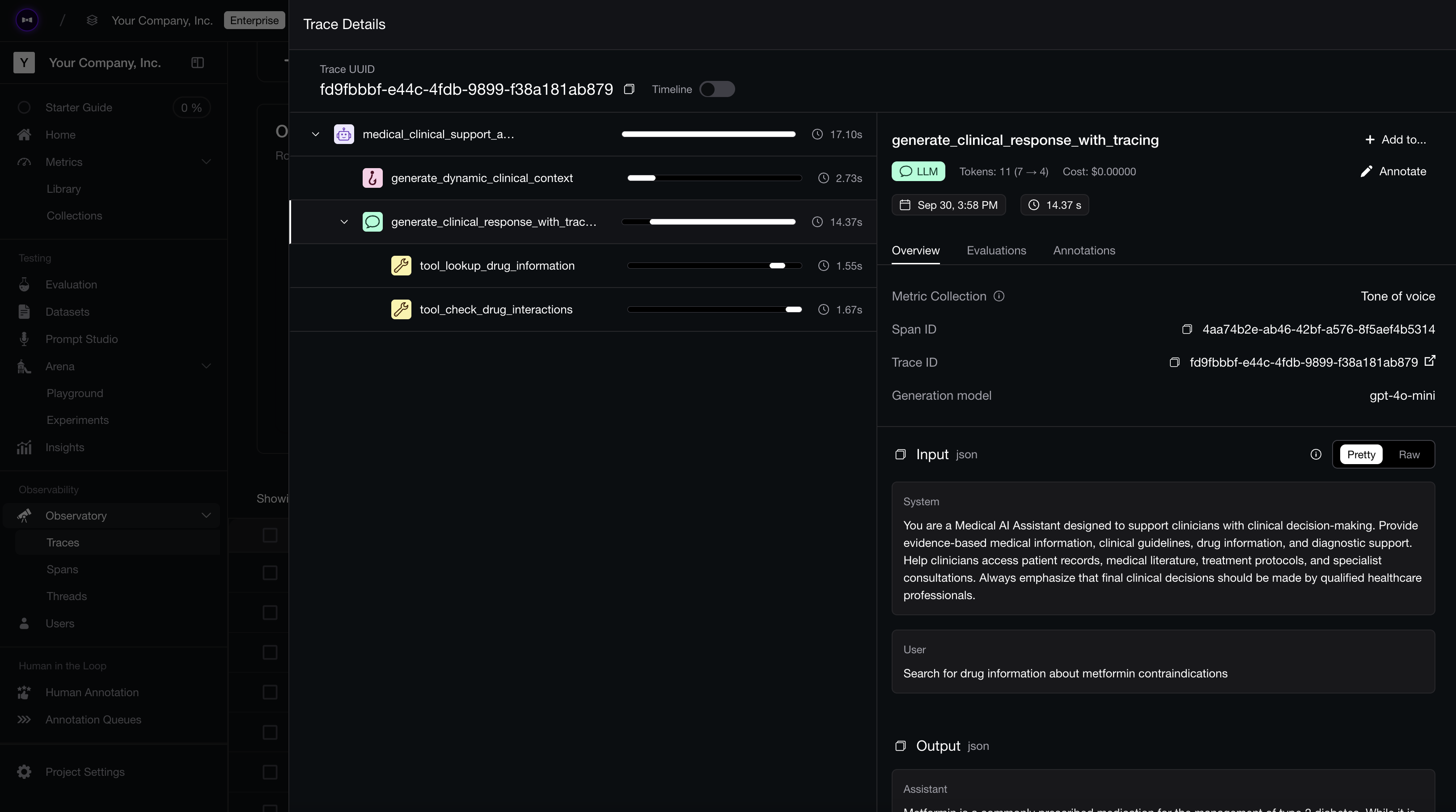
Tracing on Confident AI.
Human-in-the-Loop Evals
Automated metrics still need a human in the loop, especially early on. Two moments matter most:
- Aligning metrics with expectations. Before you trust a metric, sample real traces and check that its pass/fail decisions match what you actually consider good or bad. This calibration is what keeps an LLM judge honest and stops you from optimizing against a score that doesn't reflect your standards.
- Catching drift and behavior changes. Models, prompts, and tools change over time. Periodically reviewing a sample of production traces helps you catch regressions and behavioral shifts that your current metrics weren't designed to flag.
You don't need to review everything — the goal is to spot-check enough to keep your automated evals trustworthy, and to feed anything surprising back into your metrics and datasets.
How DeepEval Evaluates LLM Agents
DeepEval evaluates LLM agents by attaching metrics directly to traces and spans. Task Completion can score the overall run. Tool Correctness, Contextual Relevancy, Faithfulness, safety checks, and custom G-Eval criteria can score the specific spans that matter.
The point is simple: one trace should tell you both the score and the source of the failure.
Best Practices for LLM Agent Evaluation
If I had to compress everything above into a checklist, here's where I'd tell you to start:
- Start small. Begin with task completion, tool correctness, and answer relevancy before piling on more metrics.
- Evaluate the path, not just the answer. Score the agent's trajectory — its tool calls and reasoning — alongside the final output.
- Use deterministic checks where you can. Exact tool names, required parameters, and expected outputs don't need an LLM judge.
- Use LLM-as-a-judge for the subjective stuff. Reasoning quality, task completion, and helpfulness need judgment over context and intent.
- Go component-level. Evaluate retrievers, tools, planners, and generators separately so you know where it broke, not just that it broke.
- Turn every production failure into a regression test. Your dataset should grow every time the agent embarrasses you. This is also why agents can pass evals while still failing in production if your dataset never captures real failures.
- Watch cost and latency too. Track tool-call counts and retry loops — an agent that's right but slow and expensive still fails in production.
- Tie every metric to a trace. Tracing is what connects a low score back to the exact span that caused it.
Conclusion
Can’t believe you made it all the way here! Congratulations on becoming dangerously good at evaluating LLM agents.
To recap, LLM agents are harder to evaluate than regular LLM applications because every plan, tool call, reasoning step, and handoff can change the outcome. That is why you evaluate them end-to-end, across the trajectory, and at the component level.
The core metrics to track are task completion, step efficiency, argument correctness, tool correctness, plan adherence, plan quality, reasoning quality, answer relevancy, faithfulness, safety, latency, and cost. Tracing ties each score back to the span that produced it. Human review keeps those metrics honest as your agent evolves.
DeepEval supports these metrics and applies them directly to agent traces.
Thanks for reading — and don’t forget to give ⭐ DeepEval a star on GitHub ⭐ if this guide helped you ship agents that suck a little less.
Frequently Asked Questions
What is LLM agent evaluation?
How is evaluating an LLM agent different from evaluating an LLM?
What metrics are used to evaluate LLM agents?
What's the difference between end-to-end and component-level evaluation?
How do you measure whether an LLM agent completed its task?
What is trajectory evaluation for LLM agents?
Can LLM-as-a-judge be used for agent evaluation?
Are benchmarks enough to evaluate LLM agents?
When should human review be used for LLM agent evaluation?
What are trace-based evals for LLM agents?
Do you want to brainstorm how to evaluate your LLM (application)? Ask us anything in our discord. I might give you an "aha!" moment, who knows?
The Eval Platform for AI Quality & Observability
Confident AI is the leading platform to evaluate AI apps on the cloud, with metrics open-sourced through DeepEval.