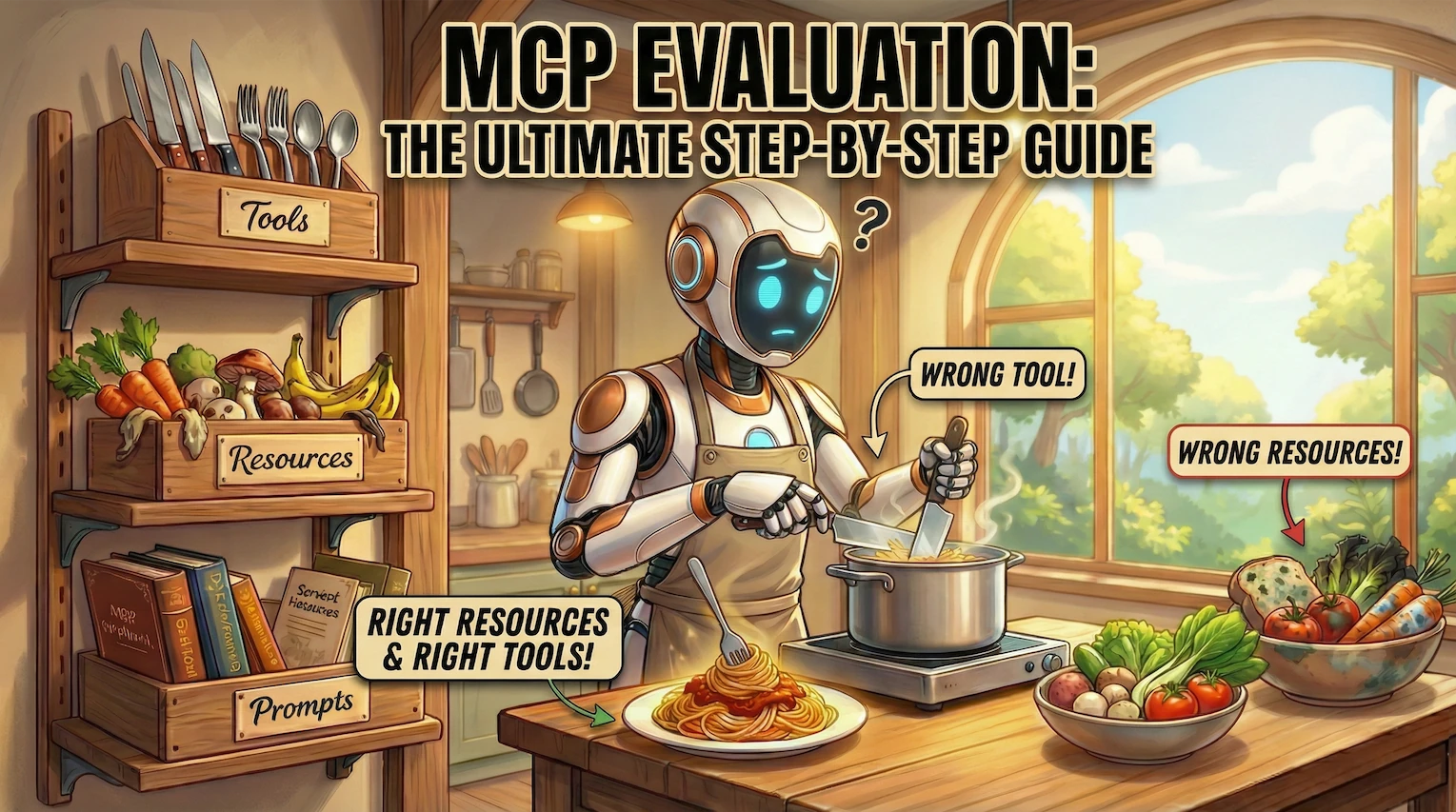
AI is getting smarter by the day, but intelligence alone isn’t enough. To be truly useful, AI needs to do more than just answer questions — it needs to complete real tasks.
Enter MCP (Model Context Protocol) — a framework that turns everyday LLM applications into AI agents on steroids.
Introduced by Anthropic in late 2024, MCP enables large language models to interact with the outside world through a standardized protocol. Instead of reinventing the wheel each time, developers can now plug their AI models into a shared ecosystem of resources. This makes AI applications more scalable, efficient, and capable of tackling a wider range of tasks.
But, as we all know, with great power comes great complexity. Giving AI access to MCP servers is one thing, but making sure it uses them correctly? That’s a completely different story. Is your AI making good use of the MCP’s resources? Passing the right arguments? Completing the actual task?
That’s where MCP evaluation comes in. In this guide, you’ll learn:
- What MCP is and how it works.
- Why evaluating MCP-based applications matters.
- How to set up evaluations using DeepEval in just 20 lines of code.
Ready to upgrade your AI agent from a generic politician to an actual public servant? Let’s dive right in.
TL;DR
- Model Context Protocol (MCP) is an open standard framework that defines how AI systems — especially LLMs — interact with external tools and data sources to perform context-aware tasks.
- MCP Evaluation measures how well LLM applications use MCP — it ensures they call the right tools at the right time, pass correct arguments, and complete tasks effectively rather than just accessing tools blindly.
- MCP allows you to build both single-turn and multi-turn applications, choosing which category your app falls into depends on the complexity of your app, this also defines how you evaluate your MCP-based application.
- Core MCP evaluation metrics include tool usage efficiency, argument generation capabilities and overall task completion.
- DeepEval is an open-source LLM evaluation framework that supports MCP evaluation across both single and multi-turn apps. It integrates with Confident AI to provide deeper insights into LLM performance and reliability.
What Is MCP Evaluation?
MCP evaluation is the process of assessing how effectively an LLM application leverages the Model Context Protocol (MCP) to complete real-world tasks.
Unlike traditional LLM evaluations that focus solely on final results, MCP evaluation takes a broader view by analyzing the full workflow of your MCP application. This allows you to assess your application on a modular level.
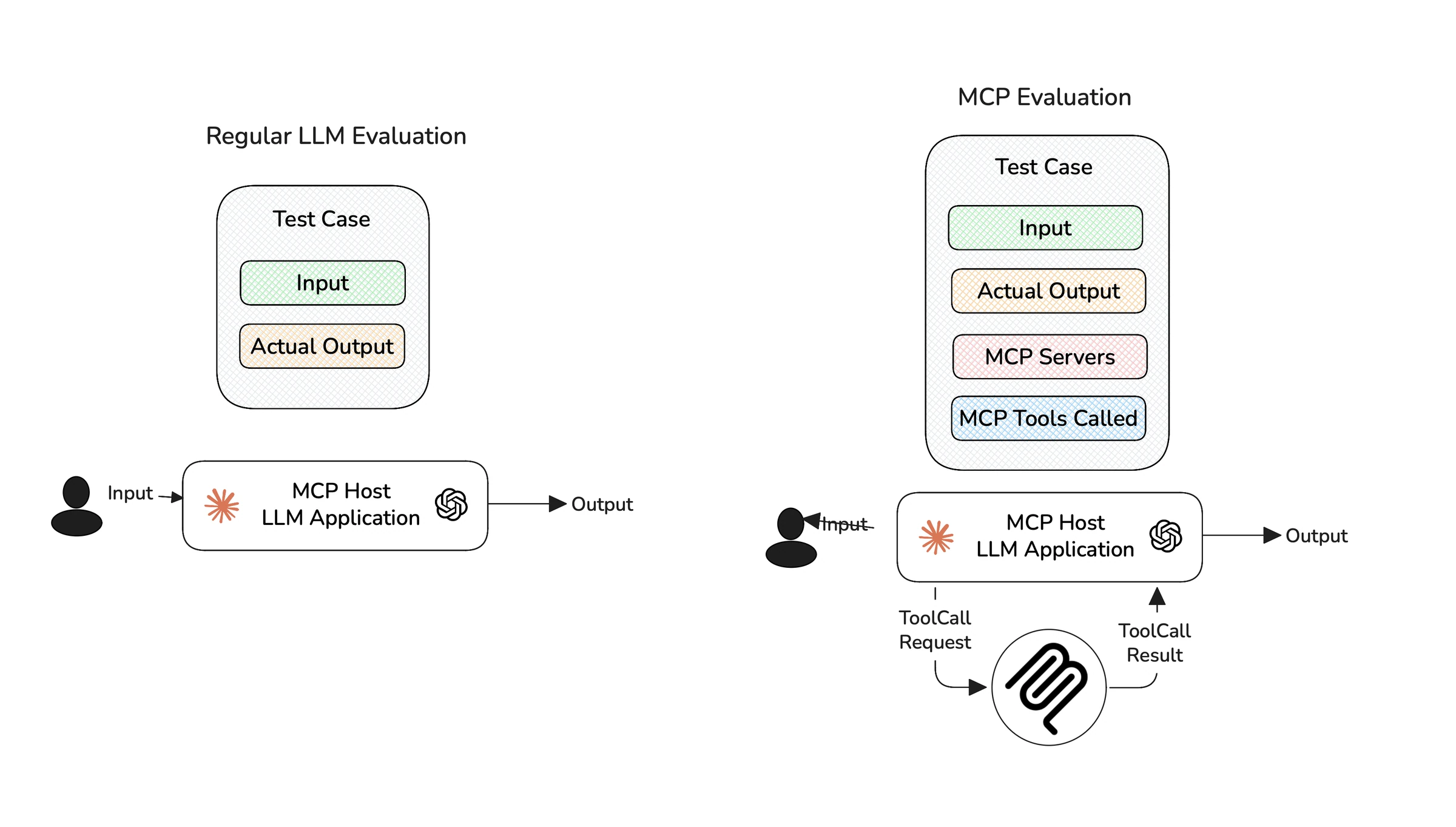
MCP evaluation captures the intermediate MCP interactions as well
Here are three key criteria to consider when evaluating MCP-based applications:
- Tool Correctness: Did your LLM choose the right tools to complete the task?
- Argument Correctness: Were the arguments generated for each tool call accurate and relevant to the current context?
- Task Completion: Did the application successfully deliver on the user’s original intent?
MCP follows a client-server architecture, where LLMs (as clients) call tools hosted on external servers. The criteria mentioned here targets how well your LLM orchestrates these tool interactions. As an MCP application developer, your goal is to assess how effectively your LLM uses the available tools, rather than what happens on the server-side, which is often outside your visibility.
To understand how MCP evaluation works, we first have to understand more about MCP itself.
Understanding MCP
Model Context Protocol (MCP) is an open framework that standardizes how LLM applications exchange context. The MCP architecture involves 3 core components:
- Server: Where tools, data, and prompts live and get executed.
- Client: The bridge that connects the host to external servers, clients maintain a one-to-one connection with the servers.
- Host: The LLM application orchestrating clients to finish tasks.
The MCP server developers only focus on building reliable tools for LLM applications to use. The client developers are the ones who create AI applications that have access to those servers, these AI applications are what we will be testing and evaluating in this article.
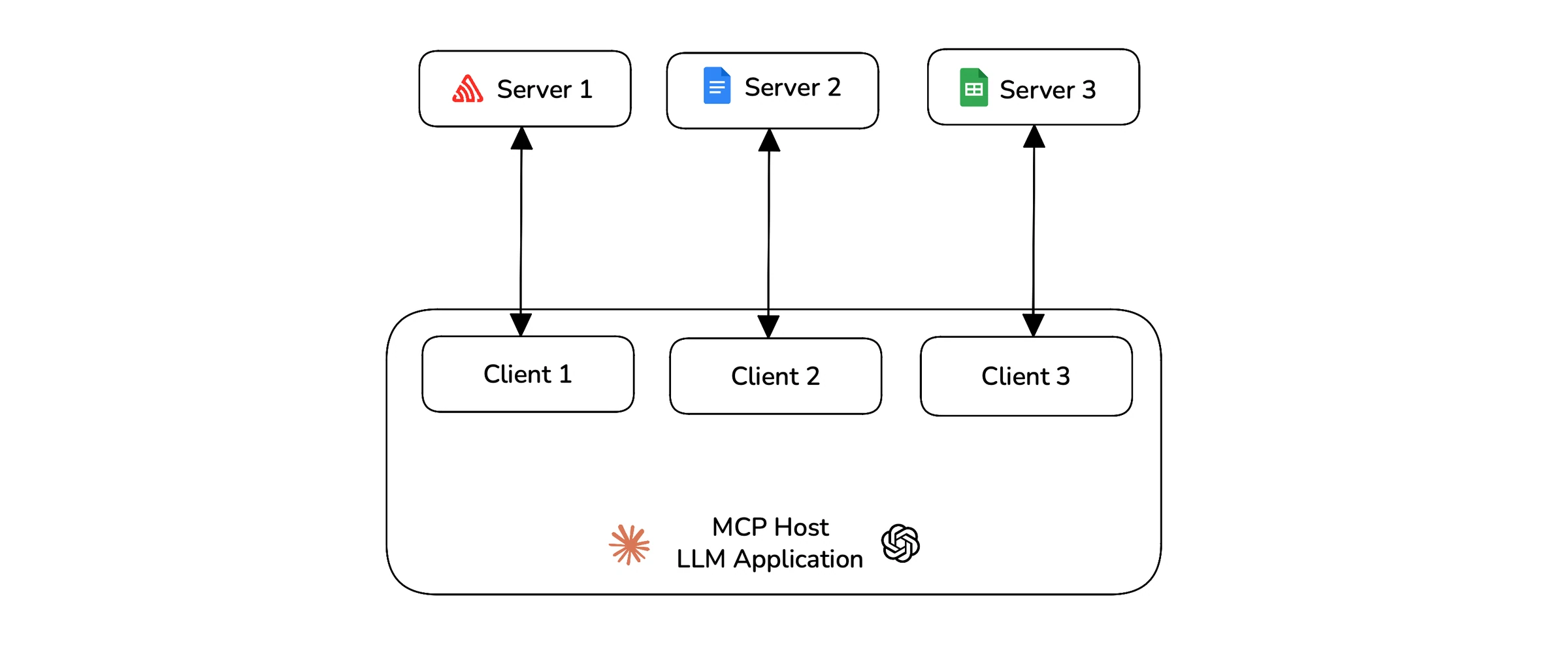
The MCP architecture with client, server and host.
Each MCP server exposes three key primitives — tools, resources, and prompts. Tools are what allow applications to perform actions, resources give additional context to LLMs for decision making, and prompts are reusable templates that guide LLM’s reasoning.
Many people confuse MCP with the standard tool-calling ability of LLMs, but that’s not quite right. Think of it this way: Tool calling represents the decision made by the LLM, and MCP is the structured protocol that enables and executes this decision.
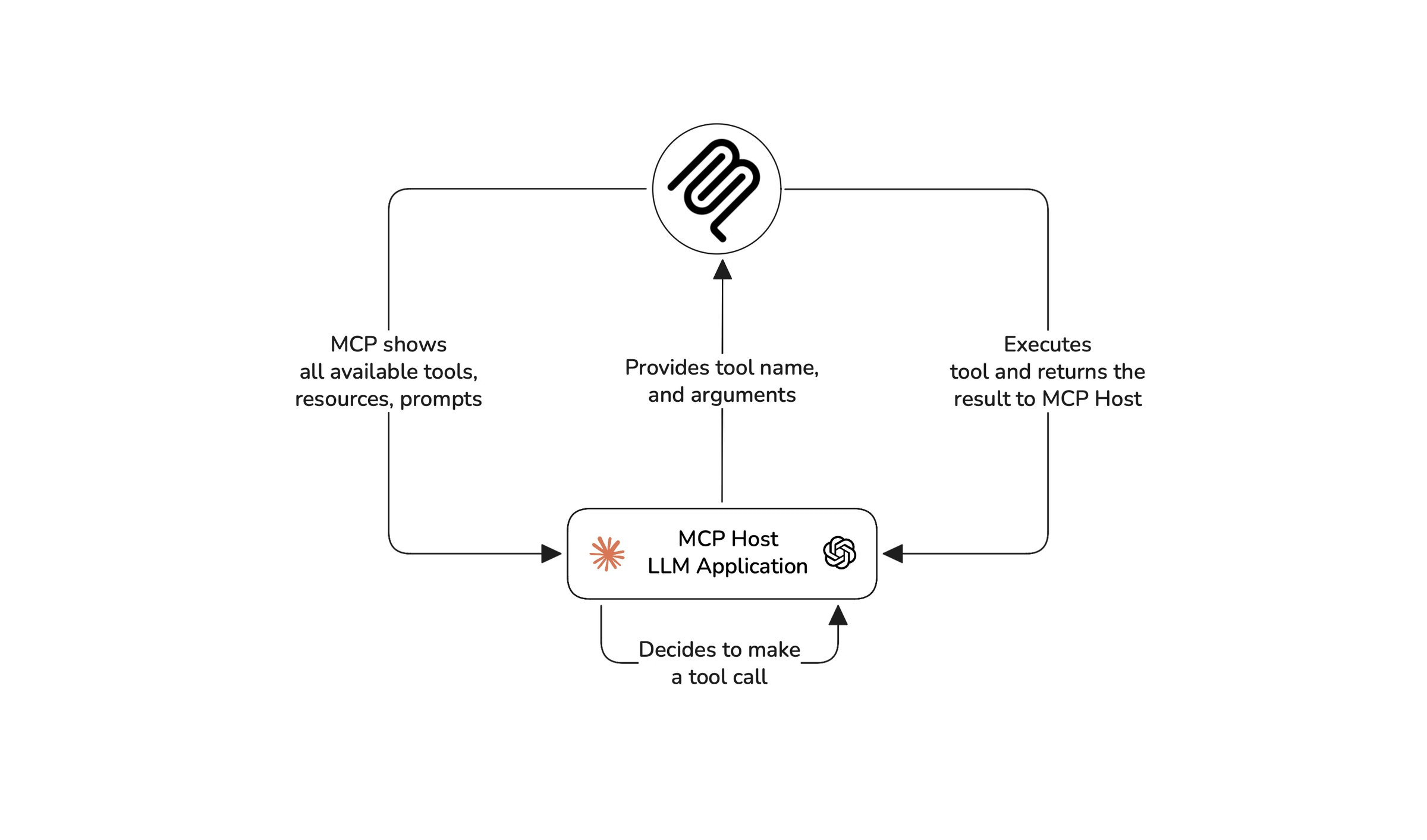
The MCP workflow that demonstrates how MCP applications work
Because tools live on remote servers, you can connect an MCP server to any number of LLM apps, and vice versa. This makes MCP-based applications more flexible than regular AI agents with tools. Speaking of which, if you want to evaluate AI agents and not MCP applications, here’s a great article on how to evaluate AI agents.
The MCP architecture adds a layer of complexity to your LLM applications. To mitigate this, MCP provides a tool called the MCP Inspector to test servers and tools, but MCP evaluation isn’t just about testing servers, it’s about testing how the LLM application itself is working with the MCP.
Evals for cross-functional teams. Not just engineers.
Give all AI use cases the same quality bar with all-in-one evals, observability, and red teaming, and enforce them at scale.
How MCP Applications Fail
Now that we understand how MCP works, here are some of the most common problems that can occur in MCP-based applications:
- Context overload — While MCP handles tool execution, it doesn’t manage context limits. If a server exposes too many tools, listing them all can consume a significant chunk of the LLM’s context window, leaving less room for actual reasoning.
- Wrong tool calls — The LLM might misinterpret the task and invoke an incorrect tool. This is especially risky when the tools have high-impact responsibilities, such as modifying databases or managing critical workflows.
- Incorrect arguments — The LLM might pass malformed or incomplete parameters to a tool — for example, calling
create_user()without auser_idor passing an invalid email address. - Unnecessary calls — The model might over-rely on tools, calling them when simpler reasoning would suffice. This adds latency, wastes computation power, and clutters execution traces.
- Hallucinations — The AI might “think” it has executed a tool when it actually didn’t, this leads to confusion and false task completions.
To avoid these pitfalls, it’s essential to evaluate your application properly. And for that, you first need to categorize whether your MCP app is single or multi-turn.
Single vs Multi-Turn MCP-Based LLM Apps
MCP-based applications generally fall into two categories: single-turn and multi-turn.
Single-turn
These applications are straightforward, they take a user input, process it, and return a response in one go. While they’re limited in flexibility, they offer more control to the client dev on what MCP interactions are allowed.
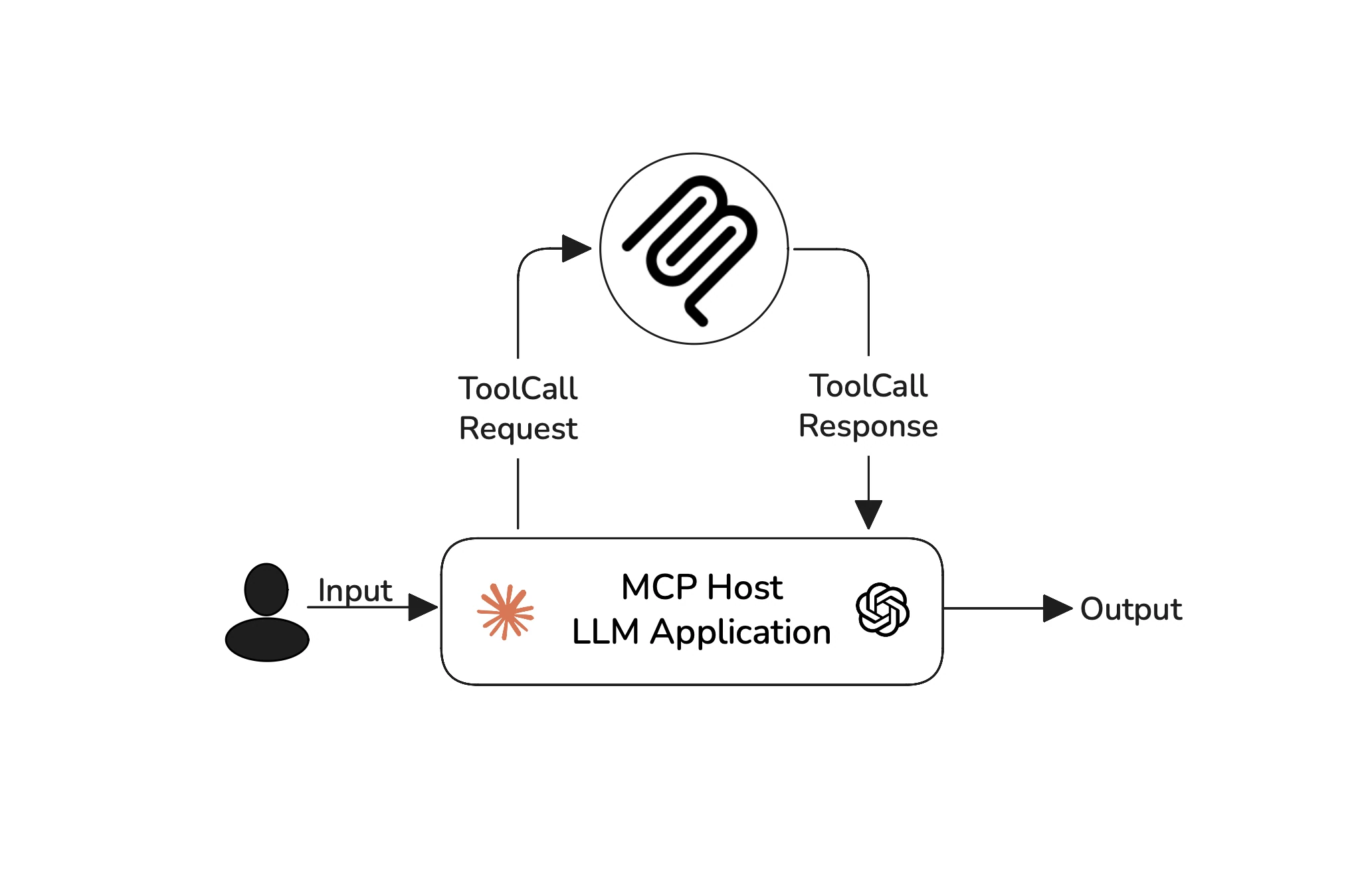
Single-turn MCP applications — best for tasks like fetching data or creating files
Multi-turn
Multi-turn applications however, involve ongoing interactions. The AI must remember context from previous turns and call tools autonomously to complete more complex tasks.
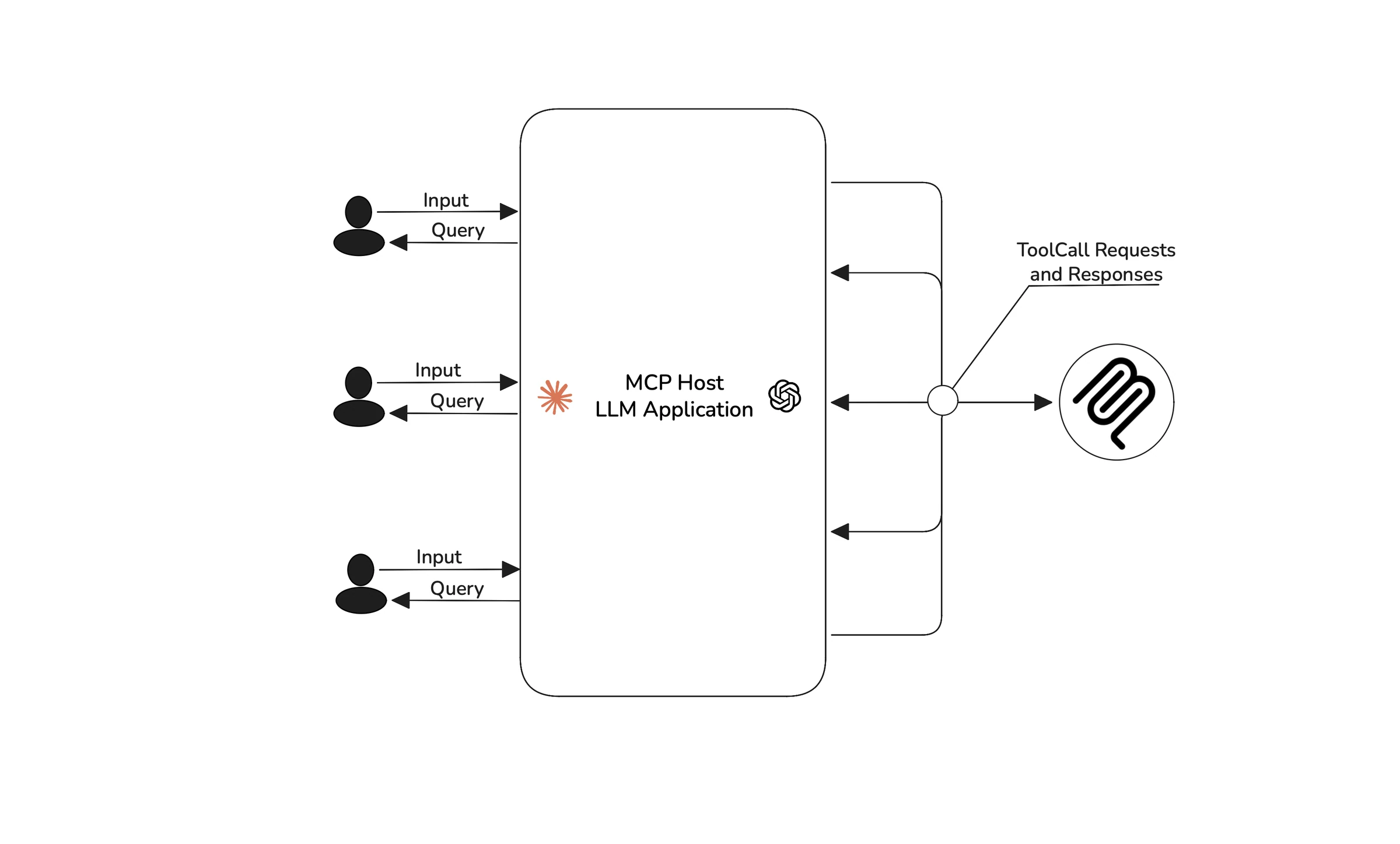
Multi-turn MCP applications — best for tasks like project management or event planning.
Choosing between single-turn and multi-turn depends on how your users interact with your LLM application. Single-turn applications involve one-off user input and response, while multi-turn applications facilitate ongoing conversations or tasks that span across multiple exchanges.
Now that you understand different types of MCP applications, let’s move on to evaluating your MCP application end-to-end.
Evals for cross-functional teams. Not just engineers.
Give all AI use cases the same quality bar with all-in-one evals, observability, and red teaming, and enforce them at scale.
MCP Evaluation: Step-by-Step Guide
While you are free to use any framework you wish to evaluate MCP apps, in this guide, I’m going to be using DeepEval due to its simplicity and integration with the original MCP protocol.
DeepEval is an open-source LLM evaluation framework that supports evaluations for both single-turn and multi-turn MCP applications. Evaluating MCP apps with DeepEval involves a simple 4-step process:
- Add your MCP servers
- Track your MCP interactions
- Create your test cases
- Run evals using various MCP metrics
DeepEval seamlessly integrates with MCP types from their official SDK, so you don’t have to worry about data formatting or preprocessing.
1. Add your MCP servers
Almost all MCP metrics are powered by LLMs-as-a-judge. This means the evaluating LLM must know information about the MCP servers your application has access to and the primitives they expose.
Using MCP’s built-in list functions, you can fetch the details of each MCP server using their respective clients and create a list of MCPServer objects. This list gives the necessary context to the evaluating LLM.
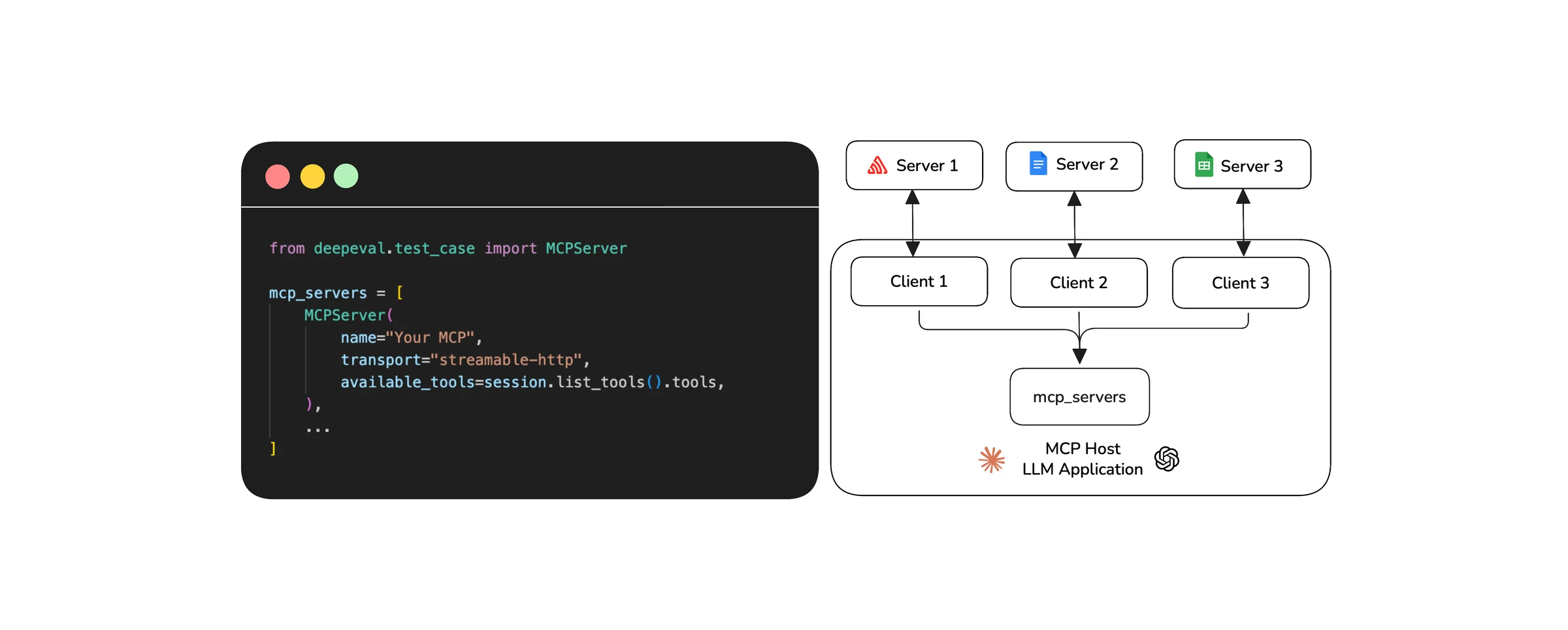
Collecting data on what MCP servers are available from clients in a list
2. Track MCP Interactions
Once you’ve added your MCP servers, the next step is to track how your MCP-based application is interacting with the MCP servers. This means monitoring every MCP request your LLM makes during execution.
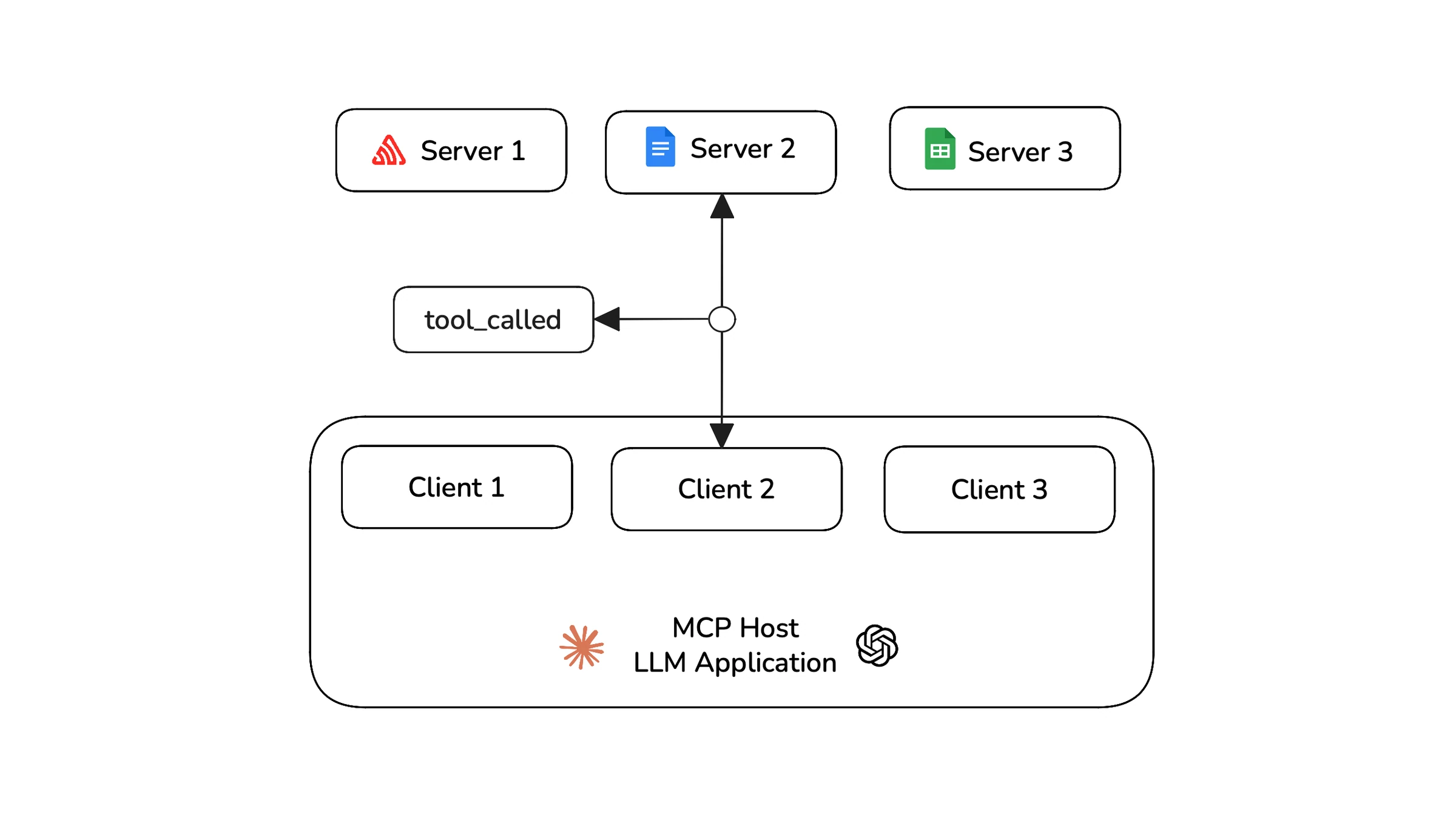
A tool call request to the MCP server can be considered as an MCP interaction
For Single-turn applications: Since single-turn applications make requests and get responses in one go. You can simply track all the MCP interactions in their respective tool, resource, and prompt lists.
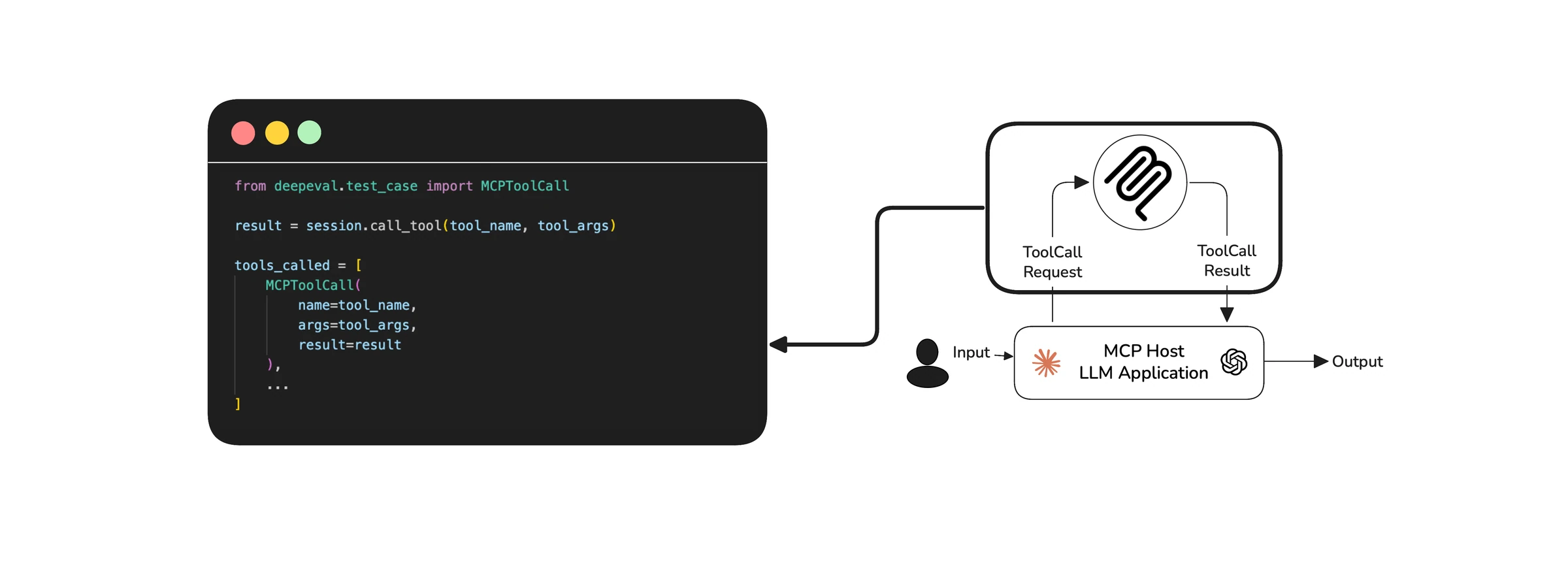
All MCP interactions for single-turn applications are stored in their respective lists
For Multi-turn applications: Multi-turn applications are a bit more complex. Since the LLM has ongoing conversations, making multiple requests to MCP servers across turns. You need to track these interactions separately for each turn.
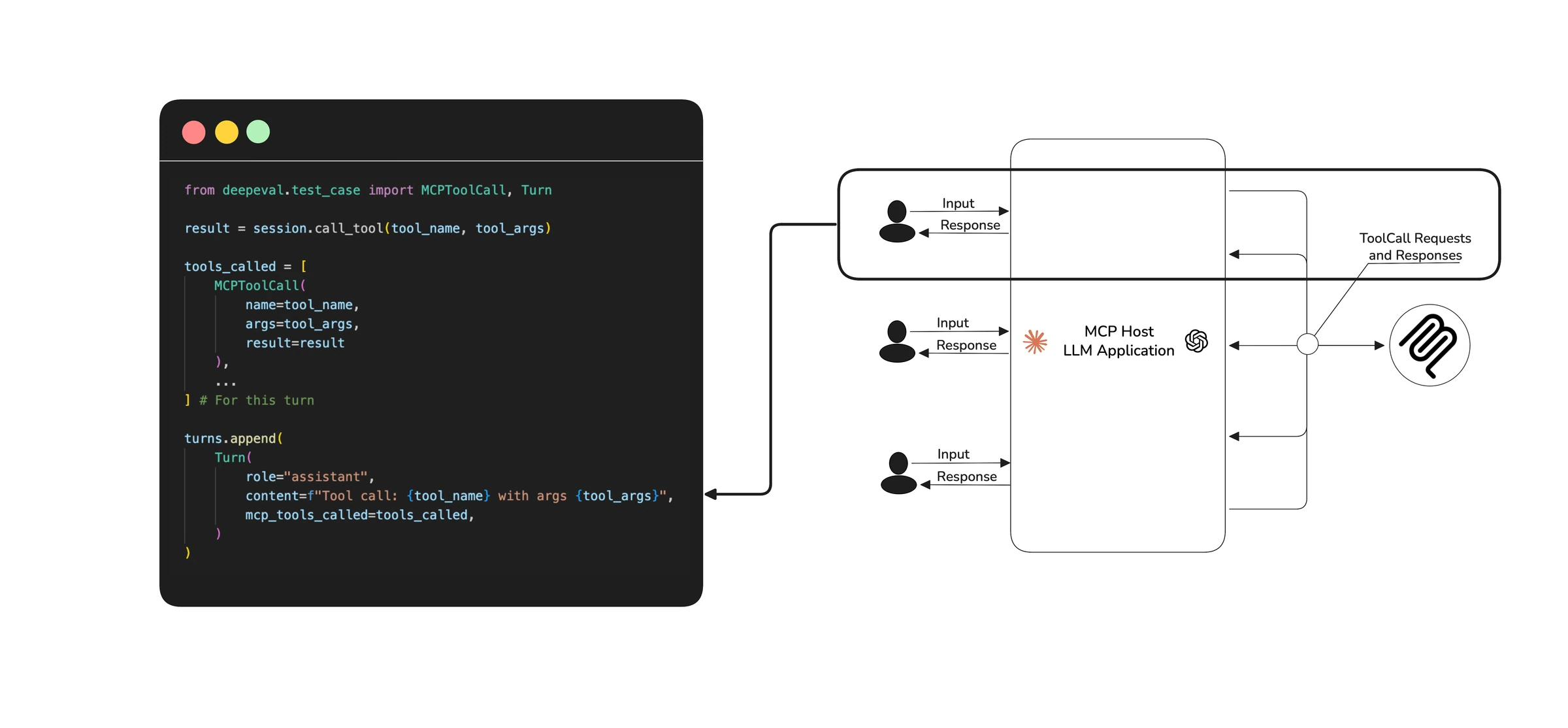
Each MCP interaction is stored in their corresponding turn's lists
Storing the MCP interactions this way allows us to understand the decision process of our MCP application during the entire execution.
3. Creating Test Cases
After your MCP application finishes executing, you can create a test case with all the data collected so far.
For single-turn apps:
The LLMTestCase from DeepEval allows you to pass the input, output, MCP servers and the MCP interactions all in one go. It represents a single snapshot of your application’s entire execution.
from deepeval.test_case import LLMTestCase

test_case = LLMTestCase(
    input="Your input",
    actual_output="Your LLM app's output",
    mcp_servers=mcp_servers,
    mcp_tools_called=tools_called,
)
For multi-turn apps:
In multi-turn MCP applications, you’ll have to pass all the turns which contain MCP interactions of their own, and MCP servers to the ConversationalTestCase object from DeepEval to create a representation of the entire conversation.
from deepeval.test_case import ConversationalTestCase

test_case = ConversationalTestCase(
    turns=turns,
    mcp_servers=mcp_servers,
)
4. Running Evals
The three core metrics to consider when evaluating MCP based applications are:
MCPUseMetric— Used for evaluating single-turn MCP applications. It evaluates your test case on tool correctness and argument generation.MultiTurnMCPUseMetric— Used for evaluating multi-turn MCP applications, this metric is the multi-turn equivalent of the single-turnMCPUseMetricMCPTaskCompletionMetric— Also designed for multi-turn applications, this metric focuses on the overall efficiency and task completion capabilities of your MCP application
These metrics directly target the criteria we mentioned earlier:
- Tool Correctness: Did the LLM choose the right tools to complete the task?
- Argument Correctness: Were the arguments generated for each tool call accurate and relevant to the current context?
- Task Completion: Did the application successfully deliver on the user’s original intent?
You can learn more about how these metrics work in DeepEval docs.
Single-turn evals:
You can now use the evaluate function from DeepEval, just pass your test cases and metrics to run evaluations.
from deepeval import evaluate
from deepeval.metrics import MCPUseMetric

metric = MCPUseMetric()
evaluate([test_case], [metric])
Since DeepEval is native to Confident AI, you will get comprehensive evaluation reports for all your evaluations. Here’s an example of how they would look like on the platform:
Multi-Turn Evals:
Similar to single-turn, you just need to pass in your conversational test cases and metrics inside DeepEval’s evaluate method to run your evaluations.
from deepeval import evaluate
from deepeval.metrics import MultiTurnMCPUseMetric, MCPTaskCompletionMetric

metrics = [MultiTurnMCPUseMetric(), MCPTaskCompletionMetric()]
evaluate([test_case], metrics)
As mentioned previously, multi-turn evaluations also get Confident AI’s evaluation reports. Here’s what multi-turn test reports would look like:
While the three metrics mentioned are good, sometimes, they might not be enough. In these cases, if you need metrics that are more tailored to your use case, DeepEval allows you to create your own custom metrics. Learn more here.
Here are some comprehensive examples that show how to evaluate MCP-based applications using DeepEval.
Congratulations! You have now successfully evaluated your MCP-based application — in less than 30 lines of code as promised.
Evals for cross-functional teams. Not just engineers.
Give all AI use cases the same quality bar with all-in-one evals, observability, and red teaming, and enforce them at scale.
Improving Your MCP Application
The evaluations covered in the previous section are an essential part of the development workflow. They offer valuable insights into your LLM application’s performance, helping you identify areas for enhancement. As a developer, you can leverage this evaluation data to significantly improve your MCP-based application.
Here are some key strategies to improve your application:
- Creating datasets: Build golden datasets with consistent inputs and scenarios to benchmark different versions of your application under the same conditions. This helps you compare changes fairly and reduces evaluation bias.
- Choosing MCP servers: Multiple MCP servers may provide the same functionality, but differ in performance, latency, or tool quality depending on their implementation. Try different servers to find the one that best fits your app’s needs.
- Providing better context: Refine how you provide context on what primitives your LLM app has access to through descriptions. Better descriptions increase the chances of your app choosing the right tools.
- Choosing models: You can try different LLM models like GPT or Claude to find which one works best for your use case. Choosing a better model increases your task completion rate.
By applying these techniques, you can continuously refine your MCP application throughout development. Tools like DeepEval and Confident AI handle the evaluation process for you, allowing you to focus on building and improving your application.
And that’s it! You now understand how to effectively evaluate and enhance any MCP-based application. Let’s now take a quick recap at what we’ve learnt throughout this article.
Conclusion
MCP has redefined how LLM applications interact with the world — but access to tools isn’t the same as using them well. That’s why MCP Evaluation is necessary for your MCP-based LLM application.
By evaluating how your LLM applications interact with tools, resources, and prompts, you can iterate continuously to build a reliable agent that not only talks but also reliably completes tasks for you.
With DeepEval, you get full visibility into your application’s reasoning, tool usage, argument generation, and tool results — all wrapped into a single test case. Its built-in metrics help you evaluate tool calls, argument correctness, and task completion.
For production teams, DeepEval + Confident AI offers beautiful, shareable evaluation reports with full traceability and observability — all in one clean UI. Curious? Sign up here. (it’s free)
We’ve now reached the end of this article, if you enjoyed reading this, make sure you give ⭐ DeepEval a star on Github ⭐.
Do you want to brainstorm how to evaluate your AI agents? Ask us anything in our discord. I might give you an "aha!" moment, who knows?
Evals for cross-functional teams. Not just engineers.
Give all AI use cases the same quality bar with all-in-one evals, observability, and red teaming, and enforce them at scale.