
Most product managers working on AI products are stuck in a weird middle seat.
You own the user experience. You know which answers are wrong, which flows feel broken, and which edge cases matter most. But the AI itself lives behind an engineering queue, so every time you want to fix a prompt, check whether quality actually improved, or understand why a release felt worse, you have to wait on someone else.
That gap is finally closing. Modern LLM tooling lets product managers do two things directly that used to require an engineer for every iteration:
- Build on the AI product. Edit and version prompts, run evals, and compare model, retrieval, or agent-behavior variants to see what actually improves quality.
- Monitor the AI product. Track quality on dashboards, surface new issues with signals, get alerted when something crosses a line, and hand engineering the exact trace or test case behind a problem.
This guide is about those two workflows. Engineers still own instrumentation, releases, and safety. But the day-to-day work of improving and watching the AI product no longer has to bottleneck on them — and that changes what an LLM PM can actually do.
TL;DR: LLM Product Manager Workflows
- An LLM PM has two core workflows: building on the product and monitoring it. Almost everything else is in service of those two.
- Both workflows run on metrics you trust. Define product-specific metrics — even custom ones, in plain English — and align them with human judgment, so "good" means the same thing in development and in production.
- Building means changing the product and proving it helped. Edit and version prompts, run evals, and compare variants on the same dataset and metrics — not by eyeballing a few answers in a playground — and grow your test cases from real production failures.
- Monitoring means watching quality and turning it into action. Review production traces, then use custom dashboards, recurring health reports, and signals to see what changed; alerts and shareable links get the right evidence to the right person.
- Engineering owns the system; PMs own the loop. Engineers wire the app, releases, and safety boundaries. PMs iterate on behavior and watch quality.
What Are LLM Product Manager Workflows for LLM Evaluation?
LLM product manager workflows for LLM evaluation are the repeatable ways a PM keeps an AI product's quality high without owning the engineering. They come down to two jobs a PM can now do directly: building on the AI product — editing prompts, running evals, and comparing versions before shipping — and monitoring it in production with dashboards, signals, and alerts that surface what changed.
This is its own discipline because AI quality does not behave like traditional software quality. Normal product habits — track adoption, watch funnels, read support tickets — assume stable behavior, but AI products are non-deterministic: a prompt change can fix one request and break another, and the product can look healthy on infrastructure metrics while the experience quietly gets worse.
Why LLM Product Managers Need an Evaluation Workflow
For a long time, the PM response to all of this was to judge from the outside: read a few outputs, write up feedback, and hand it to engineering. That does not scale, and it puts every change and every quality check behind someone else's queue.
Without a workflow of their own, PMs can describe a quality problem but cannot act on it — so AI quality moves at engineering's bandwidth, and "is the product getting better?" becomes a question nobody can answer quickly.
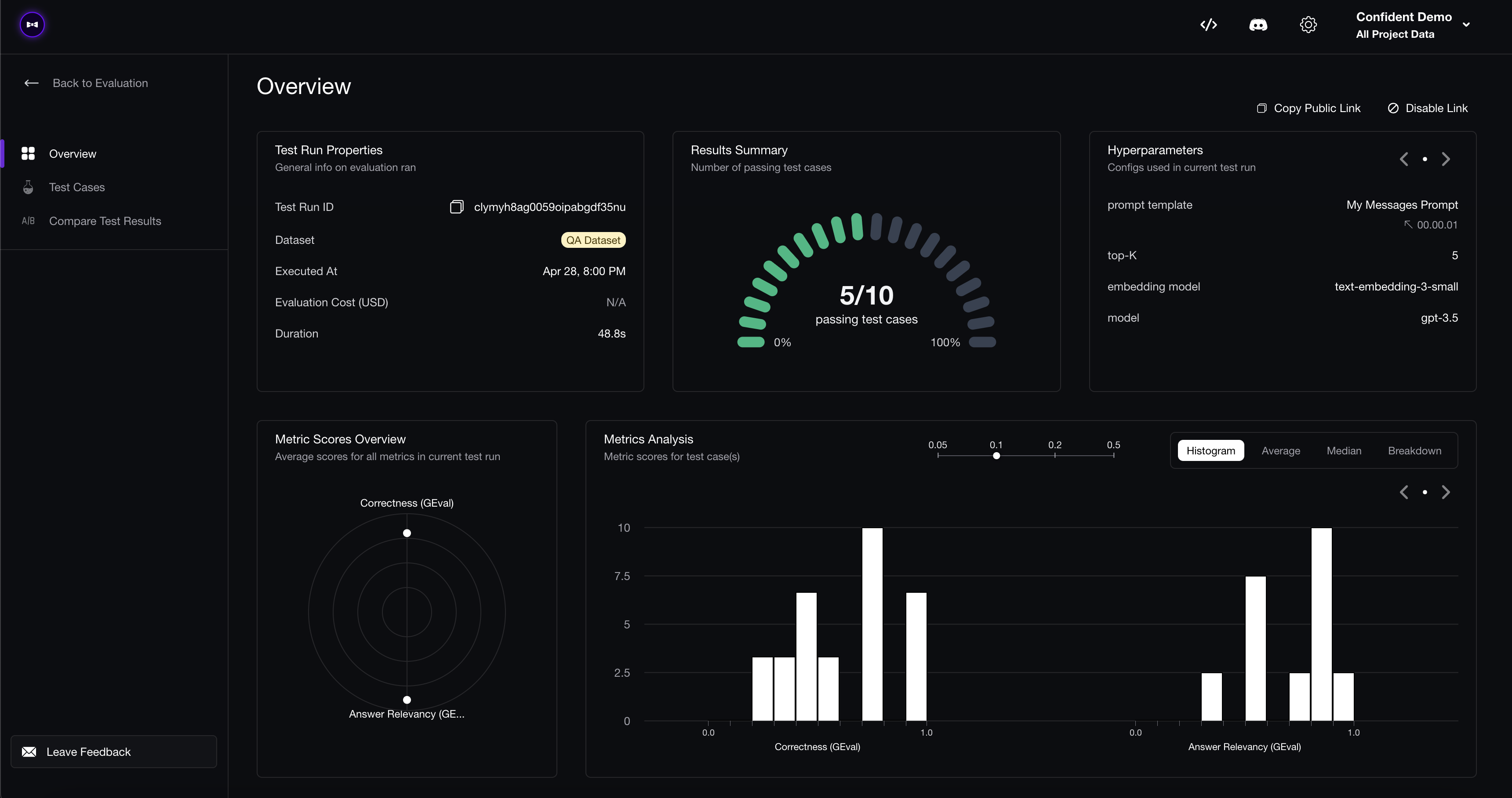
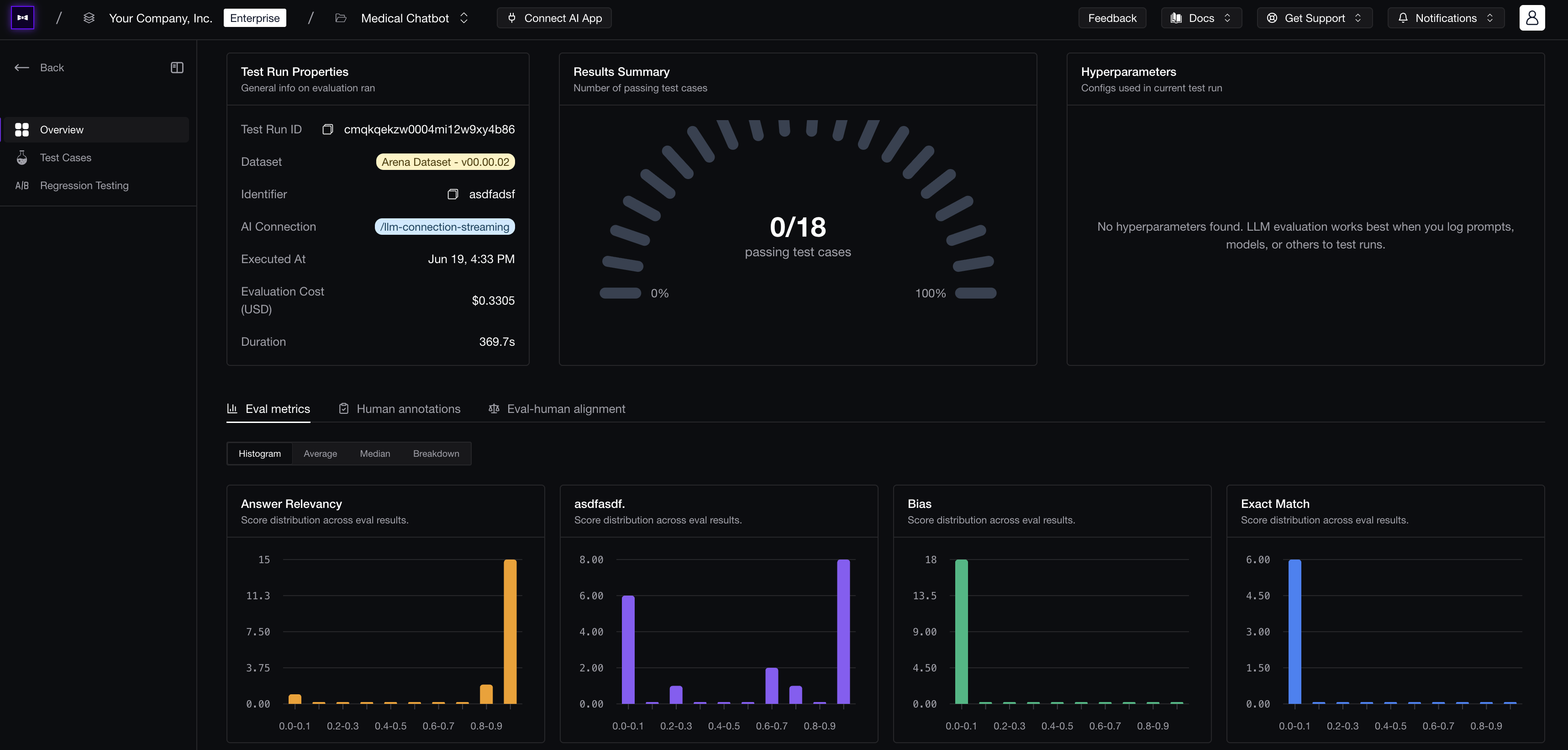 With a workflow in place, “is the product getting better?” stops being a guess — every change produces a test run report with a pass rate and per-metric scores a PM can read at a glance.
A dedicated evaluation workflow fixes that by putting both jobs directly in the PM's hands, while engineering keeps the hard infrastructure: instrumentation (the code that records what the AI does so it can be measured), the release path, and the safety boundaries. PMs own the product hypotheses, the iteration, and the quality bar.
It also helps to be precise about what "quality" even means here. The question is not "did the model return a response?" It is "did the AI actually help the user, accurately and in a way we are comfortable shipping?" An assistant can be fluent and still incomplete, take the right action in the wrong tone, or miss the moment it should have escalated. Those are product failures, not just model failures — which is exactly why PMs need to be inside both workflows instead of watching from the sidelines.
LLM Metrics for Product Managers
Both of those jobs depend on the same thing: a clear, trustworthy definition of what "good" means for your product. That definition lives in your metrics, and it is the part a PM should own most directly — before any eval is run or any dashboard is built. Two things make metrics work for a PM: being able to define the ones that fit your product, and trusting that they agree with your judgment.
Custom Metrics
A few standard, out-of-the-box metrics are a fine starting point for almost any AI product, but they only get you so far. Your real quality bar is always product-specific: ask a clarifying question before acting, avoid overconfident answers, escalate frustrated users, or preserve preferences across turns. Those requirements rarely fit a generic metric — and capturing them is exactly where a PM matters most.
The good news is that custom metrics are far easier to build than people expect, and a PM does not need engineering to write one. With a framework like G-Eval, you describe your criterion in a sentence or two of plain English and you have a working LLM-as-a-judge metric — an AI model that reads each response and scores it against your criterion. For example:
Penalize any response that promises a specific delivery date.
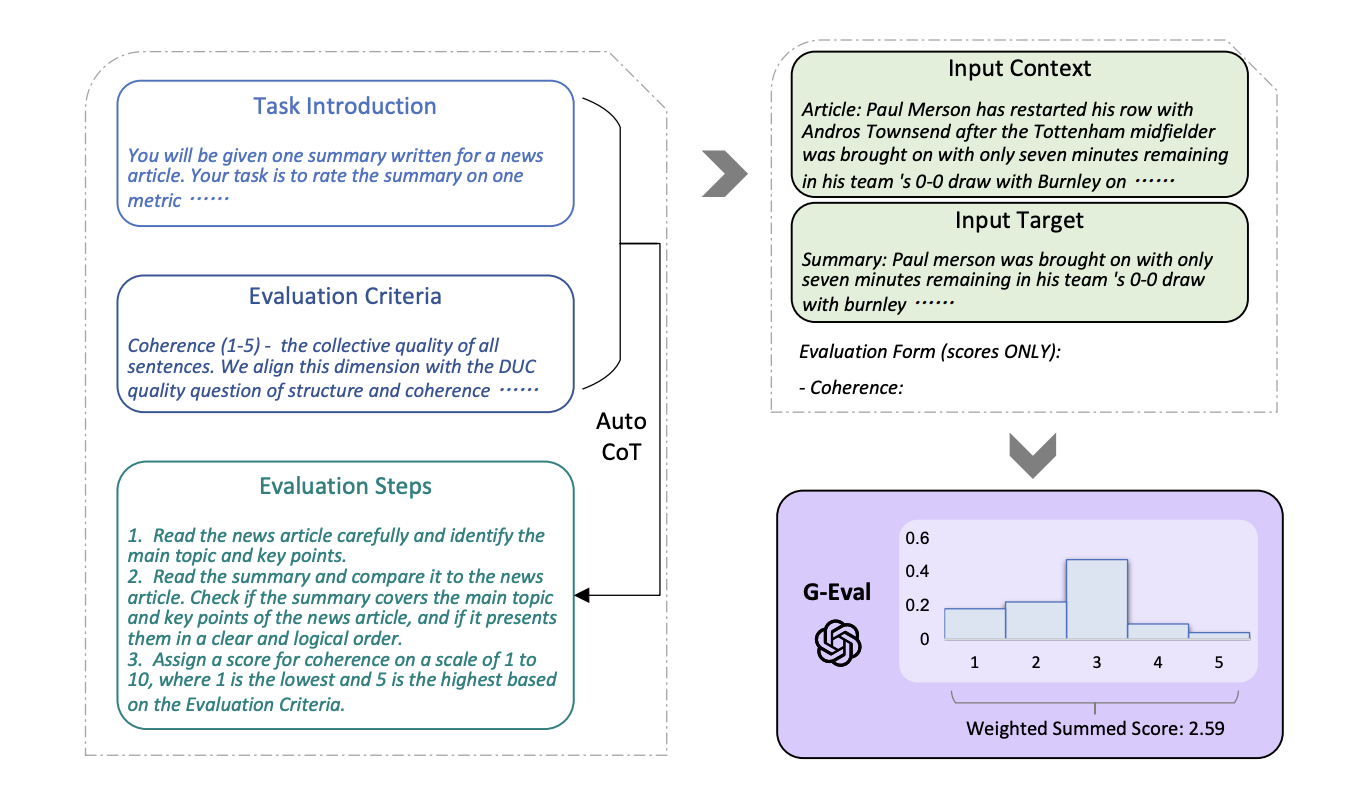
G-Eval turns a plain-English criterion into evaluation steps, judges the output against them, then weights the result into a final score.
No model training, no rubric spreadsheets, no code. Don't settle for an off-the-shelf metric that almost fits when you can write the one your product actually needs.
Metric Alignment
A custom metric is only useful if you trust it, and an automated metric can be confident and still disagree with you — passing a response because it is generally relevant when you would reject it for breaking a policy, or failing a concise answer because it expected a longer one. So before you rely on a metric, it has to be aligned with human judgment: a small sample gets annotated by hand, the metric scores the same examples, and the definition is adjusted until the two agree.
The PM's job here is usually not to label every example themselves — it's to route the right examples to the right reviewers. Who that is depends on the question: domain experts or SMEs for judgment calls that need specialized knowledge, QA for consistency and policy checks, and engineers when the issue is technical correctness. The PM owns the quality bar and the routing decision; the reviewers supply the ground truth. You do not review every trace forever — you review enough to teach the metric what good looks like, then let it run at scale. If you are weighing tools for this, our rundown of the best human-in-the-loop evaluation tools compares how well each one turns reviews into aligned metrics.
 Metric alignment shows whether automated eval scores match human judgment.
This is why metrics sit ahead of both workflows: the same metric runs in two places — on your test cases when you build, and on live traffic as an online metric when you monitor. Align it once and you get a single definition of quality you can reuse everywhere: in the evals and experiments you run before shipping, and in the dashboards and alerts that watch production later.
Standardize AI Quality for the entire org, not just individual teams
Give all AI use cases the same quality bar with all-in-one evals, observability, and red teaming, and enforce them at scale.
How Product Managers Build on the AI Product
The first workflow is the one that surprises most people: with the right tooling, you can change how the AI behaves yourself — and prove the change worked — instead of waiting on an engineering ticket.
Changing the AI product usually means editing the prompt, swapping the model, adjusting what an agent is allowed to do, or tuning how it pulls in information. All of that normally lives in code, which is exactly why a PM has to route every tweak through engineering.
The best workflows remove that bottleneck with a one-time setup: engineering connects your real application to the evaluation tool once — with a little code, or through a no-code AI connection — and chooses which controls are safe for a PM to change, usually the prompt, sometimes the model or retrieval. Not every platform works this way. But when one does, you can write a new version of the prompt, run it against the actual product, and see whether quality improved — without pulling in an engineer for every change.
The catch is that editing a prompt only helps if you can tell whether your edit made things better or worse. That is what the rest of the building workflow is for, and it follows a natural order: run an eval to check whether a change clears your quality bar, run an experiment to compare versions and pick the strongest one, and keep feeding real production failures back into your test cases so that bar keeps reflecting what users actually hit. Once that initial connection is in place, none of these steps should require writing code.
No-Code Evals
The headline capability of a strong eval workflow is simple: change the product and immediately check whether it got better — without writing a line of eval code.
That matters because a PM almost always has a specific change they want to try. Maybe a new model just launched and you want to know whether switching is actually worth it. Maybe you want to write a brand-new prompt so the assistant asks a clarifying question before acting, soften its tone, or add a guardrail for a complaint you keep seeing in support tickets. These are real product instincts — and normally each one becomes a ticket that waits in an engineering queue, so most of them never get tested at all. A no-code eval workflow lets you act on the impulse directly: make the change, run it against the real product, and see the quality impact for yourself.
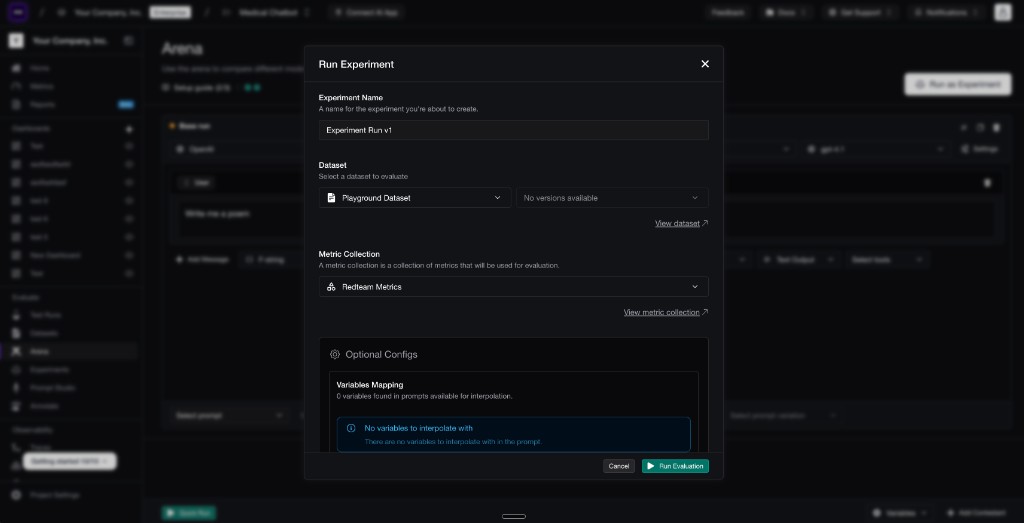 Confident AI lets you run an eval by selecting the dataset and metric collection to score a version against.
Concretely, that workflow should let you select the app or prompt version you want to test, choose the metrics you defined above, choose a dataset of representative examples, and run the eval against the real product through the existing connection — without recreating the app inside an eval tool, and without an engineer wiring up a new script every time. (Where those datasets come from is covered further below.)
Every eval run produces a report, and that report matters because PMs make trade-offs. Maybe the new prompt improves task completion but hurts tone. Maybe a cheaper model is fine for simple requests but fails harder cases. Maybe the average improved while one important use case regressed. A serious run can contain hundreds or thousands of test cases, so the report should summarize the main failure modes, call out the biggest regressions, and point to representative examples — then let you share the exact failing cases with whoever needs to fix or approve the change.
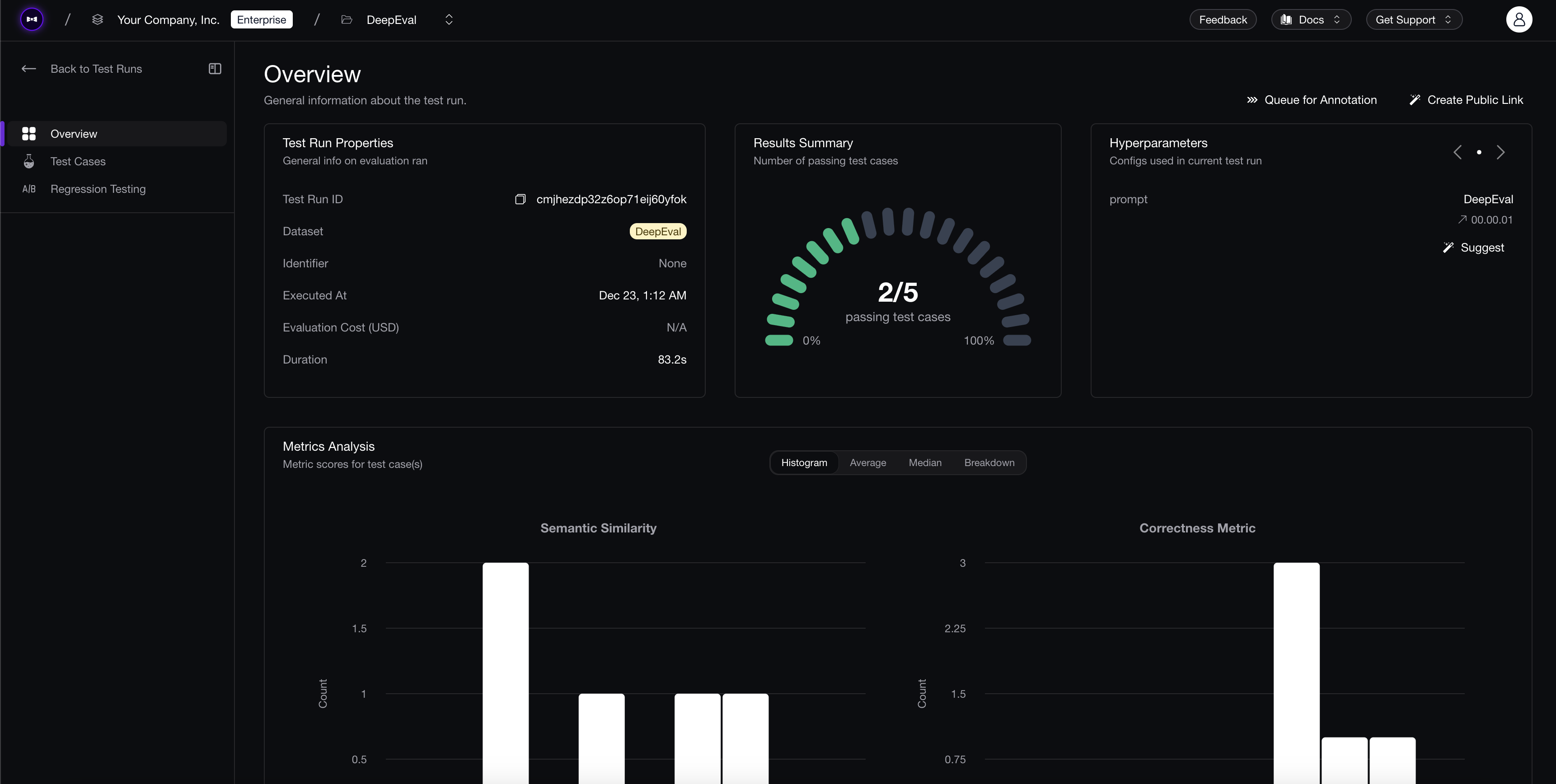 A useful eval report shows aggregate quality and the individual examples behind the score.
If you are comparing platforms for this part of the workflow, the real question is not "does it run evals?" It is "can a PM run and interpret evals without rebuilding the system around engineering?" For a broader tool-by-tool view, see our guide to the best LLM evaluation tools, or the top no-code eval tools if running evals without code is the priority.
No-Code Prompt and Model Experiments
Running an eval tells you whether one version is good enough. But you usually have more than one idea — two different prompt rewrites, or a new model versus the one you ship today — and the real question is which one is best. Answering that is an experiment, and it is usually the decision a PM actually needs to make.
The tempting shortcut is to decide by feel: change a prompt, try a handful of examples, agree the new tone reads better, and ship it. That is exactly how a rare but important case quietly breaks while everyone feels productive.
An experiment replaces that with a fair comparison. You keep the current behavior as the baseline — the version you are trying to beat — then run each new candidate against the same set of examples, scored by the same metrics, so the only thing that changes is the version itself. Then you look at the cases where the versions disagree, pick the winner, and keep a record of which one won and why.
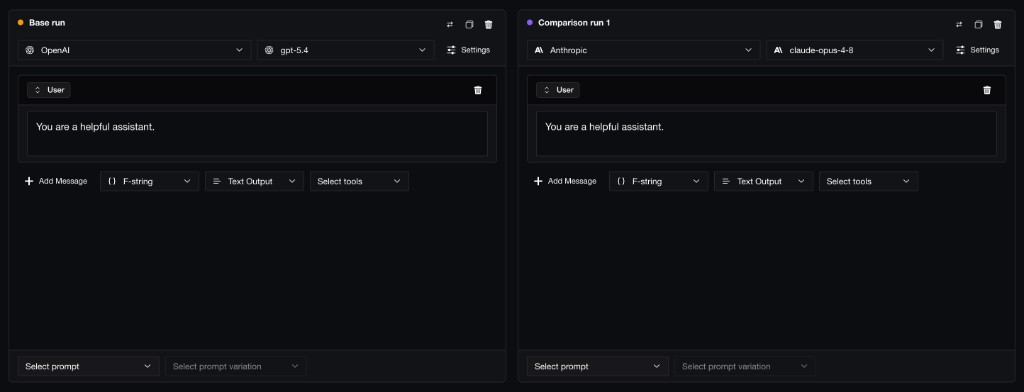 Confident AI lets you compare prompt and model variants side by side before running the full experiment.
This is the difference between a playground and an experiment. A playground — the chat box where you type a prompt and read the reply — only tells you whether one answer looks good right now. An experiment tells you whether a version is better across all the cases you care about, judged by metrics you trust, without quietly breaking something else. That second answer is the one you need before approving a change.
Many of these calls are product decisions, not engineering ones — whether the assistant should ask one more clarifying question, use a calmer tone, pull in more context, or escalate sooner. You should be able to draft the change, test it through the same connection the product already uses, and see whether quality improved before asking engineering to ship anything. And keeping versions matters: if a change helps one use case but hurts another, the team needs to know which prompt, model, or instruction caused the shift, who made it, and which eval report backs it up. For a side-by-side comparison of platforms built for this, see the best tools for prompt experimentation.
Datasets From Production
Evals and experiments are only as good as the test cases behind them, and the best cases come from real production behavior. This is where most teams lose the loop: they spot a bad response, agree it was bad, maybe file a ticket, and move on. Two weeks later the same failure comes back, because it never became part of the evaluation system.
This is also the part of building where the PM sets direction. The job is not to hand-add traces one at a time — it is to decide what is worth capturing and improving on: which failures matter, which use cases must not regress, and which patterns should always be pulled in for a closer look. Engineering can make production traces available, but the judgment about what counts as a problem worth fixing is the PM's.
Every reviewed issue should then become one of three things:
- A dataset case, if you want to stop the same failure from shipping again.
- A metric improvement, if an existing metric should have caught it but did not.
- A new metric, if the failure represents a quality dimension you are not measuring yet.
That is the difference between feedback and coverage. Feedback tells you something went wrong once. Coverage makes sure the same thing is tested every time afterward.
The strongest workflows let a PM encode that direction instead of collecting by hand: define the criteria once — a failing metric, a signal, a segment, a topic — and have matching production traces routed into a dataset or review queue automatically. The PM controls what gets collected and why; the system does the collecting.
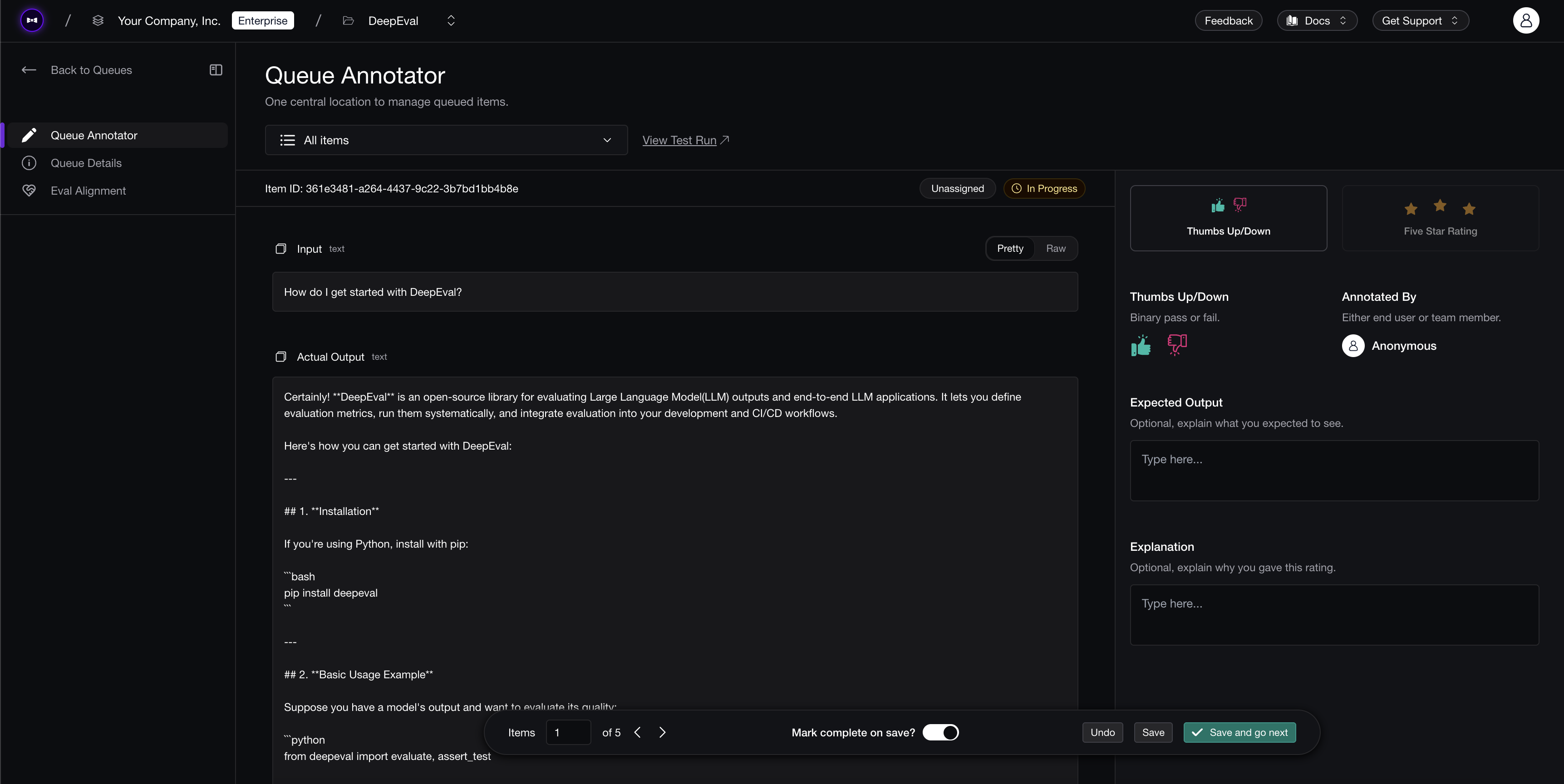 Reviewing queued production traces before they become dataset cases or new metrics.
Done consistently, this is what keeps your evals honest over time: every real failure becomes a permanent test case, and a reviewed issue that no metric caught is the signal to add one. It is the same expanding-coverage loop we walk through in the LLM evaluation guide for startups. Building is how quality goes up; keeping it up after launch is the other half of the job.
How Product Managers Monitor the AI Product
Building gets a better version shipped. The second workflow keeps it good after launch — and makes sure that when something slips, the right person hears about it with enough context to act.
AI products drift. Users ask new things, prompts get edited, retrieval content moves, and model behavior shifts under you. A PM needs a lightweight way to watch quality over time and turn a quality drop into a concrete next step, without becoming a full-time operator staring at infrastructure charts.
Custom Dashboards and Reports
Running one eval before launch is not enough. Quality should be tracked continuously through scheduled evals and a dashboard a PM can actually read.
Most monitoring is too infra-heavy for PM work. Latency, token cost, and error rates matter, but the AI can be fast, cheap, and wrong. The right PM dashboard strikes a balance — enough to answer product-quality questions, not so many engineering knobs that every chart feels like an observability console. Good platforms make these dashboards easy to build: a PM can spin up a view for a product surface, use case, or user segment in a few clicks — no SQL, no data team, no engineering ticket — and see quality over time, regression rate, failure modes, and the trace samples behind each drop, with cost and latency alongside so trade-offs stay visible.
The point of a dashboard is not to admire a line chart. It is to decide what to do next: if task completion drops on an important use case, the PM should be able to click into the failing traces, see which prompt version is active, add failures to a dataset, run a variant experiment, and track whether the next release fixed it. The dashboard is just the front door back into building.
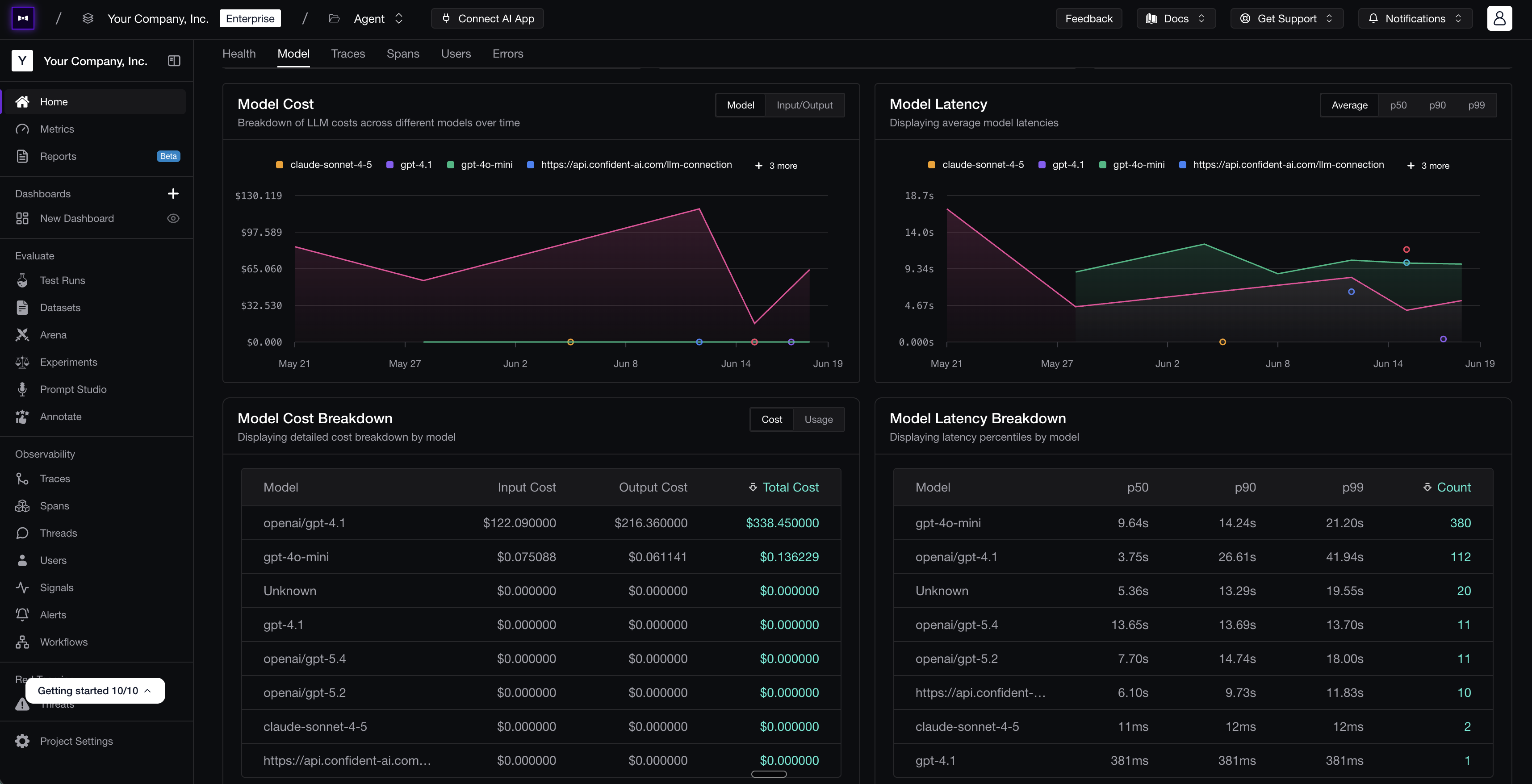 A custom dashboard on Confident AI tracking model cost and latency over time, with per-model breakdowns — the kind of view a PM can spin up without engineering.
Dashboards are useful when a PM wants to dig in; reports are useful when a PM needs the system to tell them what changed. A report is really a dashboard that arrives on a schedule and explains itself — and the same idea applies to any report, whether it summarizes a single eval run, a post-release check, or a weekly view of production. The most useful ones are AI-summarized and product-readable rather than a raw export of every metric: they say whether the experience is getting better or worse, which use cases or prompt versions regressed, which signals appeared that no existing metric covered, and what to inspect or compare next.
Generated daily, weekly, or after meaningful releases, reports give a PM an operating rhythm. Instead of asking "can someone pull the latest quality numbers?", the whole team gets a regular product-quality summary that connects scores, examples, and next actions — and the PM only has to dive into the specific traces or test cases that matter.
If monitoring is your main gap, it is worth comparing platforms through a PM lens rather than a pure infrastructure one. We cover that separately in our guide to the best LLM observability platforms for product managers.
Custom Signals
Dashboards and reports tell you the numbers moved. Signals tell you what kind of behavior is moving them — automatically, and at a scale no PM can read through by hand.
PMs and engineers should build metrics together, but asking a PM to invent a formal metric from scratch is usually too much friction. PMs often know what they want to watch for before they know how to score it.
That is where signals help. A signal is a lightweight way to surface or classify production behavior, and good platforms generate many of them automatically — flagging frustrated users, new topics, repeated failures, prompt injection attempts, or quality drift before anyone defines a metric, so issues find the PM instead of the other way around. The strongest platforms also let you define custom classification signals that reflect how the product team thinks: is a new use case emerging that we do not support, are conversations turning negative, are important user segments hitting the same failure repeatedly, are users asking for a human after the AI response?
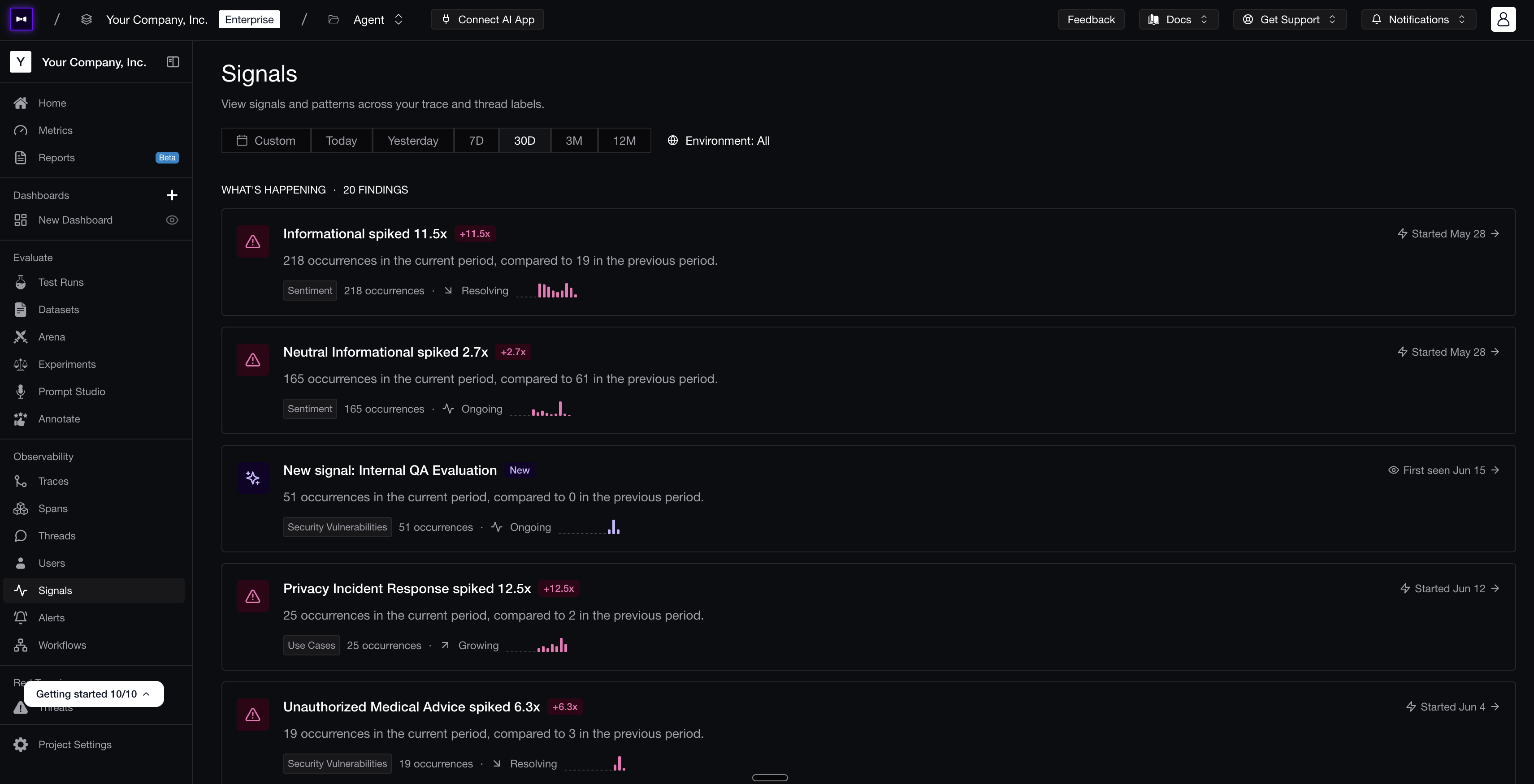 Signals on Confident AI automatically surface and classify production behavior — sentiment spikes, new use cases, and security issues — with occurrence counts a PM can track.
Those are not always "metrics" in the strict eval sense — they are product signals. The best setups give a PM both at once: automatic surfacing for the obvious failures, and custom signals for the product-specific categories you care about. Once a signal is useful, it folds right back into building — route matching traces into review, add examples to a dataset, or turn it into a metric.
Production Trace Review and Alerts
Dashboards, reports, and signals tell you something changed. A trace — the full record of a single run, from the user's input through every step to the AI's final response — tells you what actually happened. When a metric dips or a signal spikes, you open the specific traces and see what the user experienced, not aggregate pass rates and not a demo script. Good trace review keeps this readable instead of turning you into a distributed-systems debugger: the input, the response, the conversation thread, retrieved context, tool calls, the prompt version and model, metric scores, and annotations, all in one place.
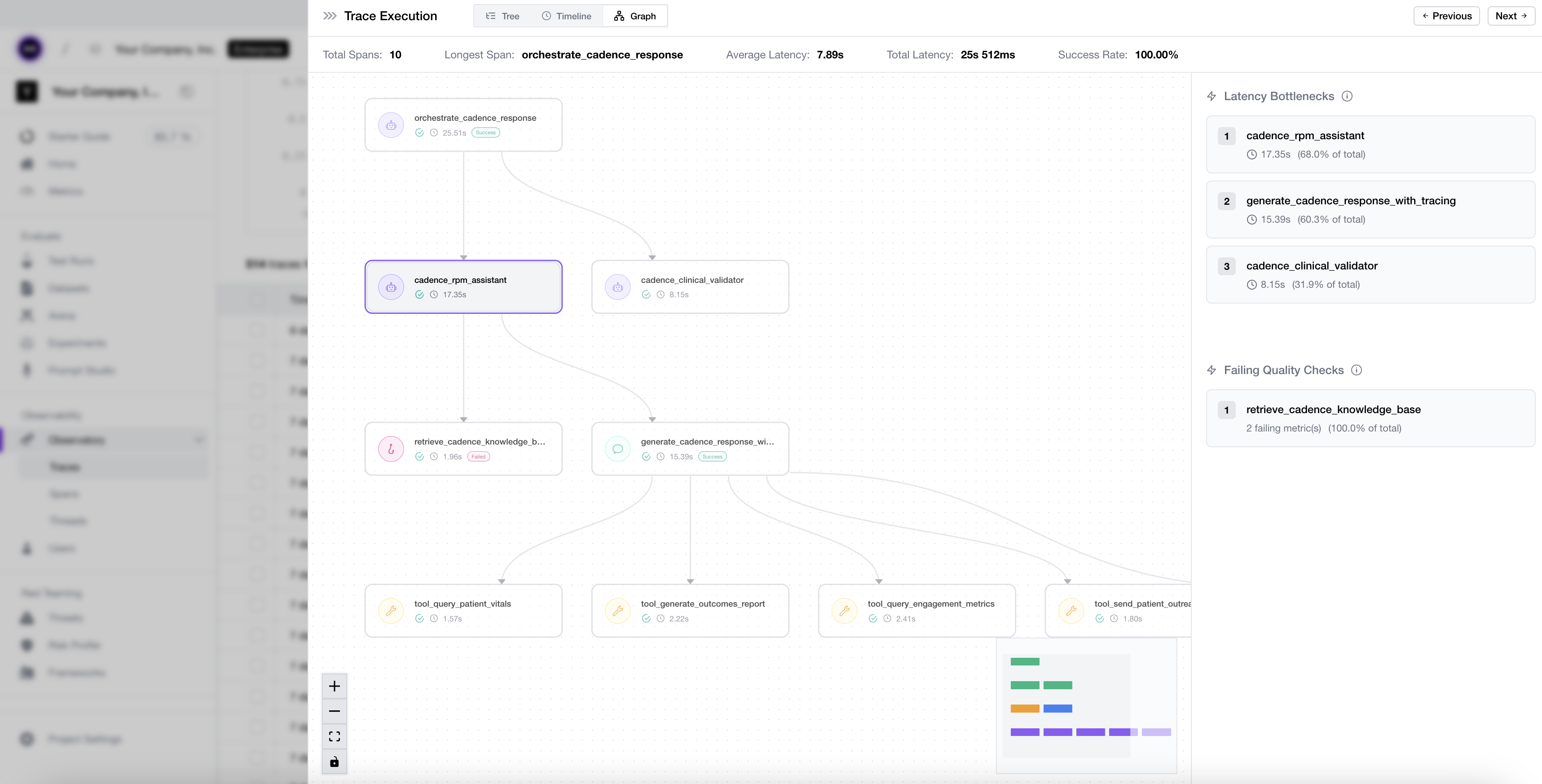 What end-to-end LLM tracing looks like on Confident AI.
The point is to turn a bad experience into something the team can act on. Flag the issue from the trace ("bad escalation decision," "good answer but bad tone") and share the link with the input, output, tool calls, context, and annotations attached. "This user had a bad experience" is vague; "here is the trace, the failing step, and the prompt version" is not — and that same flagged trace becomes the next dataset case or the reason to add a metric.
Monitoring only matters if it reaches someone who can act, and good platforms close that gap with alerts and integrations. Get notified when a metric drops below a threshold, a segment keeps hitting the same issue, or a signal crosses a line — with enough context to triage, not just "quality is down" — then route the summary, the failing trace, and the report into the channels and issue trackers your team already uses. PMs usually own the judgment, not the fix, so the goal is targeted routing, not a noisy firehose. If alerting is your main gap, see our comparison of the top tools for monitoring and alerting on agentic systems.
Common LLM Product Manager Workflow Mistakes
Most teams trip over the same things in both workflows:
- Waiting on engineering for changes you can make yourself. Once the app is connected, editing a prompt or running an eval is a PM task — routing every iteration through an engineering ticket is the exact bottleneck this workflow exists to remove.
- Editing a prompt without running an eval. A change that reads better in the playground on a handful of examples can quietly break a use case you forgot to check.
- Choosing a variant by feel instead of running an experiment. If two versions do not see the same dataset and the same metrics, the comparison is not fair — it is just a vibe in a playground.
- Settling for off-the-shelf metrics. Generic metrics are a starting point, not your quality bar; the failures that actually matter usually need a product-specific custom metric.
- Trusting a metric you never aligned. An automated metric can be confident and still disagree with you — align it against human judgment, and route examples to the right reviewers, before you rely on it.
- Letting a bad response die in a ticket. A failure you spot but never turn into a dataset case or a new metric will ship again two weeks later.
- Watching only infrastructure dashboards. Latency, cost, and error rates can look healthy while the AI is fast, cheap, and wrong — and an overall average can hold steady while an important use case quietly regresses.
- Waiting for a metric before watching a pattern. Start with a signal for new use cases, sentiment, or escalation risk, and promote it to a metric later if it earns it.
- Sending a vague complaint instead of evidence. "This felt worse" is not actionable; link engineering to the exact trace, failing test case, or eval report.
Why Confident AI Is the Best Tool for LLM Product Manager Workflows
Both workflows only work if the pieces live in one place. If trace review is in one tool, prompt editing in another, evals in a notebook, dashboards in a BI tool, and annotations in a spreadsheet, the PM ends up right back where they started — waiting on engineering to stitch the context together. Confident AI is the best tool for LLM product manager workflows because it puts both on one platform: engineers connect the application or agent once, through code or a no-code AI connection, and from then on PMs work on the real product — not a toy reconstruction of it inside an eval tool — starting from custom metrics they define in plain English and align with their own judgment, so the same definition of quality holds in development and production.
For building, PMs can edit and version prompts, run evals through the connection, compare prompt, model, retrieval, and agent-behavior variants on the same dataset and metrics, turn production failures into datasets, and read AI-summarized reports that explain what happened across thousands of test cases.
On Confident AI, every change a PM makes produces a test run report — pass rate and per-metric score distributions — without writing eval code.For monitoring, PMs can review production traces, build custom dashboards by use case, prompt version, release, or segment, get recurring AI-summarized health reports, define signals for the patterns they care about, set alerts on quality thresholds and custom filters, and route the exact trace, test case, or report into the tools the team already uses.
This is the difference between a PM-friendly AI quality workflow and an engineering-only observability setup. PMs are not just consumers of a dashboard — they build on the product and watch it, while engineering keeps instrumentation, releases, and safety in their hands.
Get started with Confident AI for free and give PMs both workflows in one place: traces, prompt versions, evals, variant experiments, AI connections, AI-summarized reports, custom dashboards, signals, alerts, collaboration integrations, and production monitoring.
Conclusion
The best AI product managers are not trying to become machine learning engineers. They are trying to make better product decisions, faster, with better evidence.
Two workflows make that possible. The first is building: edit and version prompts, run evals, and compare variants on the same dataset and metrics, so improving the product no longer waits in an engineering queue for every iteration. The second is monitoring: track quality on dashboards, catch new issues with signals, get alerted when something crosses a line, and route the exact trace or test case to whoever needs to act on it.
Engineering still matters enormously — they instrument the system, own the release path, and hold the safety boundaries. But the day-to-day work of improving and watching the AI product belongs to the PM. Do both workflows well, and AI product management stops being "does this feel better?" It becomes a real, repeatable way to improve the product.
Frequently Asked Questions
What LLM evaluation platforms have a UI where product managers can review traces and flag issues?
What tools let PMs run LLM evaluations and compare prompts without waiting on engineering?
What is the best way for a PM to run prompt experiments without writing code?
How can a product manager track whether AI quality is improving or regressing over time?
What dashboards should PMs use to monitor LLM performance?
How can product managers surface new LLM issues without creating a full metric?
Why do integrations matter for LLM product manager workflows?
Do PMs need to define LLM evaluation metrics?
How often should PMs run LLM evals?
How does Confident AI support LLM product manager workflows?
Do you want to brainstorm how to evaluate your LLM (application)? Ask us anything in our discord. I might give you an "aha!" moment, who knows?
Standardize AI Quality for the entire org, not just individual teams
Give all AI use cases the same quality bar with all-in-one evals, observability, and red teaming, and enforce them at scale.