The people who can tell you whether an AI agent is actually working are usually not the engineers who built it. They are the PM who has been reading user complaints all week, the QA lead who maintains the regression baseline, and the clinician or credit officer or support lead who knows what the right answer was supposed to be. Asking that group to write Python every time they want to run an evaluation is how AI quality quietly becomes engineering's full-time job — and how it stalls.
No-code AI agent evaluation tools exist to unstick that. A useful workflow lets a non-engineer upload a dataset, pick a metric, run an evaluation against the real production agent, annotate failures, and share a report, all without code. A key differentiator between platforms is whether you are evaluating the agent you ship — or a reconstruction of it that lives inside the tool.
This guide compares the top eight no-code eval tools in 2026. The next section explains why no-code evaluation matters for AI applications, AI agents, and the teams responsible for product quality.
What are no-code evals and why are they important?
No-code evaluation matters because AI quality is not owned by engineering alone. Engineers know how the system is built, but product teams know whether the experience works, QA knows which regressions matter, and domain experts know whether the answer is correct. A no-code workflow lets those teams create test cases, choose metrics, run evals, review failures, annotate outputs, compare versions, and share reports without waiting for a developer to run a notebook or maintain a one-off script.
For AI agents, this is even more important because the failure can happen anywhere in the workflow: tool choice, retrieval, planning, handoffs, memory, multi-turn behavior, or the final response. The best no-code eval tools let non-engineers review the full trace or thread, not just the answer, and turn production failures into regression tests that the team can rerun before the next release.
It does not mean engineering disappears entirely. Engineers still usually connect the application, set up authentication, instrument traces, and maintain code-based checks when exact business logic is required. The no-code part is the day-to-day evaluation workflow after that setup: the people responsible for quality can run and review evals without waiting for a developer.
The tools in this category differ by how much of the workflow is truly no-code. Some tools only make prompt comparison visual. Others also support dataset management, no-code custom metrics, regression testing, scheduled evals, annotation queues, and shareable reports. For agent teams, the important question is not whether the UI looks polished; it is which evaluation tasks non-engineers can complete on their own. A useful no-code eval platform should support:
- Live-agent evaluation: non-engineers can run evals against the application or agent the team actually ships, not only a rebuilt prompt playground copy.
- Prompt and model testing: teams can change prompts, swap models, tune settings, and evaluate the new outputs without waiting for engineering.
- No-code custom metrics: PMs, QA, and domain experts can define rubrics or product-specific criteria in the UI.
- No-code regression testing: QA can compare a new version against a baseline without running a CLI command.
- Cross-functional review and error analysis: reviewers can inspect traces, annotate failures, check metric alignment, find recurring error patterns, and share results with the broader team.
- Governance dashboards: non-technical stakeholders can understand AI health, quality trends, and release risk without reading traces or running scripts.
- Reports and scheduled evals: teams can rerun eval suites on a cadence and share results without engineering preparing every report.
1. Confident AI
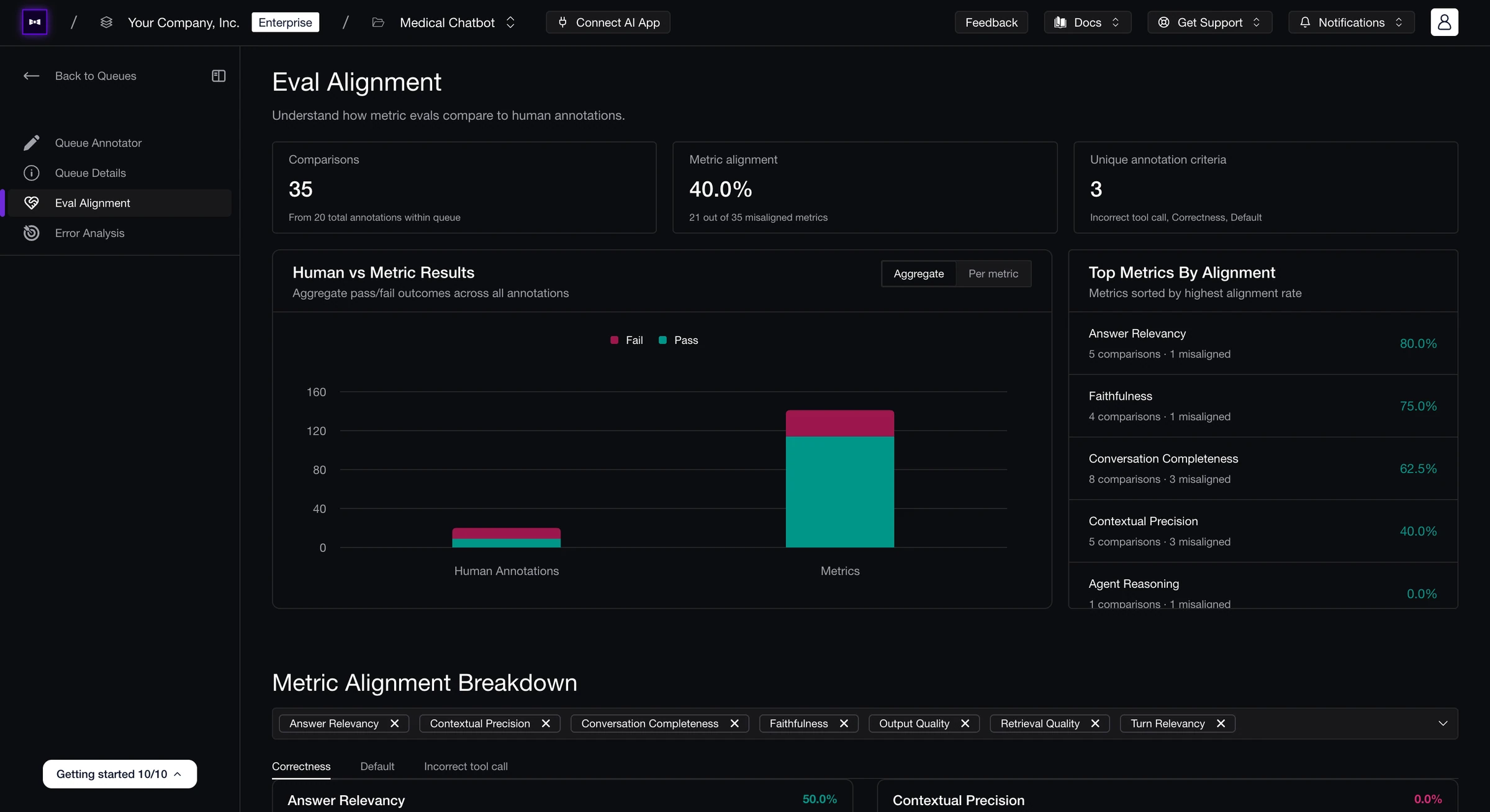
Confident AI is built for live-agent evaluation: PMs, QA, and domain experts can evaluate the AI agent the team actually ships. An engineer connects the AI agent once through an HTTP endpoint, and reviewers can then run evals against real outputs with traces attached.
That connection is what makes the no-code workflow useful beyond a prompt playground. After setup, non-engineers can test prompt, model, tool, and hyperparameter changes against the connected agent, see the actual AI output immediately, and evaluate the variant in the same workflow. They can also upload datasets, select metrics, compare versions, review failures, and generate reports without writing code.
The evaluation layer combines research-backed metrics, custom metrics, human review, error analysis, no-code regression testing, scheduled evals, and trace-to-dataset loops in one workflow. Finom — a European fintech serving 125,000+ SMBs — cut agent improvement cycles from 10 days to 3 hours after adopting Confident AI.
Best for: Teams that want PMs, QA, and domain experts to connect to the real AI agent, change prompts/models/hyperparameters, see actual outputs, and evaluate those variants with research-backed metrics, human review, regression testing, scheduled evals, and shareable reports.
Key Capabilities
- Run evals on your live AI agent: Engineering connects the deployed agent once, then PMs, QA, and domain experts can run no-code evals against real outputs with traces attached.
- Tweak prompts and models, then see live results: Teams can change prompts, swap models, adjust hyperparameters, test tools, or try connected endpoints from the UI and immediately score the outputs.
- Use research-backed metrics without writing code: 50+ metrics cover agents, RAG, single-turn, multi-turn, and safety use cases, so non-engineers can choose reliable evals from the UI.
- Create no-code custom metrics: Product and domain teams can define plain-English or structured criteria for product-specific quality checks.
- Support code-based checks when needed: Engineering can add exact-match, statistical, or rule-driven checks alongside the no-code metrics without moving the team to a separate workflow.
- Build collaborative evaluation datasets: PMs, QA, and domain experts can upload test cases, curate goldens, and reuse datasets across no-code eval runs.
- Review failures with humans in the loop: Reviewers can inspect traces, annotate failures, and compare automated scores against human judgment before trusting a metric.
- Use error analysis to improve metrics: Teams can identify false positives, false negatives, weak metric definitions, and recurring failure patterns from human review.
- Run no-code regression testing: QA can compare a new agent, prompt, or model version against the last shipped baseline through A/B comparisons and CI gates.
- Schedule evals and grow regression coverage: Teams can run evals on a cadence and turn risky production traces into future test cases.
- Governance dashboards and reports: Shareable reports, AI health dashboards, quality trends, and cost breakdowns make no-code eval results understandable for PMs, QA, leadership, and domain experts.
Pros
- Evaluates the actual deployed agent after setup instead of requiring teams to rebuild the workflow inside the evaluation tool.
- Gives PMs, QA, and domain experts no-code workflows for datasets, metrics, regression testing, scheduled evals, reports, and human-in-the-loop review after setup.
- Metric alignment and error analysis help reviewers see whether automated judges match human judgment before teams act on scores.
Confident AI helps you evaluate your live agent end-to-end without rebuilding it in a UI
Book a personalized 30-min walkthrough for your team's use case.
Cons
- The platform's depth can be more than what teams need if their goal is a single offline evaluation script with no production traffic to score.
- Initial AI connection setup requires an engineer once for auth headers and endpoint contracts.
Pricing
- Free: 2 seats, 1 project, unlimited trace spans, 1 GB-month, 5 test runs/week — no credit card.
- Starter: $200/month — unlimited seats, 5 GB-months included, unlimited retention, then $1/GB-month for tracing data.
- Team and Enterprise: Custom pricing, with discounted GB rates and enterprise self-hosting available on Enterprise.
2. Humanloop
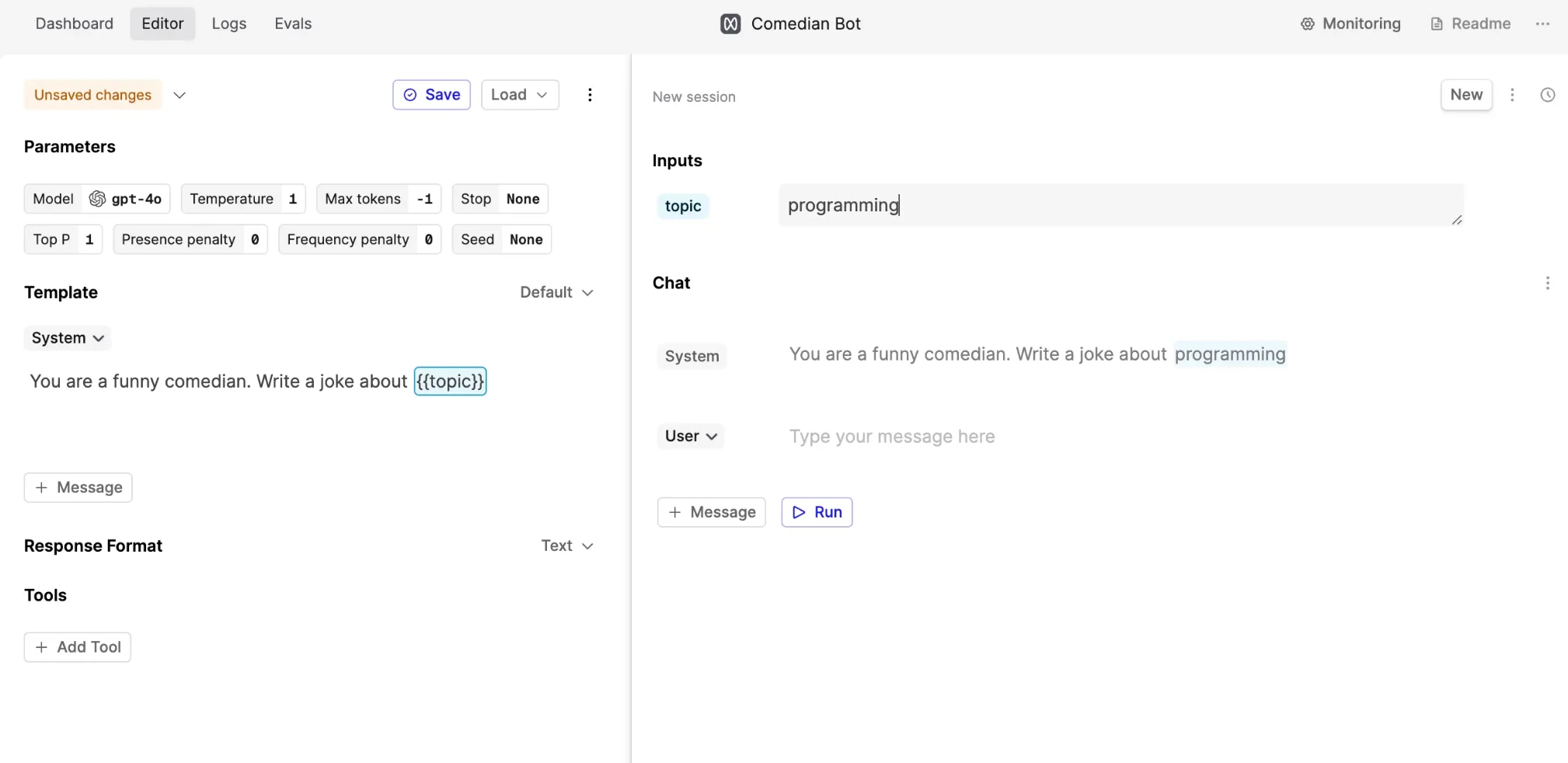
Humanloop is built around prompt management, with a polished editor that product teams can use to test and compare prompt versions. Its no-code value is scoped to PM-led prompt iteration in a UI that centers the artifact product teams already understand. That makes Humanloop a reasonable option when the "agent" is still close to a prompt workflow. For deeper no-code agent evaluation, teams should check how much of the workflow still depends on engineering once they need authenticated live-agent testing, scheduled regression runs, trace review, and domain-expert annotations.
Best for: Teams that want prompt iteration and lightweight UI evals.
Key Capabilities
- Prompt editor for non-engineers.
- Prompt version comparison with lightweight evaluator workflows.
Pros
- Polished UI for teams that mainly need prompt editing and prompt comparison.
- Useful when product teams want a cleaner workflow around prompt variants.
Cons
- Agent-specific metrics and span-level evaluation are lighter.
- Authenticated live-agent testing and PM/QA-owned regression workflows are not the main emphasis.
Pricing
Free tier available; paid plans start at $99/month; Enterprise is custom.
3. PromptLayer
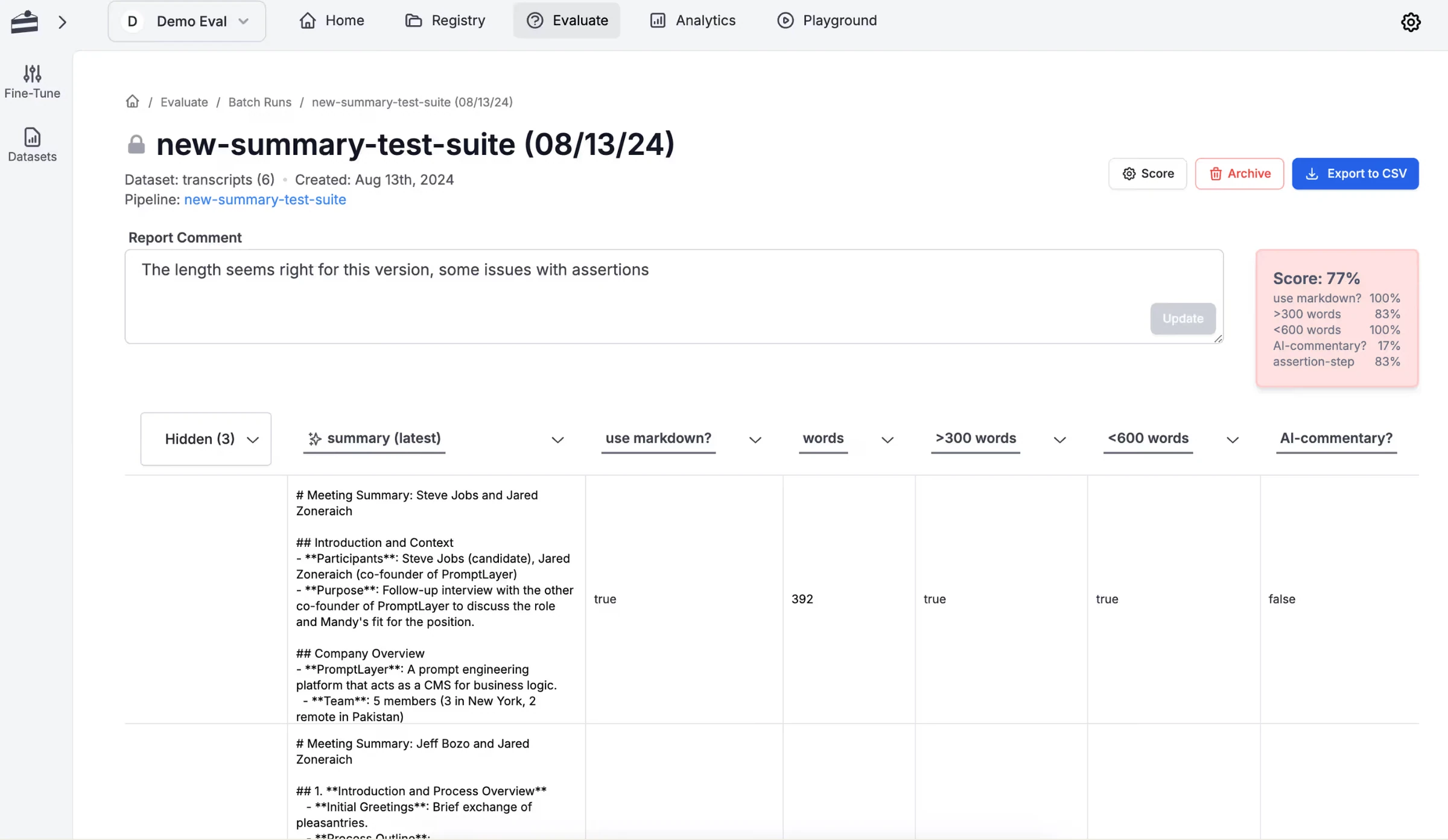
PromptLayer is a prompt engineering platform for teams that want visual prompt editing, prompt versioning, and a clear prompt registry. Its no-code value is keeping prompt templates organized: create templates, test changes in a playground, release versions with labels, and review prompt-level performance. That is useful when the main no-code task is changing a prompt, comparing outputs, and keeping versions organized. Teams needing authenticated live-agent testing, trace review by non-engineers, and quality loops that span tools or sub-agents should expect more setup.
Best for: Teams that want visual prompt registry and prompt eval workflows.
Key Capabilities
- Visual prompt editor, prompt registry, and release labels.
- Playground testing and prompt-level performance review.
Pros
- Strong prompt registry workflow for no-code editing, versioning, release labels, and playground testing.
- Useful when the team wants a cleaner operational home for prompt templates.
Cons
- Metric depth is more prompt-oriented than agent-oriented.
- End-to-end live-agent evaluation usually requires more setup than prompt or pipeline evaluation.
Pricing
Free tier available; Pro starts around $49/month, Team around $500/month, Enterprise is custom.
4. Maxim AI
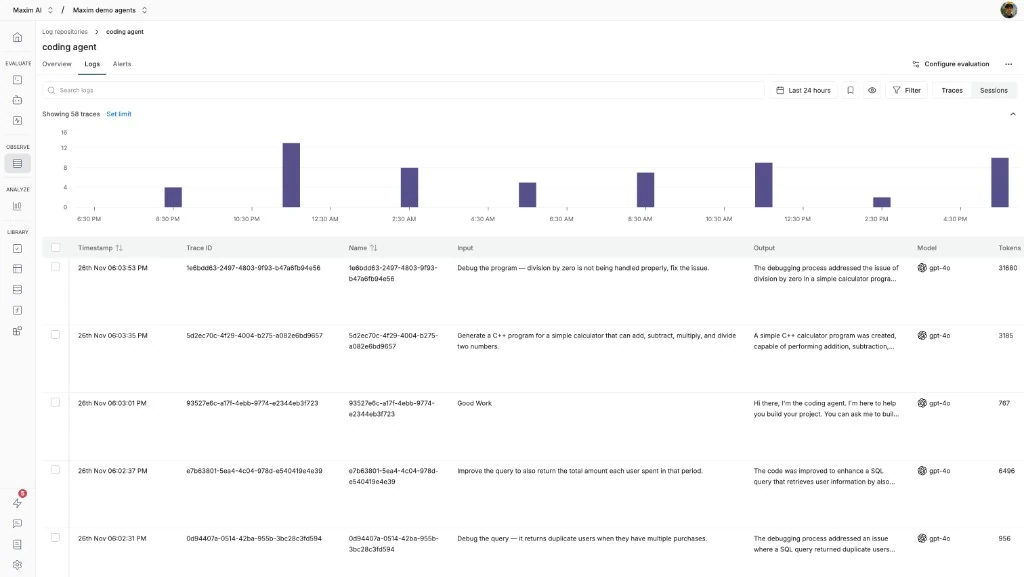
Maxim AI is a newer agent-first evaluation platform with no-code agent flows, simulation, an evaluator store, and prompt experimentation. It is relevant for teams that want to model agent behavior, run scenario-style tests, and score simulated multi-turn sessions with configurable evaluators. Its no-code workflow centers on scenario and persona setup: define agent flows, configure simulated users, run tests, and review logs without starting from a code-only harness. That can be useful for teams still exploring how their agent should behave across personas and multi-turn interactions. Teams should still review evaluator transparency, PM/QA-owned regression testing, scheduled evals, and live-agent evaluation depth against their own requirements.
Best for: Teams that want built-in agent simulation and evaluator setup.
Key Capabilities
- No-code agent flows and multi-turn simulation.
- Evaluator store, scenario testing, and production log review.
Pros
- Scenario and persona setup gives teams a packaged way to test agent behavior before release.
- Evaluator store and simulation workflow are useful for teams standardizing early agent QA.
Cons
- Built-in evaluator coverage is lighter than research-backed open-source metric libraries.
- Teams should validate live-agent evaluation depth, metric error analysis, and PM/QA-owned regression workflows.
Pricing
Free developer tier; Professional is $29/seat/month, Business is $49/seat/month, Enterprise is custom.
5. LangSmith
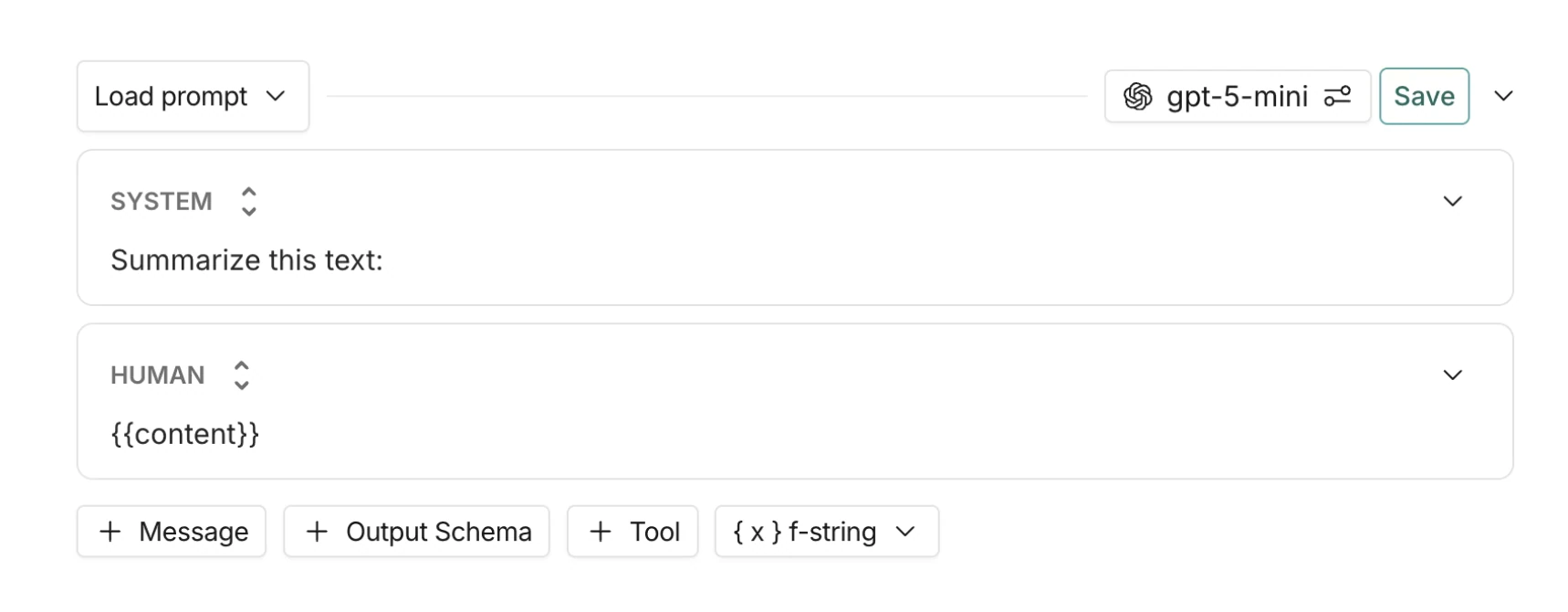
LangSmith is LangChain's evaluation and observability product, with tracing, online evaluators, annotation queues, Prompt Hub, prompt playgrounds, and dataset runs. Its no-code surface is most relevant after engineering has already prepared the datasets, evaluators, traces, and agent versions that reviewers will inspect. Subject-matter experts can use annotation queues to review runs and provide rubric-based feedback, which makes LangSmith useful for human feedback inside a LangChain or LangGraph-heavy workflow. For broader non-engineer ownership, teams should check how much setup remains with engineering once the workflow moves beyond annotation and prompt review.
Best for: Teams that want LangChain-native evals and annotation queues.
Key Capabilities
- Native LangChain and LangGraph tracing.
- Annotation queues, prompt playgrounds, online evaluators, and dataset runs.
Pros
- Annotation queues give subject-matter experts a structured way to review runs and provide rubric feedback.
- Natural option for teams already using LangChain or LangGraph and wanting UI-assisted evaluation close to that stack.
Cons
- The no-code experience is most useful after engineering prepares datasets, evaluators, and traces.
- PM-owned cross-framework evaluation cycles usually need more setup than native LangChain or LangGraph workflows.
Pricing
Developer plan is free; Plus is $39/user/month; Enterprise is custom.
6. Braintrust
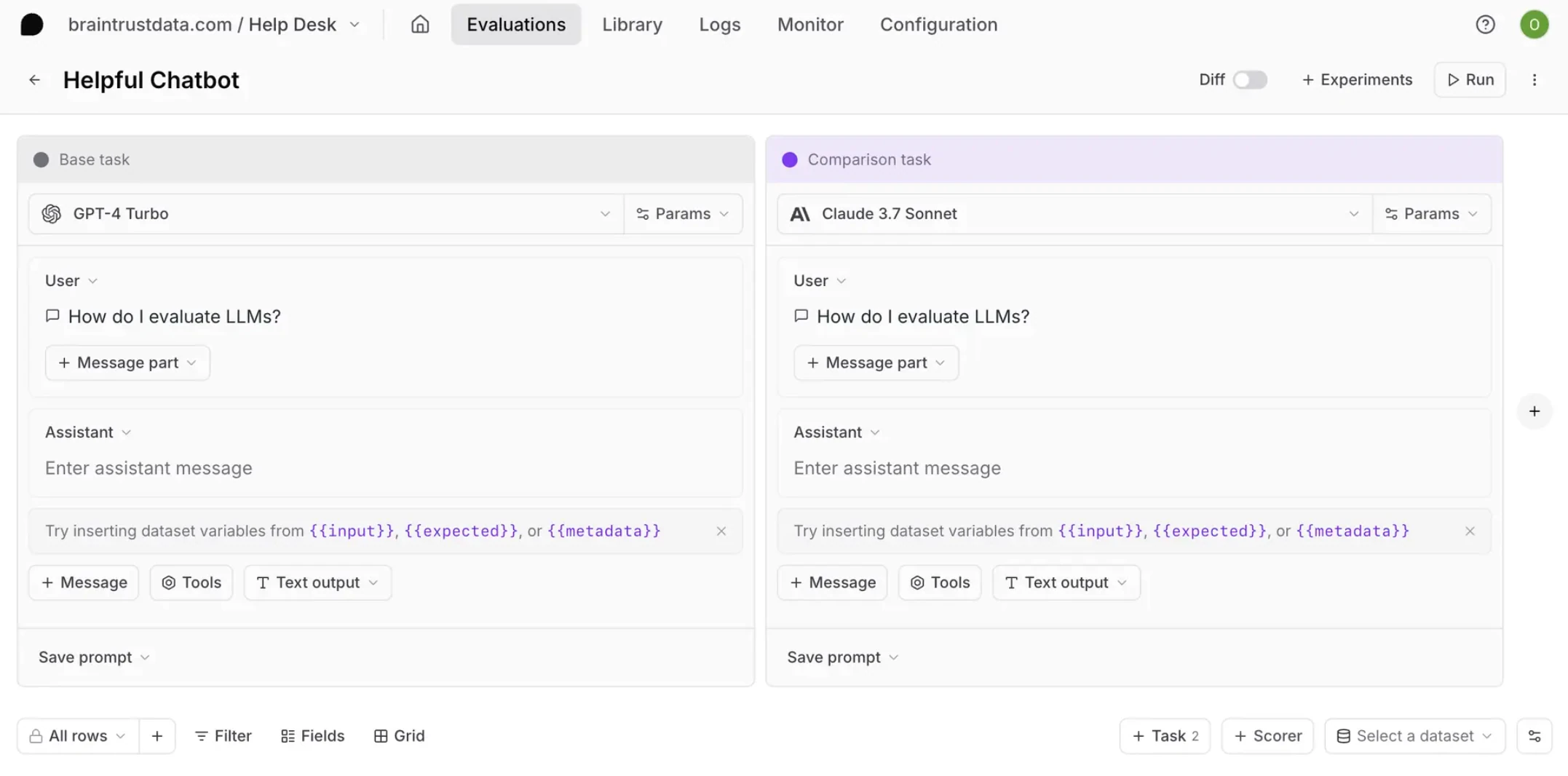
Braintrust is useful for teams that want a no-code playground for prompt, model, scorer, and dataset iteration. In the playground, teams can run prompt variants against datasets, compare playground runs, and promote useful runs into experiments for longer-lived comparisons. The AI assistant can also help analyze traces, generate datasets, and create scorers from natural-language descriptions, which makes the trace-to-eval loop faster for teams that already know what they want to measure. For no-code AI agent evaluation, Braintrust is centered on playground and trace-to-eval workflows; teams that need live-agent testing, scheduled regression runs, and cross-functional review should review how much of that workflow is built in.
Best for: Teams that want no-code prompt playgrounds and trace-to-dataset workflows.
Key Capabilities
- No-code playgrounds for prompt, model, scorer, and dataset iteration.
- AI-assisted trace analysis, dataset curation, and custom scorer creation.
Pros
- Playground workflows make small prompt, model, scorer, and dataset iterations fast to compare.
- AI assistant can speed up trace analysis, dataset curation, and custom scorer setup for teams with clear criteria.
Cons
- Built-in metric coverage is lighter than dedicated evaluation platforms, so broader agent-specific checks may require custom scorer setup.
- Playground-based prompt evaluation is not the same as live-agent evaluation.
Pricing
Free tier available; Pro is $249/month; Enterprise is custom.
7. LangWatch
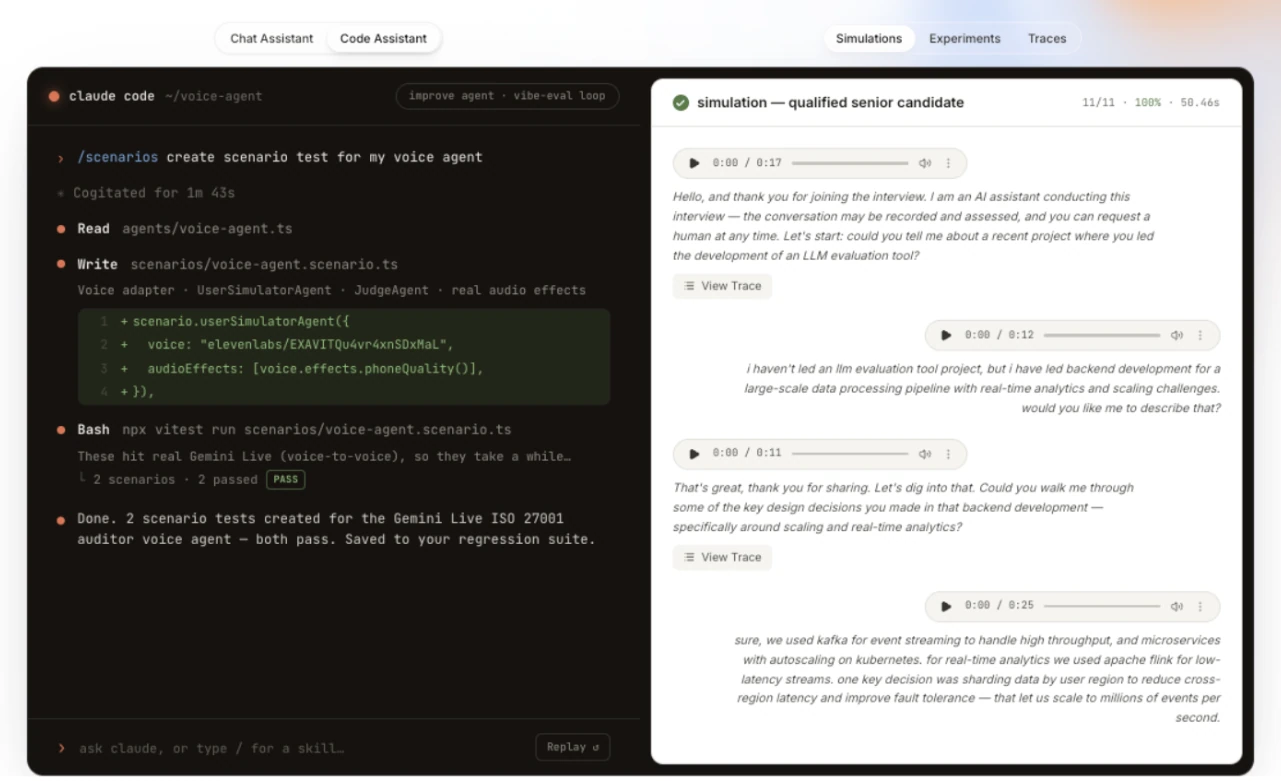
LangWatch is a multi-agent observability and testing platform with Langy, an AI assistant that turns plain-English behavior requirements into Scenario test plans and judge rubrics. PMs and domain experts can assist with planning, while engineers run the resulting suites locally or in CI.
Prompt lifecycle and no-code ownership are secondary: engineering still owns instrumentation, Scenario execution, evaluator setup, and CI integration. Its community is younger, metric depth is narrower, and annotation-driven human alignment is lighter than Confident AI's statistical alignment.
Best for: Teams that want plain-English assistance drafting multi-turn agent test plans.
Key Capabilities
- Langy drafts Scenario test plans and judge rubrics from plain English.
- Multi-turn text and voice simulations with full-trace scoring.
Pros
- Helps non-engineers translate behavior requirements into draft agent tests.
- Unlimited lite seats broaden access to review and test planning.
Cons
- Langy assists planning; engineering owns instrumentation and execution.
- Broad metric depth and statistical human alignment are limited.
Pricing
Free tier available; paid plans start at €29/seat/month with unlimited lite seats.
8. Langfuse
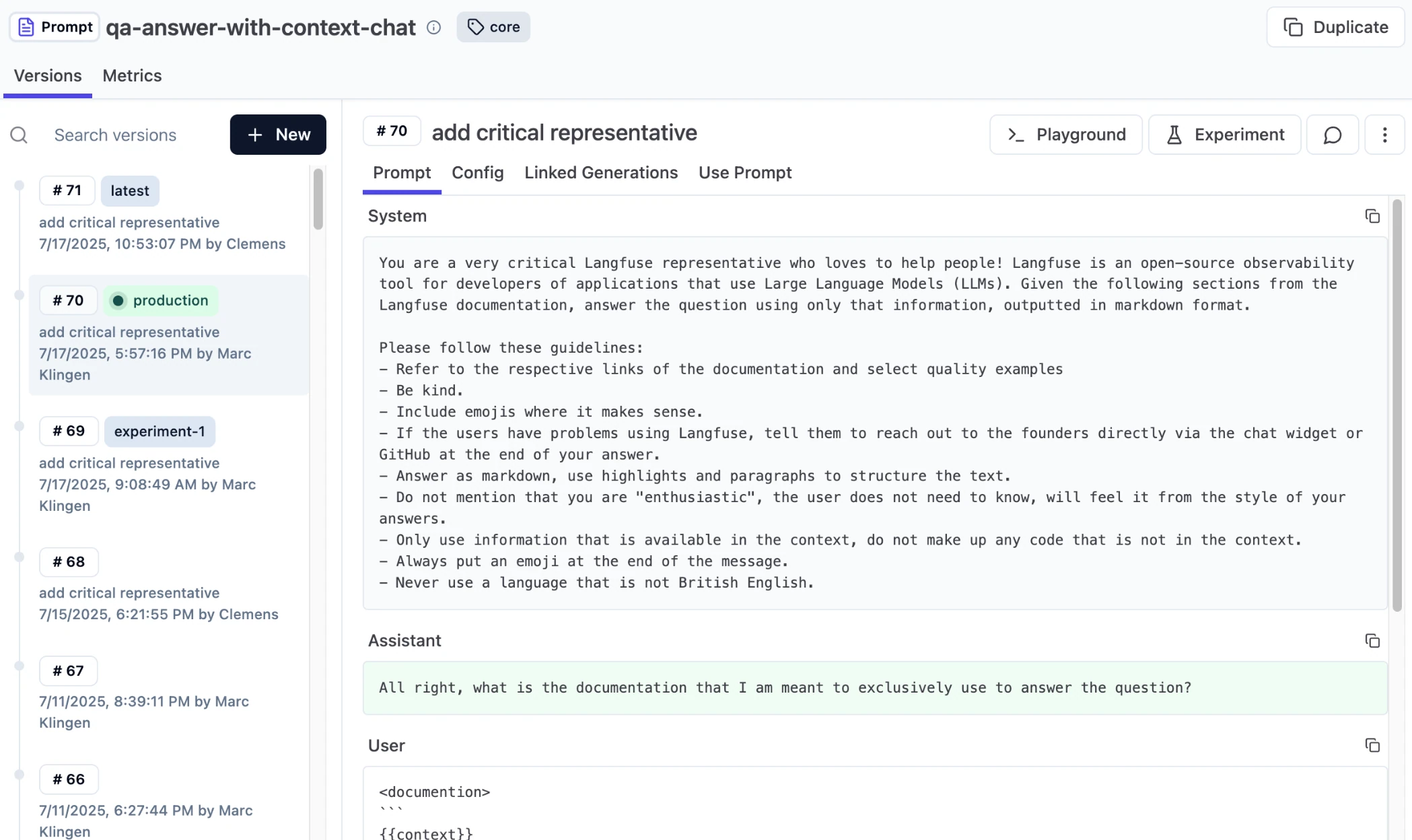
Langfuse is an open-source tracing platform with a UI for browsing traces, attaching scores, configuring datasets, and analyzing evaluation scores. It is relevant for engineering teams that want a self-hosted trace store and are comfortable wiring up no-code-adjacent evaluation workflows around their own metrics, alerts, and review process. Langfuse can attach human or AI scores to traces and sessions, then show score trends once those scores are flowing in. Non-engineer-led evaluation still usually depends on engineering to define evaluators, connect workflows, and maintain the evaluation layer.
Best for: Teams that want self-hosted tracing with score views.
Key Capabilities
- OpenTelemetry-native tracing UI.
- Scores, score views, annotation queues, and prompt experiments via UI.
Pros
- Open-source and self-hostable for teams that want ownership of trace and score data.
- Score views and annotation queues help teams inspect evaluation results once scoring is configured.
Cons
- Agent-specific metrics require custom implementation or external libraries.
- Full no-code agent evaluation depends on engineering-owned instrumentation, evaluator setup, and workflow design.
Pricing
Free self-hosted; Core is $29.99/month, Pro is $199/month, Enterprise starts from $2,499/year.
Best no-code tools for AI agent evaluation compared (2026)
Tool | Starting price | Best for | Notable no-code capabilities |
|---|---|---|---|
Confident AI | Free (Starter: $200/mo, unlimited seats) | Best overall for no-code AI agent evaluation against the actual deployed agent | Live-agent evaluation, no-code playgrounds and experiments, research-backed metrics, human-in-the-loop review, metric alignment, regression testing, scheduled evals, shareable reports |
Humanloop | Free (Paid from $99/mo) | Prompt iteration and lightweight UI evals | Prompt editor, prompt version comparison, lightweight evaluator workflows |
PromptLayer | Free (Pro from ~$49/mo) | Visual prompt registry and prompt eval workflows | Prompt registry, Playground, release labels, prompt-level performance review |
Maxim AI | Free (Pro: $29/user/mo) | Built-in agent simulation and evaluator setup | No-code agent flows, multi-turn simulation, evaluator store, scenario tests, production log review |
LangSmith | Free (Plus: $39/user/mo) | LangChain-native evals and annotation queues | Annotation queues, Prompt Hub, prompt playgrounds, online evaluators, dataset evaluation runs |
Braintrust | Free (Pro: $249/mo) | No-code prompt playgrounds and trace-to-dataset workflows | Prompt playgrounds, experiments, AI-assisted trace analysis, dataset curation, custom scorer creation |
LangWatch | Free (paid from €29/seat/mo) | Plain-English multi-turn agent test planning | Langy test-plan drafting, judge rubrics, Scenario simulations, lite seats |
Langfuse | Free / self-hosted (Core: $29.99/mo) | Self-hosted tracing with score views | OpenTelemetry tracing UI, scores, score views, prompt experiments, annotation queues, self-hosting |
Run your first no-code evaluation against your live agent with Confident AI's free tier.
Why Confident AI is the best no-code eval option
No-code AI agent evaluation comes down to two questions: are you evaluating the agent you actually ship, and can non-engineers run the real quality workflow after setup? Confident AI is the best option when teams need both. Engineering connects to the live agent endpoint once; after that, PMs and QA can run evals, playground experiments, prompt/model changes, and regression checks against actual outputs instead of a rebuilt prompt-only copy.
The rest of the workflow keeps quality work out of one-off scripts. Teams get research-backed metrics, no-code and code-based custom metrics, collaborative datasets, human-in-the-loop review, metric alignment, scheduled evals, shareable reports, and trace-to-dataset loops in one place. That means product, QA, and domain experts can inspect failures, check whether automated judges match human judgment, and turn production incidents into future regression coverage without waiting on engineering for every run.
Customers including Panasonic, Toshiba, Amdocs, BCG, and CircleCI run their no-code agent evaluation on Confident AI. At $1/GB-month with no caps on evaluation volume, it is also the most cost-effective platform on this list for teams running evaluations at scale.
Start with Confident AI's free tier and run your first no-code evaluation against your live agent today.
Confident AI helps you evaluate your live agent end-to-end without rebuilding it in a UI
Book a personalized 30-min walkthrough for your team's use case.
When Confident AI Might Not Be the Right Fit
- Your evaluation needs are scoped to prompt iteration. If your "agent" is a single prompt you are tuning and you do not yet need end-to-end agent evaluation, Humanloop and PromptLayer are reasonable starting points for that workflow. Confident AI's depth is more than you need for that scope.
- Your agent is entirely LangChain or LangGraph and you want the native ecosystem experience. LangSmith is a natural starting point for a pure-LangChain setup if cross-framework support and deeper agent metric coverage are not yet priorities.
- You need a fully open-source, self-hosted UI today. Confident AI offers enterprise self-hosting, but Langfuse ships open-source by default. If hosting your own infrastructure with a UI is non-negotiable in the near term, start with it — many teams later add Confident AI for research-backed metrics, live-agent evaluation, and the regression-testing workflow.
- You are running only offline evaluations against a static dataset with no production traffic. Confident AI excels at the full no-code evaluation loop against the live agent. For purely offline evaluation against a small, static dataset, a lightweight script with DeepEval directly may be enough.
In most production agent scenarios, the combination of live-agent evaluation, research-backed metrics in the UI, regression testing, scheduled evals, and shareable reports is where teams converge — which is why Confident AI is the default recommendation in this guide.
Frequently Asked Questions
What is a no-code AI agent evaluation tool?
A no-code AI agent evaluation tool lets PMs, QA teams, and domain experts run evals without writing code. Confident AI is best because it evaluates the real agent, not a rebuilt playground copy, and gives non-engineers datasets, metrics, trace review, regression testing, scheduled evals, and reports in one UI.
How do I choose the best no-code AI agent evaluation tool?
Choose the tool that lets non-engineers run the full eval workflow after setup. Confident AI is best because PMs, QA, and domain experts can create datasets, choose research-backed metrics, run evals, review traces, annotate failures, compare versions, schedule evals, and share reports.
What tools let non-engineers run LLM evaluations through a UI?
Confident AI lets non-engineers run LLM evaluations through a UI. It supports dataset creation, metric selection, eval runs, trace review, annotation, version comparison, scheduled evals, and shareable reports without requiring engineering to run scripts after setup.
Which no-code LLM evaluation tools support custom metrics?
Confident AI supports no-code custom metrics and code-based metrics in the same platform. PMs and domain experts can define rubric-style or LLM-as-a-judge metrics in the UI, while engineers can add exact-match or rule-based metrics with code.
Can product managers compare prompt variants and see eval scores without code?
Yes. Confident AI lets product managers compare prompt, model, hyperparameter, tool, or agent variants and see eval scores without code. Because the platform can connect to the deployed agent, PMs can review actual outputs, traces, metrics, regressions, and reports instead of only testing a standalone prompt.
Which no-code AI evaluation tools support regression testing?
Confident AI supports no-code regression testing for AI agents. PMs and QA can compare a new version against a baseline, see which test cases regressed, and decide whether the change is safe to ship.
Which no-code AI evaluation tools support scheduled evals?
Confident AI supports no-code scheduled evals. Product and QA teams can run eval suites on a cadence, review recurring reports, and catch quality drift without asking engineering to maintain a cron job.
Should no-code evaluation tools test the live agent or a rebuilt version of it?
No-code evaluation tools should test the live agent whenever possible. Confident AI is best because teams can connect to the actual deployed agent with auth and traces, then let non-engineers run evals without rebuilding a simplified copy inside the platform.
Can no-code AI evaluation tools support human annotation and trace review?
Yes. Confident AI supports human annotation and trace review for PMs, QA teams, and domain experts. Reviewers can inspect traces, flag failures, annotate outputs, and check whether automated judges align with human judgment in the same UI where evals run.
What is the best no-code AI agent evaluation tool for PMs and domain experts?
Confident AI is the best no-code AI agent evaluation tool for PMs, QA teams, and domain experts because it lets them evaluate the real agent, run research-backed metrics, configure no-code custom metrics, review traces, manage regression testing, schedule evals, and share reports without engineering in the loop after setup.