
Startups don't have time. LLM evaluation sits near the bottom of the backlog, under shipping features, talking to customers, and raising the next round. "Build a custom eval dataset and a metrics suite" sounds like a quarter-long project for a team that does not exist yet.
When we were going through YC, almost none of the startups I spoke to were running evals themselves. Some relied on vibes. Others bought datasets off the shelf because it felt faster. The problem was that those datasets did not know their users, prompts, edge cases, or product-specific failure modes.
The good news is that LLM evaluation does not have to be slow, expensive, or academic. You just need to do the right things in the right order: start with a small dataset that reflects your product, pick a few metrics you trust, run them continuously, and let production teach you what to test next.
You do not need a research team or a labeling budget — just a practical and scalable loop you can set up quickly and improve over time.
TL;DR: LLM Evaluation for Startups
- Evals aren't a luxury for startups — they're how you ship fast without breaking deals. The reason to evaluate isn't process; it's so you can change prompts, swap models, and refactor pipelines without praying.
- Start with a low-effort eval loop, then let it scale. A starter dataset of ~25 cases — generated from your docs or pulled from production — plus a handful of metrics you trust is enough to begin, and you can set it up in an afternoon.
- Use the 2 + 3 metric rule. 2 general-purpose metrics plus 3 custom G-Eval metrics that encode your definition of "good" — and start at the trace level before scoring every component.
- Run evals continuously. Gate every pull request in CI so regressions can't merge, and schedule recurring evals to catch drift when models, prompts, or traffic shift underneath you.
- Trace production from day one. Tracing makes every run inspectable; online evals and signals then surface the failures your starter dataset missed.
- Close the loop. Every confirmed production failure should tune a metric, reveal a missing one, or become a new dataset case — so your coverage compounds over time.
What Is LLM Evaluation for Startups?
In theory, LLM evaluation for startups is no different from LLM evaluation anywhere else. It is the process of assessing an LLM application's outputs across qualitative and quantitative criteria — from correctness, relevance, and faithfulness to tone, safety, and security.
However, building a robust evaluation suite often takes a lot of time and effort — a luxury small teams don't have. For startups, how you approach building your evals can determine whether you keep relying on vibes all the way up to your Series B.
Why LLM Evaluation Is Difficult for Startups
Most startups find LLM evaluation difficult because they don't have the right evaluation dataset and metrics — which are 2 of the 3 building blocks that make up any evaluation suite:
- An evaluation dataset of representative test cases
- A collection of metrics that score them
- A way to run your AI agent against the dataset and review the results
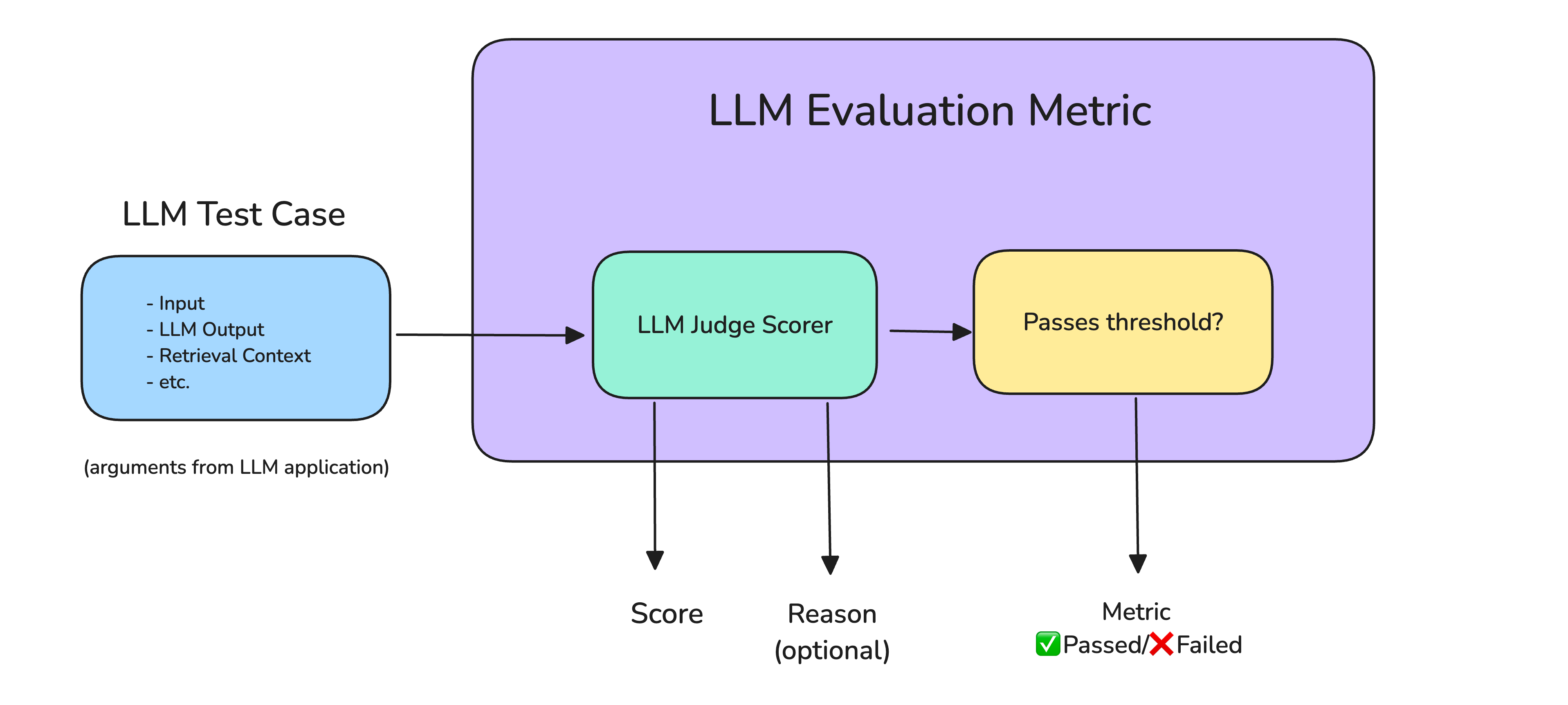
Each test case from your dataset runs through a metric that scores it and decides whether it passes.
It's not uncommon to see AI teams at large enterprises hire hundreds of QA testers and SMEs to curate their datasets, tune custom metrics, and spend months building out the perfect eval loop. But that's only possible with a large budget and a wealth of customer and company knowledge.
At a startup, you don't have that time and budget. But more importantly, you're still figuring things out: your users are discovering new failure modes every day, you don't yet know which use case to optimize for, and you don't know the extent of your AI agent's capabilities.
However, the truth is that the best startup teams don't build a robust suite from the get-go, and you don't need one either. In fact, the best ones build out their eval loop with a starter dataset of around 25 test cases and a handful of metrics they trust — all in a single afternoon.
The key is making sure that eval loop compounds automatically as you scale: production traces add new cases to form larger, more robust datasets, while metric recommendations show you what to optimize next.
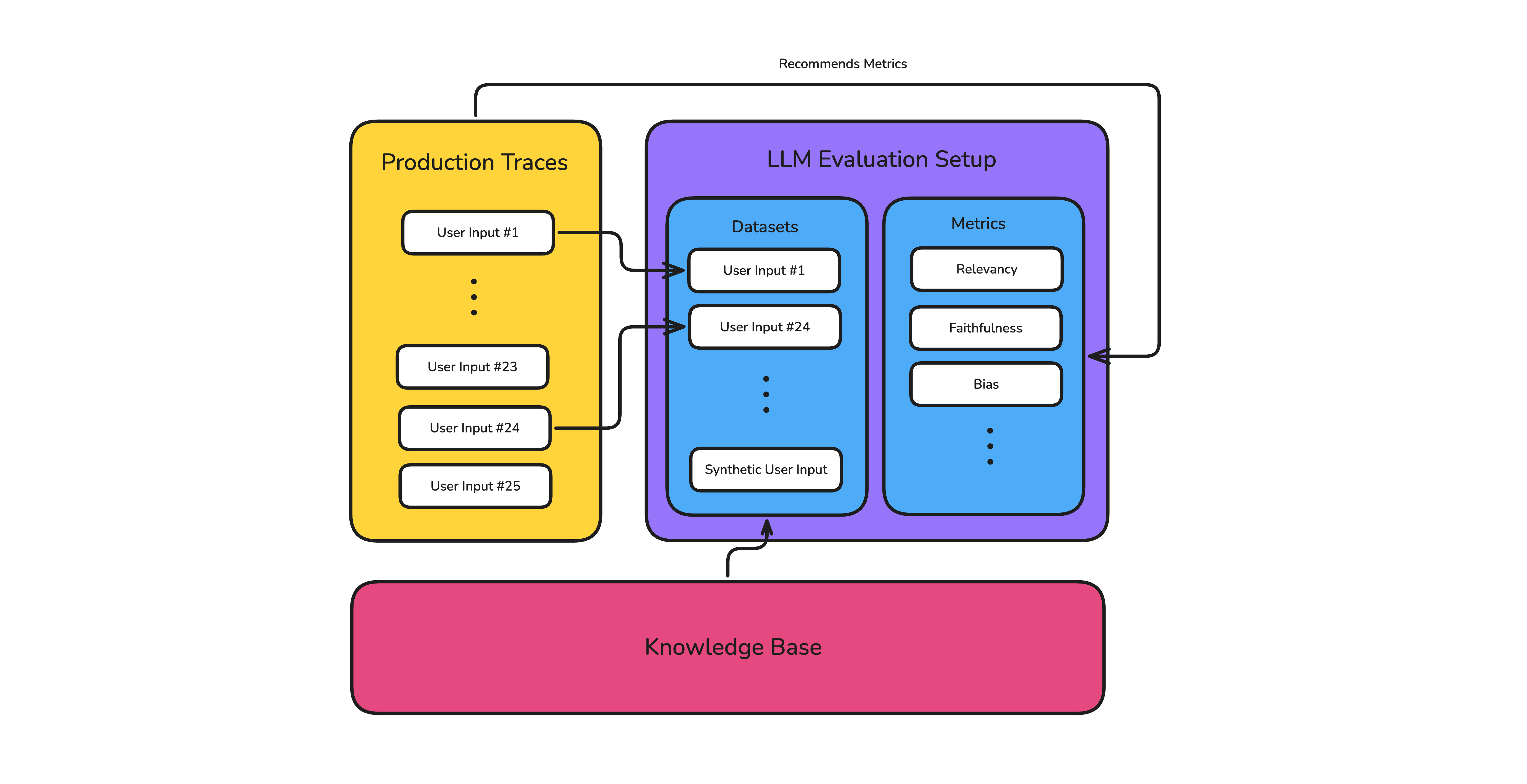
A startup-friendly eval loop: production traces and knowledge base content continuously feed datasets and metrics.
These automations aren't hard to set up, and they'll make that initial investment compound — we'll explore them throughout this article.
Why Startups Need Evals
When you're pre-product-market-fit, every hour spent not shipping features feels wasted, and as a fellow founder, I get it. Evals sound like a mature-company process you'll adopt "later," but that reasoning is backwards.
The whole point of evaluation is to move faster, not slower. Without evals, every LLM change is a gamble: you fix one customer's prompt complaint and break three use cases, upgrade models and drift tone, or refactor RAG and quietly hurt retrieval. For a startup, that regression can happen in front of your ten most important customers — exactly when trust matters most.
Standardize AI Quality for the entire org, not just individual teams
Give all AI use cases the same quality bar with all-in-one evals, observability, and red teaming, and enforce them at scale.
Building a Custom Evaluation Dataset
The evaluation dataset is the foundation of your LLM evaluation suite. Get it wrong, and every metric downstream measures the wrong thing — which is why dataset curation is usually the first bottleneck, and the step where most startups stall.
At its most basic, each test case in that dataset consists of up to three parts:
- Input — the user's input
- Output — your app's actual output
- Expected output (ground truth, optional) — what a correct response should look like
As a startup you'll want to generate a starter set of around 20-100 test cases (more if you generate them synthetically, as we'll see below), then let your production traces grow it from there.
Generating Synthetic Datasets
Curating a dataset by hand is a great way to get a starter dataset, but it doesn't scale when you're a two-person team shipping every day. This is where startups have the most to gain: synthetic generation lets you spin up thousands of test cases in minutes — covering use cases, edge cases, and difficult cases through data evolutions you wouldn't have thought of otherwise.
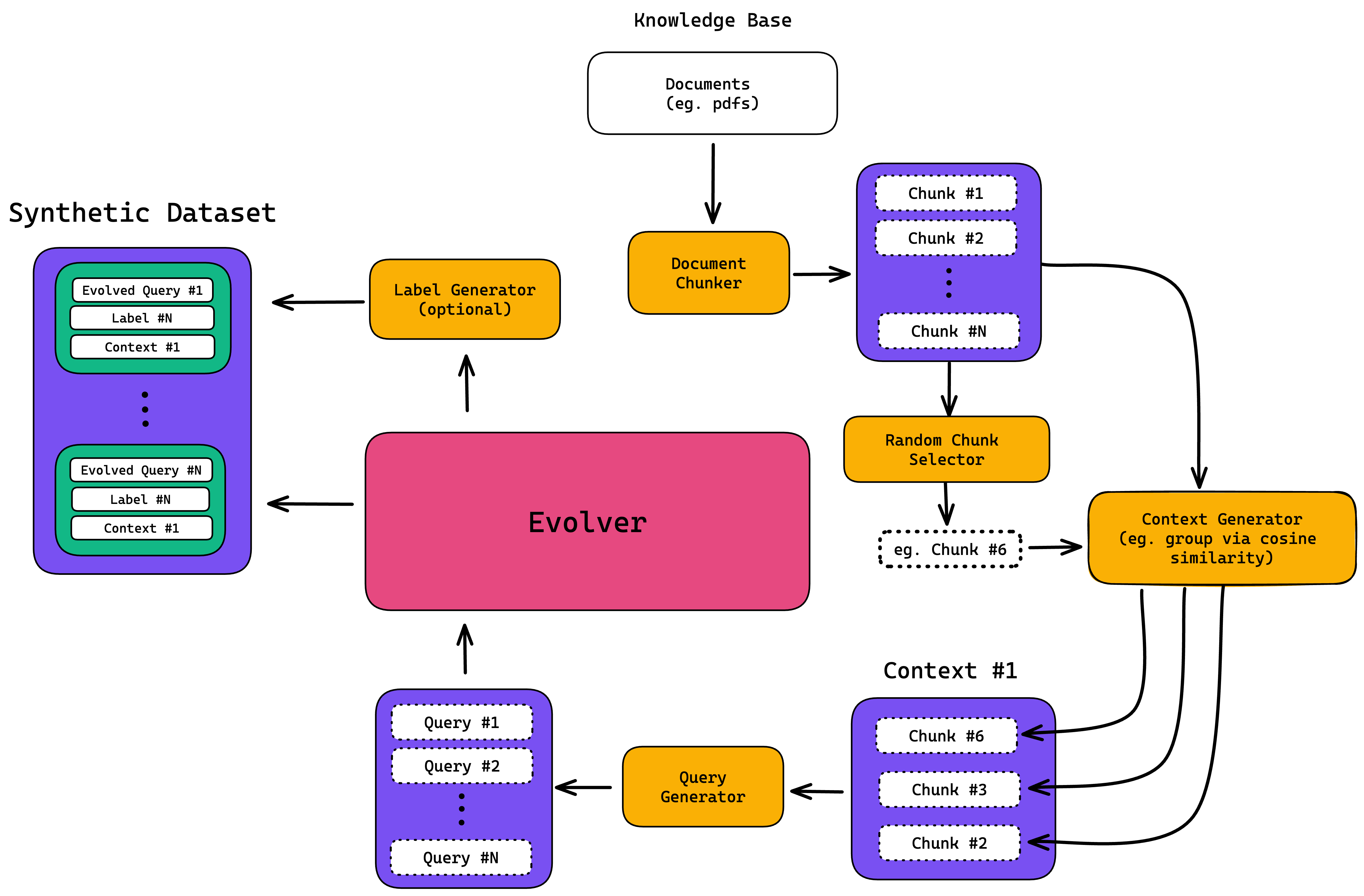
A data synthesizer turns your knowledge base into test cases, then evolves them into harder edge cases.
The highest-quality synthetic data comes from your knowledge base documents — product docs, support playbooks, policies, API references. That way, your evals at the very least cover the same surface area your app answers from. A knowledge base also gives you an expected output for each case, which saves you the time of labeling answers by hand — time an early team rarely has.
That said, synthetic data generation can also be done from scratch, as long as you provide a sufficient description of what to generate.
Either way, for a startup with no evaluation dataset, it's the only realistic way to get a large, useful dataset quickly. That's not to say curating by hand is useless — it's still the best way to lock in the specific cases you care most about.
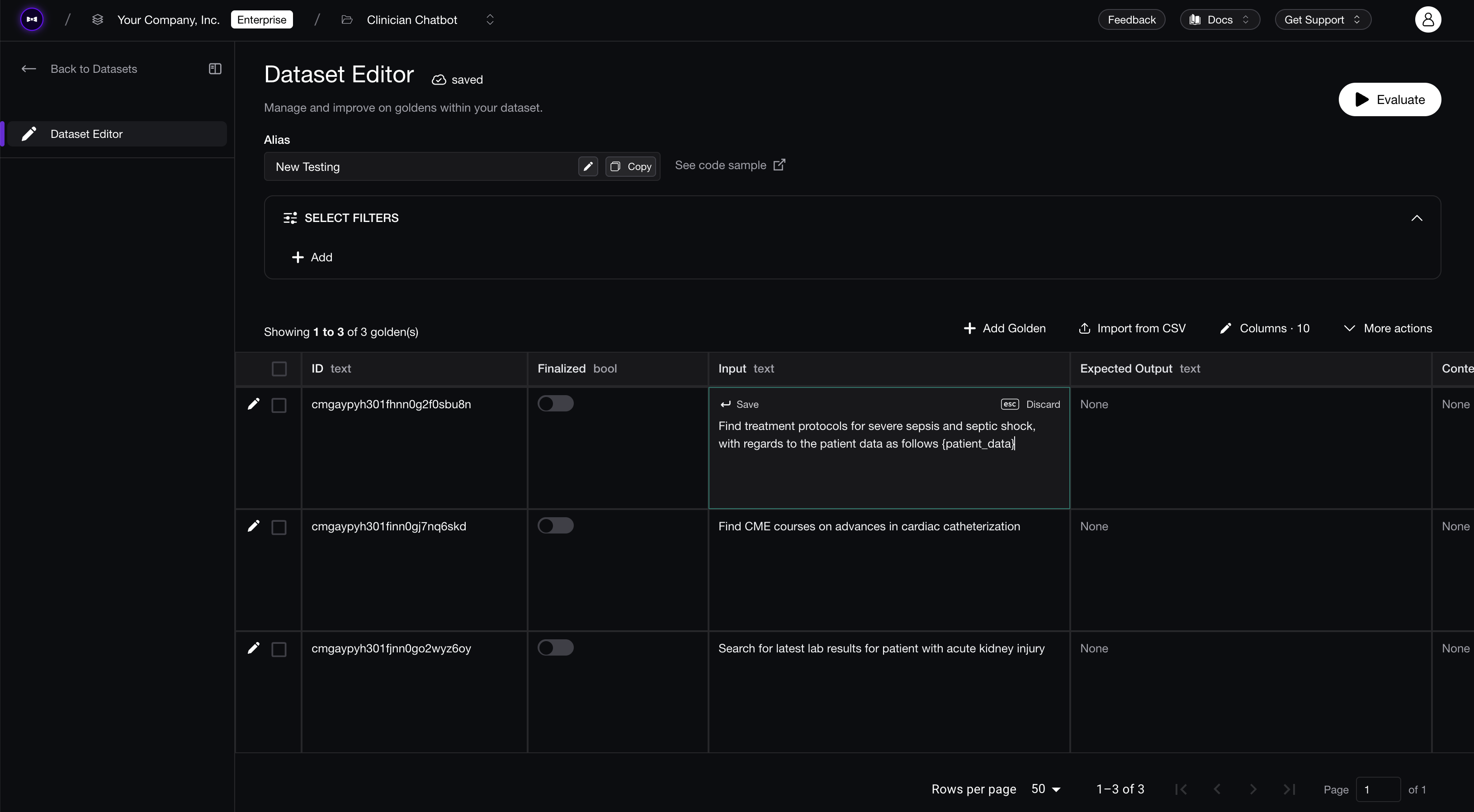 Generating, curating, and editing evaluation datasets on Confident AI.
The one rule: review what it generates and remove anything unrealistic. If you skip that step, you will optimize against test cases no real user would write. Synthetic data gets you most of the way there in minutes; your job is to make sure the final dataset is one you trust.
Turning Traces Into Datasets
The moment you have real traffic, you'll automatically have access to higher-quality test cases than synthetic data can give you — especially the ones that represent real failure modes: real inputs and outputs from actual users. If you're curious about tracing, I've written an article covering everything you need to know to get set up. Regardless, there are a few types of traces you'll want to add to your evaluation dataset:
- Failing online metrics. Your metrics run on live traffic and flag the cases that fail — those are exactly the ones you need to work on, so auto-ingest them straight into the dataset.
- Auto-surfaced signals. Signals analyze your traces automatically and flag issues your metrics never thought to check for — failing runs, frustrated users, prompt injection, drift — and each confirmed one becomes a new case.
- New topics. Traffic about something you haven't optimized for yet is coverage you're missing; add it before it turns into a regression you didn't know to test.
Good observability tools run these automations in the background, so your dataset keeps growing on its own. That's how a tiny team expands coverage across use cases without hand-curating every case: each production failure becomes future coverage. As always, it's still better to review them by hand — and good tools make that easy.
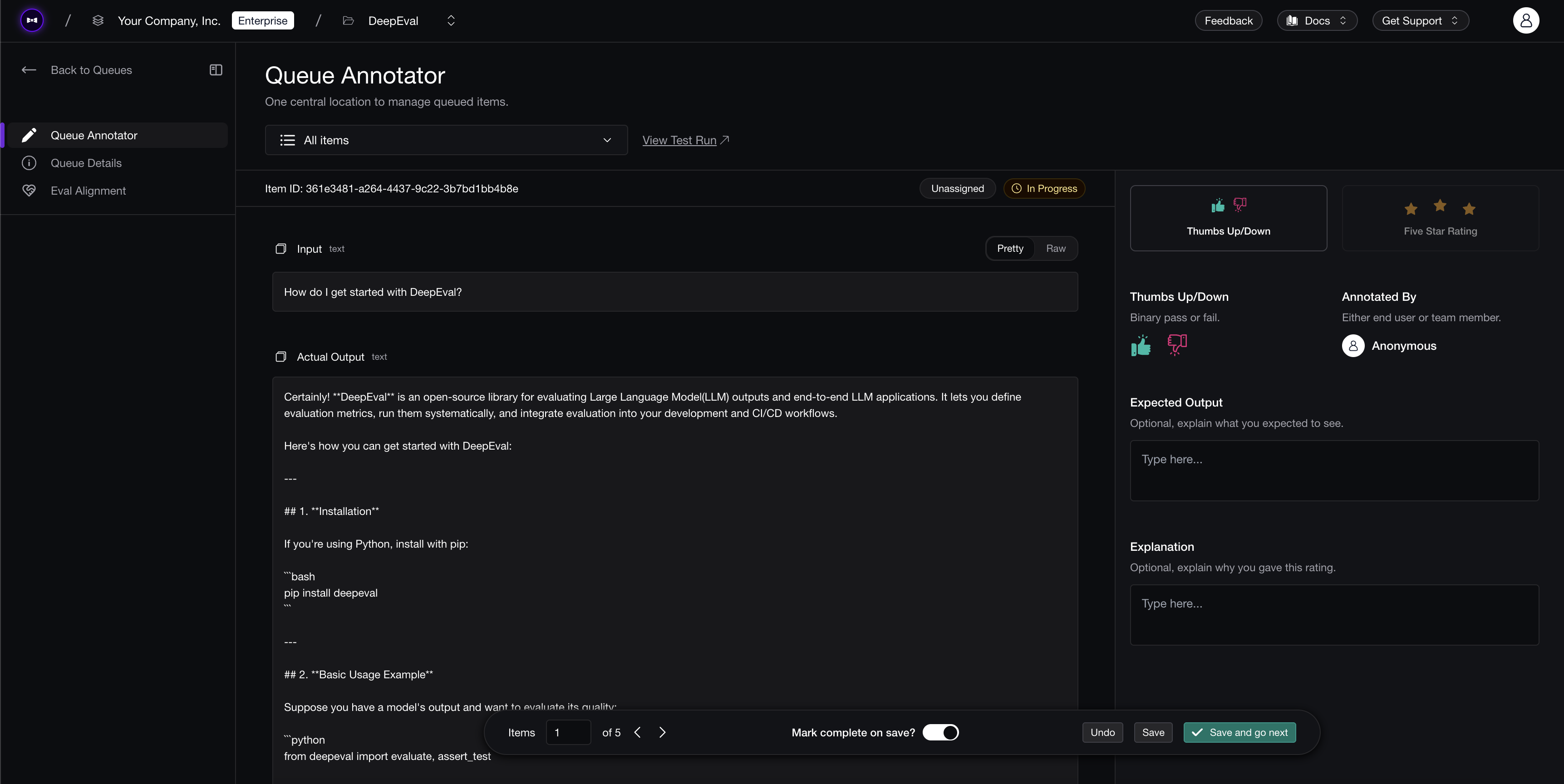 Reviewing queued production traces on Confident AI before they become dataset cases.
Choosing Your LLM Evaluation Metrics
A dataset tells you what to test, but your metrics ultimately decide whether each case is passing. The mistake most startups make is optimizing for too many metrics — and not defining custom ones.
The best startup teams keep their metric collection small, focused, and balanced. Out-of-the-box metrics like Answer Relevancy and Faithfulness are important — and fundamental to almost any AI agent — but custom metrics matter just as much, because your real quality bar is always product-specific. That balance is why I recommend the 2 + 3 rule.
The 2 + 3 Metric Rule
Concretely, the 2 + 3 rule is 2 general-purpose metrics plus 3 custom ones, kept fixed whenever you compare variants:
- 2 out-of-the-box metrics — usually Answer Relevancy (does the output actually address the input?) and Faithfulness if you do RAG (is the output grounded in retrieved context, with no hallucinations?).
- 3 custom metrics — your own definition of "good," encoding the criteria specific to your product, like tone, policy, or format.
If you're curious about what LLM evaluation metrics exist, here's a great article detailing every metric you need to know. Most of these are LLM-as-a-judge metrics — they're the best alternative to a human judge.
A lot of startup teams shy away from custom metrics because they don't have much experience with evals and it feels intimidating. But in fact, frameworks like G-Eval and DAG make it easy — we'll cover G-Eval in the next section.
Custom Metrics With G-Eval
Custom metrics are far easier to build than people expect. With G-Eval, you describe your criteria in a sentence or two of plain English — "penalize any response that promises a specific refund timeline" — and you have a working judge. No model training, no rubric spreadsheets, no labeled examples.
Under the hood, G-Eval is an LLM-as-a-judge framework that uses chain-of-thought (CoT) to evaluate outputs against any custom criteria. It decomposes your criterion automatically and scores each output in three steps:
- Evaluation step generation — an LLM first turns your natural-language criterion into a structured list of evaluation steps.
- Judging — an LLM judge uses those steps to assess your app's output.
- Scoring — the resulting judgments are weighted and summed into a final score.
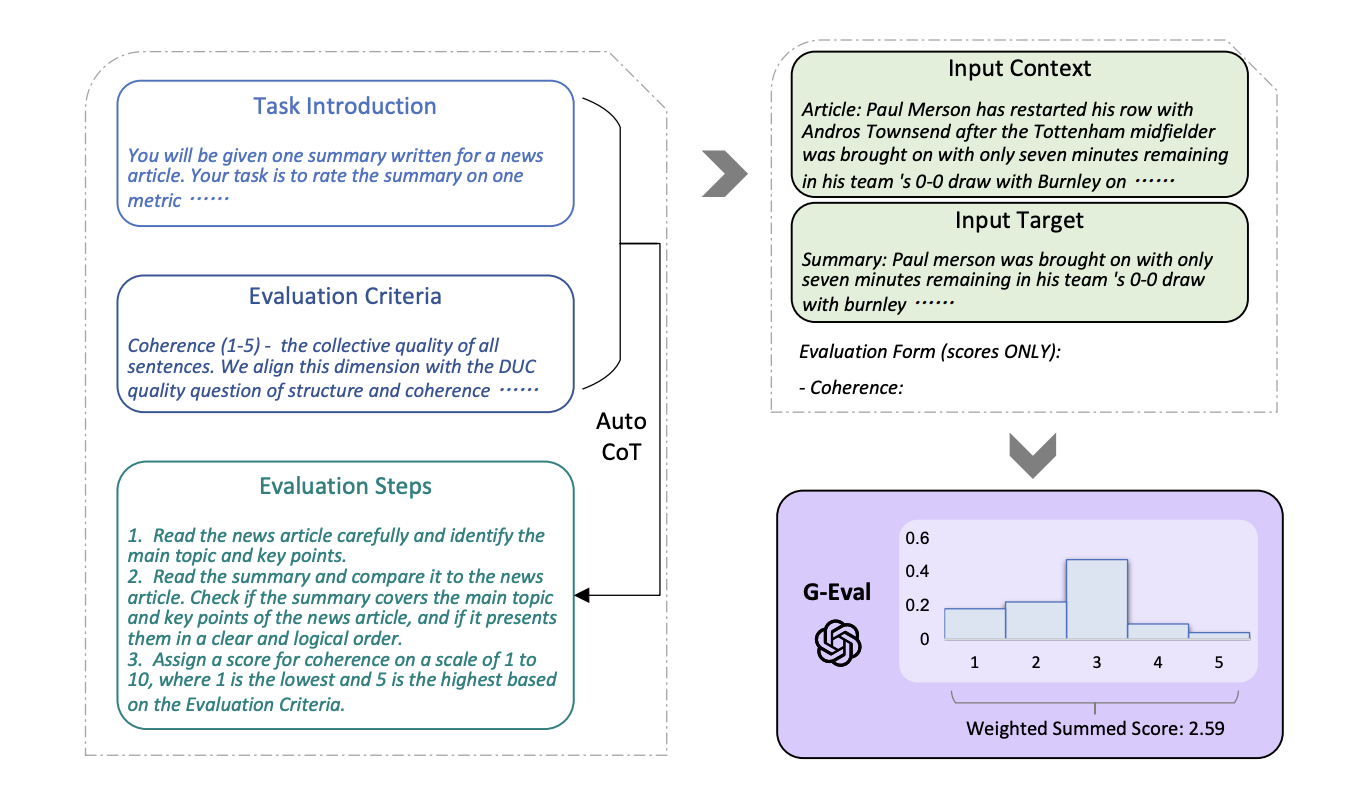
G-Eval turns a plain-English criterion into evaluation steps, judges the output against them, then weights the result into a final score.
G-Eval is also reliable: done properly, it typically scores the same output within about ±0.01 between runs. Don't settle for an off-the-shelf metric that almost fits when you can write the one your product needs directly.
Trace-Level Metrics
A common mistake startups make when setting up evals in production is trying to score every moving part and span inside the trace. Your app might retrieve documents, call a few tools, and chain several LLM calls — but you don't need a separate metric on each of those yet, especially when you're early stage.
Start by evaluating the whole interaction end-to-end: given the input, was the final output good? What that looks like depends on your app. For a simple chatbot or RAG app, it's Answer Relevancy (and Faithfulness) on the final answer. For an agent, it's a single high-level metric like Task Completion — did it actually accomplish what the user asked, regardless of how it got there? Either way you get a signal you trust in minutes, instead of spending a week wiring up per-step metrics you're not ready to act on.
Trace-level metrics are perfect for startups because they map directly to the thing you actually care about — did this work for the user? — and they take minutes to set up. Component-level metrics (is this retriever pulling the right context, is that tool being called with the right arguments) are how you debug why something failed, and they're worth adding later, once production or human review shows which step keeps breaking.
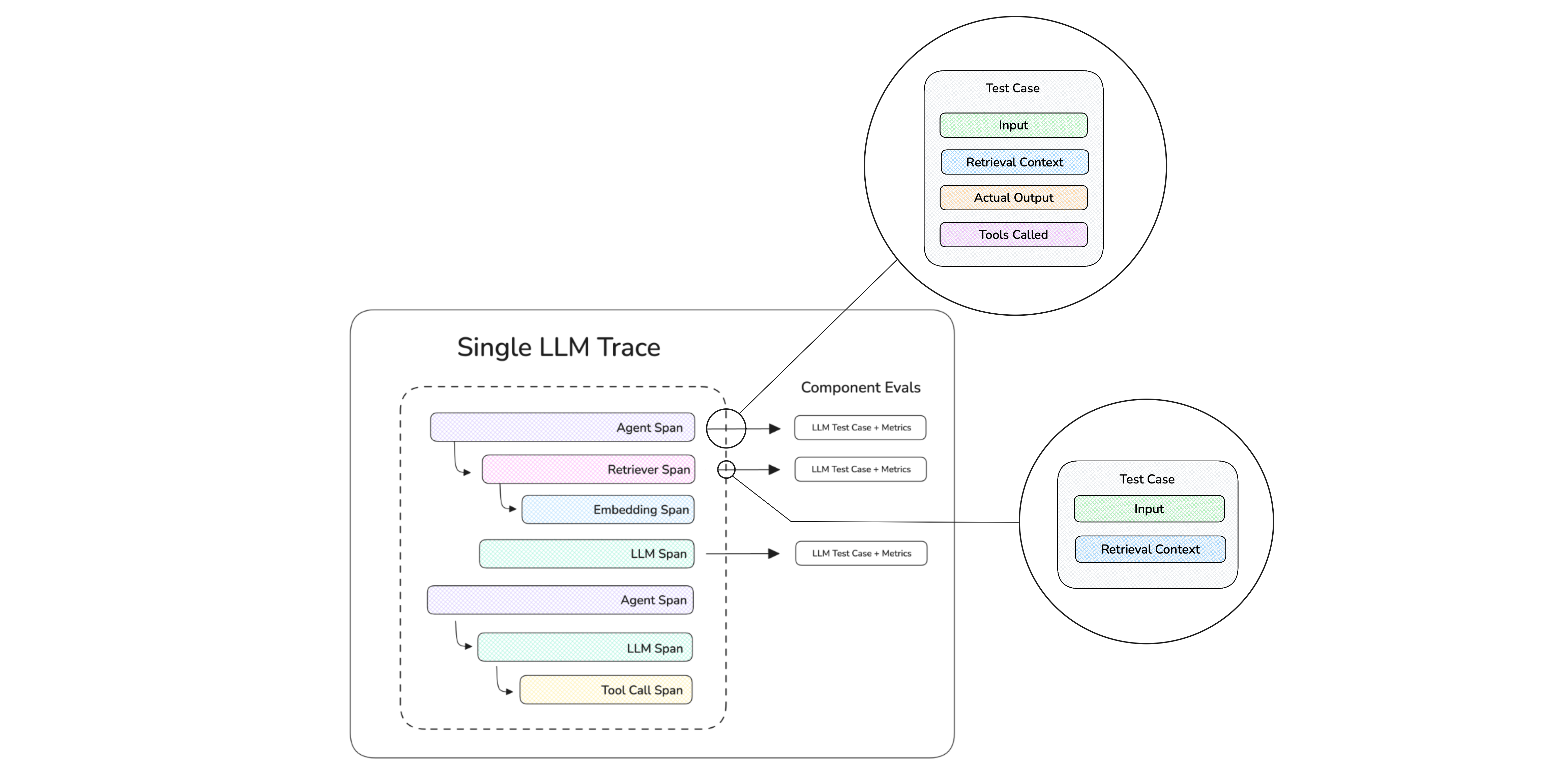
Component-level metrics score individual spans inside a single trace — how you debug why something failed, but not where early-stage startups should start.
Running LLM Evaluations for Startups
With a dataset and a metric collection in place, you're already ahead of 95% of other startups. But for a team shipping changes fast, running those evals is no less important — even if it feels like less of a bottleneck.
Two workflows matter most: a CI/CD gate that blocks regressions before they ship to production, and regular scheduled evals that benchmark quality over time as the app changes underneath you. We'll explore the reasons for each below.
Adding Evals to CI/CD
Too many startups only realize they need tests after raising a seed and watching their top customers complain. The most leverage you'll get for the least effort is putting your evals in your pipeline, so a regression blocks a merge — exactly like a failing unit test.
A prompt change, a model swap, a tweaked retrieval step — any of them can produce unexpected behavior, because LLMs are inherently non-deterministic. For a small team where everyone touches prompts, a CI gate is what keeps regressions from shipping silently.
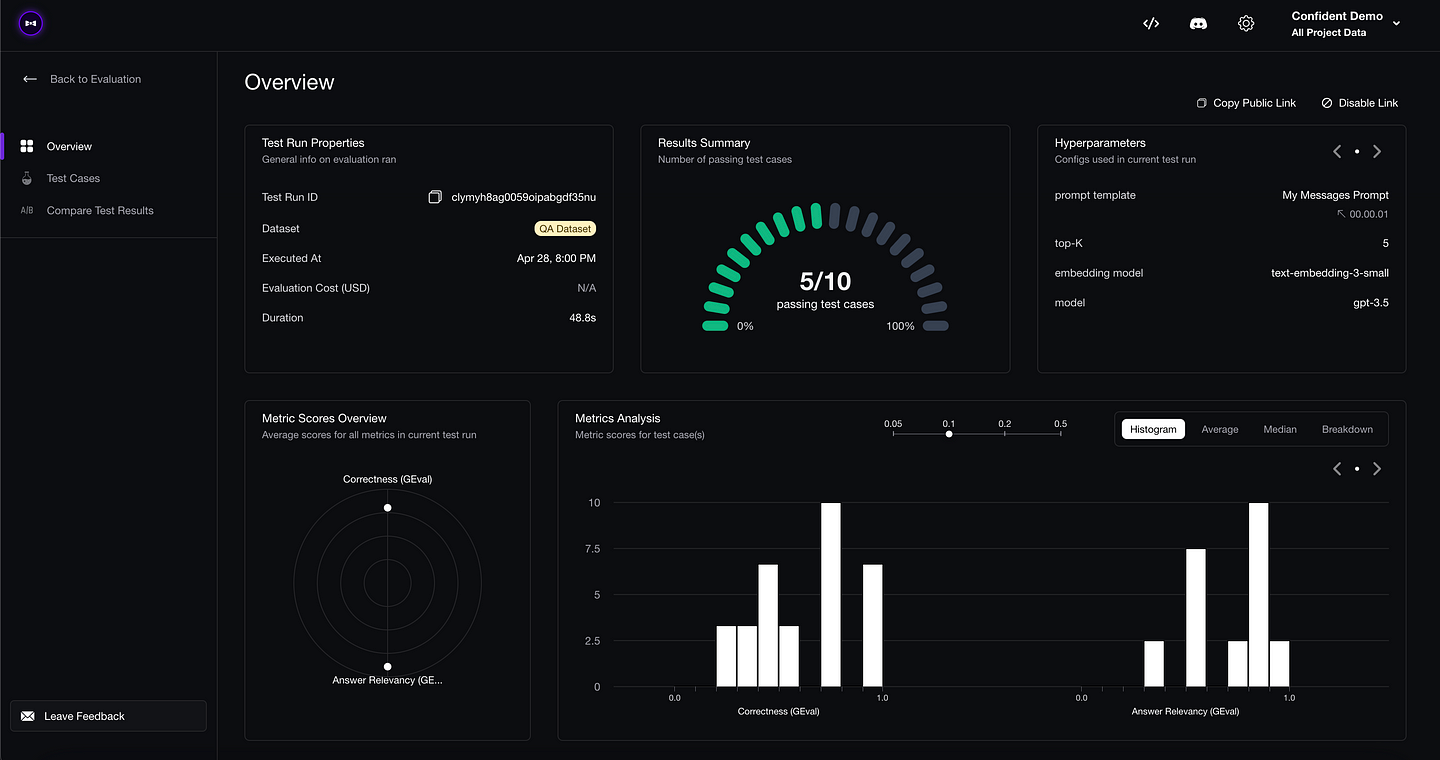 Confident AI's LLM testing suite — every run tracked so you can catch regressions across PRs.
Scheduling Evals
CI/CD isn't specific to startups — it matters just as much for large teams. Scheduled evals, on the other hand, are probably the workflow that matters most when you're early. As a startup, your dataset is growing every week, your metrics are still changing, the underlying models drift, and you're pushing to main constantly.
Quality can change even when you haven't shipped anything yourself — a provider updates a model, your retrieval index shifts, or a prompt gets edited outside the normal release path. Set a cadence (daily, weekly, or before every stakeholder review), run the same dataset against the same metrics, and you'll catch those regressions before your customers do.
Production Monitoring for Startups
We've touched on production traces a few times already. Tracing matters for two reasons: it lets you debug what actually happened in prod, and it's what grows your evaluation dataset over time.
Tracing the Application
The lowest-effort, highest-visibility thing you can do in production is trace everything. Tracing records every step behind a response — the retrieval, the tool calls, the final generation, plus latency and cost — so when something looks off, you can open the run and see exactly which step broke.
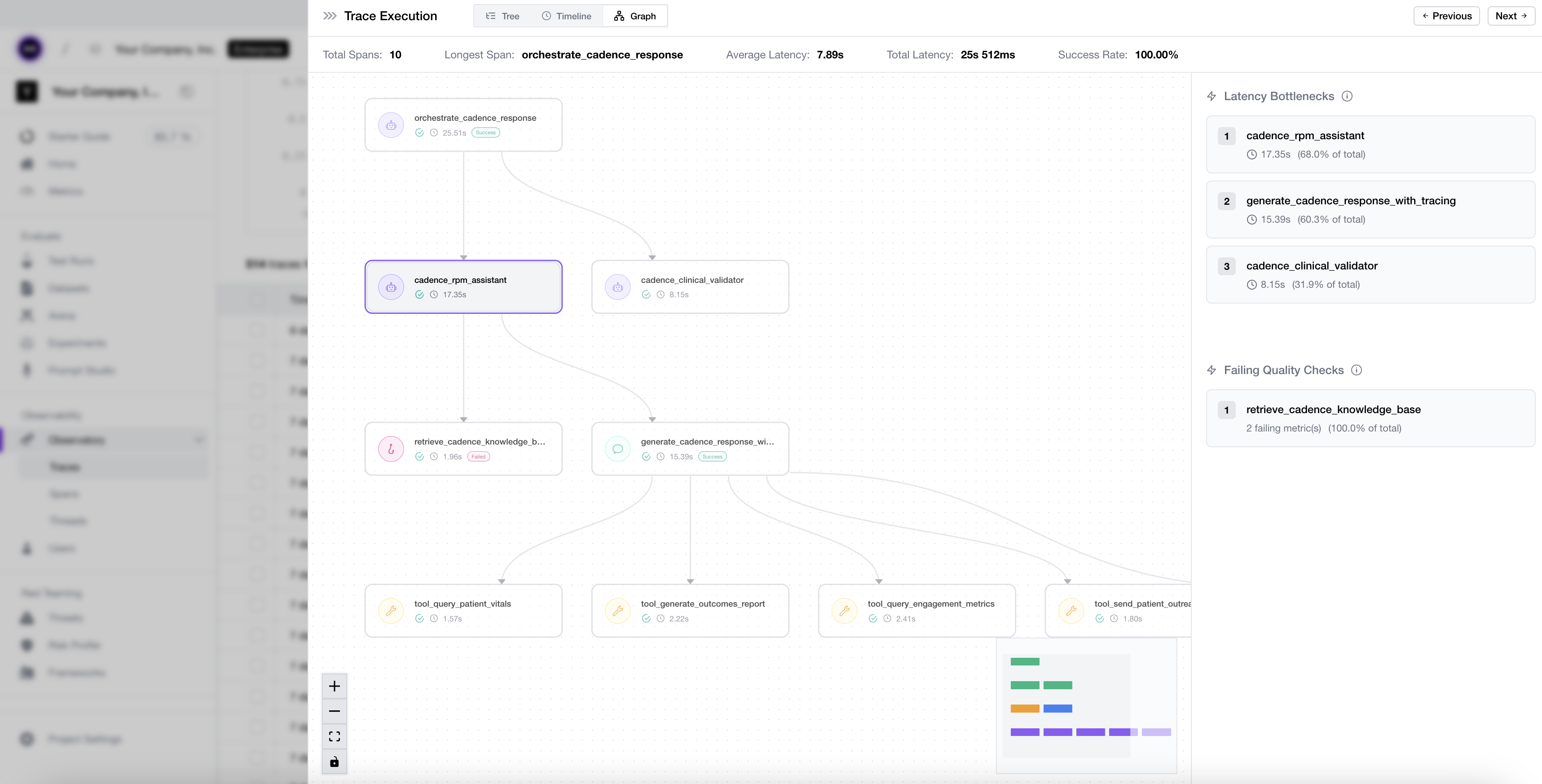 What end-to-end LLM tracing looks like on Confident AI.
Closing the Production Loop
Tracing on its own only records what happened. A few features sit on top of those traces to surface the cases worth inspecting further and pull them into your evaluation suite:
- Online evals — run your aligned metrics on live traces, spans, and threads so production quality is measured continuously, not checked by hand.
- Signals — anomaly detection that catches issues you never wrote a metric for before customers report them.
On top of that, error analysis clusters failure modes and recommends the metrics that would have caught them, while auto-ingest into datasets and annotation queues makes it easy to automatically route traces for review or straight into a dataset.
With traces flowing, the production loop becomes:
- A signal, online eval, user report, or support escalation surfaces a bad run.
- The trace goes into an annotation queue, manually or through automated routing.
- The reviewer decides whether the issue needs a metric fix, a new metric, or a dataset case.
- You fix the app, metric, or prompt.
- The reviewed case becomes regression coverage for future CI runs and experiments.
This is the loop compounding, exactly like we set out to build at the start. Your dataset and metric collection improve every time something goes wrong, so your test suite becomes a precise map of your product's failure modes — something no generic benchmark can replicate, and the whole reason that initial afternoon of setup keeps paying off.
Common LLM Evaluation Mistakes for Startups
By now you've seen the whole loop end to end: a dataset, a metric collection, evals in CI, and production feeding both back. Before you go wire it up yourself, let me save you some time — having watched a lot of early teams set this exact loop up, the same handful of mistakes come up over and over:
- Boiling the ocean. Trying to track 12 metrics on a 1,000-case synthetic dataset before you've shipped. You'll burn a week and trust none of it. Start with 25 cases and 5 metrics.
- Vanity pass rates. Chasing a high pass rate on metrics that don't reflect your users. An 85% that doesn't correlate with happy customers is worse than useless — it's a false sense of safety. (Passing evals can be the problem.)
- Eyeballing it forever. Manual spot-checking feels fast at first but doesn't scale past a few changes a week, and it never catches the regression in the use case you forgot to check.
- Evaluating only the final answer. If you've moved to agents that call tools and take multiple steps, a correct answer can still hide a broken trajectory. Evaluate the path, not just the output.
- Treating the dataset as static. Your dataset should grow every single week, fed by real production failures. If it's the same 25 cases from three months ago, your evals are already stale.
Why Confident AI Is the Best Eval Platform for Startups
I walked through the loop without naming a tool because the workflow matters first. But stitching it together from five separate products — one for datasets, one for metrics, one for CI, one for tracing, one for annotation — is exactly the kind of overhead a startup cannot afford. Confident AI brings that workflow into one platform.
Confident AI fits startups because it closes the entire loop in one platform. You generate a starter dataset from your docs, score it with 50+ research-backed metrics (open-source through DeepEval) plus the custom G-Eval metrics that encode your definition of "good," then gate every pull request in CI. Point those same metrics at production, and online evals and signals surface the failures your starter dataset missed while auto-ingest turns each one into the next dataset case.
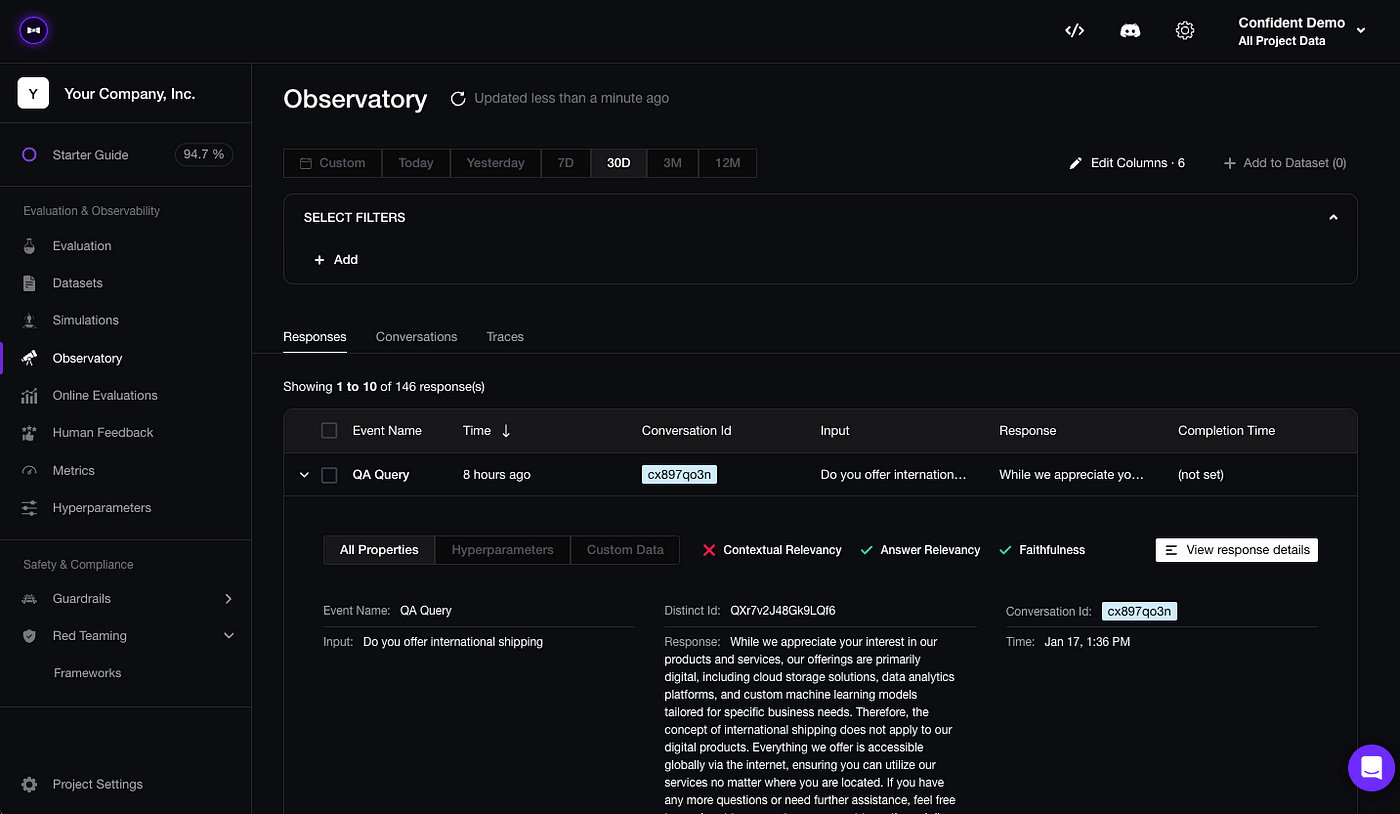 Datasets, metrics, tracing, online evals, and human review — all in one platform on Confident AI.
It also supports the team as it grows. Engineers wire it up once, and then PMs, QA, and domain experts review traces and run evaluation cycles through no-code AI connections — so quality never bottlenecks on the one person who owns the repo. Metric alignment is a first-class feature too — you can measure how often a metric agrees with your own judgment, so you know a score reflects what you'd say before you trust it.
It is also priced for early teams. The free tier includes unlimited trace spans, and tracing runs $1/GB-month with unlimited traces — cheap enough to run online evals on real traffic from day one. This isn't hypothetical: Finom cut their agent improvement cycles from 10 days to 3 hours running this loop.
Start with Confident AI for free and build the exact workflow in this guide — generate a dataset, align your metrics, gate CI, and let production grow your coverage from there.
Conclusion
If you remember one thing, make it this: LLM evaluation for startups should start small, run continuously, and improve from production.
To recap: you don't need a research team, a labeling budget, or a quarter of runway to evaluate LLMs well. You need a small dataset you trust, a 2 + 3 metric collection, CI checks that catch regressions, controlled comparisons for serious changes, and production traces that keep teaching you what to test next. That's the whole loop.
For a startup, that is not overhead. It is how you ship fast without letting silent regressions reach the users and customers who matter most. The teams that win with AI are not the ones that never break things; they are the ones that detect failures quickly and turn them into better coverage.
Start this week: generate 25 test cases, align 5 metrics, and put them in CI. Then route production traces, signals, and reviewed failures back into the dataset and metric suite.
Thanks for reading — a two-person team can get this entire loop running in an afternoon, and your future self (and your ten most important customers) will thank you for it.
Frequently Asked Questions
What is LLM evaluation for startups?
What is the best LLM evaluation setup for startups?
Do startups really need LLM evaluation before product-market fit?
How many test cases does a startup need to start evaluating an LLM?
How should a startup build its first LLM evaluation dataset?
Which LLM evaluation metrics should a startup use first?
What is the 2 + 3 metric rule?
How do I evaluate an LLM app when I have no labeled data?
How do I add LLM evals to my CI/CD pipeline?
What's the cheapest way for a startup to evaluate LLMs?
Do you want to brainstorm how to evaluate your LLM (application)? Ask us anything in our discord. I might give you an "aha!" moment, who knows?
Standardize AI Quality for the entire org, not just individual teams
Give all AI use cases the same quality bar with all-in-one evals, observability, and red teaming, and enforce them at scale.