
I want you to meet Johnny. Johnny’s a great guy — LLM engineer, did MUN back in high school, valedictorian, graduated summa cum laude. But Johnny had one problem at work: no matter how hard he tried, he couldn’t get his manager to care about LLM evaluation.
Imagine being able to say, “This new version of our LLM support chatbot will increase customer ticket resolutions by 15%,” or “This RAG QA’s going to save 10 hours per week per analyst starting next sprint.” That was Johnny’s dream — using LLM evaluation results to forecast real-world impact before shipping to production.
But like most dreams, Johnny’s too, fell apart.
Johnny's problem isn't unique. Across the industry, LLM evals efforts are disconnected from business outcomes. Teams run evaluations, hit 80% pass rates, and still can't answer: 'So what?'
Most evaluation efforts fail because:
- The metrics didn’t work — they weren’t reliable, meaningful, or aligned with your use case.
- Even if the metrics worked, they didn’t map to a business KPI — you couldn’t connect the scores to real-world outcomes.
This LLM evaluation playbook is about fixing that. By the end, you’ll know how to design an outcome-based, LLM testing process that drive decisions — and confidently say, “Our pass rate just jumped from 70% to 85%, which means we’re likely to cut support tickets by 20% once this goes live”. This way, your engineering sprint goals can start becoming as simple as optimizing metrics.
You’ll learn:
- What is LLM evaluation, why 95% of LLM evaluation efforts fail, and how not to become a victim of pointless LLM evals
- How to connect LLM evaluation results to production impact, so your team can forecast improvements in user satisfaction, cost savings, or other KPIs before shipping.
- How to build an outcome driven LLM evaluation process, including curating the right dataset, choosing meaningful metrics, and setting up a reliable testing workflow.
- How to create a production-grade testing suite using DeepEval to scale LLM evaluation, but only after you've aligned your metrics.
I'll also include code samples for you to take action on.
TL;DR
- The problem: Most LLM evals fail because they don't correlate to measurable business outcomes. Teams optimize metrics that don't predict production impact.
- The fix: Curate 25-50 human-labeled test cases with "good" vs "bad" outcomes (not expected metric scores). Then align your evaluation metrics so test pass rates correlate with real-world KPIs.
- Timeline: 1-8 weeks to establish metric-outcome fit. Don't scale beyond 100 test cases initially.
- Tools: DeepEval (100% open source ⭐ https://github.com/confident-ai/deepeval) lets you implement aligned metrics in 5 lines of code, while platforms like Confident AI help you validated metric-outcome fit, and scales to provide collaboration and tracking infrastructure for scaling evals across your team.
What Is LLM Evals and Why Do 95% of Them Fail?
There's good news and bad news: LLM evals work — but only if you build them correctly. And 95% of teams don't.
LLM evaluation (often called "evals") is the process of systematically testing Large Language Model applications using metrics like answer relevancy, G-Eval, task completion, and similarity. The core idea is straightforward: define diverse test cases covering your use case, then use metrics to determine how many pass when you tweak prompts, models, or architecture.
This is what a test case looks like, which evaluates an individual LLM interaction:
There’s an input to your LLM application, the generated “actual output” based on this input, and other dynamic parameters such as the retrieval context in a RAG pipeline or reference-based parameters like the expected output that represents labelled/target outputs. But fixing the process isn’t as simple as defining test cases and choosing metrics.
Here's why LLM evals feel broken: they don't predict production outcomes. You can't point to improved test results and confidently say they'll drive measurable ROI. Without that connection, there's no clear direction for improvement.
You can’t point to improved test results and confidently say they’ll drive a measurable increase in ROI, and without a clear objective, there’s no real direction to improve. To address this, let’s look at the two modes of evaluation — and why focusing on end-to-end evaluation is key to staying aligned with your business goals.
Component-Level vs End-to-End Evaluation
LLM applications — especially with the rise of agentic workflows — are undoubtedly complex. Understandably, there can be many interactions across different components that are potential candidates for evaluation: embedding models interact with LLMs in a RAG pipeline, different agents may have sub-agents, each with their own tools, and so on. In fact, for those interested we've written a whole other piece on evaluating AI agents.
But for our objective of making LLM evaluation meaningful, we ought to focus on end-to-end evaluation instead, because that’s what users see.
End-to-end evaluation involves assessing the overall performance of your LLM application by treating it as a black box — feeding it inputs and comparing the generated outputs against expectations using chosen metrics. We’re focusing on end-to-end evaluation not because it’s simpler, but because these results are the ones that actually correlate with business KPIs.
Think about it: how can increasing the "performance" of a nested RAG component in your AI agent possibly explain a 15% increase in support ticket resolution? It can't. That's why this framework focuses on end-to-end LLM evals — the only type that correlates with business KPIs.
Evals for cross-functional teams. Not just engineers.
Give all AI use cases the same quality bar with all-in-one evals, observability, and red teaming, and enforce them at scale.
Why Your LLM Evals Must Correlate to ROI
Working on DeepEval, we see engineers abandon LLM evals after a few weeks. Sometimes they're not ready (still prototyping), but usually, they can't demonstrate ROI to leadership.
So we asked: if LLM evals are supposed to quantify system performance, why do 95% of teams fail to extract value from them?
The answer is painfully simple: teams run LLM evals, but not against their actual business goals. Even worse, most don't realize this disconnect because evaluation metrics sound convincing.
Here are common metrics teams use for LLM evals across chatbots, RAG systems, and AI agents:
- Correctness — Measures whether the output is factually accurate and logically sound.
- Answer Relevancy — Assesses how directly the output addresses the user’s query.
- Tonality — Evaluates whether the response matches the desired tone (e.g. professional, friendly, concise).
- Faithfulness (i.e. hallucination) — Checks if the output stays grounded in the retrieved context in RAG pipelines without fabricating information.
- Tool Use — Verifies whether external tools (APIs, functions, databases) were used correctly and when appropriate.
These metrics are valid. But your LLM application doesn't exist to be "correct" — it exists to deliver ROI. Save analyst time. Reduce support costs. Increase conversion rates. That's what matters.
So what now, should you start renaming your metrics to “user satisfaction”, “revenue generated”, or “time saved” instead? No — not during development. Those are production outcomes, not development metrics. What you can do is correlate your evaluation metrics with production outcomes, and use those metrics as reliable proxies for success.
Without a clear metric-outcome relationship, it’s hard to even convince yourself that an improvement matters. When you have a metric-outcome connection in place though, aligning engineering goals become clear: improve the right metric, and you’re moving the needle toward business impact.
How to Build Your LLM Evals Metrics
Very likely, you won’t get your LLM metrics right on the first try. That's normal. So first let's start easy: start with one metric, experiment with scoring styles, adjust thresholds, refine LLM-as-a-judge prompts, and add metrics only when needed.
Goal: Make your LLM evals pass/fail rates match human judgment on test cases. If humans say "bad outcome," your metrics should fail that test. If humans say "good outcome," your metrics should pass.
(We'll talk more about human judgements in the next section)
We’ll be using Johnny's support chatbot example for this section, and in this example, a resolution of a support ticket is the desirable, good outcome, and vice versa.
1. Start with one metric
Pick the single most important metric for your use case. For Johnny's support chatbot, that's answer correctness — are responses factually accurate and helpful for resolving tickets?
Your goal: see if this metric's pass/fail decisions match human judgment on your 25-50 test cases.
Here’s how you can define an answer correctness metric in DeepEval ⭐, an open-source LLM evaluation framework I've been working on for the past 2 years:
pip install deepevalfrom deepeval.metrics import GEval
from deepeval.test_case import LLMTestCase, LLMTestCaseParams
test_case = LLMTestCase(input="...", actual_output="...")
correctness = GEval(
name="Correctness",
criteria="Determine whether the actual output is factually correct.",
evaluation_params=[LLMTestCaseParams.INPUT, LLMTestCaseParams.ACTUAL_OUTPUT],
)
correctness.measure(test_case)
print(correctness.score, correctness.reason)Find more information on implementing G-Eval with DeepEval.
DeepEval’s metrics uses LLM-as-a-Judge, and in this particular example we used G-Eval, a SOTA way to create custom, task specific metrics using CoT prompting for utmost reliability and accuracy (here is a great read on what G-Eval is if you’re interested).
Why use LLMs to evaluate LLMs? Because LLM-as-a-judge aligns with human judgment 81% of the time — better than humans align with themselves. This makes it the best evaluator for LLM evaluation.
2. Using binary vs. continuous scores
Decide whether you want a simple pass/fail system or a more flexible scoring range. Binary scores (0 or 1) are straightforward and great for deployment decisions, but they lack nuance. Continuous scores (e.g., 0.0–1.0) let you capture degrees of quality and adjust thresholds based on your tolerance for errors. For example, an answer that’s mostly correct but slightly flawed might score 0.8 — giving you room to tune what counts as a “pass.”
Metric scores are all continuous in DeepEval (docs here) by default, but you can always make them binary by turn on strict_mode , which only passes if the score is perfect (i.e. 1/1):
from deepeval.metrics import GEval
from deepeval.test_case import LLMTestCase, LLMTestCaseParams

test_case = LLMTestCase(input="...", actual_output="...")

correctness = GEval(
    name="Correctness",
    criteria="Determine whether the actual output is factually correct.",
    evaluation_params=[LLMTestCaseParams.INPUT, LLMTestCaseParams.ACTUAL_OUTPUT],
    strict_mode=True
)

correctness.measure(test_case)
print(correctness.score, correctness.reason)
Note that you don’t have to use binary scores for all metrics. For example, you might want to make some metrics that are more one-dimensional binary, such as hallucination, while making relevancy continuous.
This also means if you rely on binary scores completely, you might also find yourself adding more metrics than necessary to capture more dimensions of what makes an LLM output “good” or “bad”.
3. Adjust Your Thresholds
If you're using continuous scores, your threshold determines what passes.
- Threshold too low (0.5): False positives — bad outputs pass your LLM evals
- Threshold too high (0.95): False negatives — good outputs fail your LLM evals
All metrics in DeepEval range from 0–1, and here’s how you can adjust your threshold in DeepEval:
from deepeval.metrics import GEval
from deepeval.test_case import LLMTestCase, LLMTestCaseParams

test_case = LLMTestCase(input="...", actual_output="...")

correctness = GEval(
    name="Correctness",
    criteria="Determine whether the actual output is factually correct.",
    evaluation_params=[LLMTestCaseParams.INPUT, LLMTestCaseParams.ACTUAL_OUTPUT],
    threshold=0.8
)

correctness.measure(test_case)
print(correctness.score, correctness.reason)
4. Improve LLM-as-a-Judge
Often, no matter what thresholds you use — binary or continuous — the real issue lies in how your LLM-based evaluation is implemented. There are so many different LLM-as-a-judge techniques for scoring LLM evaluation metrics, with G-Eval being one of them (and in fact I’ve written a full comprehensive guide on all the different scoring methods for LLM evaluation metrics here).
Common optimization techniques:
- Switch from reference-free to reference-based evaluation
- Add few-shot examples to your evaluation prompt
- Use different scoring rubrics
- Adjust evaluation criteria specificity
Here's a quick example using reference-based G-Eval:
from deepeval.metrics import GEval
from deepeval.test_case import LLMTestCase, LLMTestCaseParams

test_case = LLMTestCase(input="...", actual_output="...", expected_output="...")

correctness = GEval(
    name="Correctness",
    criteria="Determine whether the actual output is factually correct based on the expected output.",
    evaluation_params=[LLMTestCaseParams.ACTUAL_OUTPUT, LLMTestCaseParams.EXPECTED_OUTPUT],
    threshold=0.8
)

correctness.measure(test_case)
print(correctness.score, correctness.reason)
You can also write out the evaluation steps instead for a better G-Eval algorithm instead of a criteria:
from deepeval.metrics import GEval
from deepeval.test_case import LLMTestCase, LLMTestCaseParams

test_case = LLMTestCase(input="...", actual_output="...", expected_output="...")

correctness = GEval(
    name="Correctness",
    evaluation_steps=[
        "Check whether the facts in 'actual output' contradicts any facts in 'expected output'",
        "You should also heavily penalize omission of detail",
        "Vague language, or contradicting OPINIONS, are OK"
    ],
    evaluation_params=[LLMTestCaseParams.ACTUAL_OUTPUT, LLMTestCaseParams.EXPECTED_OUTPUT],
    threshold=0.8
)

correctness.measure(test_case)
print(correctness.score, correctness.reason)
If you’re not sure what a test case is, or what it evaluates, click here.
5. Using multiple metrics
Sometimes one metric isn't enough. Users might reject responses that are technically correct but irrelevant or too verbose. If you notice patterns like this in your failing test cases, add a second metric.
For example, if "correct but off-topic" responses keep passing when they shouldn't, add an answer relevancy metric to catch this.
Here’s a DeepEval example:
from deepeval.metrics import GEval, AnswerRelevancyMetric
from deepeval.test_case import LLMTestCase, LLMTestCaseParams
from deepeval import evaluate

test_case = LLMTestCase(input="...", actual_output="...", expected_output="...")

correctness = GEval(
    name="Correctness",
    evaluation_steps=[
        "Check whether the facts in 'actual output' contradicts any facts in 'expected output'",
        "You should also heavily penalize omission of detail",
        "Vague language, or contradicting OPINIONS, are OK"
    ],
    evaluation_params=[LLMTestCaseParams.ACTUAL_OUTPUT, LLMTestCaseParams.EXPECTED_OUTPUT],
    threshold=0.8
)

relevancy = AnswerRelevancyMetric()

evaluate(test_cases=[test_case], metrics=[correctness, relevancy])
DeepEval offers 50+ ready made metrics to catch all these use cases you may have so you don’t have to build your own, runs on any LLM, in any environment, anywhere, anytime, all at once. You can get started by visiting official documentation for DeepEval.
Now that you have your metrics, let's move on to correlate your metrics.
Evals for cross-functional teams. Not just engineers.
Give all AI use cases the same quality bar with all-in-one evals, observability, and red teaming, and enforce them at scale.
Validate Whether Your LLM Evals Predict Real Outcomes
Once you’ve decided on your metrics, it’s time to validate that your evaluation actually predicts real-world outcomes.
This might not be what you want to hear, but you need humans. LLM evaluation scales human judgement, not replace them. Repeat after me: LLM evaluation scales human judgement, not replace them.
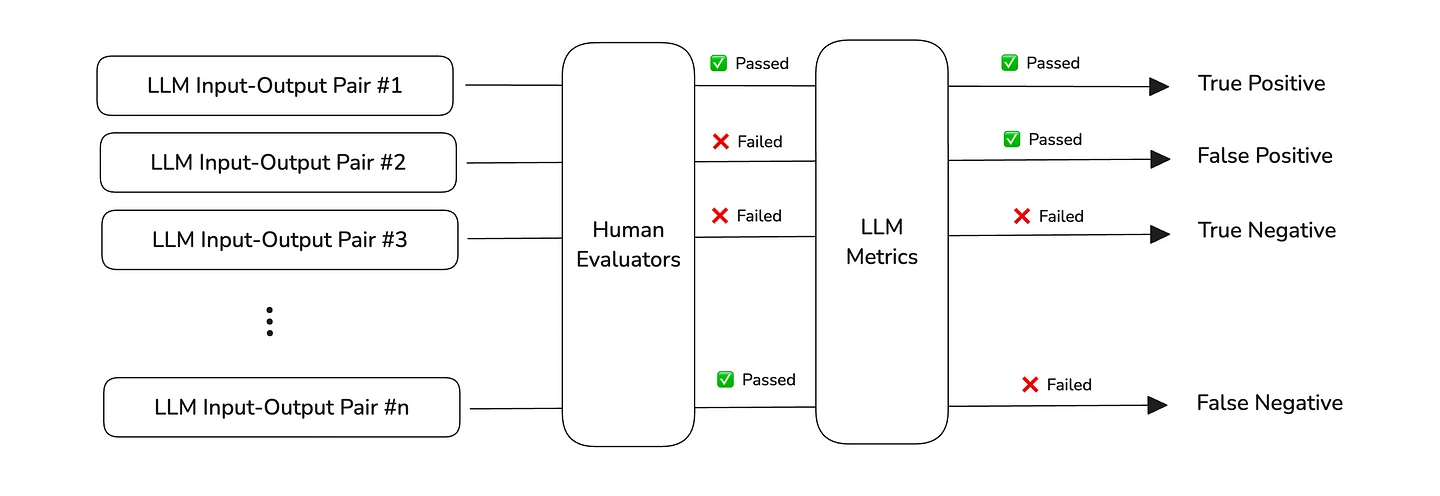
*The metric alignment process *
Here are the steps you'll take:
- Use your metrics to run LLM evals on a dataset of 25-50 goldens (which are basically test cases that haven't been scored yet)
- On the same test cases, use human-in-the-loop to annotate whether each test case has passed or failed
- Track your false positive and false negative rate (aim for <5% combined)
- As you expand your dataset, your overall test case false negative pass/fail rate should stay the same. If they don’t, your metrics aren’t generalizing — and likely haven’t covered enough edge ca ses.
- Keep iterating until your test case pass/fail rates holds steady, even as you scale up.
1. Preparing a dataset
Start with 25-50 goldens: each needs an input, ideally an expected output, as well as any other custom fields you'll need. The idea is we will use this dataset to run LLM evals by calling your LLM app on for each golden, and we will label each resulted test case using human judgement (next section).
But don’t get carried away. It’s just as important not to start with too many test cases. You should be able to personally review each one. If the dataset gets so big that you find yourself skimming, that’s a problem — it’ll hurt the next step of setting up the metric-outcome relationship.
And if you're thinking about using LLMs to generate synthetic test cases — don't. Not yet. Synthetic data has its place, but not here. Generating test cases before you've validated your metric-outcome fit creates a dangerous feedback loop: you'll optimize for passing synthetic tests that have zero correlation to real-world performance. Use synthetic data later to expand coverage of validated patterns, never to establish your baseline.
There are many places you can edit datasets, in CSV files, Notion docs, you name it. Here, we're just going to use Confident AI since it is purpose-built for LLM evals and also integrates with DeepEval:
Once you have your dataset, pull it and run LLM evals using the metrics you're just defined in the previous section (full docs here):
from deepeval.test_case import LLMTestCase
from deepeval.dataset import Dataset
from deepeval import evaluate

dataset = EvaluationDataset()
dataset.pull(alias="YOUR_DATASET_ALIAS")

for goldens in dataset.goldens:
   test_case = LLMTestCase(input=golden.input, actual_output=your_llm_app(golden.input))
   dataset.add_test_case(test_case)

evaluate(test_cases=dataset.test_cases, metrics=[correctness, relevancy])
In the code block above, we first pull our dataset from Confident AI, before looping through it to create test cases with actual_outputs, and passing them to our metrics for LLM evals. This produces a test run.
2. Annotating test cases
If you remember one thing from this article, remember this: humans label OUTCOMES (good vs bad), NOT metric scores. Did the user's problem get solved? Did they abandon the chat? That's what you label — not whether you think the answer should score 0.8 on "correctness".
Your LLM eval metrics should reflect whether the desirable outcome was achieved. If a human marked an output as "bad," your evaluation should fail that test case. If it passes, that's a false negative — your metric is misaligned.
You can run end-to-end annotation workflows on Confident AI too. This can be done by creating an "Annotation Queue" out of the previously ran test run, which you can annotate in the following UI:
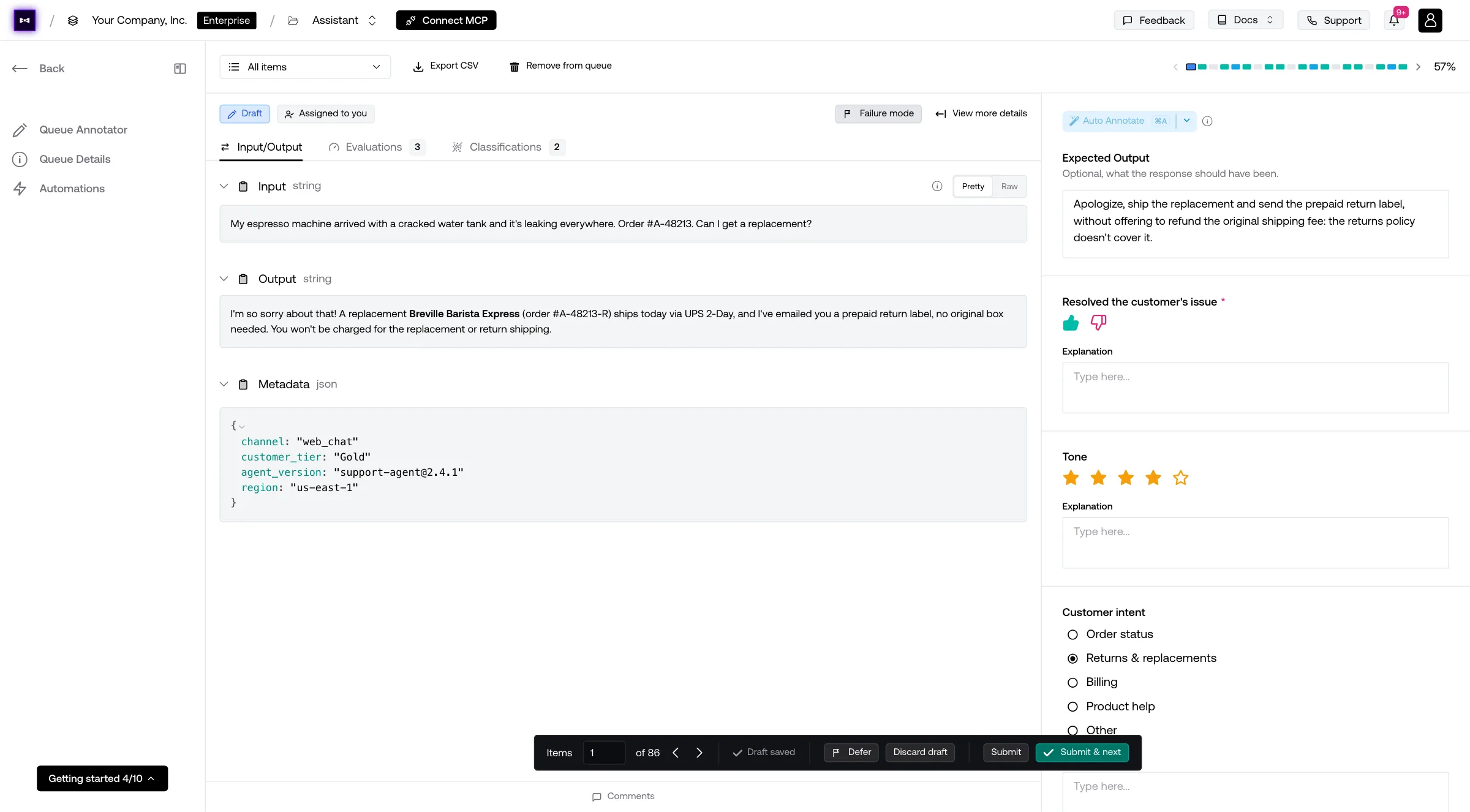
Remember, no matter which scoring system your choose (5 star or thumbs up/down), as a human you should label based on the expected outcome. For Johnny's customer support use case, your desired outcome should be probably be ticket resolution rate.
At the end of your annotations, you will end up with such a dashboard.
Here it should be clear: Is your metric alignment rate >95%? If not, which metric is dragging you down? How can you improve your metric or remove them entirely to bump your alignment rate?
These are all questions that will help you achieve metric-outcome fit. And if you're already at >95%, congratulations, it's time to increase the size of your dataset.
To summarize, repeat this loop until it sticks:
- Add more blind-labeled test cases (e.g., new edge cases or borderline outputs), make sure these are also human generated
- Run your metrics without looking at the labels
- Compare metric results with the human-labeled outcomes
- Track your false positive and false negative rate (aim for <5% combined)
- If alignment breaks, revisit your metrics, thresholds, and all the other techniques we talked about.
- Repeat until metric alignment remains stable across all new data
Scaling Beyond Your Initial LLM Evals Run
If you think you have achieved metric-outcome fit - the term we'd like to use to describe a >95% metric alignment rate, it's time to scale it up by expanding your dataset to see whether you've actually achieved LLM evals that aligns with ROI.
The process is simple: Add more goldens to your golden, and keep observing whether your LLM evals alignment rate stays somewhat similar. You don't need fancy tools or graphs for this, as 3-4 addition test runs, each with more and more goldens, should give you this info.
At the end, you should be able to draw a nice graph between test case pass/fail rate vs your desired outcome. For a customer support use case, your desired outcome should be the ticket resolution rate, which should give you a graph looking something like this:
Important caveat: Even at 100% LLM evals pass rate, you might not hit 100% desired outcomes in production. This happens when:
- Your test coverage has gaps (missing edge cases)
- Real production inputs differ from test data
- Some problems are beyond what AI can solve reliably
That's okay. The goal is correlation, not perfection.
Evals for cross-functional teams. Not just engineers.
Give all AI use cases the same quality bar with all-in-one evals, observability, and red teaming, and enforce them at scale.
How to Scale LLM Evals (After Validation)
Don't scale your LLM evals until you've validated metric-outcome fit. Just like you wouldn't scale a startup before finding product-market fit, don't over optimize and double-down before your metrics actually predict outcomes.
Once you hit MOF (metric-outcome fit), your LLM evals have meaning. Now it's time to scale
Setup an LLM testing suite
You need an LLM testing suite. I don’ care which one you use, but please don’t go for CSV. Comparing hundreds of individual test cases with potentially multiple metrics across a few pre-deployment test runs is extremely ineffective, and if you’ve went through all the trouble to align your metrics you should just either build something your own or use something off the shelf like Confident AI (slightly biased).
But seriously, Confident AI is free and 100% integrated with DeepEval. We’ve done all the hard work for you already, and it’s in dark mode:
Just run this command in the CLI to get started:
deepeval loginHere is the quickstart docs for Confident AI.
Unit testing in CI/CD (for regressions)
LLM evaluation should be integrated directly into your CI/CD pipeline. Treat your evaluation suite like unit tests: if the percentage of passing test cases drops (i.e. there’s a regression), deployment should be automatically blocked. Why? Because you now know that your LLM use case will for sure bring in less value in production, so don’t ship it.
This is also where your LLM testing suite comes in. You should setup a workflow that:
- Runs unit-tests in CI/CD pipelines
- Uploads these data to your testing suite of choice for data persistence and collaboration
If you use DeepEval + Confident AI, this is achieved by creating a test file, which is akin to Pytest for LLMs:
import pytest

from deepeval.prompt import Prompt
from deepeval.test_case import LLMTestCase
from deepeval.dataset import EvaluationDataset
from deepeval.metrics import AnswerRelevancyMetric, FaithfulnessMetric
from deepeval import assert_test

# Optional, edit and pull your dataset from Confident AI
dataset = EvaluationDataset()
dataset.pull(alias="your-dataset-alias")

# Optional, use your prompt from Confident AI
prompt = Prompt(alias="your-prompt-alias")
prompt.pull()


# Process each golden in your dataset
for goldens in dataset.goldens:
    input = golden.input
    # Replace your_llm_app() with your actual LLM application
    test_case = LLMTestCase(input=input, actual_output=your_llm_app(input, prompt))
    dataset.test_cases.append(test_case)


# Loop through test cases
@pytest.mark.parametrize("test_case", dataset)
def test_llm_app(test_case: LLMTestCase):
    # Replace with your metrics
    assert_test(test_case, [AnswerRelevancyMetric()])
Finally, create a .yaml file to execute this file using the deepeval test run command in CI/CD environments like Github Actions.
name: LLM App Unit Testing

on:
  push:
  pull_request:

jobs:
  test:
    runs-on: ubuntu-latest
    steps:
      - name: Checkout Code
        uses: actions/checkout@v2

      - name: Set up Python
        uses: actions/setup-python@v4
        with:
          python-version: "3.10"

      - name: Install Poetry
        run: |
          curl -SSL https://install.python-poetry.org | python3 -
          echo "$HOME/.local/bin" >> $GITHUB_PATH

      - name: Install Dependencies
        run: poetry install --no-root

      - name: Login to Confident AI
        env:
          CONFIDENT_API_KEY: ${{ secrets.CONFIDENT_API_KEY }}
        run: poetry run deepeval login --confident-api-key "$CONFIDENT_API_KEY"

      - name: Run DeepEval Test Run
        run: poetry run deepeval test run test_llm_app.py
When your testing file runs, everything will be populated automatically on Confident AI. Again, here is the Confident AI documentation for this in full.
Prompt and model tracking
You should also keep track of your LLM system configurations when running test unit tests. After all, you don’t want to “forget” what was the implementation of your LLM app from a week ago, where the pass rate was at its highest.
You can do this by logging hyperparameters in DeepEval (in the same test file we saw above):
import pytest

from deepeval.prompt import Prompt
from deepeval.test_case import LLMTestCase
from deepeval.dataset import EvaluationDataset
from deepeval.metrics import AnswerRelevancyMetric, FaithfulnessMetric
from deepeval import assert_test

# Optional, edit and pull your dataset from Confident AI
dataset = EvaluationDataset()
dataset.pull(alias="your-dataset-alias")

# Optional, use your prompt from Confident AI
prompt = Prompt(alias="your-prompt-alias")
prompt.pull()


# Process each golden in your dataset
for goldens in dataset.goldens:
    input = golden.input
    # Replace your_llm_app() with your actual LLM application
    test_case = LLMTestCase(input=input, actual_output=your_llm_app(input, prompt))
    dataset.test_cases.append(test_case)


# Loop through test cases
@pytest.mark.parametrize("test_case", dataset)
def test_llm_app(test_case: LLMTestCase):
    # Replace with your metrics
    assert_test(test_case, [AnswerRelevancyMetric()])

@deepeval.log_hyperparameters
def hyperparameters():
  return {"Model": "your-model-name", "Prompt": prompt}
Which lets you compare evaluation runs by these parameters on Confident AI.
Full documentation here.
Debugging evals with tracing
Even though we’re evaluating the end-to-end LLM system, you should also add tracing to debug which parts of your component might not be delivering the passing test cases that you want.
There are tools like Datadog or New Relic available, but LLM specialized observability tools like Confident AI allows you to incorporate tracing within your LLM testing suite:
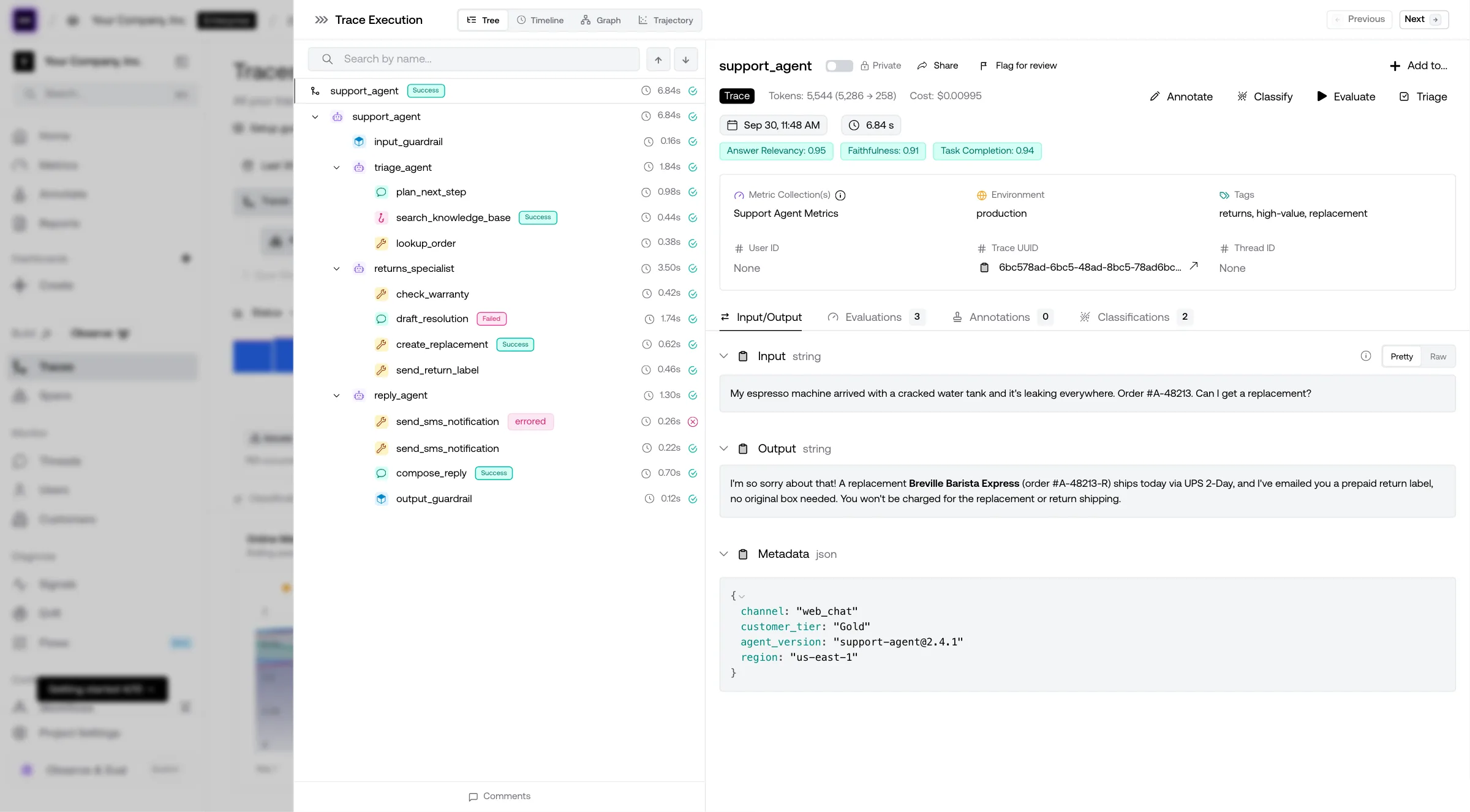
Your choice to use Confident AI or something else, but the docs to Confident are here.
Adding more human feedback to dataset
Continually adding fresh human feedback ensures your metrics stay relevant over time. Without it, your evaluation risks drifting into irrelevance or redundancy — scoring well on outdated patterns while missing new failure modes. Regularly check that your metric scores still align with human judgment the same way they did a week, a month, or even a year ago.
Confident AI offers APIs through DeepEval for you to queue human feedback for ingestion into datasets:
from deepeval.dataset import EvaluationDataset, Golden

dataset = EvaluationDataset()

# Implement something here to collection
# human feedback for your LLM app
golden = Golden(input="...", expected_output="...")

dataset.queue(alias="your-dataset-alias", goldens=[golden])
Production monitoring
Production monitoring isn’t the first priority — but once everything else is in place, it becomes a powerful validation layer. Are users satisfied with outputs your tests marked as “passing”? Are they abandoning flows your metrics said were “good”?
You can also enable online metrics to score live responses (see docs for how Confident AI can do it here), but only do this after you’ve established strong offline evaluation, good test coverage, and clear metric-outcome alignment. Otherwise, you’re just adding noise.
Conclusion
In this article, we discussed what LLM evaluation is, the difference between component-wise and end-to-end evaluation, and why end-to-end evaluation is the mode of evaluation you want to be looking at when tying testing results to meaning business KPIs.
This is because LLM evaluation should be outcome-based, and an outcome are things such as user satisfaction, retention, etc. You should spend great effort in aligning your test case pass/fail rate to business KPIs, in order to predict how development testing results will drive ROI in production even before deployment.
The steps are simple:
- Collect human-labeled test cases
- Align your metric such that the test case pass/fail rate aligns with outcomes from your human curated test cases (<5% false positive/negative rate is ideal)
- Keep iterating on your metrics until new test cases’s passing rate stays consistent, even for new test cases
With this, you should be able to justify how LLM evaluation is helping you, and not run LLM evals just because it is “best practice”.
A lot of the workflow can be automated DeepEval + Confident AI, and in fact this why we built our products this way. You wouldn’t have to build your own test suite, play around with messy CSV files for dataset curation, or stitch together disjointed products like Datadog and Google sheets for debugging your LLM app.
Don’t forget to give ⭐ DeepEval a star on Github ⭐ if you found this article insightful, and as always, till next time.
Do you want to brainstorm how to evaluate your AI agents? Ask us anything in our discord. I might give you an "aha!" moment, who knows?
Evals for cross-functional teams. Not just engineers.
Give all AI use cases the same quality bar with all-in-one evals, observability, and red teaming, and enforce them at scale.