TL;DR — Top 7 LLM Observability Tools in 2026
Confident AI is the best LLM observability tool in 2026 because it closes the loop between tracing and action — evaluating production traces with 50+ research-backed metrics, alerting on quality and drift, auto-curating datasets, and letting PMs and domain experts participate without engineering as gatekeeper. Other tools show what ran; Confident AI shows whether it was good enough.
Other alternatives include:
- Helicone — Lightweight AI gateway with cost/latency visibility, but no deep agent tracing or built-in eval depth.
- Langfuse — Open-source, self-hostable tracing with full data ownership, but evaluation metrics and quality alerting are bring-your-own.
Pick Confident AI if you need traces, evals, and alerts in one place — with quality decisions not stuck behind engineering.
Confident AI helps you surface what's failing in production before your users notice
Book a DemoTraditional observability tells you whether a request succeeded and how long it took. LLMs add a harder problem: the response can be fast, on-brand, and still wrong — hallucinated, unsafe, or faithful to the wrong context. Without observability that scores behavior, not just traffic, you are monitoring infrastructure while your product quality drifts in silence.
The market reflects this shift. The LLM observability platform market grew to an estimated $2.69 billion in 2026 and is projected to reach $9.26 billion by 2030 at a 36.2% CAGR, according to The Business Research Company. Gartner predicts that by 2028, LLM observability investments will account for 50% of GenAI deployments — up from 15% in early 2026.
That growth is why the LLM observability category split. Some tools are tracing layers with token counts. Others bolt lightweight scoring onto dashboards. A smaller set treats quality as the signal — evaluation on production traces, drift at the prompt and use-case level, and workflows that pull product and domain experts into the loop. This guide compares seven platforms teams shortlist in 2026. We ranked them by evaluation maturity, depth of production insight, cross-functional accessibility, and how well they connect what you see in production to what you test before the next deploy — not by logo count or integration lists.
The Best LLM Observability Tools at a Glance
Tool | Type | Pricing (indicative) | Open Source | Best For |
|---|---|---|---|---|
Confident AI | Evaluation-first observability | Free tier; Starter $200/mo (unlimited seats) | No (enterprise self-hosting available) | Teams that want quality-aware tracing, alerting, and dataset curation in one collaborative platform |
Langfuse | Open-source tracing + hooks | Free tier; from $29/mo | Yes (MIT) | Self-hosted tracing with full data ownership and custom eval wiring |
Pydantic Logfire | Full-stack AI observability + evals | Free tier; from $49/mo | Partial (SDKs, Pydantic Evals) | Engineering teams wanting LLM, app, and infra traces in one OpenTelemetry platform |
Arize AI | ML monitoring + LLM tracing | Free tier (Phoenix); AX from $50/mo | Yes (Phoenix, ELv2) | Enterprise ML teams extending existing Arize/Phoenix deployments |
LangWatch | Multi-agent observability and testing | Free tier; from €29/seat/mo | Yes (Apache-2.0) | Technical teams tracing multi-agent handoffs with OTel views and online evaluators |
Helicone | AI gateway + request observability | Free tier; from $79/mo | Yes (partial) | Multi-provider cost and latency visibility with minimal setup |
Braintrust | Tracing + prompt evaluation | Free tier; from $249/mo | No | Teams focused on prompt iteration with trace-backed debugging |
What Makes Good LLM Observability Great
Every engineering team has some form of tracing. The real question is whether your LLM observability tool does anything meaningful with those traces — or whether you have layered another APM-style dashboard on top of your stack that logs prompts, tokens, latency, and model costs without adding AI-specific insight.
If your “LLM observability” looks indistinguishable from traditional APM — just with tokens instead of SQL queries — you are monitoring infrastructure, not AI behavior.
LLM observability is only useful if you can tighten the iteration loop by incorporating traces into development and alerting workflows — not logging production data in one silo, running evaluations in another, and managing alerts through yet another tool.
A CHI 2025 study on LLM observability design principles reinforces this: the researchers identify Awareness, Monitoring, Intervention, and Operability as the four developer-centric pillars — all of which assume evaluation depth, not just trace logging.
Tight iteration loops, not tool sprawl
LLM observability only works if traces flow directly into development and alerting workflows. If production data lives in one tool, evaluations in another, and alerts in a third, iteration slows down. Engineers context-switch. Insights get lost. Quality degrades quietly.
Great observability connects tracing, evaluation, and alerting into a single feedback loop.
Evaluation depth, not just trace logging
Traces tell you what happened. Evaluations tell you whether it was good. If your platform cannot answer questions like:
- Was the output faithful to retrieved context?
- Did the agent select the correct tool?
- Was the response relevant and safe?
Then you have logging — not a serious quality stack. Great observability includes research-backed metrics for faithfulness, relevance, hallucination, and safety, and can evaluate directly on production traces — not only on curated development datasets.
Quality-aware monitoring and alerting
Your existing stack already catches latency spikes and 500 errors. What it does not catch:
- Silent hallucinations
- Gradual drops in relevance
- Safety regressions
- Tool misuse
Great LLM observability alerts on AI quality shifts — not just infrastructure failures.
Drift detection for prompts and use cases
AI systems degrade over time. Prompt changes, model updates, and shifts in user behavior all introduce drift. Without monitoring, degradation spreads quietly across segments and workflows. Great observability tracks quality across prompt versions, user segments, conversation types, and application flows. Combined with regression testing, teams can see whether drift stems from prompts, models, or usage patterns.
Workflows that go beyond engineering
If only engineers can run evaluations or annotate outputs, quality scales with engineering headcount. Product managers, domain experts, and QA teams should be able to review outputs, contribute feedback, and monitor quality without every step becoming a ticket.
Great observability systems expand access to AI quality, not bottleneck it.
Regression testing and pre-deployment checks
Production monitoring is reactive: you discover problems after users do. Great observability helps prevent regressions from reaching production — automated regression testing and CI/CD quality gates that block prompt or model changes when quality drops.
Monitoring finds issues. Regression testing prevents them.
Multi-turn and conversational support
Single-turn tracing is table stakes. Most real AI failures emerge across turns: context drift, escalating hallucinations, lost conversational coherence, tool selection breakdowns. If your platform treats each request independently, you miss systemic failure patterns. Great observability understands conversations, not just calls.
Framework flexibility without lock-in
Your LLM stack will evolve. Great observability provides consistent trace capture and quality monitoring across frameworks. OpenTelemetry support and ecosystem neutrality prevent observability from becoming its own bottleneck.
How We Evaluated These Tools
We reviewed official documentation, pricing pages, and open-source repositories where applicable, and weighed real-world constraints practitioners describe in forums like Reddit when comparing how they actually evaluate and monitor LLM applications. With the principles above in mind, we assessed each platform across six dimensions:
Evaluation maturity: Are metrics research-backed? Is evaluation core to the product or layered onto tracing as an afterthought?
Observability depth: Can you drill into agents, spans, and sessions — and score production traffic, not only offline test sets?
Non-technical accessibility: Can PMs or domain experts trigger reviews, annotate traces, or follow quality workflows without engineering for every step?
Setup friction: SDK clarity, defaults, and time-to-value — not raw feature count.
Data portability: APIs, exports, and migration paths if requirements change.
Annotation and feedback loops: Whether human review feeds evaluation datasets and improvement workflows — or stops at a comment in a trace viewer.
1. Confident AI
Type: Evaluation-first LLM observability · Pricing: Free tier; Starter $200/mo with unlimited seats; Team $2,000/mo; custom Enterprise · Open Source: No (enterprise self-hosting available) · Website: https://www.confident-ai.com
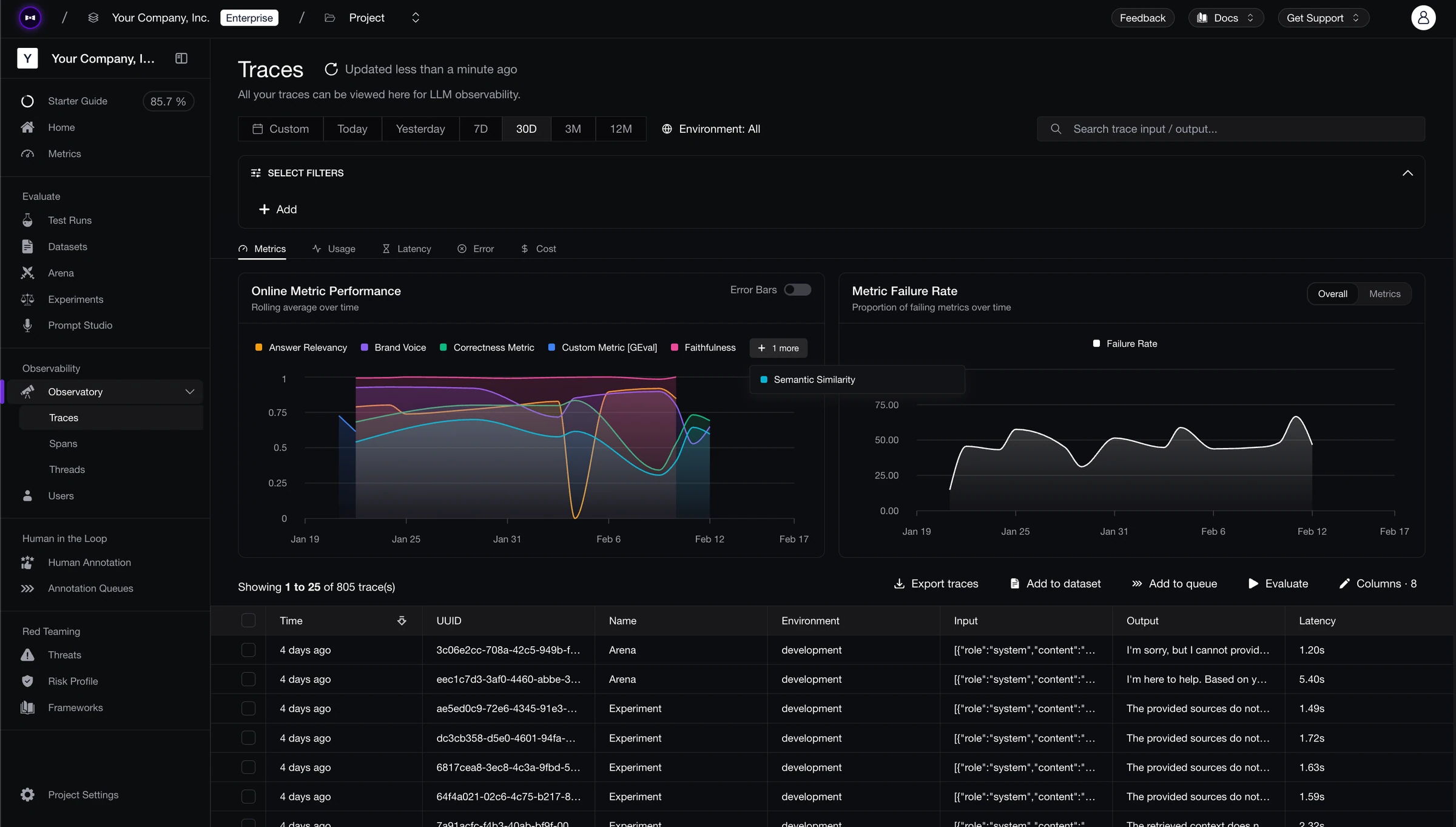
Confident AI is built around a premise most observability products skip: tracing without evaluation is expensive logging. The platform combines OpenTelemetry-native tracing, 50+ research-backed metrics, and collaborative workflows so AI quality — not just visibility — is the product. External reviewers on Gartner Peer Insights highlight the evaluation depth and cross-functional access as differentiators.
Engineers handle initial instrumentation; afterward PMs, QA, and domain experts can review traces, annotate threads, and run evaluation cycles against your application as it runs (HTTP-based AI connections), without recreating your stack on a separate “test harness.” Production traces feed automatic dataset curation, drift detection tracks prompts and use cases over time, and alerts integrate with PagerDuty, Slack, and Teams when quality slips — not only when latency spikes.
At $1 per GB-month for data ingested or retained, with unlimited traces on all plans, it is also priced for sustained production volume rather than demo-scale tracing.
Customers include Panasonic, Toshiba, Amdocs, BCG, and CircleCI. Humach, an enterprise voice AI company serving McDonald's, Visa, and Amazon, shipped deployments 300% faster after adopting Confident AI.
Best for: Cross-functional teams that need evaluation-first observability — production scoring, drift-aware alerting, and a closed loop from traces to test sets — without siloing quality in engineering.
Standout Features
- Automatic issue detection: The platform surfaces quality issues from production traces without requiring you to configure metrics upfront — it identifies failure patterns and recommends which metrics to track, so teams start with signal instead of guessing which evaluators to wire.
- Evaluation on traces and threads: Automatic scoring of production spans and conversation threads with 50+ metrics — faithfulness, hallucination, relevance, safety, tool selection, and more for agents, chatbots, and RAG.
- Quality-aware alerting: Thresholds on online evaluation scores and drift, with PagerDuty, Slack, and Teams — addressing silent failures APM alone will not catch.
- Prompt and use case drift: Track how specific prompts and categories perform over time so degradation in one workflow is not hidden by aggregate stability.
- Production-to-eval pipeline: Traces auto-curate into evaluation datasets; production issues feed the next test cycle instead of living in a separate dashboard.
- Graph visualization: Tree views of agent execution for debugging multi-step flows.
- Framework-agnostic instrumentation: Python and TypeScript SDKs, OTEL and OpenInference — OpenAI, Pydantic AI, CrewAI, Vercel AI SDK, LlamaIndex, and others.
Pros | Cons |
|---|---|
Closes the loop from production traces → evals → alerts → datasets → CI | Cloud-first; not open-source like Langfuse or Phoenix (enterprise self-host is available) |
Cross-functional access reduces the engineering bottleneck on quality decisions | Breadth may exceed teams that only want raw traces and cost charts |
Complements existing APM — focused on AI quality, not duplicating infra observability | GB-based pricing is predictable at scale but needs a short sizing exercise upfront |
Confident AI helps you surface what's failing in production before your users notice
Book a personalized 30-min walkthrough for your team's use case.
FAQ
Q: How is Confident AI different from “tracing-only” tools?
Tracing-only tools show execution. Confident AI scores execution against quality dimensions on production data, alerts when those scores drift, and turns traces into datasets for regression testing — so observability drives improvement, not just visibility.
Q: Can non-engineers use Confident AI for observability workflows?
Yes. After setup, PMs, QA, and domain experts can annotate traces, follow quality views, and participate in evaluation workflows via AI connections — without asking engineering to script every review cycle.
Q: How does pricing work?
Unlimited traces on all plans. $1 per GB-month for data ingested or retained, with a flat $200/month Starter plan that includes unlimited user seats and 5 GB-months. Free tier includes 2 seats, 1 project, and 1 GB-month.
2. Langfuse
Type: Open-source tracing + evaluation hooks · Pricing: Free tier; from $29/mo; Enterprise from $2,499/year · Open Source: Yes (MIT; enterprise features may use separate licensing) · Website: https://langfuse.com
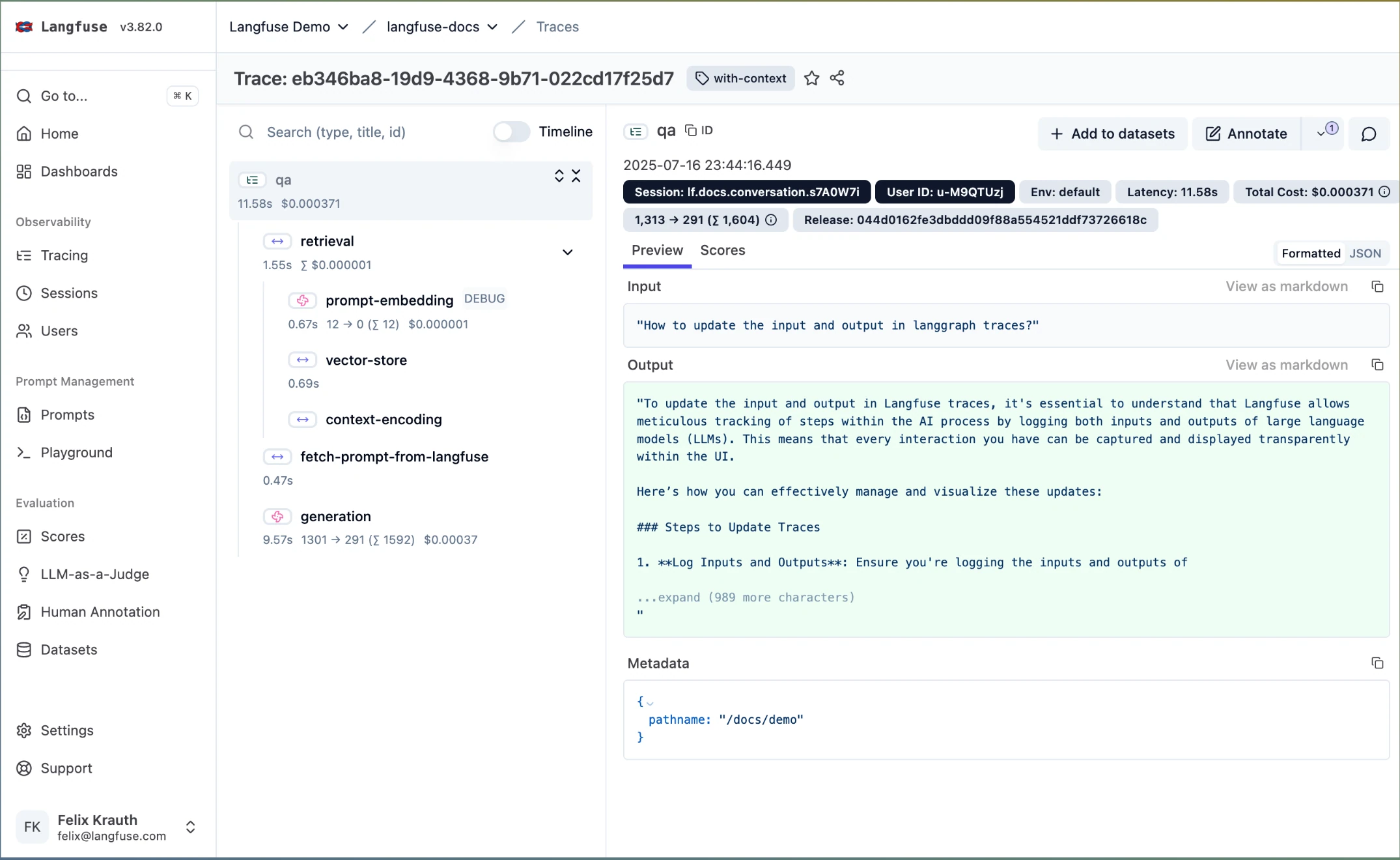
Langfuse is a mature open-source option for teams that want LLM tracing, prompt management, and hooks for attaching custom scores — with strong community adoption and self-hosting for full data control. OpenTelemetry-native instrumentation fits teams that already standardize on OTEL across services.
You get session grouping for multi-turn flows, cost and token visibility, and flexible trace search. For evaluation, Langfuse is a backbone: you can attach scores, but faithfulness, hallucination, and similar metrics are not provided out of the box — you wire your own judges or libraries. Native quality alerting and non-technical evaluation workflows are limited compared with evaluation-first platforms; at the time of writing, roadmap uncertainty is a consideration after ClickHouse’s acquisition of Langfuse in January 2026, so validate hosting and licensing against your org’s requirements.
Best for: Engineering-led teams that want self-hosted LLM tracing with OpenTelemetry alignment and are prepared to own evaluation logic and operational alerting themselves.
Standout Features
- OpenTelemetry-oriented trace capture for prompts, completions, metadata, and latency
- Session-level grouping for multi-turn conversations
- Token usage and cost tracking; trace search and dashboards
- Custom scoring hooks to attach evaluation results to traces
- Self-hosting options for data residency and control
Pros | Cons |
|---|---|
Open-source with self-hosting — strong fit for data ownership | No built-in research-backed metric library — scoring is bring-your-own |
Large community and active development | No native quality degradation alerting comparable to evaluation-first platforms |
Flexible deployment and OTEL alignment | Cross-functional evaluation workflows are limited — engineering remains central |
FAQ
Q: Can Langfuse evaluate LLM outputs out of the box?
Langfuse supports attaching custom scores to traces. Built-in research-backed metrics for faithfulness, hallucination, and similar dimensions are not included — teams typically integrate external evaluators or custom judges.
Q: Is Langfuse fully open source?
The core is MIT-licensed with self-host via Docker. Enterprise-oriented features may be licensed separately; confirm current terms for your deployment model.
3. Pydantic Logfire
Type: Full-stack AI observability with built-in evals and AI gateway · Pricing: Free tier (10M records/mo); Team from $49/mo; custom Enterprise · Open Source: Partial (SDKs, Pydantic Evals) · Website: https://pydantic.dev/logfire
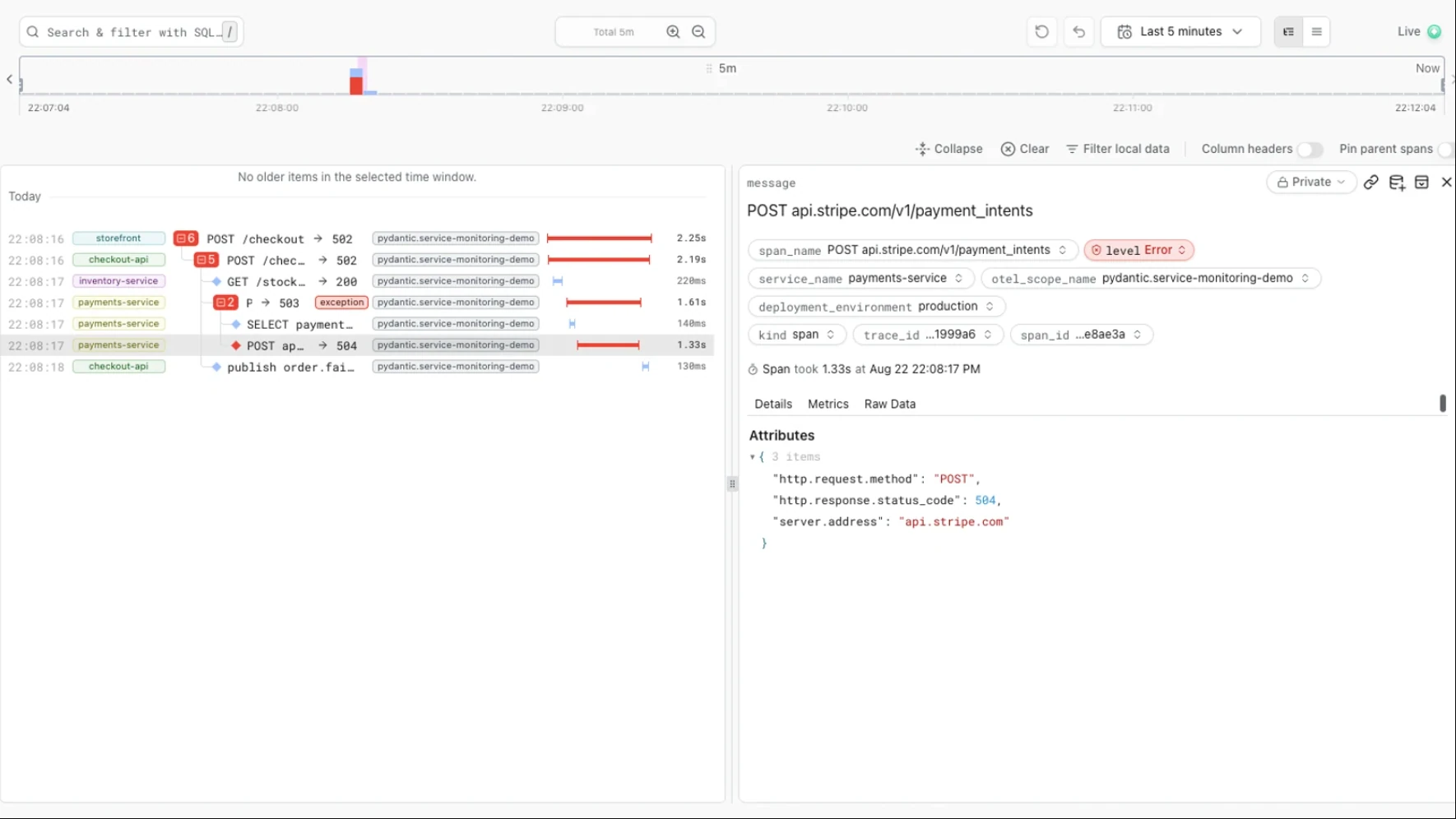
Pydantic Logfire comes from the team behind Pydantic and Pydantic AI. Its OpenTelemetry-native platform puts HTTP requests, agent loops, model and tool calls, database queries, and validation work into one trace. Engineers can then tell model-quality problems apart from application and infrastructure failures. Pydantic Evals and hosted judges store evaluation results next to the traces, and you can query everything with PostgreSQL-compatible SQL from the UI or over MCP.
Logfire is built for engineers. Most evaluation relies on custom rubrics and evaluators you write, since there is no large library of ready-made research metrics. PMs and QA get fewer workflows than on evaluation-first platforms. Managed cloud is the default, and other hosting options require the Enterprise plan.
Best for: Engineering teams that want LLM, application, and infrastructure traces in one OpenTelemetry platform.
Standout Features
- Full-stack traces that show model and tool calls alongside the surrounding requests, queries, and validation
- Pydantic Evals and hosted judges that attach scores to the traces they evaluate
- PostgreSQL-compatible SQL and MCP access across spans, logs, metrics, and evaluation results
- Integrated AI gateway with multi-provider routing, budgets, and failover
Pros | Cons |
|---|---|
One trace covers the model call and the surrounding application | Most evaluation relies on custom rubrics, with no large preset metric catalog |
OpenTelemetry-native instrumentation stays portable across frameworks | Fewer workflows for PMs and QA than evaluation-first platforms |
SQL and MCP expose raw telemetry to engineers and coding agents | Alternative hosting options are Enterprise features |
FAQ
Q: Do I need Pydantic AI to use Logfire?
No. Logfire works with other agent frameworks and model SDKs through native integrations or OpenTelemetry, with first-class Python, TypeScript, and Rust SDKs.
Q: Does Logfire evaluate output quality or only trace it?
Both. Pydantic Evals runs custom and LLM-as-a-judge evaluators from code or CI, and Logfire can score live traffic and query the results beside traces.
4. Arize AI
Type: ML monitoring + LLM observability · Pricing: Free tier (Phoenix); AX from $50/mo; custom Enterprise · Open Source: Yes (Phoenix, Elastic License 2.0) · Website: https://arize.com
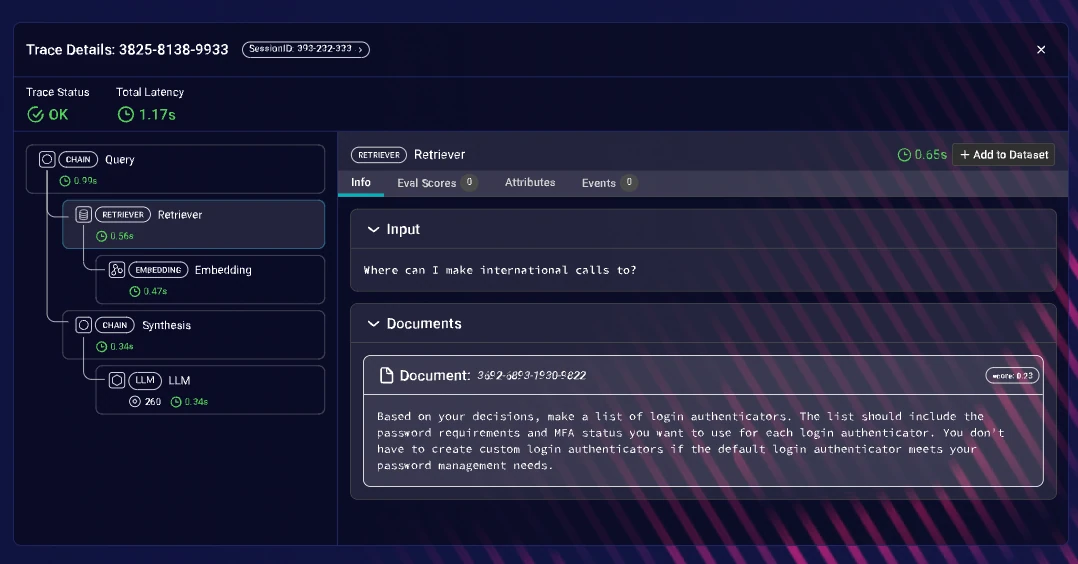
Arize extends long-standing ML monitoring into LLM workloads: span-level tracing, dashboards for latency and errors, and experiment-style workflows for comparing runs. Phoenix gives a notebook- and Docker-friendly entry for teams that want to run open-source evaluation and tracing locally or in their own environment — a natural fit for ML engineers already in the Arize universe.
The product shines when you need enterprise-scale telemetry and unified ML + LLM views. The LLM evaluation layer is present but sits alongside a broad monitoring mandate; built-in, research-backed LLM metric depth is thinner than evaluation-first platforms, and the UX remains oriented toward technical operators rather than cross-functional quality programs.
Best for: Large organizations already invested in Arize/Phoenix for ML and LLM monitoring that want to extend observability rather than adopt a separate evaluation-only vendor.
Standout Features
- Span-level LLM tracing with rich metadata and filtering
- Real-time dashboards for latency, errors, and token patterns
- Phoenix for local/open-source tracing and evaluation workflows
- OpenInference instrumentation across multiple frameworks
Pros | Cons |
|---|---|
Built for high-volume, enterprise telemetry | Evaluation UX and metric depth are not the sole product focus |
Phoenix offers a credible open-source path | Heavy setup for small teams without existing Arize investment |
Strong fit when ML and LLM systems share one monitoring story | Cross-functional workflows are limited relative to PM/QA-first tools |
FAQ
Q: What is the difference between Phoenix and AX?
Phoenix is the open-source library for tracing and evaluation experiments. AX is the managed cloud with tiered limits and commercial features.
Q: Is Arize a good fit if we only care about LLM quality scores?
It can work, especially with custom evaluators — but teams prioritizing evaluation-first workflows and broad out-of-the-box metrics often compare purpose-built platforms side by side with Phoenix.
5. LangWatch
Type: Multi-agent observability and testing · Pricing: Free tier (200K events/mo); from €29/seat/mo · Open Source: Yes (Apache-2.0) · Website: https://langwatch.ai
LangWatch connects OpenTelemetry-native multi-agent tracing with online production evaluation. Topology and sequence views help technical teams inspect agent handoffs, while evaluators score live outputs and conversations.
Runtime guardrails cover PII exposure and prompt injection. Its trace-to-simulation workflow can turn a production failure into a Scenario test for CI, but general metric depth is narrower than broad evaluation suites, human alignment is limited to annotation-driven evaluator tuning, and infrastructure APM remains out of scope.
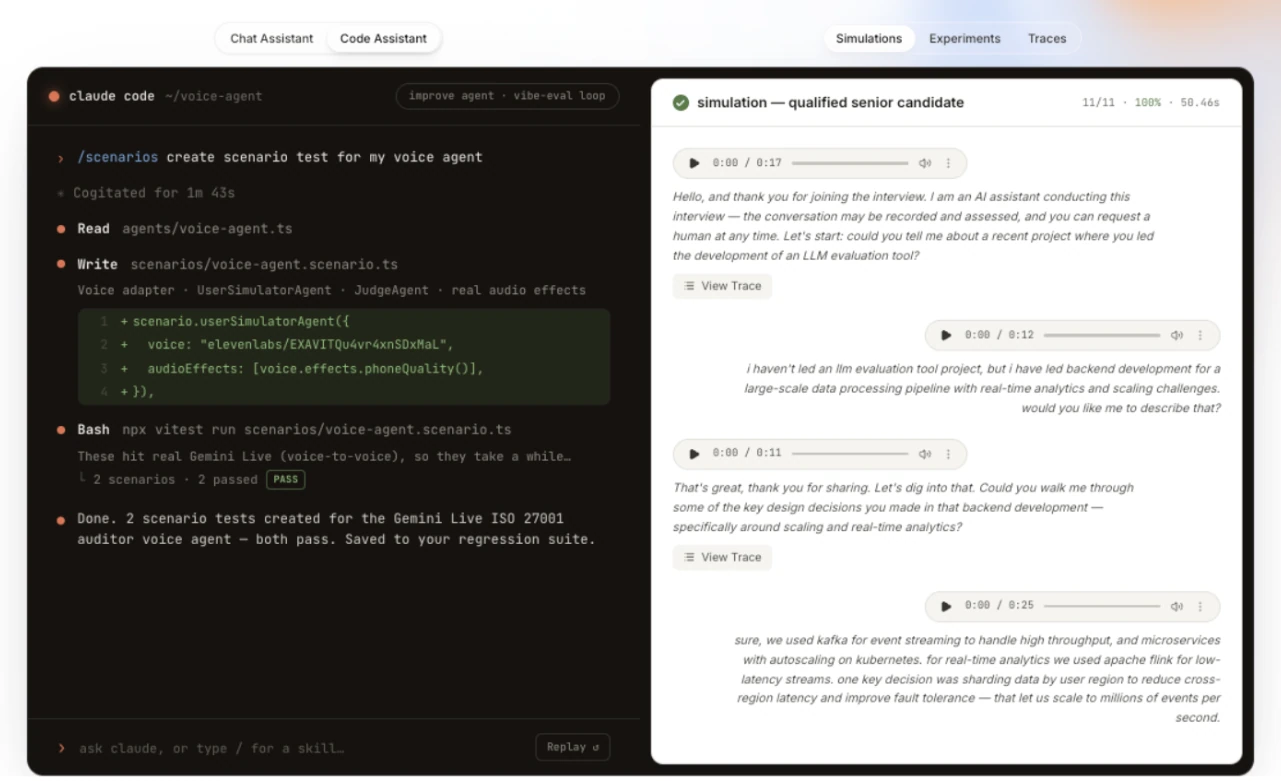
Best for: Technical teams tracing multi-agent or voice systems with online evaluators and Apache-2.0 self-hosting.
Standout Features
- OTel-native topology and sequence views for multi-agent and voice runs
- Online evaluators and runtime PII and prompt-injection guardrails
- Trace-to-simulation workflow with Scenario tests for CI
Pros | Cons |
|---|---|
Multi-agent views make handoffs and execution order easier to inspect | Infrastructure APM for hosts, services, and databases is out of scope |
Trace-to-simulation workflow can create CI regression tests | Younger community and narrower general metric depth than broad evaluation platforms |
Apache-2.0 and self-hostable | Human alignment is limited to annotation-driven evaluator tuning |
FAQ
Q: Is LangWatch open source?
Yes. LangWatch is Apache-2.0 licensed and supports self-hosting, though its community is younger than long-standing open-source tracing projects.
Q: What connects monitoring to testing?
Production traces can enter a trace-to-simulation workflow for CI; this does not provide Confident AI's broader human-alignment and cross-functional evaluation ownership.
6. Helicone
Type: AI gateway + request-level observability · Pricing: Free tier; from $79/mo; custom Enterprise · Open Source: Partial (gateway/related components — verify current license) · Website: https://helicone.ai
Helicone sits in front of many LLM providers as a gateway, giving unified logging for prompts and completions, plus cost, latency, and error visibility across vendors. Following Mintlify’s acquisition of Helicone in March 2026, the platform has transitioned to maintenance mode. Setup is fast: you route traffic through Helicone and get dashboards without deep instrumentation in every service.
That strength is also the boundary: observability is request-centric. Deep agent graphs, span-level reasoning steps, and rich production evaluation loops are not the core story. Teams that need gateway-level spend control and quick multi-provider visibility get value; teams debugging complex agents or running research-backed scoring on every trace usually pair Helicone with additional tooling.
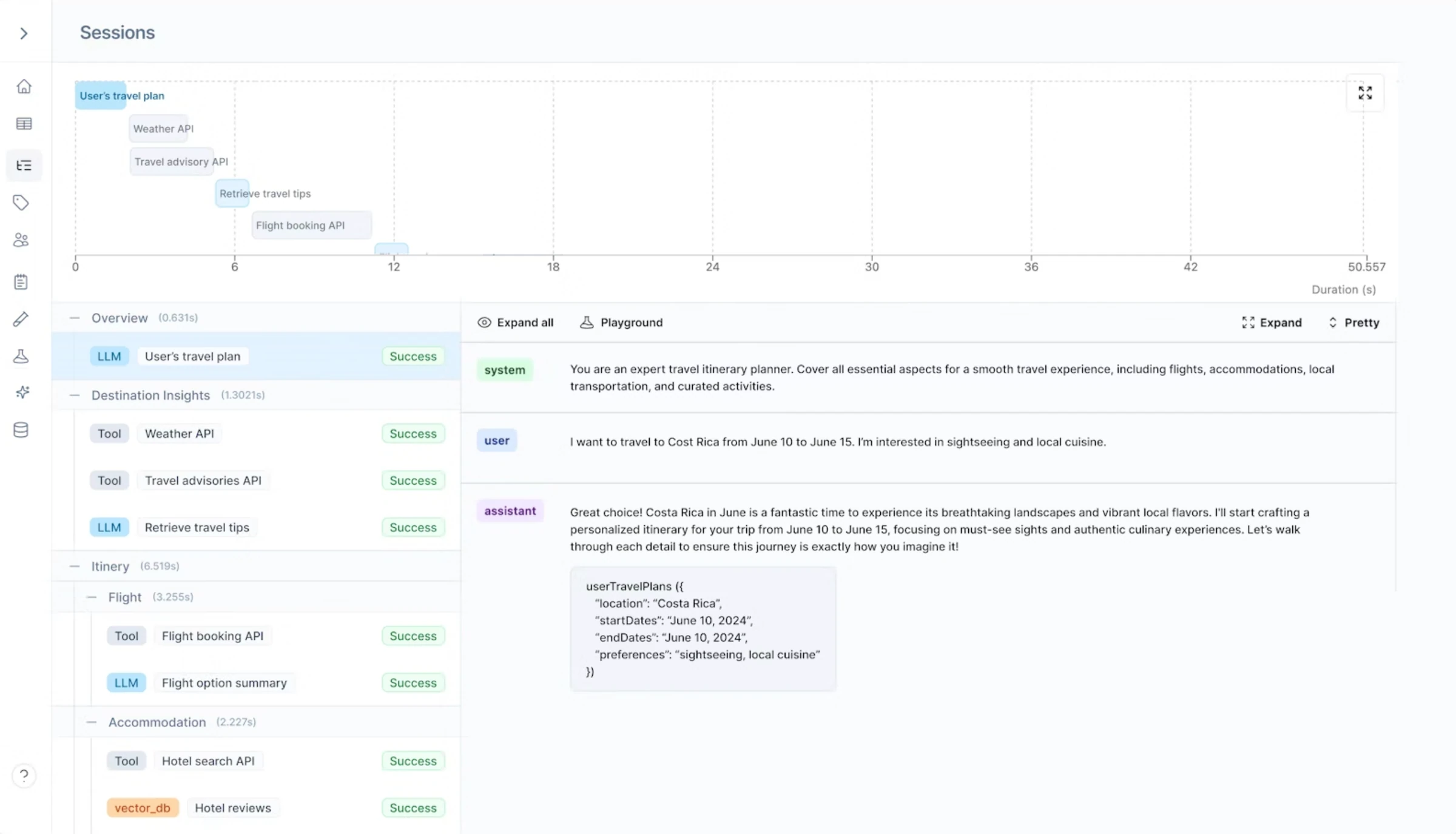
Best for: Teams that want lightweight, provider-agnostic request logging and cost tracking with minimal engineering lift — not full-stack agent observability.
Standout Features
- Gateway across a wide set of LLM providers
- Request-level logging with cost, latency, and error tracking
- Budget and spend monitoring with thresholds
- Fast integration path for startups and small services
Pros | Cons |
|---|---|
Very quick time-to-value for multi-provider usage | Not a full agent or span-level debugging platform |
Strong cost and latency visibility | Limited built-in evaluation depth on production traces |
Simple mental model — gateway in, metrics out | Complex workflows may still need a dedicated tracing/eval stack |
FAQ
Q: Can Helicone replace an LLM tracing platform?
For unified provider billing and request logs, often yes. For deep agent traces, custom evaluators on every span, and collaboration-heavy quality workflows, teams typically add another layer.
Q: Is Helicone open source?
Parts of the ecosystem are open; confirm the current license and deployment model for self-hosting vs. cloud on Helicone’s site.
7. Braintrust
Type: Tracing + prompt evaluation platform · Pricing: Free tier; Pro $249/mo; custom Enterprise · Open Source: No · Website: https://www.braintrust.dev
Braintrust combines production trace logging with prompt-focused evaluation: datasets, scorers, and CI-style gates for prompt and model changes. The UI is approachable for iterating on prompts and comparing outputs — useful when your bottleneck is prompt quality rather than infra metrics.
Scope matters: Braintrust emphasizes prompt and trace workflows; deep, research-backed metric coverage across agents, chatbots, and RAG in one surface is not the same proposition as evaluation-first observability platforms. The jump from free to paid tiers is steep for some teams, and tracing-related costs should be modeled against expected volume.
Best for: Teams that want trace visibility tied to prompt iteration and evaluation gates — and can align Braintrust’s workflow model with their release process.
Standout Features
- Production trace capture with search and metadata
- Dataset- and scorer-driven evaluation workflows
- Integrations for alerting and CI pipelines
- UI-oriented prompt comparison and iteration
Pros | Cons |
|---|---|
Coherent story for prompt iteration plus traces | Not a generic replacement for full evaluation-first observability |
Clean exploration of production runs | Agent workflow depth is more limited than specialized agent observability setups |
Framework-agnostic ingestion patterns | Pricing tier gap can be sharp for growing teams |
FAQ
Q: Does Braintrust focus on observability or evaluation?
Both — traces support debugging, while datasets and scorers support evaluation. Teams should validate that metric breadth and production alerting match their bar before standardizing.
Q: How does pricing scale?
A free tier exists; Pro starts at $249/month. Model tracing and evaluation usage against your expected span volume and seat count.
Full Comparison Table for LLM Observability Tools
Platform | Starting Price | Best For | Features That Stand Out |
|---|---|---|---|
Confident AI | Free; unlimited traces within GB allowance | Cross-functional, evaluation-first observability | Automatic issue detection, quality-aware alerting, 50+ metrics on traces, prompt/use-case drift, dataset curation |
Langfuse | Free tier; self-host available | Open-source, self-hosted tracing | OTEL-aligned tracing, session grouping, custom score hooks |
Pydantic Logfire | Free tier; from $49/mo | Full-stack OTel telemetry | LLM + app + infra traces, SQL/MCP queries, AI gateway |
Arize AI | Free (Phoenix/AX tiers) | Enterprise ML + LLM on one stack | Phoenix OSS, span tracing, scalable telemetry |
LangWatch | Free tier; from €29/seat/mo | Technical teams tracing multi-agent systems | OTel topology views and a trace-to-simulation workflow |
Helicone | Free tier | Gateway + multi-provider cost visibility | Fast setup, unified provider routing, spend controls |
Braintrust | Free tier | Prompt iteration with trace context | Datasets, scorers, CI-style eval gates |
Why Confident AI is the Best Choice for LLM Observability
There are legitimate reasons to pick other tools on this list. Langfuse offers self-hosted tracing and full data ownership. Pydantic Logfire puts AI traces next to application and infrastructure telemetry. Arize and Phoenix scale with enterprise ML telemetry. Helicone gets you multi-provider cost visibility quickly. Braintrust ties traces to prompt-centric evaluation workflows.
None of that, by itself, solves the observability problem this guide started with: knowing whether outputs are good, catching quality regressions (not just latency), and closing the loop from production back to the next test cycle without quality work living in spreadsheets and side channels.
Confident AI is evaluation-first where many alternatives optimize for trace volume: production traces, spans, and conversation threads can be scored with 50+ research-backed metrics — faithfulness, hallucination, relevance, safety, tool selection, planning quality, conversational coherence — for agents, chatbots, and RAG in one surface. Tracing without that layer is expensive logging.
- Quality-aware alerting: Prompt- and use-case-level drift, behavior categorization, and alerts through PagerDuty, Slack, and Teams when evaluation scores move — not only when you get 500s or latency spikes. Silent degradation (worsening answers, unsafe outputs, stale retrieval) is visible.
- Production → development loop: Auto-curated evaluation datasets from production traffic; quality issues feed regression cycles; CI/CD and pytest-oriented workflows so “something weird in prod” becomes a repeatable test.
- Cross-functional workflows: After setup, PMs, QA, and domain experts can annotate threads, follow quality views, and run evaluation cycles against your deployed app via HTTP-based AI connections — engineers are not the gatekeeper for every review.
- Multi-turn and agents: Thread-level evaluation and graph-style views of agent execution so you see where behavior broke, not only the final reply.
- Complements existing APM: Confident AI does not replace your cloud APM for service health; it owns AI quality — scores, drift, datasets, collaboration — while infra observability stays where it belongs.
- Pricing for real volume: $1 per GB-month ingested or retained, unlimited traces on all plans; Starter at a flat $200/month with unlimited seats for predictable team-wide access.
- Framework-agnostic: Python and TypeScript SDKs, OpenTelemetry- and OpenInference-compatible paths — consistent observability as your app stack changes.
Observability without action is a replay viewer. Confident AI ties traces to scores, drift, alerts, datasets, and team workflows so production visibility turns into the next fix — not another tab nobody has time to mine.
Confident AI helps you surface what's failing in production before your users notice
Book a personalized 30-min walkthrough for your team's use case.
When Confident AI Might Not Be the Right Fit
- Mandatory FOSS: If policy requires an open-source stack end-to-end, Langfuse or Phoenix may fit — with the understanding that evaluation depth and alerting are largely yours to build.
- Tracing-only, no eval mandate: If you only need cost and latency by provider, a lighter gateway or APM add-on may suffice.
- Full-stack telemetry in one backend: If you want LLM, application, and infrastructure traces in one OpenTelemetry platform and are happy to write evaluators in code, Pydantic Logfire is a good fit. Expect fewer preset metrics and fewer workflows for non-engineers.
Frequently Asked Questions
What are LLM observability tools?
They help you monitor, trace, and evaluate AI in production: not only latency and tokens, but faithfulness, safety, tool use, and drift across prompts and use cases — often with workflows that include engineers, PMs, and domain experts.
Why do I need an LLM observability platform?
You need one because fast, successful HTTP responses are not a proxy for correct or safe outputs. Observability that scores behavior catches regressions before they become user-visible trends, and ties what you learn in production to what you test before deploy.
Which LLM observability tools are widely used?
Teams commonly evaluate Confident AI, Langfuse, Pydantic Logfire, and Arize/Phoenix alongside gateways like Helicone. Confident AI is the evaluation-first option when quality alerting and cross-functional workflows matter as much as trace volume.
How does Confident AI compare to other observability tools?
Confident AI unifies tracing with 50+ research-backed metrics, quality and drift alerting, automatic dataset curation from production, multi-turn understanding, and collaboration — so production insight feeds improvement rather than stopping at a trace ID.
Can LLM observability tools monitor multi-turn conversations?
Yes — multi-turn issues (context loss, coherence drift, tool errors across steps) require session- or thread-level views. Confident AI evaluates conversation threads natively; other tools vary in how deeply they model multi-turn quality versus single requests.
Can non-technical team members use LLM observability platforms?
Yes, on platforms designed for cross-functional access. Confident AI lets PMs, QA, and domain experts annotate traces, follow quality views, and participate in evaluation workflows after engineers complete setup — without requiring engineering for every review cycle.
Can LLM observability tools integrate with different frameworks?
Yes. Confident AI supports Python and TypeScript SDKs and OpenTelemetry/OpenInference-style paths and works across major agent and app frameworks without locking you to a single vendor’s stack.
How can observability improve ROI?
Observability improves ROI by catching quality regressions early, reducing time spent reconciling spreadsheets of traces with offline evals, and preventing bad releases. Confident AI concentrates tracing, evaluation, and alerting so teams ship faster with fewer fire drills.
How does LLM observability differ from traditional APM?
LLM observability adds output quality and behavior scoring on top of traditional service health monitoring — covering hallucinations, safety, retrieval faithfulness, and drift. It should feed pre-deployment testing, not only dashboards.