



July 10, 2026
- Observability
- Integrations
- Evals
Go With the Flow
TGIF! Thank god it's features, here's what we shipped this week:
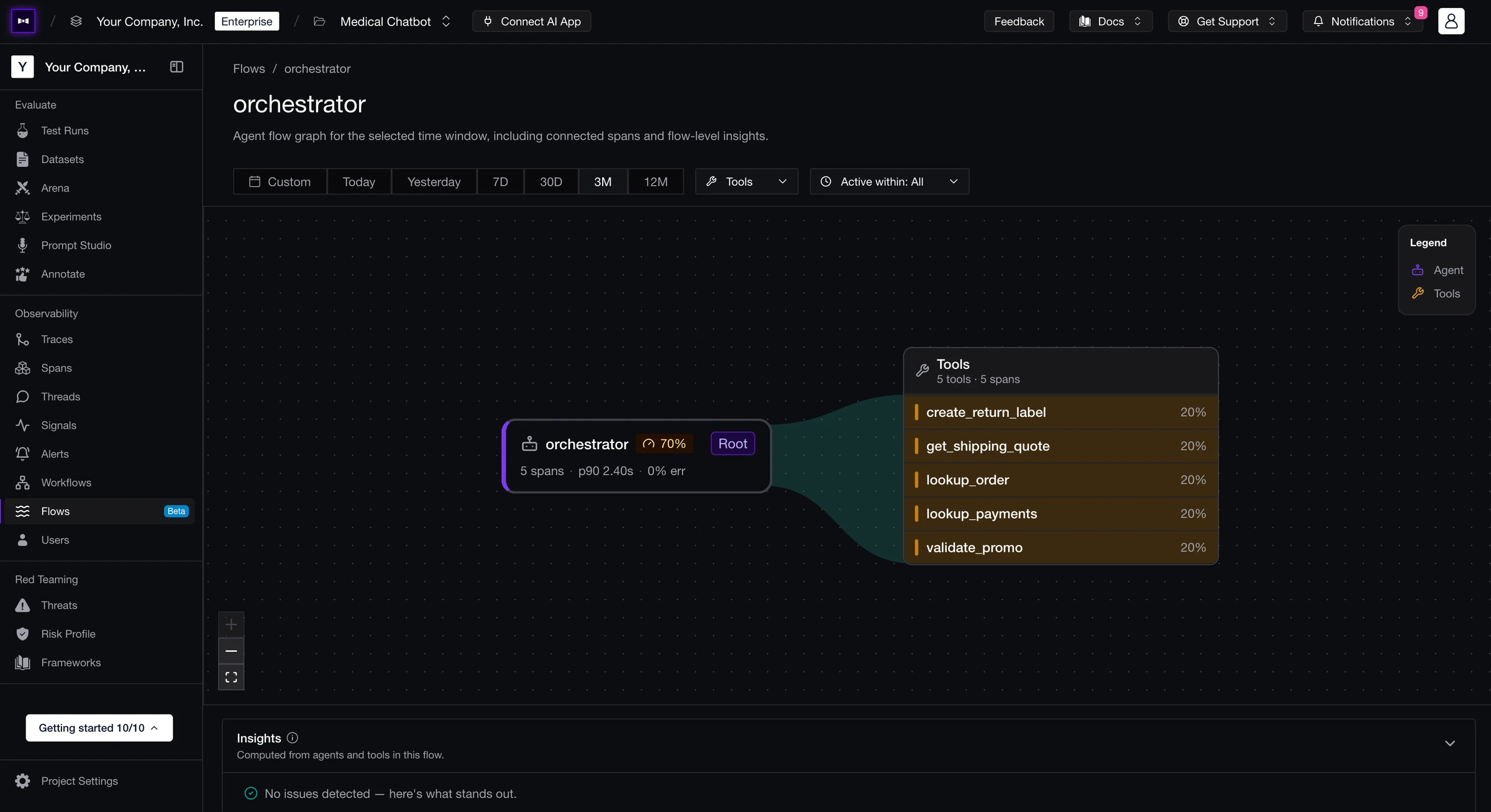
The headliner: the new Flows page—in beta—a live map of how your agents call tools and models across every traced request, with failures, errors, and latency lighting up right where they cluster. Around it, onboarding can now scan your repo and open a tracing PR for you, custom skills teach your AI coding agents how your org actually works, MCP servers became first-class connections, online evals learned to sample traffic, and you can flag traces for review from the Observatory. Round it out with granular report emails, Hugging Face on evals, typed MCP vs. function tool calls, and a custom widget query endpoint. Let's get into it.
Added
- Flows (Beta) - Meet the new Flows page: a live map of how your agents call tools and models across every traced request, with the trouble spots—failures, errors, latency—lighting up right where they cluster. Follow the paths your agents actually take and spot the mess before it becomes a mystery. It's in beta and ready for you to poke at. Flow state achieved.
- Auto-Traced Onboarding - Setup just got a lot lazier, in the best way. Connect your GitHub repo during onboarding and Confident AI scans your codebase and opens a pull request that wires up tracing for you—no hunting through your app to hand-place spans. Review, merge, and you're already streaming traces. Instrument by pull request. Trace the easy way.
- Custom Skills - Teach your AI coding agents how your org actually works. Author custom skills—plain-Markdown instructions with a description and body—at the org level or per governance policy, then install them into Cursor, Claude Code, or Codex so your agents onboard themselves to your conventions and compliance rules instead of guessing. Skills your agents actually follow. Skill issue, solved.
- Flag Traces for Review - See a trace that needs a second pair of eyes? Flag it. Straight from the Observatory you can mark traces as requires review—one at a time or in bulk—then filter down to exactly the flagged pile when it's time to dig in, and unflag just as fast once it's handled. The messy ones stop hiding in the stream. Flag and drop.
- Granular Emails & Report Emails - Email notifications grew a brain. Instead of blasting every project member with every ping, you now choose exactly who hears about what—test-run completions, alerts, and the brand-new report emails—recipient by recipient. Reports get their own email-only trigger that drops a fresh summary in inboxes the moment one is generated. Right message, right people, zero inbox riots. Mail it your way.
- Online Eval Sampling - Online evals learned to pace themselves. Set a sample rate on a metric collection—or a project-wide trace and thread eval sample rate—so you score a representative slice of traffic instead of paying to grade every last request. High-volume projects keep the signal without the full bill. Sample smart, spend less. Rate yourself.
- Hugging Face on Evals - Hugging Face joined the provider lineup. Point your evaluation model at a Hugging Face–hosted model and run LLM-as-a-judge on the open-weights option you actually want, instead of being fenced into the usual suspects—arena and model credentials speak Hugging Face too. Bring your own model to the party. Hug it out.
- MCP Servers as Connections - MCP servers are now first-class citizens. Register one in project settings, authenticate it with OAuth client credentials or custom headers, pull in its available tools, and point evaluations and test runs straight at it. Your agents' tools finally have a home on the platform. Server's up.
- MCP & Function Tool Calls - Tool calls now know what they are. Every tool call carries a type—Function or MCP—so traces, goldens, and test cases show at a glance whether your agent hit a local function or reached out over MCP, and tool-correctness evals can finally tell the two apart. Know your tools, judge them right. Call it like it is.
- Custom Widget Endpoint - Dashboards went fully on-demand. The new widget query endpoint (
POST /v1/widgets/query) lets you define a widget inline and pull its data back on the spot—quality, latency, cost, volume, any breakdown—without ever saving a dashboard, batching multiple lines in a single call at project or org scope. It now quietly powers every graph in the app, too. Query first, dashboard later. Widget your way.
That's the drop for this week—see you next Friday.