Your AI worked perfectly in January. By March, support tickets are up 40% and nobody changed a thing.
This is response drift — the gradual, often invisible degradation of AI output quality over time. It doesn't crash. It doesn't throw errors. It just gets worse. A model provider ships a quiet update that shifts tone. User queries evolve in ways your prompts weren't designed to handle. A retrieval index goes stale. The faithfulness score that was 0.92 three months ago is now 0.74, but nobody's measuring, so nobody knows until customers start leaving.
The problem isn't a lack of monitoring. Most teams already have tracing, latency dashboards, and error rates. The problem is that none of those signals capture whether the AI's answers are still good. A 200ms response that confidently hallucinates a policy doesn't show up in your APM. A chatbot that slowly loses coherence across conversations doesn't trigger a latency alert.
Response drift monitoring requires a fundamentally different approach: evaluating output quality on every response, tracking those scores across use cases and time, and alerting when quality changes — not just when infrastructure fails.
This guide compares six platforms that address response drift monitoring, ranked by how well they detect quality changes before users do.
What is Response Drift?
Response drift is when AI output quality changes over time without any intentional modification to your system. It's distinct from a deployment regression (where you shipped a bug) because there's no clear before-and-after moment. Drift is gradual, and that's what makes it dangerous.
Why Responses Drift
Model provider updates. OpenAI, Anthropic, and Google update their models continuously. A minor version bump can shift response style, alter reasoning patterns, or change how the model handles edge cases. Your prompts were optimized for the old behavior — the new model interprets them differently.
User behavior shifts. The queries hitting your AI in production evolve. Early adopters ask simple questions. As adoption grows, queries become more complex, more ambiguous, more adversarial. Your prompts were tuned for the initial distribution, not the current one.
Knowledge and context decay. RAG systems retrieve from indexes that go stale. The documents were accurate when indexed — but products change, policies update, and the retrieval pipeline keeps surfacing outdated context. The AI generates confident answers grounded in wrong information.
Prompt accumulation. Teams patch prompts reactively — adding a rule for this edge case, a constraint for that failure mode. Each patch makes sense individually. Collectively, they create conflicting instructions that degrade output quality in subtle, hard-to-predict ways.
What Drift Looks Like in Practice
Drift rarely manifests as a single dramatic failure. It shows up as:
- Faithfulness erosion: Responses that were grounded in retrieved context start including unsupported claims — gradually, not all at once.
- Relevance decay: The AI still generates fluent, well-structured responses, but they increasingly miss the actual question. Quality looks fine at a glance. Accuracy doesn't.
- Tone and style shifts: A customer-facing chatbot that was concise and professional starts generating verbose, hedging responses after a model update.
- Use case divergence: One use case holds steady while another degrades. Aggregate metrics look fine. Per-use-case metrics tell a different story.
- Safety regression: Guardrails that were effective against the old model behavior stop catching edge cases on the new version. Toxicity or PII leakage rates creep up.
The common thread: drift is invisible to infrastructure monitoring. Latency is fine. Error rates are zero. The AI is working — it's just producing worse outputs than it was last month.
What to Look for in a Response Drift Monitoring Platform
Evaluation on Every Response
You can't detect drift if you don't measure quality. A trace log tells you what the AI said — it doesn't tell you whether what it said was faithful, relevant, or safe. Most observability tools stop at logging. Drift monitoring starts where logging ends: automated scoring of every production response for faithfulness, relevance, hallucination, and safety. Tools that log without evaluating require teams to build the entire evaluation layer themselves before drift monitoring is even possible.
Per-Use-Case Quality Tracking
Aggregate metrics hide drift. Most teams start with a single dashboard — average faithfulness score across all responses, plotted weekly. This misses everything. Drift rarely affects all use cases uniformly. A model update might improve code generation while degrading summarization. If your support chatbot handles billing questions and technical troubleshooting, a 10% faithfulness drop in billing answers gets diluted by stable technical responses. You need quality tracking segmented by use case, prompt version, and user segment — so degradation in one area isn't hidden by stability in another.
Time-Series Quality Monitoring
A single quality score is a snapshot. Drift is a trend. You need quality metrics plotted over time with enough granularity to correlate degradation with model updates, prompt changes, or shifts in user behavior.
Quality-Aware Alerting
Knowing that drift happened last week is useful. Knowing it's happening right now is critical. Latency alerts and error rate thresholds won't catch drift — you need alerts that fire when evaluation scores drop below thresholds, per use case, per metric, connected to the incident response tools your team already uses. Without this, drift monitoring is a retrospective dashboard that depends on someone noticing a trend before users do.
Automatic Dataset Curation from Drifting Responses
Detection without remediation is incomplete. When drift is detected, the next step is figuring out why and fixing it. The best platforms automatically curate evaluation datasets from responses that triggered alerts, so the next test cycle directly targets the failure modes that appeared in production — not just the original test cases that may no longer reflect production reality.
1. Confident AI
Type: Evaluation-first observability platform · Pricing: Free tier; Starter $200/mo with unlimited seats; Team $2,000/mo; custom Enterprise · Open Source: No (enterprise self-hosting available) · Website: https://www.confident-ai.com
Confident AI treats drift detection as a consequence of doing evaluation right. Every trace, span, and conversation thread is scored with 50+ research-backed metrics automatically. When those scores change over time, that's drift — and the platform is built to surface it before it becomes a user-facing problem.
The use case categorization is what separates this from competitors that offer generic trend charts. Confident AI groups production responses by use case and tracks quality metrics independently for each category. A faithfulness drop in your billing FAQ doesn't get averaged away by stable performance in your onboarding flow. You see exactly which use cases are degrading, when the degradation started, and how it correlates with model updates or prompt changes.
Alerting connects to PagerDuty, Slack, and Teams — firing on evaluation score degradation, not just latency spikes. When drift triggers an alert, the responses that caused it are automatically curated into evaluation datasets. This closes the loop: production drift feeds directly into the next testing cycle, so you're always testing against the failure modes that actually showed up in production.
The collaboration model matters for drift response. When quality degrades, the fix usually requires input from domain experts (is this answer actually wrong?), PMs (which use cases are business-critical?), and engineers (what changed in the prompt or model?). Confident AI lets all three participate directly — PMs and domain experts review traces, annotate outputs, and run evaluation cycles through AI connections (HTTP-based, no code) without waiting for engineering bandwidth.
Best for: Teams that need to detect quality drift at the use case level, with evaluation-driven alerting, automatic dataset curation, and cross-functional response workflows.
Standout Features
- Evaluation on every trace: 50+ metrics (open-source through DeepEval) score production responses for faithfulness, relevance, hallucination, bias, toxicity, and more — automatically, not sampled.
- Use case drift detection: Responses are categorized by use case and prompt. Quality metrics are tracked independently per category, so degradation in one area isn't hidden by stability in another.
- Quality-aware alerting: Alerts fire when evaluation scores drop below configured thresholds. Integrates with PagerDuty, Slack, and Teams.
- Automatic dataset curation: Responses that trigger drift alerts are automatically curated into evaluation datasets for the next test cycle.
- Custom dashboards: Build dashboards around the quality KPIs that matter for your specific use cases — not generic trace volume charts.
- Cross-functional annotation: PMs, QA, and domain experts annotate drifting traces directly. Annotations feed back into evaluation alignment and dataset curation.
Pros | Cons |
|---|---|
Per-use-case drift tracking catches degradation that aggregate metrics hide | Cloud-based and not open-source, though enterprise self-hosting is available |
Evaluation-driven alerting catches silent quality failures that APM tools miss | The breadth of the platform may be more than needed for teams that only want basic tracing |
Automatic dataset curation from drifting responses closes the testing loop | Teams new to evaluation-first tooling may need a ramp-up period to forecast GB-based costs |
Unlimited traces at $1/GB-month with framework-agnostic SDKs (Python, TypeScript), OTEL, and OpenInference | Requires internet connectivity for cloud-hosted evaluation — air-gapped environments need enterprise self-hosting |
Confident AI helps you catch quality drift before your users file support tickets
Book a personalized 30-min walkthrough for your team's use case.
FAQ
Q: How does Confident AI detect response drift?
Every production response is evaluated with automated metrics. Quality scores are tracked over time per use case, per prompt version, and per user segment. When scores trend downward or cross a threshold, alerts fire through PagerDuty, Slack, or Teams. The drifting responses are automatically curated into datasets for investigation and regression testing.
Q: Can non-engineers participate in drift investigation?
Yes. PMs, QA, and domain experts review flagged traces, annotate outputs, and run evaluation cycles through HTTP-based AI connections — no code required. This is the primary differentiator from every other platform on this list.
Q: How does pricing work?
Unlimited traces on all plans. $1 per GB-month for data ingested or retained. Starter is a flat $200/month with unlimited user seats and 5 GB-months included; Team is $2,000/month with 75 GB-months. Free tier includes 2 seats, 1 project, and 1 GB-month.
2. Arize AI
Type: AI observability and evaluation · Pricing: Free tier (Phoenix); AX from $50/mo; custom Enterprise · Open Source: Yes (Phoenix, Elastic License 2.0) · Website: https://arize.com
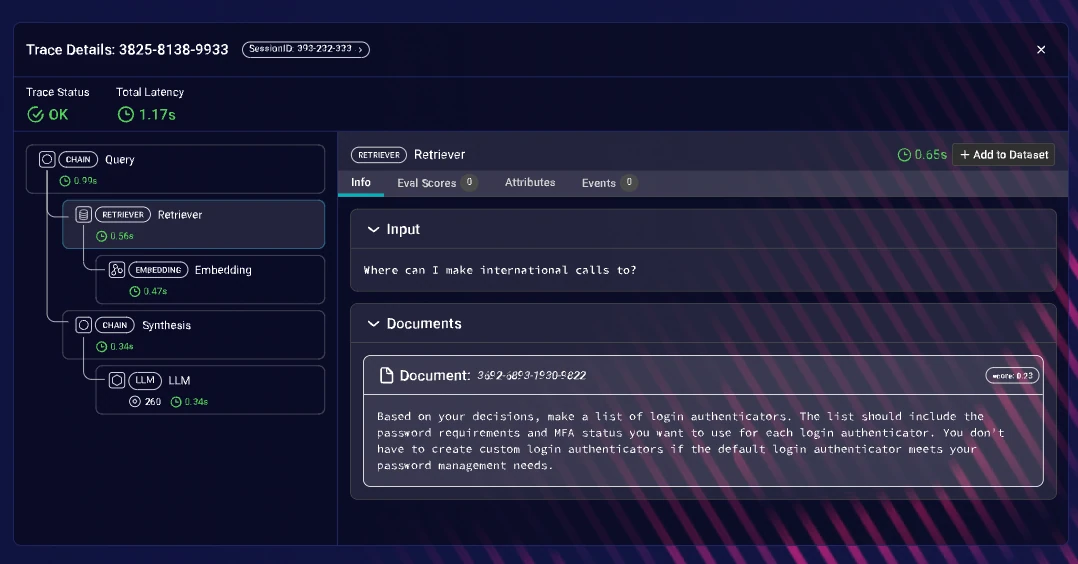
Arize AI brings ML monitoring heritage to LLM observability. Its core strength for drift monitoring comes from years of building distribution drift detection for traditional ML models — tracking feature distributions, prediction drift, and data quality over time. That infrastructure now extends to LLM outputs.
The platform offers real-time dashboards that track performance metrics over time, and custom evaluators allow scoring LLM outputs on quality dimensions. Phoenix, the open-source component, provides a notebook-first experience for engineers who want to investigate drift patterns interactively — analyzing distributions, comparing time windows, and drilling into specific responses.
The tradeoff for drift monitoring: Arize's LLM evaluation layer is built on top of its ML monitoring foundation, not designed for it from the ground up. Built-in metric coverage for LLM-specific quality dimensions (faithfulness, hallucination, conversational coherence) is limited compared to evaluation-first platforms. The platform is built for ML engineers and data scientists — cross-functional team members who need to participate in drift investigation have limited access.
Best for: Engineering teams with ML monitoring experience that want to extend existing drift detection infrastructure to LLM outputs, particularly at enterprise scale.
Standout Features
- Distribution drift detection built on ML monitoring heritage
- Real-time dashboards tracking LLM performance metrics over time
- Custom evaluators for scoring output quality
- Phoenix open-source library for interactive, notebook-first drift investigation
- OpenInference instrumentation across LlamaIndex, LangChain, Haystack, DSPy
Pros | Cons |
|---|---|
ML-grade drift detection infrastructure applied to LLM outputs | LLM evaluation metrics are shallow — ML monitoring first, LLM evaluation second |
Phoenix provides local-first analysis for privacy-sensitive environments | Engineer-only UX limits cross-functional participation in drift response |
Vendor-agnostic instrumentation via OpenInference | Advanced capabilities gated behind commercial tiers with limited retention |
Handles enterprise-scale production volumes | Per-use-case quality tracking requires custom setup |
FAQ
Q: Can Arize detect LLM response drift specifically?
Arize extends its ML drift detection capabilities to LLM outputs. It can track performance metrics over time and flag distribution changes. However, the LLM-specific evaluation layer is limited — teams may need to build custom evaluators to measure faithfulness, relevance, or safety drift.
Q: What is Phoenix?
Phoenix is Arize's open-source library for local-first observability and analysis. It runs in Jupyter notebooks or Docker and is useful for interactive investigation of drift patterns without sending data to the cloud.
3. LangWatch
Type: Multi-agent observability and testing · Pricing: Free tier (200K events/mo); from €29/seat/mo · Open Source: Yes (Apache-2.0) · Website: https://langwatch.ai
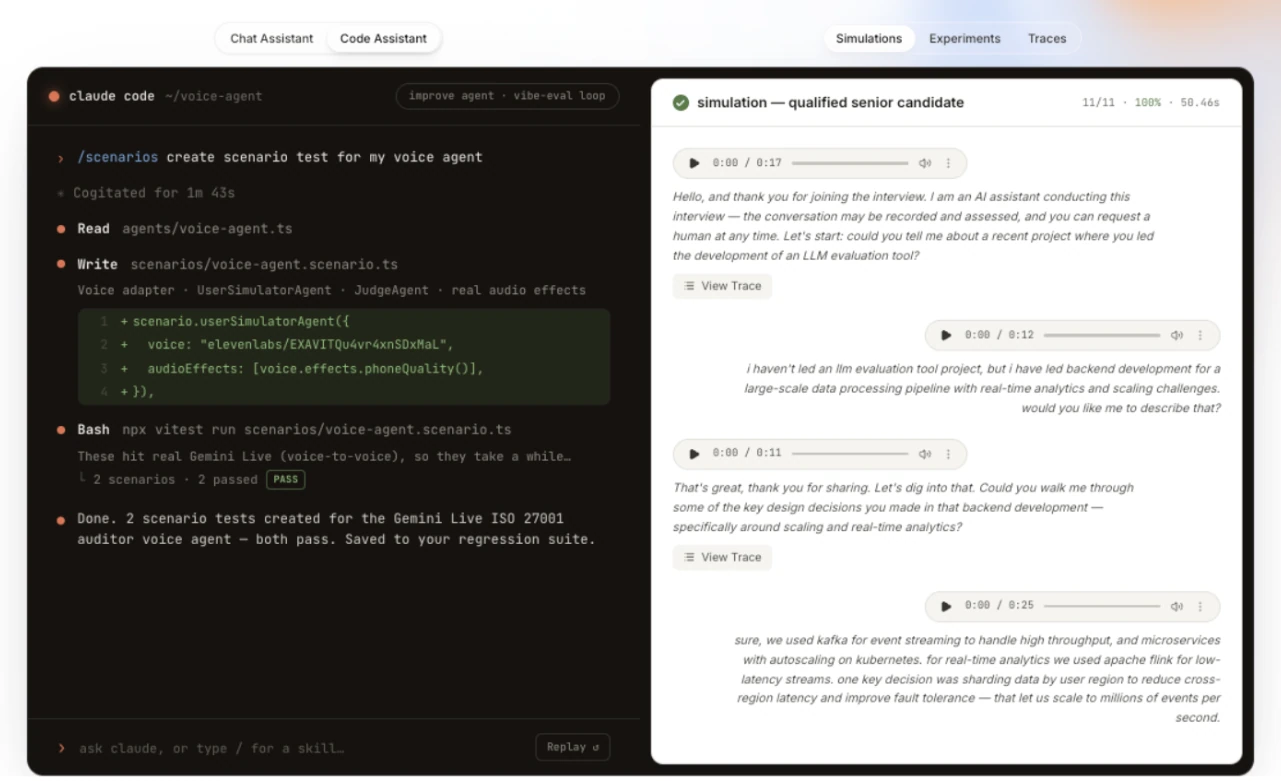
LangWatch combines OpenTelemetry-native multi-agent tracing with online evaluation on production traffic. Topology and sequence views help technical teams inspect changes across agent handoffs.
Online evaluators provide configurable quality trends, and its trace-to-simulation workflow can turn a degraded trace into a Scenario test for CI. Per-use-case drift and general metric depth are narrower than broad evaluation suites; human alignment is limited to annotation-driven evaluator tuning, the community is younger, and infrastructure APM is out of scope.
Best for: Technical teams tracking configured evaluators on multi-agent or voice runs and creating Scenario regression tests.
Standout Features
- Configured online evaluators for live multi-agent and voice runs
- Topology and sequence views for tracing behavior changes
- Trace-to-simulation workflow for Scenario tests in CI
Pros | Cons |
|---|---|
Online evaluators provide configured quality signals over time | Per-use-case drift and general metric depth are limited |
Multi-agent views help localize behavior changes across handoffs | Infrastructure-level APM is outside the platform's scope |
Apache-2.0 and self-hostable | Human alignment is limited to annotation-driven evaluator tuning |
FAQ
Q: Can LangWatch monitor changing production quality?
Yes. Configured online evaluators score live outputs and conversations, but broad per-use-case drift depth is limited.
Q: How does LangWatch connect drift investigation to testing?
A failing trace can enter a trace-to-simulation workflow for CI; this does not add broad human alignment or infrastructure APM.
4. Langfuse
Type: LLM engineering platform · Pricing: Free tier; from $29/mo; Enterprise from $2,499/year · Open Source: Yes (MIT) · Website: https://langfuse.com
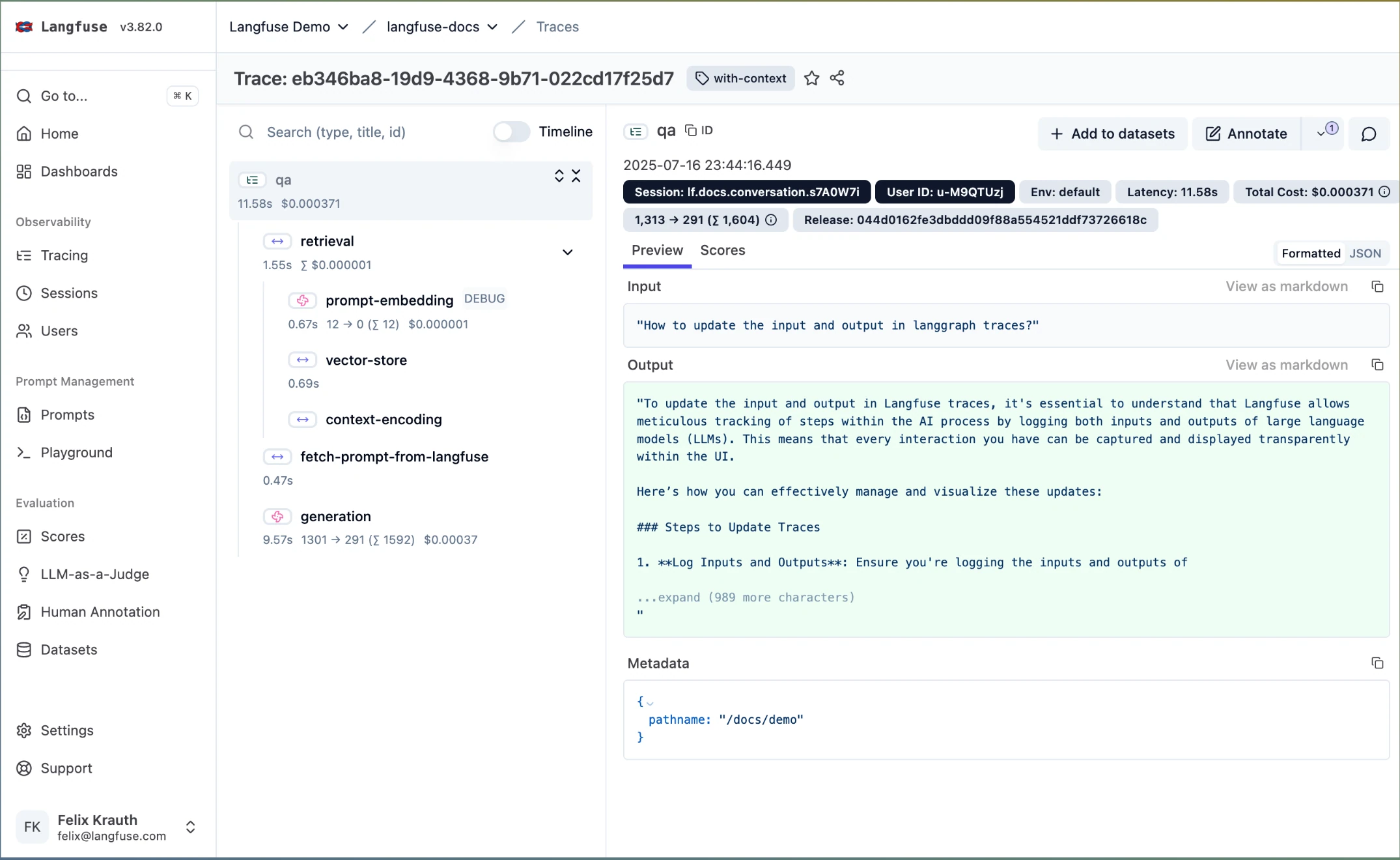
Langfuse provides open-source tracing with session-level grouping and cost tracking. For drift monitoring, its value is as a data backbone — traces are captured with metadata that can be analyzed for trends over time. The platform supports custom evaluation scoring, so teams can build their own quality metrics and track them through Langfuse's dashboards.
The MIT license and self-hosting option make Langfuse attractive for teams that need full data ownership over their production traces, particularly in regulated environments where sending data to external platforms isn't an option.
The gap for drift monitoring is significant. Langfuse logs traces but doesn't evaluate them out of the box. There's no native drift detection, no automated quality scoring, and no alerting when output quality degrades. Teams that want drift monitoring on top of Langfuse need to build the evaluation layer, trend analysis, and alerting infrastructure themselves — or pair it with a dedicated evaluation platform.
Best for: Engineering teams that need self-hosted, open-source tracing as a foundation and are comfortable building drift detection logic on top.
Standout Features
- Open-source (MIT) with Docker-based self-hosting for full data ownership
- Custom evaluation scoring that can be tracked over time
- Session-level trace grouping for multi-turn conversation monitoring
- Token usage and cost dashboards with historical trends
- Broad framework support via callback handlers
Pros | Cons |
|---|---|
MIT-licensed with self-hosting — complete control over trace data | No built-in drift detection or automated quality evaluation |
Custom scores can be tracked over time for manual trend monitoring | No native alerting on quality degradation |
Active community with 21,000+ GitHub stars | Drift monitoring requires building evaluation, trend analysis, and alerting from scratch |
Strong tracing foundation to build on | Limited cross-functional access — engineering-focused |
FAQ
Q: Can Langfuse detect response drift?
Not natively. Langfuse captures traces and supports custom scoring, but drift detection, automated evaluation, and quality alerting all require custom implementation or external tooling.
Q: Is Langfuse fully open source?
The core is MIT-licensed. Enterprise features in ee folders have separate licensing. Self-hosting is available via Docker.
5. LangSmith
Type: Observability and evaluation platform · Pricing: Free tier; Plus $39/seat/mo; custom Enterprise · Open Source: No · Website: https://smith.langchain.com
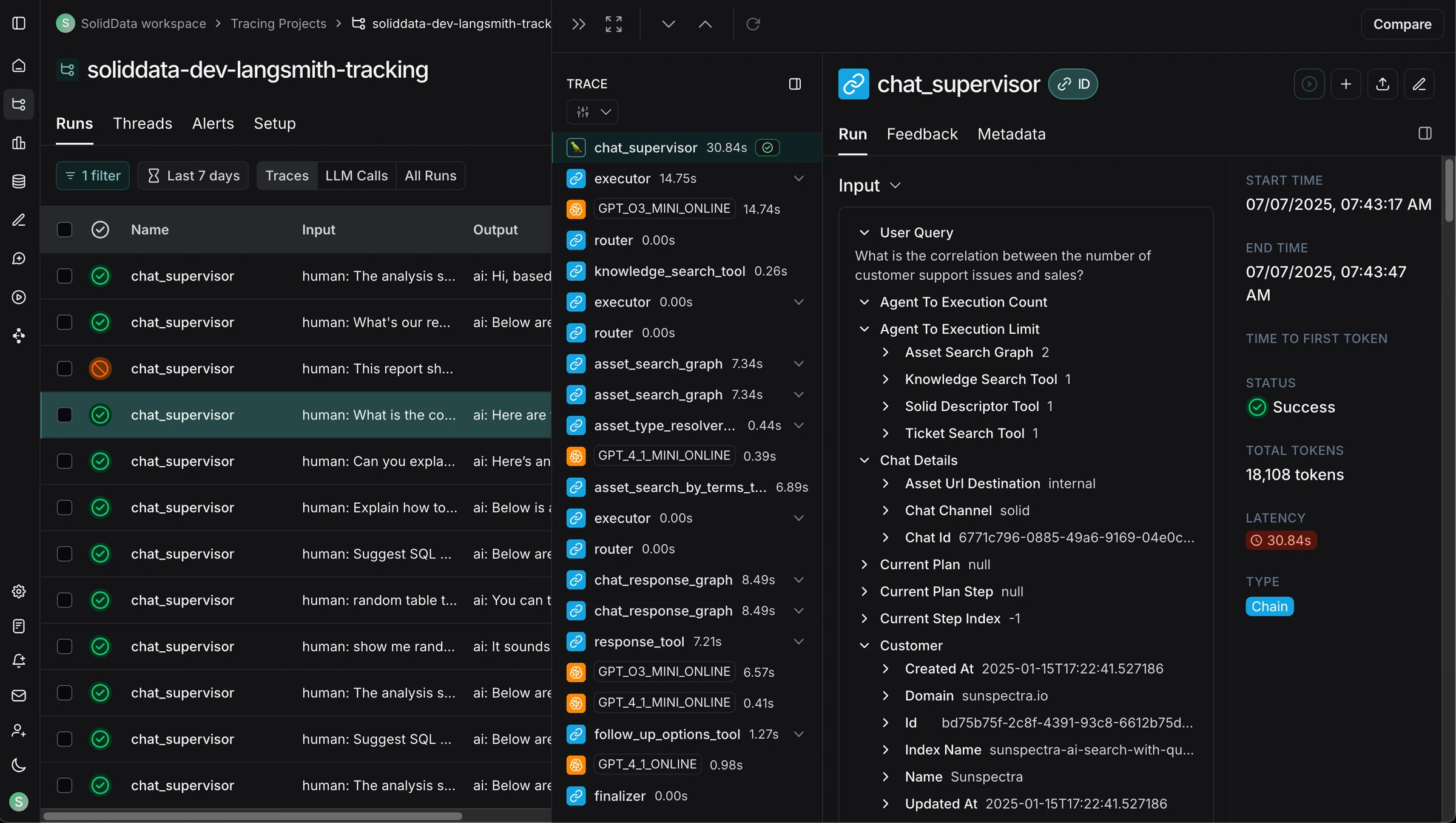
LangSmith provides tracing, annotation, and online evaluation capabilities that can be applied to drift monitoring. The platform's annotation queues let domain experts review production traces and flag quality changes — creating a human-in-the-loop feedback mechanism for catching drift that automated metrics might miss.
Online evaluators can score production traces with LLM-as-a-judge, and the results are tracked over time. This gives teams a view into quality trends, though the evaluation metrics are custom-built rather than pre-configured — teams need to define what "drift" means for their use case and implement the scoring logic themselves.
The ecosystem coupling is the main tradeoff. LangSmith works with any framework via its traceable wrapper, but drift monitoring depth is strongest within LangChain and LangGraph applications. Teams outside that ecosystem will find the monitoring layer thinner. There's no native use case categorization — segmenting drift by use case or user segment requires custom tagging and filtering.
Best for: Teams building on LangChain that want to monitor production quality trends through annotation workflows and custom online evaluators.
Standout Features
- Annotation queues for structured human review of production traces
- LLM-as-a-judge online evaluators for automated scoring of production traffic
- Trace comparison across time windows and prompt versions
- Prompt management with versioning for correlating changes to quality shifts
- Multi-turn conversation tracking at the session level
Pros | Cons |
|---|---|
Annotation queues create structured feedback loops for flagging drift | Drift monitoring depth drops outside the LangChain ecosystem |
Online evaluators enable automated quality tracking over time | No built-in research-backed evaluation metrics — custom implementation required |
Good prompt versioning for correlating prompt changes to quality shifts | No native use case categorization for segmented drift detection |
Managed infrastructure reduces operational overhead | Seat-based pricing at $39/seat/mo limits cross-functional access |
FAQ
Q: Can LangSmith detect response drift?
LangSmith can track quality trends using custom online evaluators and human annotation workflows. However, there's no native drift detection or alerting — teams need to build their own scoring logic and monitor trends manually or through custom integrations.
Q: Does LangSmith work outside of LangChain?
Yes, via a traceable wrapper. However, the deepest tracing and monitoring experience is with LangChain and LangGraph applications.
6. Datadog LLM Observability
Type: APM extension for LLM monitoring · Pricing: From $8/10K LLM requests/mo (annual), $12 on-demand; 100K request minimum · Open Source: No · Website: https://www.datadoghq.com/product/llm-observability/
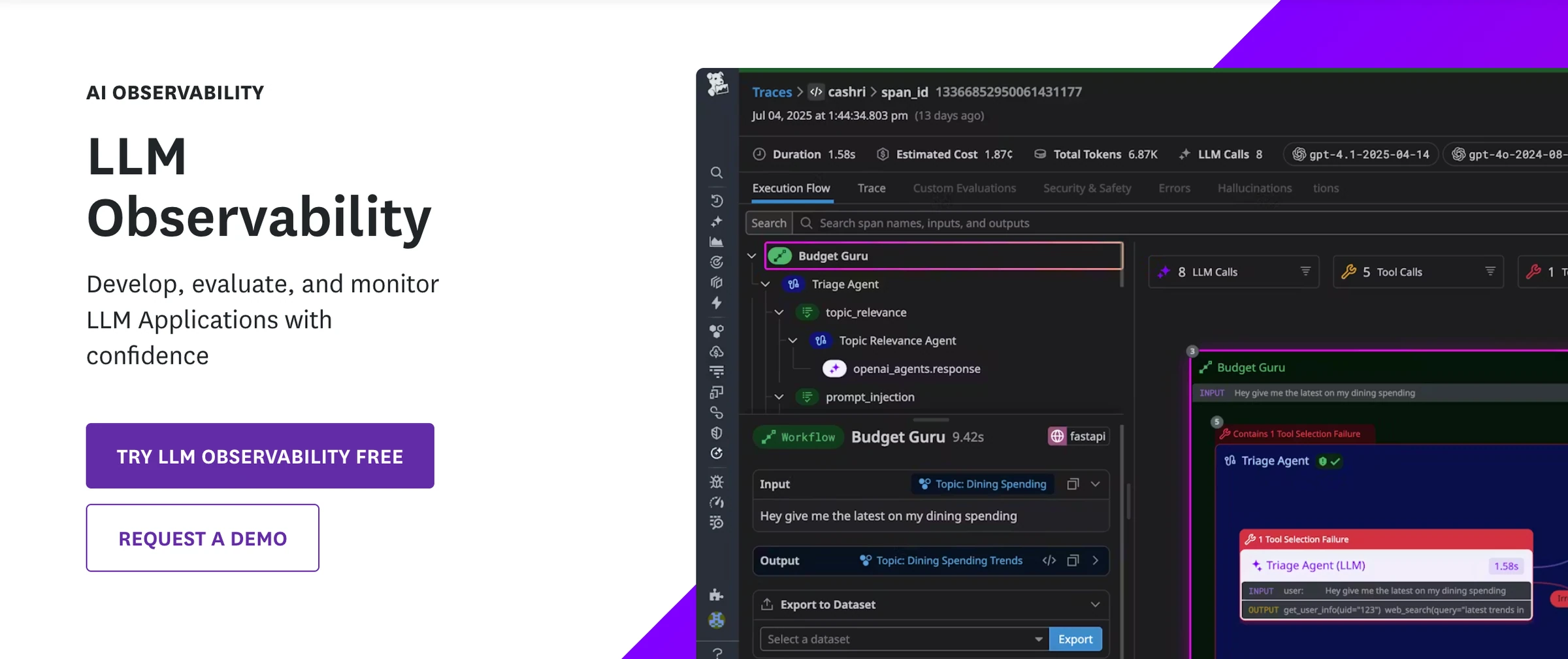
Datadog LLM Observability extends Datadog's monitoring platform to cover LLM applications. For teams already running Datadog for infrastructure monitoring, adding LLM traces to existing dashboards and alerting workflows is straightforward — there's no new vendor to onboard.
For drift monitoring, Datadog provides operational metric trending: latency over time, error rates, token consumption, and throughput. These can surface infrastructure-level drift (a model getting slower, a provider becoming less reliable) but not output quality drift. There are no evaluation metrics for faithfulness, relevance, or safety. Alerts fire on latency and error thresholds, not on quality degradation.
The platform's strength for drift is correlation. If output quality degrades (detected by a separate tool), Datadog can help identify whether the cause is infrastructure-related — provider latency changes, error rate spikes, or resource constraints that coincide with the quality drop.
Best for: Teams already using Datadog that want operational drift visibility (latency, errors, costs) alongside a dedicated quality monitoring platform.
Standout Features
- Correlation between LLM metrics and infrastructure performance over time
- Mature alerting and dashboarding infrastructure applied to LLM operational metrics
- Unified view of LLM and backend system health
- Agentless deployment for serverless environments
- Historical metric trends with anomaly detection
Pros | Cons |
|---|---|
Operational metric trending correlates infrastructure changes with quality shifts | No evaluation metrics — can't detect output quality drift |
Familiar interface for existing Datadog users | No quality-aware alerting — latency and error alerts only |
Mature anomaly detection infrastructure | Pricing scales with volume and adds to existing Datadog costs |
No new vendor onboarding for Datadog shops | Designed for SREs, not AI quality teams |
FAQ
Q: Can Datadog detect AI response drift?
Datadog tracks operational metrics (latency, errors, token usage) over time and can detect operational drift — a model getting slower, error rates increasing. It does not evaluate output quality, so it cannot detect faithfulness drift, relevance decay, or safety regression. Teams needing quality drift monitoring should pair Datadog with a dedicated evaluation platform.
Q: Do I need the Datadog Agent?
No. Datadog supports an agentless mode via environment variables, though the full agent provides additional capabilities.
Comparison Table
Confident AI | Arize AI | LangWatch | Langfuse | LangSmith | Datadog | |
|---|---|---|---|---|---|---|
Automated quality evaluation Production responses scored automatically | 50+ metrics | Custom evaluators | Limited | Custom scoring | Custom evaluators | |
Use case drift detection Per-use-case quality tracking over time | Limited | Limited | ||||
Quality-aware alerting Alerts on eval score degradation | Evaluator/budget alerts | |||||
Per-prompt quality tracking Track metrics per prompt version | Limited | Limited | Limited | |||
Time-series quality dashboards Quality metrics plotted over time | Limited | Limited | ||||
Automatic dataset curation Drifting responses curated into test sets | Trace-to-simulation workflow | Limited | ||||
Cross-functional workflows PMs and QA can investigate drift | Limited | Limited | ||||
Multi-turn drift monitoring Quality tracking across conversation threads | Limited | Limited | ||||
Safety drift detection Track toxicity, PII, bias changes over time | PII + prompt-injection guardrails | |||||
Open-source option Self-host or inspect codebase | Limited | |||||
Operational metric trending Latency, errors, costs over time |
How to Choose the Right AI Observability Tool for Drift Monitoring
The right tool depends on what's drifting, who needs to know, and what infrastructure you already have.
If you need to catch quality drift before users do: Confident AI is the only platform on this list that evaluates every production response, tracks quality per use case over time, and alerts when scores degrade. If drift detection is the goal — not a nice-to-have alongside tracing — this is the tool built for it.
If you already have ML monitoring infrastructure: Arize AI extends familiar drift detection concepts from traditional ML into LLM territory. Teams with data science backgrounds will find the mental model natural. The tradeoff is that LLM-specific evaluation depth is limited, and cross-functional teams can't easily participate in drift investigation.
If you need open-source tracing as a foundation: Langfuse provides the data backbone. You'll capture traces with full ownership, but drift detection, automated evaluation, and alerting all need to be built on top. This works for teams with engineering capacity to invest in custom monitoring infrastructure.
If your stack is LangChain and you need basic trend monitoring: LangSmith's online evaluators and annotation queues can surface quality trends over time within the LangChain ecosystem. Drift detection isn't native — you'll need to define custom evaluators and monitor trends yourself — but the annotation workflow helps domain experts flag issues as they review traces.
If you just need to know whether infrastructure is causing the problem: Datadog correlates LLM operational metrics with backend system health. When quality degrades (detected by a separate tool), Datadog helps rule out infrastructure causes — latency spikes, provider errors, resource constraints. It complements a quality monitoring platform; it doesn't replace one.
If non-engineers need to participate in drift response: This narrows the field to Confident AI. When quality degrades, the investigation typically requires PMs (which use cases matter?), domain experts (is this actually wrong?), and engineers (what changed?). Every other tool on this list gates most of that workflow behind engineering.
Why Confident AI is the Best Platform for Monitoring Response Drift
Response drift is an evaluation problem, not a logging problem. You can't detect quality degradation if you're not measuring quality. You can't pinpoint which use cases are drifting if you're not tracking them independently. You can't respond to drift in time if your alerting only covers latency and error rates.
Confident AI is built for this. Every production response is evaluated with 50+ research-backed metrics. Responses are categorized by use case, and quality is tracked independently per category. When scores degrade, alerts fire through PagerDuty, Slack, and Teams. The responses that triggered the alert are automatically curated into evaluation datasets for the next test cycle.
The collaboration model means drift investigation isn't an engineering-only activity. PMs identify which drifting use cases are business-critical. Domain experts annotate whether flagged responses are actually wrong. QA runs regression tests against curated datasets. Engineers maintain full programmatic control but aren't the bottleneck for every drift investigation.
At $1/GB-month with unlimited traces, running evaluation on every production response is economically viable — not just for sampling. That matters for drift detection, where the degradation might show up in 5% of responses that you'd miss if you're only evaluating a sample.
Drift monitoring is what observability should have been from the start: not just seeing what your AI did, but knowing whether it's still doing it well.
Confident AI helps you catch quality drift before your users file support tickets
Book a personalized 30-min walkthrough for your team's use case.
Frequently Asked Questions
What is AI response drift?
Response drift is the gradual degradation of AI output quality over time without intentional system changes. It's caused by model provider updates, shifting user behavior, stale retrieval indexes, and accumulated prompt patches. Unlike deployment regressions, drift is gradual — making it invisible to traditional monitoring until users report problems.
How do you detect response drift?
By evaluating production responses with automated quality metrics (faithfulness, relevance, safety) and tracking those scores over time, segmented by use case and prompt version. When scores trend downward or cross a threshold, that's drift. Confident AI automates this entire workflow — evaluation, tracking, alerting, and dataset curation from drifting responses.
Can APM tools like Datadog detect response drift?
APM tools detect operational drift (latency increases, error rate spikes) but not output quality drift. A model can return responses in 50ms with zero errors and still hallucinate, miss the question, or leak PII. Detecting quality drift requires evaluation metrics that APM tools don't provide. Teams typically run APM for infrastructure monitoring and a dedicated AI observability platform for quality monitoring.
How often should you monitor for response drift?
Continuously. Drift doesn't happen on a schedule. Model provider updates can shift behavior overnight. User query distributions evolve daily. Confident AI evaluates every production response in real-time, so drift is detected as it happens — not on a weekly dashboard review.
What's the difference between response drift and a deployment regression?
A deployment regression is caused by a change you made — a prompt update, a code change, a configuration error. It has a clear before-and-after moment. Response drift happens without any intentional change to your system. It's caused by external factors (model updates, user behavior shifts, data staleness) and is gradual, making it harder to detect and diagnose.
Can open-source tools monitor response drift?
Open-source tracing tools like Langfuse and Arize Phoenix capture the data needed for drift monitoring, but they don't provide automated evaluation, drift detection, or quality-aware alerting out of the box. Teams using open-source tools typically need to build the evaluation layer, trend analysis, and alerting infrastructure themselves — or pair them with a dedicated evaluation platform like Confident AI.