TL;DR — 12 LLM Observability Tools to Evaluate & Monitor AI in 2026
Confident AI is the best LLM observability tool for evaluation and monitoring in 2026 because it makes evaluation the core of observability — every trace scored with 50+ research-backed metrics, quality drops trigger alerts via PagerDuty/Slack/Teams, traces auto-curate into datasets, and the entire workflow is accessible to PMs, QA, and domain experts.
Other alternatives include:
- LangWatch — Open-source, multi-agent observability with online evaluation and a production-to-simulation loop, but infrastructure APM is out of scope.
- Portkey — AI gateway with multi-provider routing, caching, and cost tracking, but observability is provider-level, not output-quality.
Pick Confident AI for observability that evaluates AI quality — not another dashboard logging what happened.
Confident AI helps you turn expensive logging into real quality signal
Book a DemoError logs tell you what broke. Latency charts tell you what's slow. Neither tells you whether your AI's output was faithful, relevant, or safe.
That's the gap LLM observability tools are supposed to fill — but most don't. The category has split into three camps. Traditional APM platforms (Datadog, New Relic) are adding LLM tabs that track tokens and latency alongside infrastructure metrics. AI-native tracing tools (Langfuse, LangSmith) go deeper on trace capture but stop at logging what happened. AI gateways (Helicone, Portkey) sit between your app and LLM providers to add routing, caching, and cost tracking with minimal code changes.
All three camps are useful. None of them, on their own, answer the question that actually matters: is your AI producing good outputs?
The tools that matter in 2026 close the gap between observing AI behavior and evaluating AI quality. They don't just show you traces — they score outputs, alert on quality degradation, detect drift across prompts and use cases, and feed production insights back into the development cycle.
This guide compares twelve LLM observability platforms across their tracing, evaluation, monitoring, and collaboration capabilities. We prioritized tools that help teams act on what they observe — not just observe more.
The Best LLM Observability Tools at a Glance
Tool | Type | Pricing | Open Source | Best For |
|---|---|---|---|---|
Confident AI | Evaluation-first observability | Free tier; Starter $200/mo (unlimited seats) | No (enterprise self-hosting available) | Eval-driven monitoring, cross-functional quality workflows, production-to-eval pipelines |
LangWatch | Multi-agent observability & testing | Free tier; from €29/seat/mo | Yes (Apache-2.0) | Regulated industries needing multi-agent tracing, online evals, guardrails, and self-hosting |
LangSmith | Observability & evaluation | Free tier; from $39/seat/mo | No | LangChain-native tracing, annotation queues, agent debugging |
Pydantic Logfire | Full-stack AI observability with evaluation & AI gateway | Free tier (10M records/mo); from $49/mo, then $2/M additional records | Partial (SDKs, Pydantic Evals) | Unified LLM, application, and infrastructure traces in one OpenTelemetry platform |
OpenObserve | Unified infrastructure and LLM observability | Open-source self-hosting; Cloud $0.50/GB ingested + $0.01/GB queried | Yes (AGPL-3.0) | Self-hosted LLM and infrastructure telemetry in one backend |
Latitude | Agent observability with an automated fix loop to raise PRs | Free tier; Pro $99/mo (unlimited seats) | Yes (MIT) | Turning recurring production failures into Signals, then opening fix PRs through your own coding agent |
Arize AI | AI observability & evaluation | Free tier; from $50/mo | Yes (Phoenix, ELv2) | Enterprise ML/LLM monitoring, high-volume production environments |
Langfuse | LLM engineering platform | Free tier; from $29/mo | Yes (MIT) | Self-hosted tracing, prompt management, OpenTelemetry-native instrumentation |
Datadog LLM Observability | APM extension | From $8/10K requests/mo | No | Unified LLM + infrastructure monitoring for existing Datadog users |
Helicone | LLM observability & AI gateway | Free tier; from $79/mo | Yes (Apache-2.0) | Proxy-based observability, cost tracking, multi-provider caching |
Portkey | AI gateway & LLM routing | Free tier; from $49/mo | Yes (MIT) | Production routing, fallbacks, load balancing with built-in logging |
Weights & Biases | AI observability via Weave | Free tier; from $50/seat/mo | Yes (Weave, partial) | ML experiment tracking teams expanding into LLM observability |
What to Look for in an LLM Observability Tool
Catching errors is table stakes. The harder problem is knowing when outputs are technically valid but wrong for your domain — a hallucinated policy, a drifting tone, a retrieval miss that produces a confident but incorrect answer. The best observability tools surface these ambiguous cases for review and action.
Evaluation Depth
Does the tool score outputs for faithfulness, relevance, hallucination, and safety? Or does it just log traces and count tokens? Tracing without evaluation is expensive logging. The tools that close the loop evaluate what happened, not just record it.
Tracing Granularity
You need visibility into every step of complex workflows: tool calls, retrieved documents, intermediate reasoning, branching paths. Black-box monitoring that only captures inputs and outputs doesn't work for multi-step agents or RAG pipelines.
Quality-Aware Alerting
Your existing APM catches latency spikes and 500 errors. LLM observability should alert on quality degradation — faithfulness drops, safety regressions, drift across prompts — not just infrastructure failures.
Collaboration Beyond Engineering
AI quality isn't an engineering-only concern. Product managers need to validate behavior. QA needs to test regressions. Domain experts need to flag edge cases. If every quality decision requires an engineer to write a script, engineering becomes the bottleneck.
Production-to-Development Loop
The tools that matter feed production insights back into development. Traces become evaluation datasets. Quality issues trigger the next test cycle. Without this loop, monitoring and development are disconnected silos.
How We Evaluated These Tools
We analyzed official documentation, GitHub repositories, public pricing pages, and community feedback from Reddit, Hacker News, and GitHub discussions for each platform. Real user feedback surfaces nuances that official docs don't.
For this analysis, we focused on six dimensions:
- Evaluation maturity: Are metrics research-backed? Is evaluation core to the product or bolted onto tracing?
- Observability depth: Can you drill into agent steps, query large trace volumes, and evaluate directly on production traffic?
- Alerting and drift detection: Can you set alerts that fire on quality drops — not just latency? Can you track quality changes across prompt versions and use cases?
- Cross-functional accessibility: Can PMs, QA, and domain experts participate in quality workflows — or is everything gated behind engineering?
- Framework flexibility: Does the tool work consistently across frameworks, or does depth depend on ecosystem lock-in?
- Pricing transparency: Is the pricing model clear and predictable at scale?
1. Confident AI
Type: Evaluation-first observability platform · Pricing: Free tier; Starter $200/mo with unlimited seats; Team $2,000/mo; custom Enterprise · Open Source: No (enterprise self-hosting available) · Website: https://www.confident-ai.com
Confident AI is built around a simple premise: tracing without evaluation is just expensive logging. The platform scores every trace, span, and conversation thread with 50+ research-backed metrics automatically — turning observability from passive logging into active quality monitoring.
Where most observability tools stop at showing you what happened, Confident AI tells you whether it was good and alerts you when it stops being good. Quality-aware alerting triggers through PagerDuty, Slack, and Teams when evaluation scores drop below thresholds. Production traces are automatically curated into evaluation datasets, closing the loop between what you observe in production and what you test against before the next deployment.
The collaboration model is the widest gap between Confident AI and everything else on this list. PMs, QA, and domain experts run full evaluation cycles via AI connections (HTTP-based, no code), review traces, annotate outputs, and trigger evaluations against production applications — all without engineering involvement at every step.
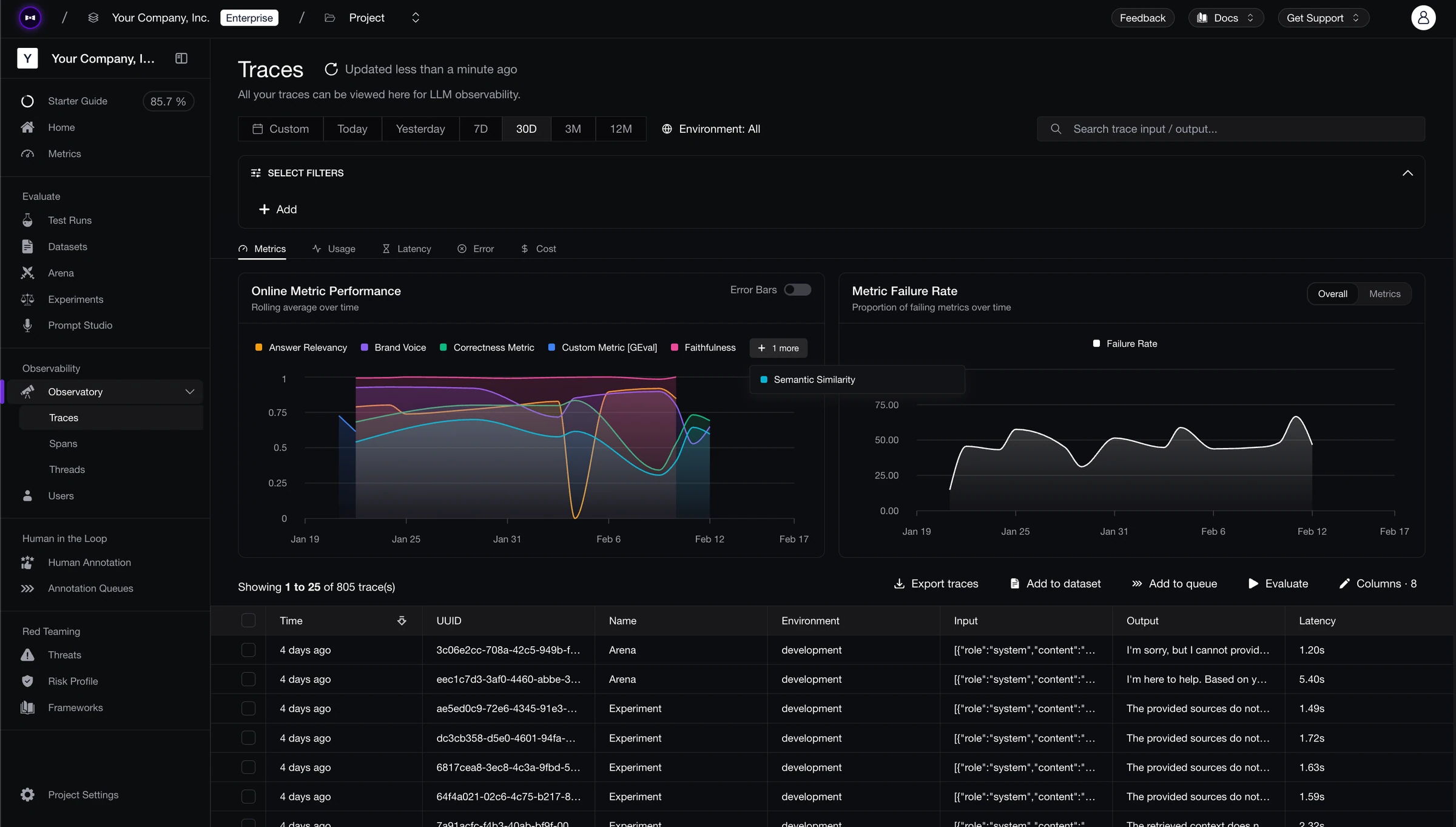
Customers include Panasonic, Toshiba, Amdocs, BCG, and CircleCI.
Best for: Cross-functional teams that need AI quality monitoring — evaluation, alerting, drift detection, and annotation — accessible to the entire team, not just engineers.
Standout Features
- Evaluation on every trace: 50+ research-backed metrics (open-source through DeepEval) score production traces for faithfulness, relevance, hallucination, bias, toxicity, and more — automatically.
- Quality-aware alerting: Alerts fire when evaluation scores drop, not just when latency spikes. Integrates with PagerDuty, Slack, and Teams.
- Prompt and use case drift detection: Track how specific prompts and use cases perform over time. Catch degradation at the prompt level, not just the aggregate.
- Automatic dataset curation: Production traces are converted into evaluation datasets, so test coverage evolves alongside real usage.
- Cross-functional annotation: PMs, domain experts, and QA annotate traces directly. Annotations feed back into evaluation alignment and dataset curation.
- Multi-turn simulation: Generate realistic multi-turn conversations from scratch — what takes 2-3 hours of manual prompting takes minutes.
- Red teaming: Test for PII leakage, prompt injection, bias, and jailbreaks. Based on OWASP Top 10 and NIST AI RMF.
- CI/CD regression testing: Integrates with pytest. Evaluation results flow back as testing reports with regression tracking.
Pros | Cons |
|---|---|
Every trace is evaluated, not just logged — evaluation IS the observability | Cloud-based and not open-source, though enterprise self-hosting is available |
Quality-aware alerting catches silent failures that APM tools miss entirely | The breadth of the platform may be more than what's needed for lightweight tracing |
Cross-functional workflows mean PMs and QA own AI quality independently | Teams new to evaluation-first tooling may need a ramp-up period to forecast GB-based costs |
Unlimited traces at $1/GB-month — the most cost-effective option on this list | |
Framework-agnostic with native SDKs (Python, TypeScript), OTEL, and OpenInference |
Confident AI helps you turn expensive logging into real quality signal
Book a personalized 30-min walkthrough for your team's use case.
FAQ
Q: Does Confident AI require DeepEval?
No. Confident AI is a standalone platform that works independently — though both are built by the same company. DeepEval is Confident AI's open-source framework, and the 50+ metrics it provides are available natively in the platform, so no separate library is needed.
Q: How does pricing work?
Unlimited traces on all plans. $1 per GB-month for data ingested or retained. Starter is a flat $200/month with unlimited user seats and 5 GB-months included; Team is $2,000/month with 75 GB-months. Free tier includes 2 seats, 1 project, and 1 GB-month.
Q: Can non-engineers use Confident AI?
Yes. PMs, QA, and domain experts run evaluation cycles through AI connections (HTTP-based, no code), annotate traces, and review quality dashboards without engineering involvement. Confident AI provides the broadest cross-functional workflow on this list.
2. LangWatch
Type: Multi-agent observability and testing · Pricing: Free tier (200K events/mo); €29/seat/mo with unlimited lite seats; custom Enterprise · Open Source: Yes (Apache-2.0) · Website: https://langwatch.ai
LangWatch treats observability as one half of a testing loop. Its OpenTelemetry-native tracing supports the GenAI specification and renders multi-agent runs as waterfalls, flame graphs, topology maps, and sequence diagrams. Tool calls, skills, and MCP interactions are captured with token, cost, and cache data on each span.
The platform runs online evaluations on production traffic using LLM-as-a-judge, code, or workflow evaluators over individual outputs and whole conversations. Built-in guardrails protect against PII exposure and prompt injection. When monitoring surfaces a failure, the production trace can become a multi-turn simulation that verifies the fix and joins the CI regression suite.
An AI gateway adds virtual keys, budgets, routing policies, and audit trails across models, keys, and tools. The Apache-2.0 platform supports cloud, hybrid, VPC, Docker, and Kubernetes deployments across EU, US, UK, and APAC regions.
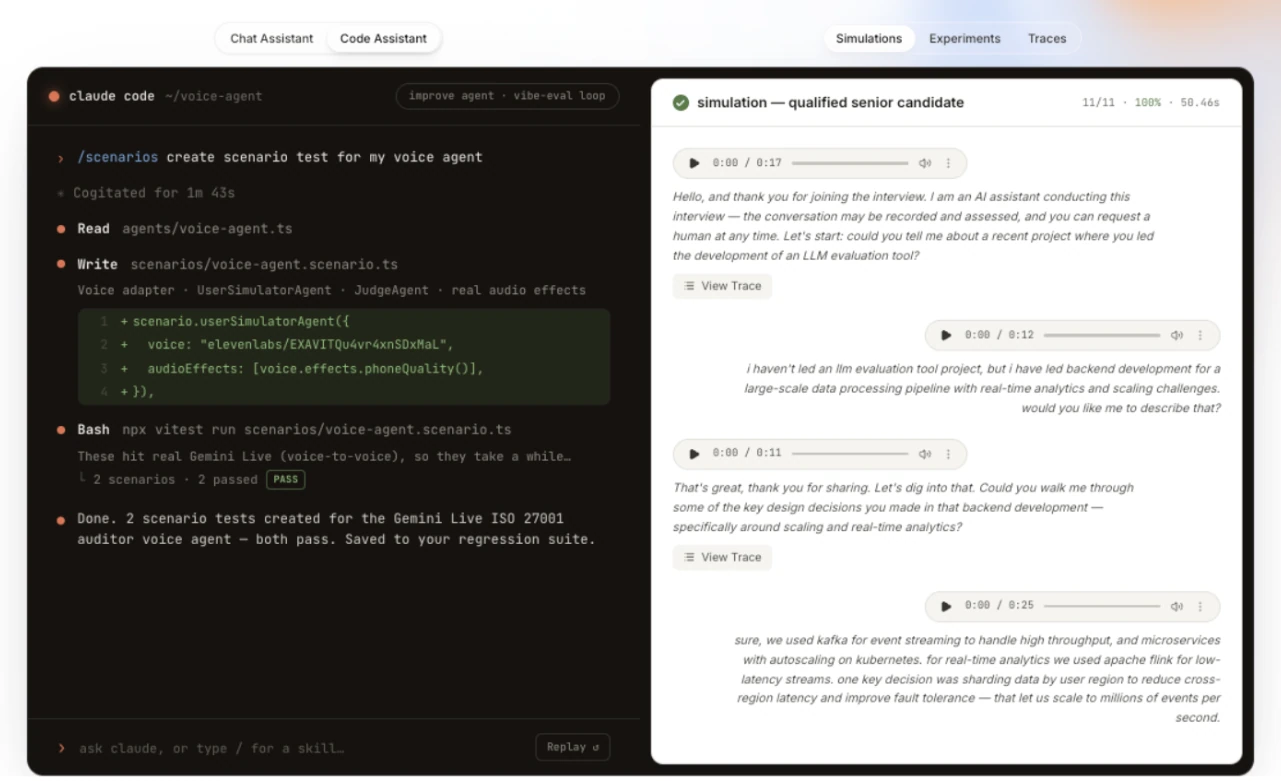
Best for: Regulated-industry teams running multi-agent or voice systems that need online evaluation, runtime guardrails, and self-hosting.
Standout Features
- OTel-native multi-agent tracing: Waterfall, topology, and sequence views capture tool calls, skills, MCP interactions, and voice-agent runs.
- Online production evaluation: LLM-as-a-judge, code, and workflow evaluators score live traces, voice interactions, and whole conversations.
- Built-in guardrails: Runtime PII and prompt-injection protection monitors production traffic.
- Production-to-simulation loop: Observed failures become multi-turn simulations that verify fixes and gate releases in CI.
- Gateway and deployment controls: Virtual keys, budgets, routing, audit trails, and Apache-2.0 self-hosting support regulated deployments.
Pros | Cons |
|---|---|
Production failures can become simulations that verify fixes and join CI regression suites | Infrastructure-level APM for hosts, services, and databases is out of scope |
Evaluation and guardrails run directly on live production traffic | Younger community than the longest-standing open-source tracing projects |
Topology and sequence views make multi-agent handoffs easier to inspect | Teams needing only lightweight request logging may not need the full platform |
Apache-2.0 open source with gateway controls, self-hosting, and regional deployment options |
FAQ
Q: Is LangWatch open source?
Yes. The core platform is Apache-2.0 licensed and self-hostable through Docker or Kubernetes on any plan. Its Scenario agent-simulation framework is also open source.
Q: How is LangWatch different from Langfuse or LangSmith?
LangWatch connects OTel-native multi-agent tracing with online evaluation, runtime guardrails, and simulations that verify production fixes in CI. Its focus is the complete trace-to-test loop rather than tracing alone.
Q: How does pricing work?
The free tier includes 200K events per month. Paid pricing starts at €29 per seat per month with unlimited lite seats, then $1 per additional 100K events. Custom Enterprise plans support self-hosted, hybrid, and VPC deployments.
3. LangSmith
Type: Observability and evaluation platform · Pricing: Free tier; Plus $39/seat/mo; custom Enterprise · Open Source: No · Website: https://smith.langchain.com
LangSmith is a unified platform from the LangChain team that provides tracing, evaluation, and prompt management. It creates high-fidelity traces that render the complete execution tree of an agent — tool selections, retrieved documents, and exact parameters at every step.
The platform's annotation queues are a genuine strength. Subject matter experts can review, label, and correct specific traces through a structured workflow. This domain knowledge flows into evaluation datasets, creating a feedback loop between production behavior and engineering improvements. LangSmith also supports LLM-as-a-judge evaluators for automated scoring.
The tradeoff is ecosystem coupling. LangSmith works with any framework via its traceable wrapper, but the deepest integration is with LangChain and LangGraph. Teams outside that ecosystem will find observability depth drops. Evaluation metrics require custom implementation — there's no deep library of pre-built, research-backed metrics to draw from.
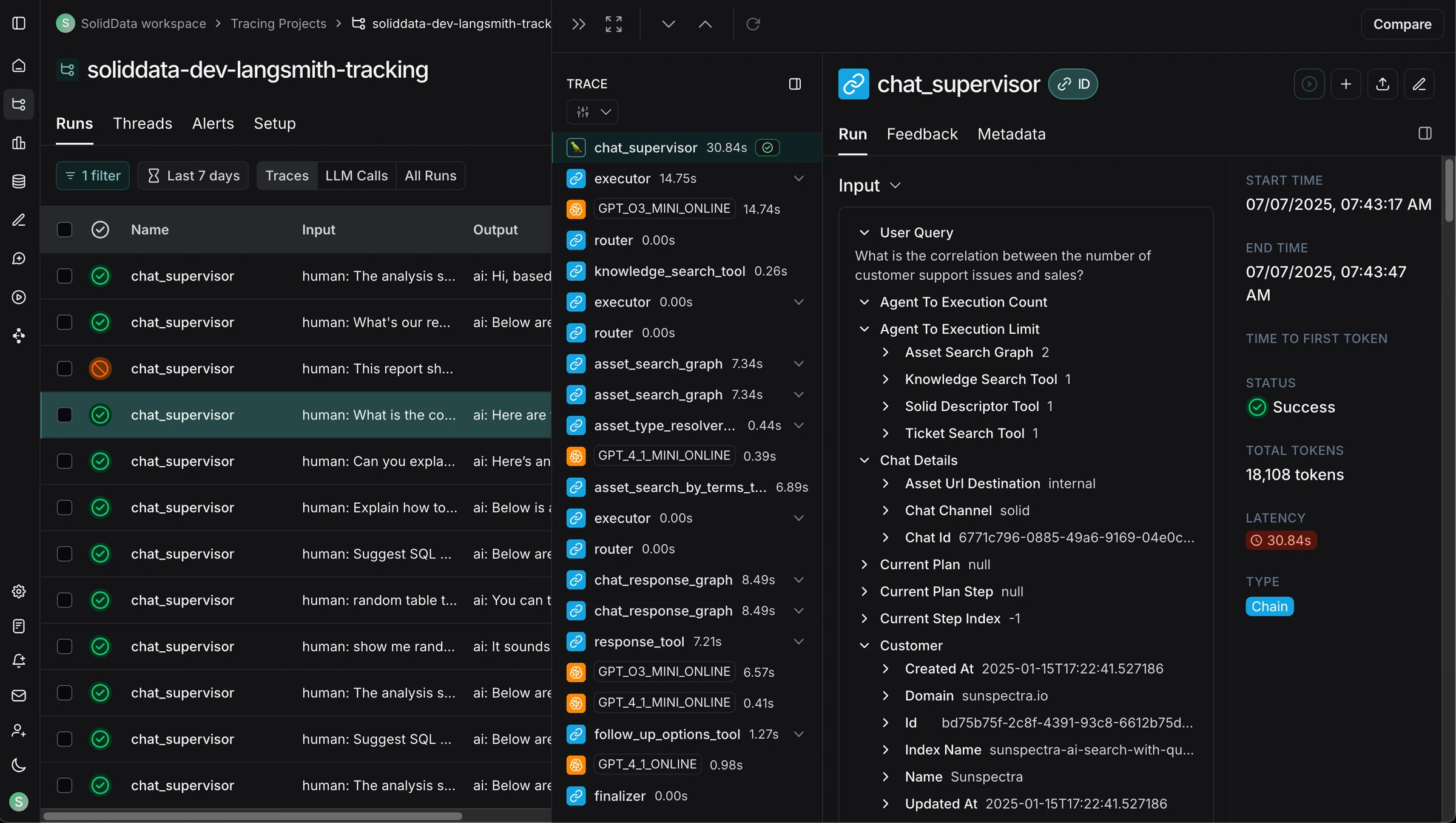
Best for: Teams building on LangChain that want native tracing with annotation workflows and agent debugging, and don't need deep built-in evaluation metrics.
Standout Features
- Full-stack tracing capturing the execution tree of agents, including tool calls, document retrieval, and model parameters
- Annotation queues for structured human review — domain experts can rate output quality and add context
- LLM-as-a-judge evaluators for automated scoring of historical runs
- Multi-turn evaluation support for measuring agent performance across conversation threads
- Prompt management and versioning integrated with evaluation workflows
Pros | Cons |
|---|---|
Deep visibility into LangChain and LangGraph workflows with step-level tracing | Observability depth drops outside the LangChain ecosystem |
Annotation queues create structured feedback loops between domain experts and engineering | Limited built-in evaluation metrics — LLM-as-a-judge requires custom implementation |
Managed infrastructure reduces operational overhead | Self-hosting restricted to Enterprise tier |
Works with any framework via | Seat-based pricing at $39/seat/mo limits access for cross-functional teams |
FAQ
Q: Does LangSmith only work with LangChain?
No. LangSmith works with any LLM framework via a traceable wrapper. However, the deepest integration and best experience is with LangChain and LangGraph applications.
Q: What evaluation approaches does LangSmith support?
LangSmith supports offline evals (testing known scenarios), online evals (scoring production data), and multi-turn evaluations. You can use LLM-as-a-judge evaluators or human annotation workflows. Built-in metric coverage is limited — most evaluators require custom implementation.
Q: How does LangSmith handle production traffic?
LangSmith processes millions of traces per day for enterprise customers. The platform offers 14-day retention for base traces and 400-day extended retention, with volume-based pricing.
4. Pydantic Logfire
Type: Full-stack AI observability with built-in evals and AI gateway · Pricing: Free tier (10M records/mo); Team from $49/mo, then $2/M additional records; custom Enterprise · Open Source: Partial (SDKs, Pydantic Evals) · Website: https://pydantic.dev/logfire
Pydantic Logfire comes from the team behind Pydantic and Pydantic AI. Its OpenTelemetry-native platform puts HTTP requests, agent loops, model and tool calls, database queries, and validation work into one trace, helping engineers separate model-quality problems from application and infrastructure failures.
Pydantic Evals and hosted judges keep evaluation results beside that telemetry. Production traces can become dataset cases, while PostgreSQL-compatible SQL powers investigation and alerts through the UI or MCP. Pydantic AI Gateway adds routing, budgets, and failover. The tradeoff is an engineering-led workflow that relies more on code, SQL, and custom evaluators than evaluation-first platforms with larger preset metric libraries and broader cross-functional workflows.
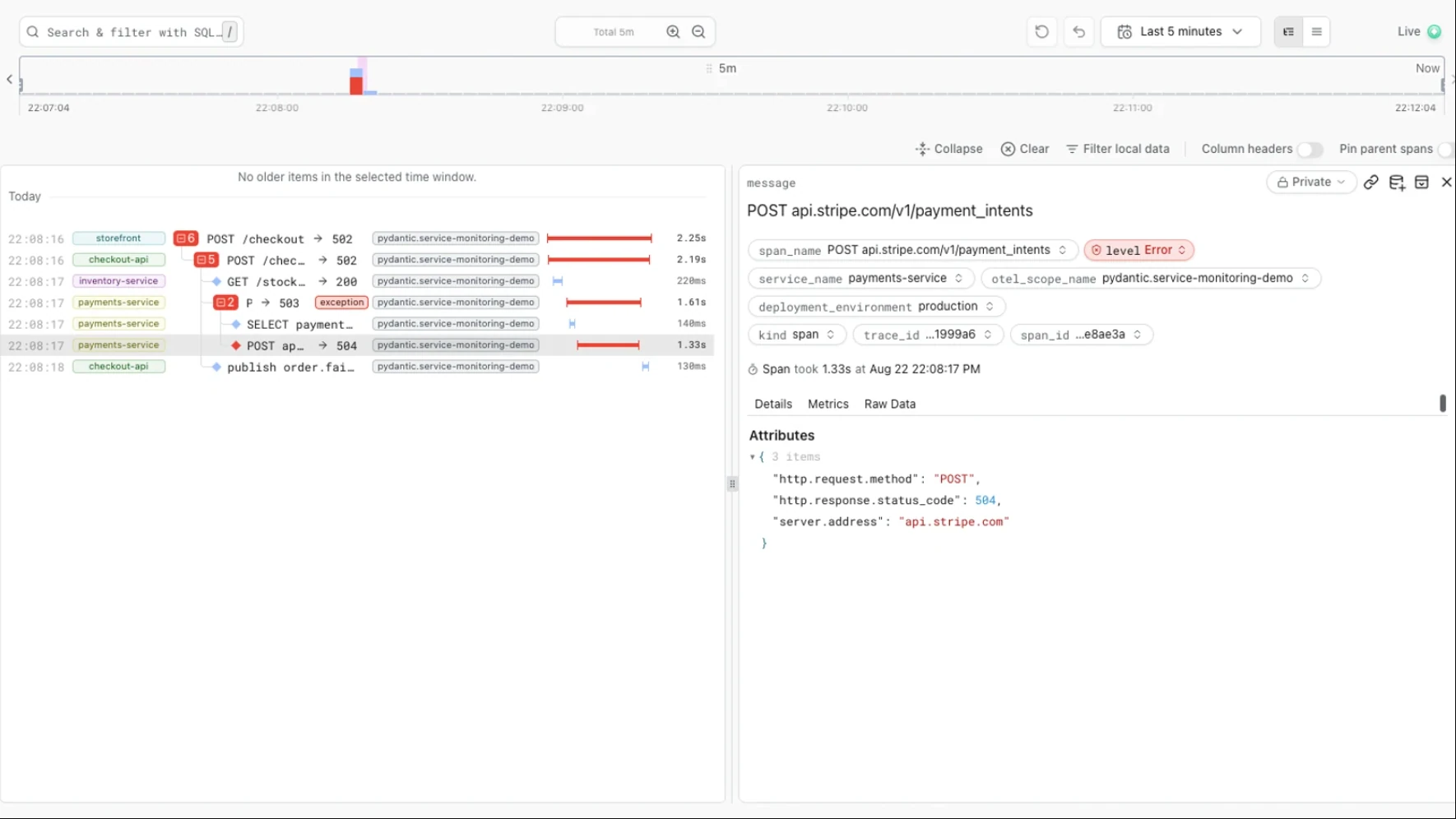
Best for: Engineering teams that want LLM, application, and infrastructure traces in one OpenTelemetry platform.
Standout Features
- Full-stack traces: Model and tool calls appear with the surrounding requests, queries, and validation.
- Evaluation beside telemetry: Pydantic Evals and hosted judges attach scores to the traces they evaluate.
- SQL and MCP access: PostgreSQL-compatible queries cover spans, logs, metrics, and evaluation results.
- OpenTelemetry-native: First-class Python, TypeScript, and Rust SDKs complement standard OTel support.
- Integrated AI gateway: Multi-provider routing, budgets, policy controls, and failover share the same telemetry.
Pros | Cons |
|---|---|
One trace covers the model call and the surrounding application, making infrastructure and output failures easier to separate | Evaluation breadth depends more on custom rubrics and evaluators than on a large preset metric catalog |
OpenTelemetry-native instrumentation remains portable across frameworks and backends | Cross-functional evaluation workflows are narrower than dedicated evaluation-first platforms |
SQL and MCP expose raw telemetry to engineers and coding agents | Managed cloud is the default; alternative hosting options are Enterprise features |
Evals and dataset cases stay linked to their source traces | The full-stack breadth may be more than teams need for lightweight request tracing |
FAQ
Q: Is Pydantic Logfire only for Python?
No. First-class SDKs support Python, TypeScript, and Rust, while standard OpenTelemetry covers other languages.
Q: Do I need Pydantic AI or Pydantic validation to use Logfire?
No. Logfire works with other agent frameworks and model SDKs through native integrations or OpenTelemetry.
Q: Does Logfire evaluate output quality or only trace it?
Both. Pydantic Evals runs custom and LLM-as-a-judge evaluators from code or CI, while Logfire can score live traffic and query the results beside traces.
5. OpenObserve
Type: Unified infrastructure and LLM observability · Pricing: Open-source self-hosting; Cloud $0.50/GB ingested and $0.01/GB queried; custom Enterprise · Open Source: Yes (AGPL-3.0) · Website: https://openobserve.ai
OpenObserve is an OpenTelemetry-native observability backend that stores logs, metrics, traces, frontend telemetry, and LLM spans in one system. Its LLM views expose model and tool calls, token usage, latency, errors, and configurable cost attribution, while SQL connects that data to the surrounding infrastructure.
Online evaluations can score incoming traces with versioned LLM-as-a-judge templates or remote scorers, and the same alerting system can watch evaluation results alongside operational signals. Datasets, experiments, the playground, managed evaluations, and MCP access belong to its Enterprise AI suite. This makes OpenObserve a practical full-stack backend for teams that want infrastructure and LLM telemetry in one system.
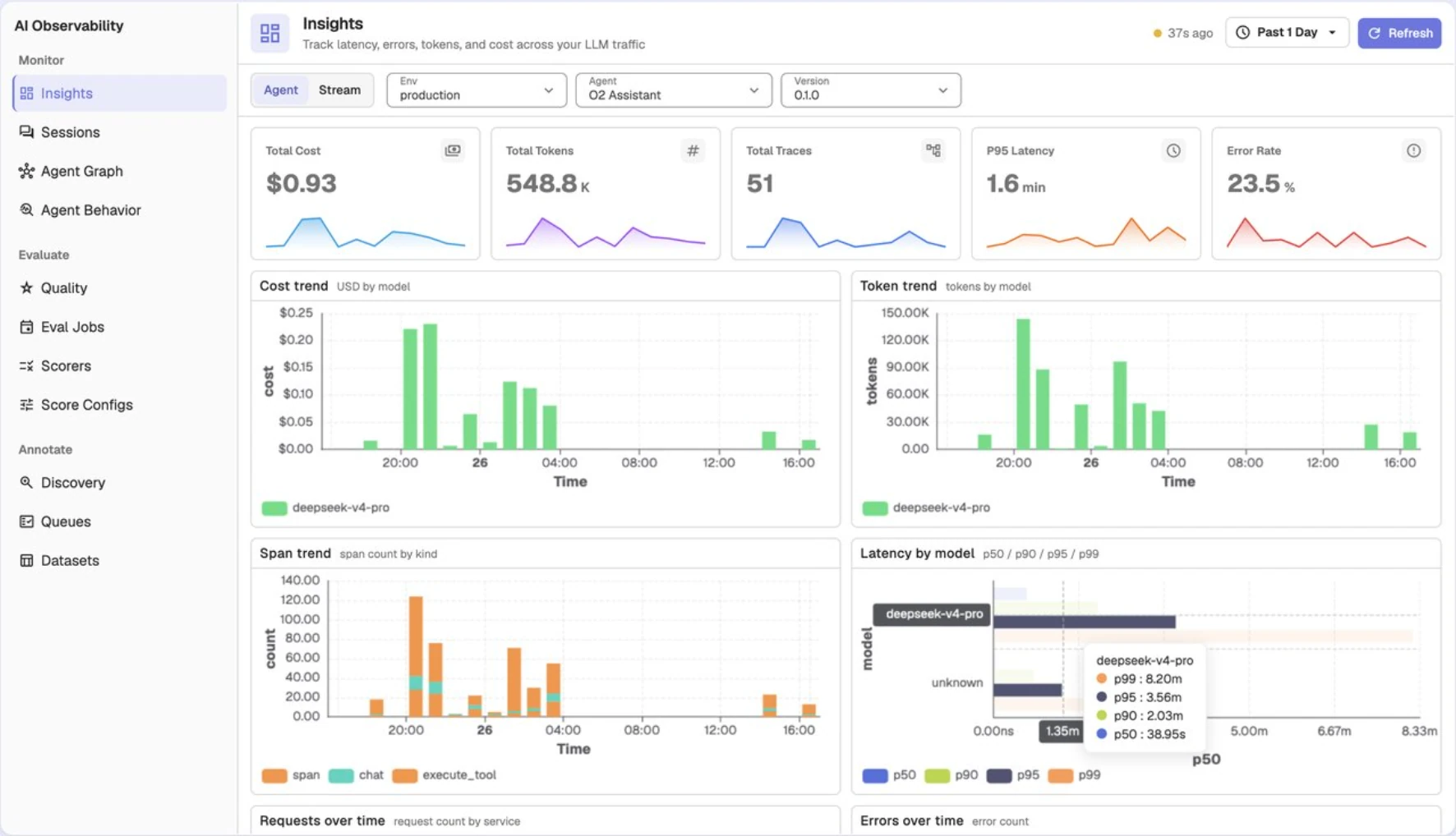
Best for: Infrastructure-focused teams that want self-hosted LLM traces, logs, metrics, and alerts in one OpenTelemetry backend.
Standout Features
- Unified telemetry: LLM traces sit beside application logs, metrics, distributed traces, and frontend monitoring.
- OpenTelemetry-native ingestion: Standard OTLP instrumentation supports AI frameworks and custom services.
- Token and cost visibility: Model-level usage, latency, errors, and configurable pricing enrich LLM spans.
- Online evaluations: Enterprise pipelines run versioned LLM judges or remote scorers over production traces.
- SQL-based operations: Queries, alerts, dashboards, and SLOs use the same telemetry store.
Pros | Cons |
|---|---|
One backend correlates LLM behavior with application and infrastructure telemetry | Advanced evaluation, experiment, playground, and MCP workflows are Enterprise features |
AGPL-licensed self-hosting provides control over deployment and data | AGPL obligations may not fit teams modifying the platform for a proprietary service |
SQL-based queries and alerts work across telemetry types | Built-in AI quality metrics are narrower than evaluation-first platforms |
Cloud pricing has no per-host or per-seat charge | Running the full observability stack adds operational scope for teams that only need LLM tracing |
FAQ
Q: Is OpenObserve open source?
Yes. Its Open Source Edition is AGPL-3.0 and self-hostable; Enterprise features use a commercial license.
Q: Can OpenObserve evaluate LLM outputs?
Yes. Its Enterprise evaluation pipelines support versioned LLM judges and remote scorers over sampled production traces.
Q: How is OpenObserve different from AI-native observability tools?
OpenObserve prioritizes a shared backend for infrastructure and LLM telemetry. That reduces observability tool sprawl, while evaluation-first platforms provide deeper preset metrics and broader quality workflows.
6. Latitude
Type: Agent observability with an automated fix loop · Pricing: Free tier; Pro $99/mo with unlimited seats; custom Enterprise · Open Source: Yes (MIT, self-hostable) · Website: https://latitude.so
Latitude captures 100% of agent traffic on ingest, then uses semantic search and Behaviours — embedding-based clusters that group sessions by meaning — to surface how agents are actually being used and where they fail.
Recurring failures become Signals: named problems with occurrence counts, affected-user trends, and auto-generated evaluations. Latitude can then hand a Signal to your own coding agent, such as Claude Code or Cursor, along with sample traces and the relevant context. The coding agent implements the smallest fix, adds a regression test, and opens a pull request for human review.
Latitude is open source under the MIT license and can be self-hosted with the full feature set.
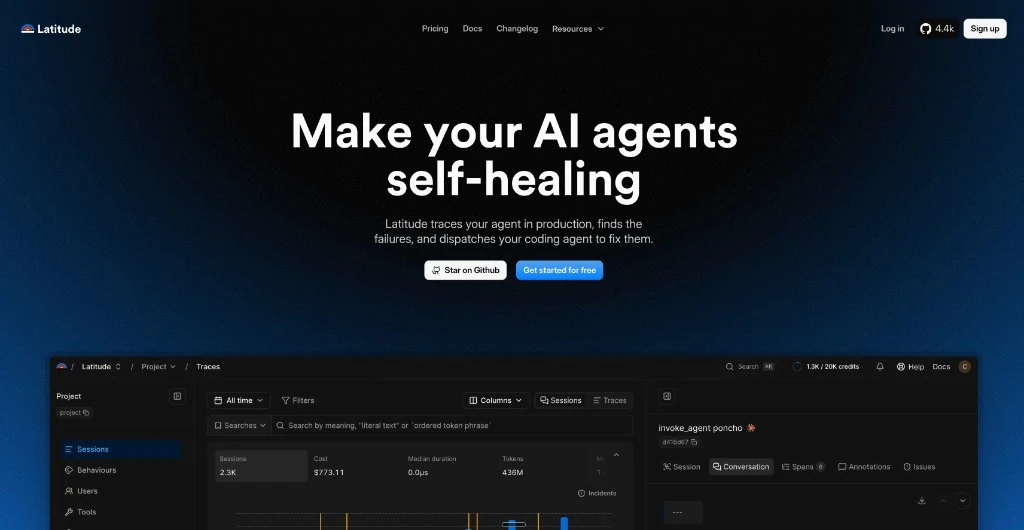
Best for: Engineering teams that want recurring production failures to become tracked problems, evaluations, and fix PRs through the coding agents they already use.
Standout Features
- Signals from real failures: Recurring failure patterns grouped into named, trend-tracked problems with occurrence counts and affected-user trends.
- Behaviours: Semantic clustering surfaces topics and failure modes across real sessions without requiring predefined queries.
- Coding-agent handoff: Sends a detected Signal, sample traces, and context to your own coding agent (Claude Code, Cursor) through Latitude's MCP server.
- Closed fix loop: The coding agent implements the fix, adds a regression test, and opens a pull request for review.
- Auto-generated evaluations: Evals are generated from real Signal examples and annotations, then continue scoring live traffic.
- 100% capture on ingest: No sampling at the trace-collection layer. LLM-based flaggers sample during analysis, with an adjustable 10% default.
- Open source: MIT-licensed and available for full-featured self-hosting.
Pros | Cons |
|---|---|
Detected issues become fix PRs through the coding agent your team already uses | No LLM gateway for routing, caching, or failover |
Behaviours surface qualitative patterns and unknown failure modes in real agent usage | Newer platform with a smaller community than long-standing tracing tools |
Open source (MIT) and free to self-host with the full feature set | Primarily designed for engineering-led workflows — limited room for PMs and domain experts |
OTel-native with around 18 framework adapters, on a flat $99/mo Pro plan with unlimited seats | Evaluations are generated from your own failures rather than a library of research-backed metrics |
FAQ
Q: Does Latitude require a coding agent like Claude Code or Cursor to be useful?
No. Observability, search, Behaviours, and Signals work independently. Connecting a coding agent through Latitude's MCP server adds the automated handoff from a diagnosed Signal to an opened pull request.
Q: How does Latitude handle evaluations?
Latitude generates evaluations from real production failures using a Signal's example traces and annotations. Teams that need a large catalog of pre-built, research-backed metrics may pair it with a dedicated evaluation library.
Q: Can Latitude be self-hosted with full features?
Yes. Latitude is MIT-licensed, and the full feature set can be self-hosted for free.
7. Arize AI
Type: AI observability and evaluation · Pricing: Free tier (Phoenix); AX from $50/mo; custom Enterprise · Open Source: Yes (Phoenix, Elastic License 2.0) · Website: https://arize.com
Arize AI extends its ML monitoring heritage into LLM observability, offering span-level tracing, real-time dashboards, and agent workflow visualization at enterprise scale. Its open-source Phoenix library provides a local-first, notebook-friendly entry point that runs in Jupyter, locally, or via Docker with zero external dependencies.
Phoenix uses OpenInference (OpenTelemetry-based) instrumentation to support multiple frameworks without vendor lock-in — LlamaIndex, LangChain, Haystack, DSPy, and smolagents. The notebook-first experience is a real strength for ML engineers who want observability during experimentation, not just production monitoring.
Custom evaluators allow scoring LLM outputs, but built-in metric coverage for LLM-specific use cases (faithfulness, hallucination, conversational coherence) is limited compared to evaluation-first platforms. The platform's UX is designed for technical users, which limits involvement from cross-functional team members.
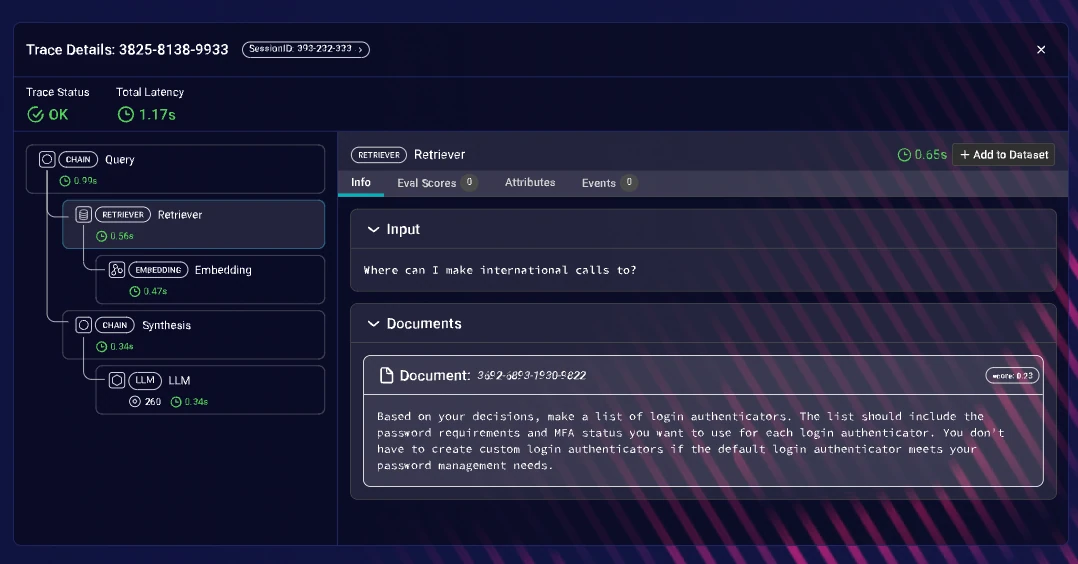
Best for: Large engineering organizations that need enterprise-scale LLM monitoring, particularly those already using Arize for ML observability.
Standout Features
- Span-level tracing with custom metadata tagging for granular production debugging
- Real-time performance dashboards tracking latency, error rates, and token consumption
- Visual agent workflow maps for understanding multi-step LLM pipelines
- Phoenix open-source library for local-first, notebook-friendly observability
- OpenInference instrumentation supports LlamaIndex, LangChain, Haystack, DSPy, smolagents
Pros | Cons |
|---|---|
Enterprise-scale infrastructure handles high-throughput production environments | The LLM evaluation layer is shallow — built for ML monitoring first, extended to LLMs second |
Phoenix runs locally with zero external dependencies — great for privacy-focused teams | Engineer-only UX limits involvement from PMs, QA, and domain experts |
Vendor-agnostic instrumentation via OpenInference | Advanced capabilities gated behind commercial tiers with only 14 days of retention |
Combines ML and LLM monitoring, reducing vendor count | Cost tracking focuses on tokens rather than dollar amounts |
FAQ
Q: What is the difference between Phoenix and AX?
Phoenix is the open-source, self-hosted library. AX provides managed cloud hosting with tiered limits: Free (25K spans/month), Pro, and Enterprise.
Q: Can Phoenix run completely locally?
Yes. Phoenix runs in Jupyter notebooks, locally, or via Docker with zero external dependencies. This makes it suitable for privacy-sensitive environments.
Q: Does Arize support LLM evaluation?
Arize supports custom evaluators for scoring outputs. However, built-in research-backed metrics for LLM-specific use cases are limited compared to evaluation-first platforms.
8. Langfuse
Type: LLM engineering platform · Pricing: Free tier; from $29/mo; Enterprise from $2,499/year · Open Source: Yes (MIT, except enterprise features) · Website: https://langfuse.com
Langfuse combines tracing, prompt management, and evaluation hooks in a single open-source platform. The MIT-licensed core makes it popular with teams wanting full control over their data through self-hosting. Community adoption is strong, with over 21,000 GitHub stars.
Automated instrumentation via callback handlers captures traces without modifying business logic. The platform supports OpenAI SDK, LangChain, LlamaIndex, LiteLLM, Vercel AI SDK, Haystack, and Mastra. For teams that already have internal evaluation pipelines, Langfuse provides a solid tracing backbone.
The gap is evaluation. Langfuse logs traces but doesn't score them out of the box. Quality monitoring — faithfulness, relevance, hallucination — requires custom implementation or external tooling. There's no native alerting, so teams can't get notified when output quality degrades without building custom integrations.
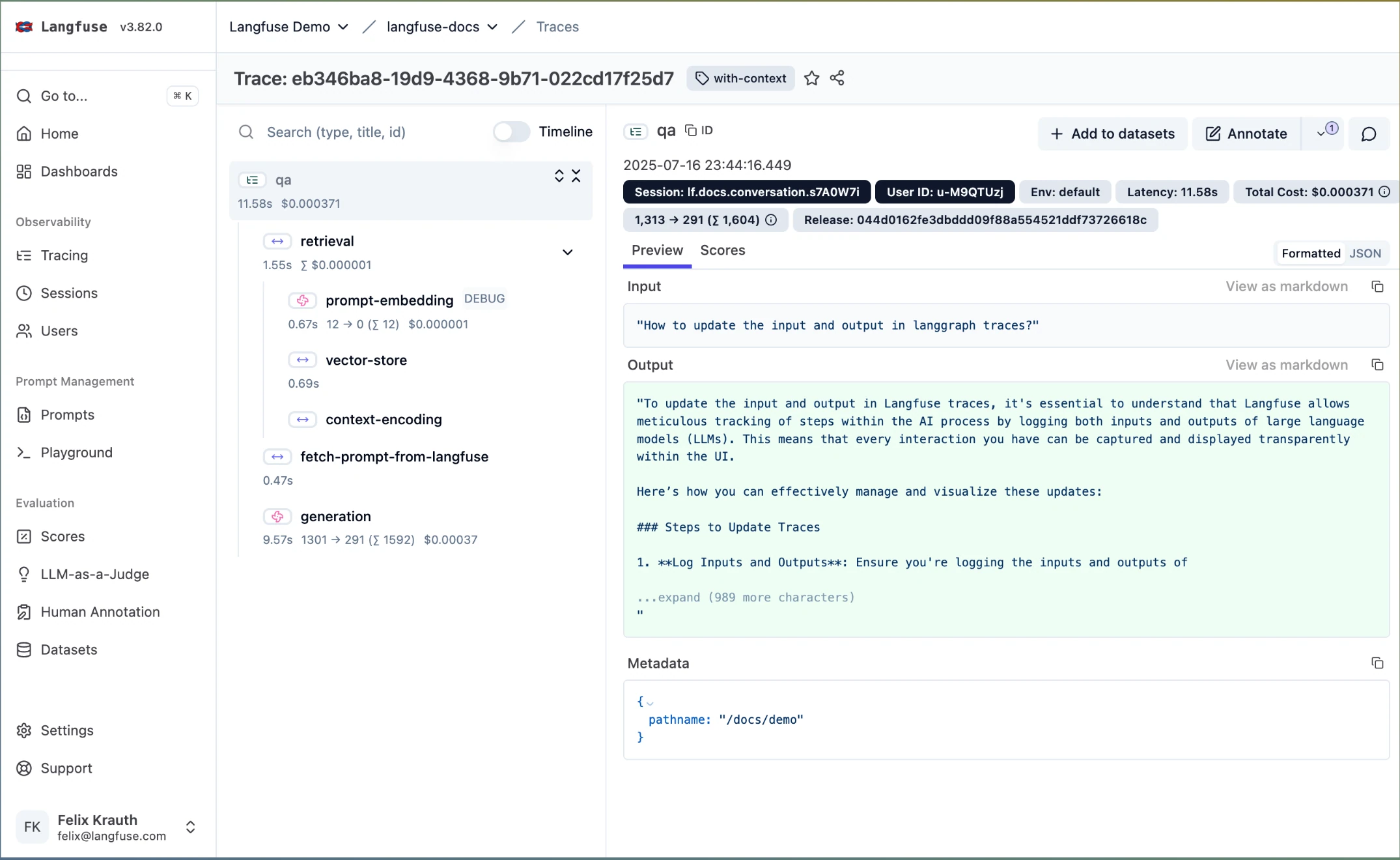
Best for: Engineering teams that want open-source, self-hostable tracing with full data ownership and are comfortable building evaluation logic themselves.
Standout Features
- OpenTelemetry-native trace capture covering prompts, completions, metadata, and latency
- Multi-turn conversation grouping at the session level
- Prompt management and versioning within the platform
- Token usage dashboards with cost attribution across models
- Self-hosting via Docker for complete data ownership
- 21,000+ GitHub stars with active community development
Pros | Cons |
|---|---|
Fully open-source (MIT) with self-hosting — complete ownership over trace data | No built-in evaluation metrics — scoring requires custom implementation |
Strong OpenTelemetry foundation integrates into existing infrastructure | No native alerting on quality degradation |
All-in-one platform reduces tool fragmentation for tracing + prompt management | Native SDK support limited to Python and TypeScript |
Large community and active development | Self-hosted version has occasional bugs; continued investment uncertain after ClickHouse acquisition |
FAQ
Q: Is Langfuse fully open source?
The core is MIT-licensed. Enterprise features in ee folders have separate licensing. Self-hosting is available via Docker.
Q: Can Langfuse evaluate LLM outputs?
Langfuse supports custom evaluation scoring, but there are no built-in research-backed metrics. Teams typically integrate external evaluation libraries or build custom LLM-as-a-judge implementations.
Q: What frameworks does Langfuse support?
OpenAI SDK, LangChain, LlamaIndex, LiteLLM, Vercel AI SDK, Haystack, and Mastra. Other languages require API wrappers.
9. Datadog LLM Observability
Type: APM extension for LLM monitoring · Pricing: From $8/10K LLM requests/mo (annual), $12 on-demand; 100K request minimum · Open Source: No · Website: https://www.datadoghq.com/product/llm-observability/
Datadog LLM Observability extends Datadog's existing monitoring platform to cover LLM applications. It correlates LLM spans with standard APM traces, showing how model latency affects overall application performance. For teams already invested in Datadog, this means zero new vendor procurement — LLM traces sit alongside infrastructure metrics, error rates, and traditional monitoring.
The platform supports agentless deployment via environment variables, making it accessible for serverless environments. Automatic instrumentation of LangChain applications is available via dd-trace-py. The familiar Datadog UX means teams already comfortable with the platform can onboard quickly.
The tradeoff: AI observability is a feature module on a general-purpose APM platform, not a purpose-built AI quality tool. There are no built-in evaluation metrics for faithfulness, relevance, or safety. Alerts fire on latency and error rates, not on output quality degradation.
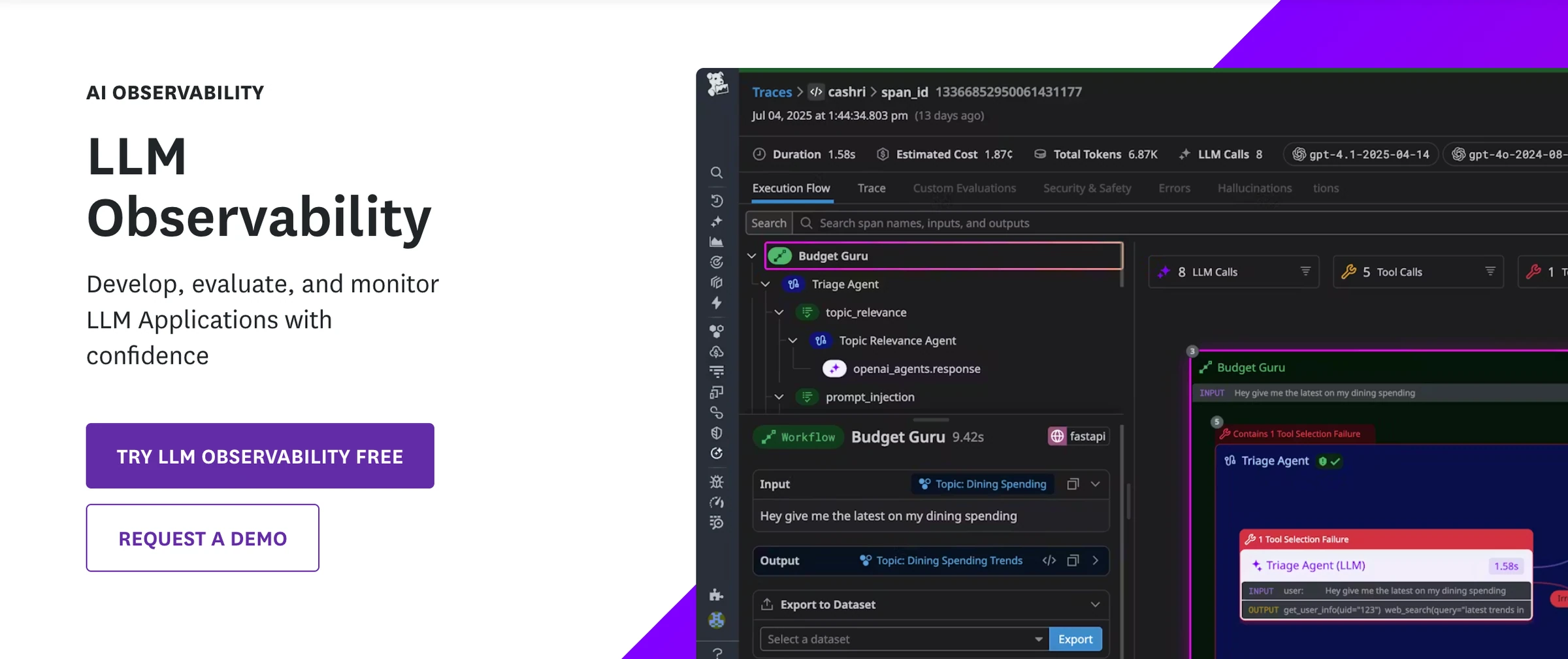
Best for: Teams already using Datadog for infrastructure monitoring that want LLM visibility in their existing stack — and don't need evaluation or AI-specific quality workflows.
Standout Features
- Correlation between LLM spans and standard APM traces for end-to-end latency analysis
- Agentless deployment mode for serverless and restricted environments
- Unified dashboards showing LLM performance alongside infrastructure metrics
- Mature alerting infrastructure applied to LLM operational metrics
- Automatic instrumentation of LangChain applications via
dd-trace-py
Pros | Cons |
|---|---|
Unified view of LLM and infrastructure metrics — no new vendor for Datadog users | No built-in evaluation metrics for output quality — can't score faithfulness, relevance, or safety |
Familiar interface for teams already using Datadog | No quality-aware alerting — alerts on latency and errors only |
Agentless mode simplifies deployment in restricted environments | Pricing scales with trace volume and can be expensive at scale |
Enterprise-grade alerting and dashboard infrastructure | Designed for SREs and infrastructure teams, not AI quality teams |
FAQ
Q: Do I need the Datadog Agent for LLM Observability?
No. Datadog supports an agentless mode via environment variables, though running the full agent provides additional capabilities.
Q: Can Datadog evaluate LLM output quality?
No. Datadog LLM Observability tracks operational metrics (latency, tokens, errors) but doesn't include evaluation metrics for output quality like faithfulness or relevance. Teams needing quality evaluation will need to supplement Datadog with a dedicated tool.
Q: Is pricing publicly available?
Partially. Starts at $8 per 10K monitored LLM requests per month (billed annually), or $12 on-demand, with a minimum of 100K LLM requests per month. Enterprise pricing requires contacting sales.
10. Helicone
Type: LLM observability and AI gateway · Pricing: Free tier (10K requests/mo); Pro $79/mo; Team $799/mo; custom Enterprise · Open Source: Yes (Apache-2.0) · Website: https://www.helicone.ai
Helicone takes a proxy-based approach to observability. It sits between your application and LLM providers — swap your API's base URL, and you gain observability, caching, and cost tracking with minimal code changes. The platform adds negligible latency overhead, making it suitable for production workloads where every millisecond matters.
The AI gateway supports 300+ models across OpenAI, Azure OpenAI, Anthropic, AWS Bedrock, Gemini, and more. Intelligent caching reduces API costs, and automatic failover improves reliability across providers. The fully open-source core supports managed cloud, self-hosted Docker, and enterprise Helm chart deployments.
Helicone provides some built-in scoring capabilities for basic quality checks, but evaluation features are limited compared to dedicated evaluation platforms. Monitoring operates at the gateway/request level — you get visibility into individual model calls but not into how outputs flow through your broader application or agent chains.
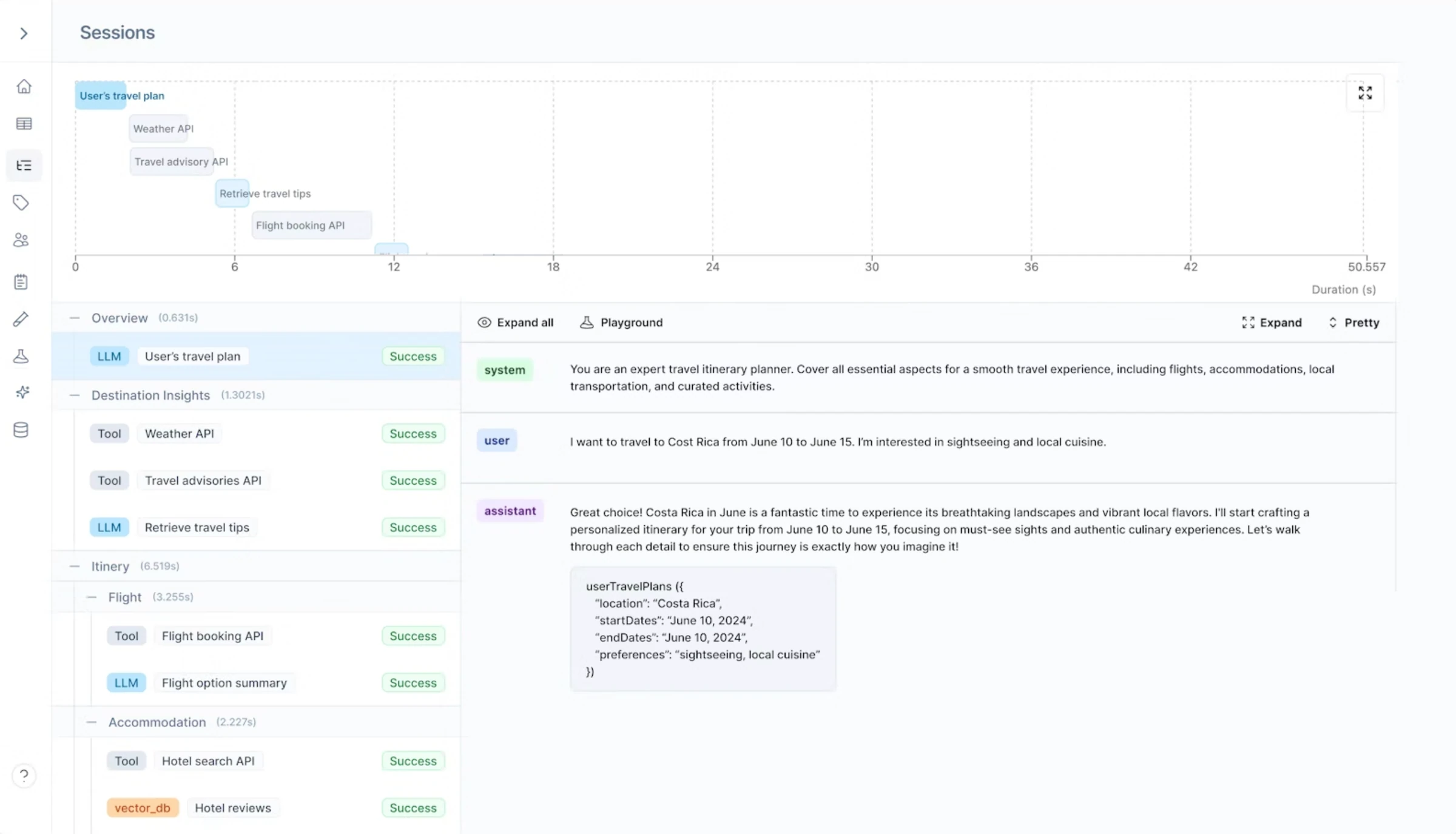
Best for: Teams that want observability and cost tracking without heavy SDK integration, particularly those managing multiple LLM providers.
Standout Features
- One-line integration by swapping the API base URL — minimal code changes required
- Negligible latency overhead suitable for latency-sensitive production environments
- Intelligent caching and automatic failover across providers
- Support for 300+ models via unified gateway
- Cost attribution, latency tracking, and budget threshold alerts
- Fully open-source core with flexible deployment options (cloud, Docker, Helm)
Pros | Cons |
|---|---|
Minimal code changes required — proxy-based setup is the fastest on this list | Monitoring scoped to request level — no visibility into multi-step workflows or agent chains |
Cost-saving caching reduces API spend | Evaluation capabilities are basic compared to dedicated eval platforms |
Open-source with multiple deployment options | Missing advanced governance features like granular RBAC and audit trails |
Excellent multi-provider visibility and failover | Adding a gateway layer introduces an extra hop in your infrastructure |
FAQ
Q: How much latency does Helicone add?
Negligible overhead, which is acceptable for most production workloads.
Q: What LLM providers does Helicone support?
OpenAI, Azure OpenAI, Anthropic, AWS Bedrock, Gemini, Ollama, Vercel AI, Groq, and 300+ additional models.
Q: Can I self-host Helicone?
Yes. The open-source core supports Docker and Helm chart deployments.
11. Portkey
Type: AI gateway and LLM routing · Pricing: Free tier (10K logs/mo); Production $49/mo; custom Enterprise · Open Source: Yes (MIT) · Website: https://portkey.ai
Portkey is primarily an AI gateway. It handles routing, fallbacks, and load balancing for LLM applications with a lightweight architecture (~122 KB footprint) that adds sub-millisecond latency overhead. Teams often adopt Portkey to replace custom LLM management code — the unified SDKs for JavaScript and Python handle failovers, retries, and routing logic that would otherwise require significant engineering effort.
Observability comes as a built-in feature of the gateway rather than the primary focus. Teams get request-level logging, cost tracking, and basic performance monitoring as part of the gateway functionality. For teams that need reliable production routing first and observability second, Portkey fills a specific niche.
The evaluation and quality monitoring layer is thin. Teams needing to score outputs for faithfulness, detect quality drift, or run evaluation metrics on production traffic will need to pair Portkey with a dedicated observability or evaluation platform.
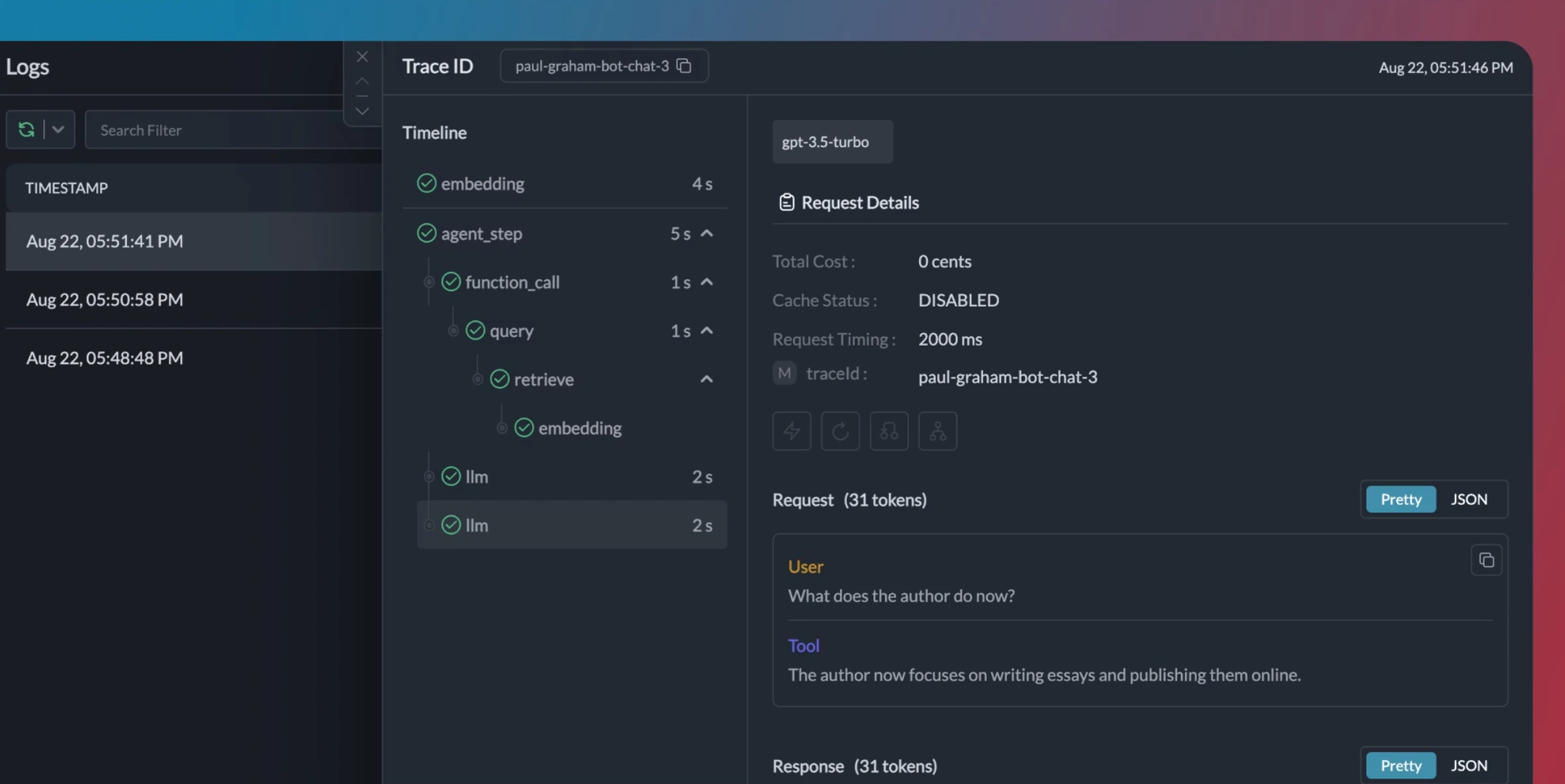
Best for: Teams building production applications that need reliable LLM routing, fallbacks, and load balancing — with observability as a built-in bonus.
Standout Features
- High-performance gateway with ~122 KB footprint and sub-millisecond latency overhead
- Automatic failovers, custom routing, retries, and load balancing
- Unified SDKs (JavaScript, Python) simplify multi-provider management
- Integration with LangChain, LlamaIndex, Autogen, and CrewAI
- Request-level logging with cost and performance tracking
Pros | Cons |
|---|---|
Minimal latency overhead makes it ideal for production routing | Observability is secondary to gateway functionality — limited depth |
Built-in reliability features replace thousands of lines of custom code | No evaluation metrics for output quality |
MIT-licensed with 10,000+ GitHub stars | No quality-aware alerting or drift detection |
One of the fastest gateway options available | Pricing unclear for high-volume enterprise use |
FAQ
Q: Is Portkey an observability tool or a gateway?
Primarily a gateway. Observability (logging, tracing) is a built-in feature but not the primary focus. Teams needing deep evaluation workflows should pair it with a dedicated platform.
Q: How much latency does Portkey add?
Sub-millisecond overhead with a ~122 KB footprint.
Q: Can Portkey replace custom LLM management code?
Yes. Users report removing thousands of lines of custom failover, retry, and routing code by switching to Portkey's unified SDKs.
12. Weights & Biases (Weave)
Type: AI observability via Weave · Pricing: Free tier; Teams $50/seat/mo; custom Enterprise · Open Source: Yes (Weave, partial) · Website: https://wandb.ai/site/weave
Weights & Biases built its reputation in ML experiment tracking and has expanded into LLM observability through Weave, its tracing and evaluation product. For teams already using W&B for model training and experiment management, Weave adds LLM-specific observability to the same platform — structured trace capture, evaluation scoring, and dashboard visualization.
The experiment tracking heritage is a genuine strength. Model versioning, artifact management, and reproducibility features carry over from the core W&B platform. Teams that already live in W&B for their ML workflow get continuity without adding another vendor.
The LLM observability layer is newer and less mature than the core product. Real-time quality alerting is limited. Multi-turn conversation support and agent-specific debugging features are still developing. The platform is built for ML engineers, not cross-functional teams.
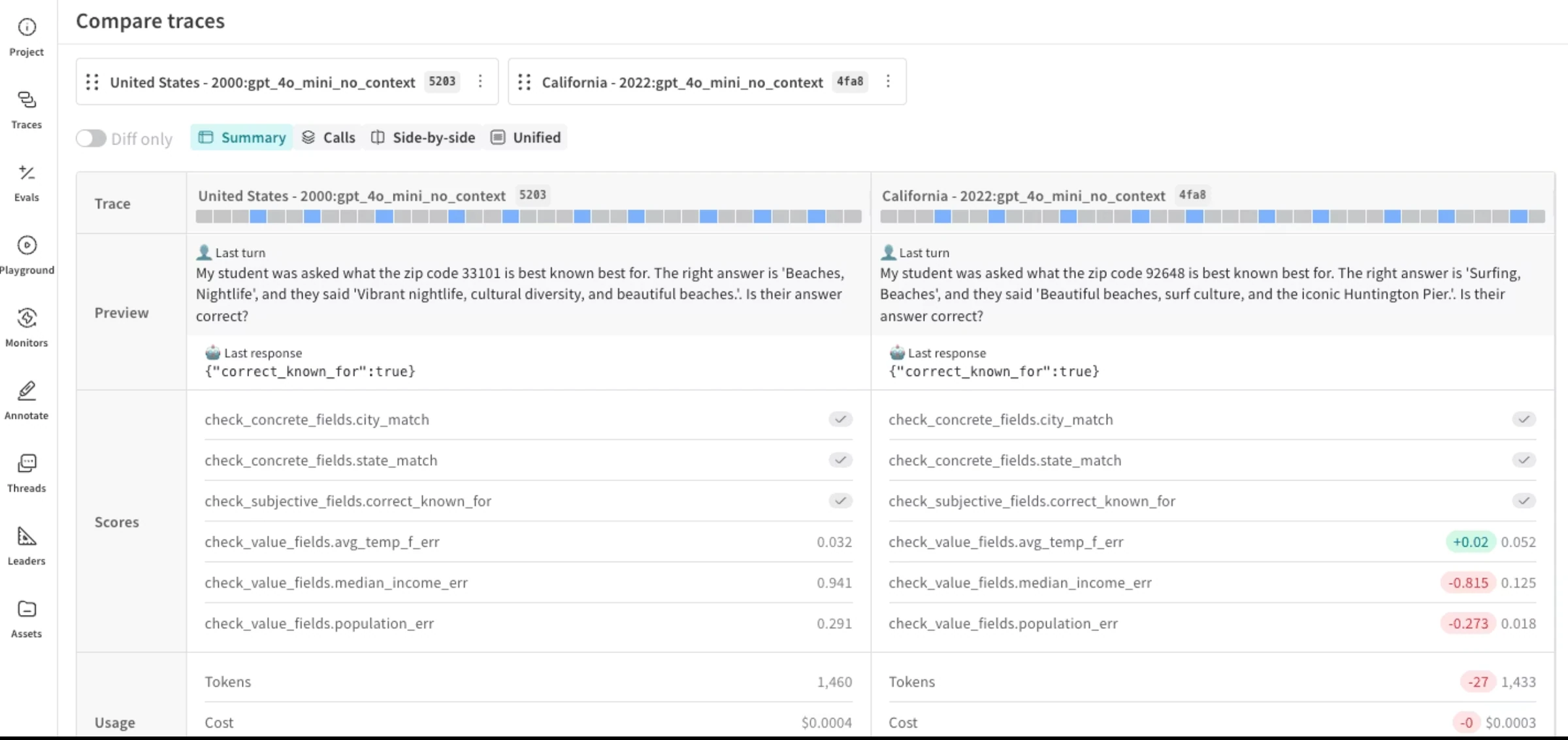
Best for: ML teams already using Weights & Biases for experiment tracking that want to add LLM observability without leaving the W&B ecosystem.
Standout Features
- LLM trace capture through Weave with structured logging
- Experiment tracking heritage with model versioning and artifact management
- Evaluation scoring capabilities within the Weave framework
- Dashboard and visualization tools for tracking quality over time
- Integration with the broader W&B ecosystem for ML workflow continuity
Pros | Cons |
|---|---|
Unified experiment tracking and LLM observability for teams already in W&B | Weave is newer — less mature for production LLM observability |
Strong model versioning and artifact management from ML heritage | No real-time quality alerting |
Good fit for research-oriented teams that value reproducibility | No cross-functional workflows — built for ML engineers |
Structured trace capture with evaluation hooks | No multi-turn conversation support or agent-specific debugging |
FAQ
Q: What is Weave?
Weave is W&B's tracing and evaluation product for LLM applications. It provides structured logging, evaluation scoring, and dashboard visualization.
Q: Is Weave open source?
Partially. Weave has open-source components, but the full W&B platform is commercial.
Q: Is Weave production-ready?
Weave is functional for production use, but it's a newer product compared to W&B's core experiment tracking. Teams with demanding production observability needs may find it less mature than purpose-built alternatives.
Full Comparison Table
Confident AI | LangWatch | LangSmith | Pydantic Logfire | OpenObserve | Latitude | Arize AI | Langfuse | Datadog | Helicone | Portkey | W&B Weave | |
|---|---|---|---|---|---|---|---|---|---|---|---|---|
Built-in eval metrics Research-backed metrics for faithfulness, relevance, safety | 50+ metrics | LLM-as-judge + evaluators | Custom evaluators | LLM-as-judge + custom evaluators | Configurable judges (Enterprise) | Auto-generated from failures | Custom evaluators | Custom evaluators | Basic scorers | Limited | ||
Quality-aware alerting Alerts on eval score drops, not just latency | SQL alerts on eval scores | Eval-score alerts | ||||||||||
Drift detection Track quality changes across prompts and models | Online evals + topic clustering | Limited | Eval scores over time | Limited | Signal trend states | Limited | ||||||
Multi-turn monitoring Evaluate conversations across turns | Conversation views | Session grouping | ||||||||||
Cross-functional workflows PMs and QA can review, annotate, and run evals | Limited | Annotation queues | ||||||||||
Agent tracing Capture tool calls, reasoning, and execution flow | Multi-agent topology + sequence | Full-stack nested spans | ||||||||||
Production-to-eval pipeline Traces become test datasets | Traces become simulations | Limited | Trace to dataset case | Enterprise experiments | Signals become evals + fix PRs | Limited | Limited | Limited | ||||
Framework-agnostic Consistent depth across frameworks | OTel-native | Limited | OTel-native | OTel-native | OTel-native | |||||||
Safety monitoring Toxicity, bias, PII detection on production traffic | PII + prompt-injection guardrails | Custom evaluators | Custom eval templates | Jailbreak + NSFW flaggers | ||||||||
Open-source option Self-host or inspect codebase | Limited | Partial | Limited | |||||||||
Multi-provider gateway Routing, caching, and failover across LLM providers |
How to Choose the Right LLM Observability Tool
The decision starts with what you actually need to observe. These tools solve different problems, and the right choice depends on where you are and what matters most.
If you need to know whether your AI outputs are good — not just that they happened: Several platforms can now score production traffic — but they ask you to build the evaluators first: custom judges on LangSmith, Langfuse, and Arize, or evals generated from your own failures on Latitude. Confident AI is the only one that scores every trace against 50+ research-backed metrics out of the box, then alerts through PagerDuty, Slack, or Teams when faithfulness, relevance, or safety drops. Most tools log traces — Confident AI evaluates them.
If your entire stack is LangChain: LangSmith provides the tightest integration and the best trace visualization within that ecosystem. If your stack is LangChain today and will be LangChain tomorrow, the native experience has value. Evaluation depth outside LangChain is more limited.
If you need open-source and self-hosting: OpenObserve (AGPL-3.0), LangWatch (Apache-2.0), Langfuse (MIT), and Arize Phoenix (ELv2) provide self-hosted options. OpenObserve combines infrastructure and LLM telemetry, LangWatch adds multi-agent evaluation and guardrails, Langfuse focuses on LLM tracing and prompt management, and Phoenix provides notebook-first observability.
If you need one trace across the AI and application stack: Pydantic Logfire connects model and tool calls with the HTTP requests, database queries, and infrastructure around them. Its OpenTelemetry foundation, SQL query layer, MCP server, evaluations, and AI gateway fit engineering teams that want full-stack context in one system.
If you need one self-hosted backend for infrastructure and LLM telemetry: OpenObserve puts logs, metrics, traces, and LLM spans into one OpenTelemetry-native store. Its open-source edition suits infrastructure ownership, while managed evaluation and experimentation workflows require Enterprise.
If you already run Datadog: Adding LLM monitoring to your existing APM is the path of least resistance. You get operational metrics (latency, tokens, costs) in a familiar interface. But it complements an AI quality platform — it doesn't replace one. It doesn't evaluate outputs.
If you need a gateway with routing and failover: Portkey and Helicone solve the reliability and cost problem. Portkey excels at routing, fallbacks, and load balancing with minimal overhead. Helicone adds caching and cost tracking via a proxy. Both provide observability as a bonus, not the core product.
If non-engineers need to participate in AI quality: This is where the field narrows the most. If PMs, QA, or domain experts need to review traces, annotate outputs, and run evaluation cycles independently, Confident AI is the only option on this list with cross-functional workflows. Every other tool requires engineering involvement at most steps.
If you're just starting out: Langfuse's free tier is generous for engineering teams that want tracing, and Arize Phoenix runs locally in a notebook with zero external dependencies. Both are good starting points before investing in a full evaluation platform.
Why Confident AI is the Best LLM Observability Tool for Evaluation and Monitoring
There are strong options on this list for different needs. OpenObserve unifies infrastructure and LLM telemetry, while Langfuse and Phoenix provide more AI-focused open-source foundations. LangSmith provides deep LangChain debugging. Pydantic Logfire connects AI traces with application telemetry. Helicone and Portkey solve the gateway problem, and Datadog serves teams that want LLM metrics inside their existing APM.
Some platforms now evaluate production outputs, but none match Confident AI's combination of 50+ research-backed metrics, quality-aware alerting, automatic dataset curation, and cross-functional workflows.
Confident AI makes evaluation the core of observability. Every trace is scored automatically with 50+ research-backed metrics. When faithfulness drops, hallucination rates rise, or safety scores degrade, alerts fire through PagerDuty, Slack, or Teams. Production traces are automatically curated into evaluation datasets for the next test cycle. Drift detection tracks quality changes across prompt versions, model updates, and user segments — so you catch degradation at the source, not just the aggregate.
The collaboration model remains the widest gap. Confident AI makes AI quality a team effort: PMs trigger evaluations against production applications via HTTP, domain experts annotate traces, and QA runs regression tests. Engineers maintain full programmatic control but aren't the bottleneck for every quality decision.
Multi-turn simulation generates dynamic test scenarios. Red teaming covers PII leakage, prompt injection, bias, and jailbreaks without a separate vendor. CI/CD integration catches regressions before deployment. At $1/GB-month with no evaluation caps, it's the most cost-effective platform on this list for teams running AI at scale.
Observability without evaluation is just expensive logging. Confident AI closes the loop.
Confident AI helps you turn expensive logging into real quality signal
Book a personalized 30-min walkthrough for your team's use case.
Frequently Asked Questions
What are LLM observability tools?
LLM observability tools help teams monitor, trace, and evaluate AI system behavior in production. They go beyond traditional application monitoring by assessing output quality — faithfulness, relevance, safety, hallucination rates — not just infrastructure metrics like latency and error rates.
How is LLM observability different from traditional APM?
APM tools (Datadog, New Relic) monitor infrastructure — latency, uptime, error rates, resource usage. LLM observability monitors output quality. A model can return a 200 response in 50ms and still hallucinate, leak PII, or produce biased content. LLM observability evaluates the actual content of responses using metrics that APM was never designed to capture.
Do I need a separate tool if I already use Datadog?
For infrastructure monitoring, no. But if you need to evaluate output quality, detect quality drift, alert on evaluation score drops, or involve non-engineers in quality workflows, you'll need a purpose-built AI observability tool alongside your APM. Confident AI is designed to complement — not compete with — your existing infrastructure monitoring.
What's the difference between an AI gateway and an observability tool?
AI gateways (Helicone, Portkey) sit between your application and LLM providers to handle routing, caching, and failover. Observability is a built-in feature, not the core purpose. Dedicated observability tools provide deeper tracing, evaluation, alerting, and quality monitoring. Many teams run both — a gateway for reliability and cost optimization, and an observability platform for quality monitoring.
Which LLM observability tools are open source?
OpenObserve (AGPL-3.0), Langfuse (MIT), Latitude (MIT), Arize Phoenix (ELv2), Helicone (Apache-2.0), Portkey (MIT), and Pydantic Evals all have open-source components. Latitude is MIT-licensed and supports full-featured self-hosting; it also connects recurring production failures to your own coding agent so the agent can open a fix pull request. Open-source options provide code transparency and, depending on the platform, infrastructure control, but typically require more work to assemble evaluation, alerting, and quality workflows.
Can LLM observability tools monitor multi-turn conversations?
Some tools support session-level grouping (Langfuse, LangSmith), but true conversational monitoring requires evaluation across turns — measuring coherence, context retention, and quality drift within a conversation. Confident AI evaluates conversation threads natively with metrics designed for multi-turn interactions.
What metrics should I track for AI observability?
At minimum: faithfulness (is the output grounded in context), relevance (does it answer the question), and safety (is it free from toxicity, bias, or PII leakage). For RAG systems, add context relevance and answer correctness. For agents, add tool selection accuracy and planning quality. For conversational AI, track coherence across turns. Operational metrics like latency and cost still matter but shouldn't be your only signals.
Can non-engineers use LLM observability tools?
On most platforms, no — observability workflows require engineering skills. Confident AI is the exception, with cross-functional workflows that let PMs, QA, and domain experts review traces, annotate outputs, and run evaluation cycles through a no-code interface.
How do I choose between so many options?
Start with the problem you're solving. If you need operational metrics in your existing APM, use Datadog. If you need open-source tracing, use Langfuse or Phoenix. If you need a gateway, use Helicone or Portkey. If you need to know whether your AI outputs are actually good — with evaluation, alerting, drift detection, and cross-functional workflows — use Confident AI.