

Every AI team eventually ends up in the same debate: is this new prompt actually better, or do we just like the 3 examples we happened to look at?
This is what LLM experimentation is for. It gives you a controlled way to compare two or more versions of your AI app against the same dataset, using the same metrics, before you push changes to production.
No vibes, no cherry-picked examples, and no gut feel. Instead, you get a repeatable process for deciding which prompt, model, tool set, or agent configuration should actually ship.
In this guide, I'll walk through the full LLM experimentation workflow: what LLM experimentation means, how it differs from evaluation, how to choose what to optimize, how to curate datasets and metrics, how to interpret results, how to extend experiments into production, and how Confident AI supports the loop end-to-end.
TL;DR
- LLM evaluation answers "how good is this version?" LLM experimentation answers "which version is better?"
- The only fair comparison uses the same dataset and evaluation metrics. If prompt A and prompt B see different inputs, you are not running an experiment. You are collecting anecdotes.
- Change one variable at a time. Compare prompt vs prompt, model vs model, tool set vs tool set, or retrieval config vs retrieval config. If everything changes at once, you will not know what worked.
- Use the 2 + 3 rule for metrics. Start with 2 general-purpose metrics and 3 custom metrics that encode what good means for your product.
- Look beyond LLM-as-a-judge scores. Latency, cost, tool correctness, retries, token usage, and escalation rate can matter just as much as answer quality.
- Experiments do not end after the report. Winners should be versioned, A/B tested when appropriate, monitored in production, and used to improve future datasets.
What Is LLM Experimentation?
LLM experimentation is the process of comparing multiple versions of an LLM app under controlled conditions. Each version runs against the same evaluation dataset and gets scored by the same metric collection so you can see which version performs better.
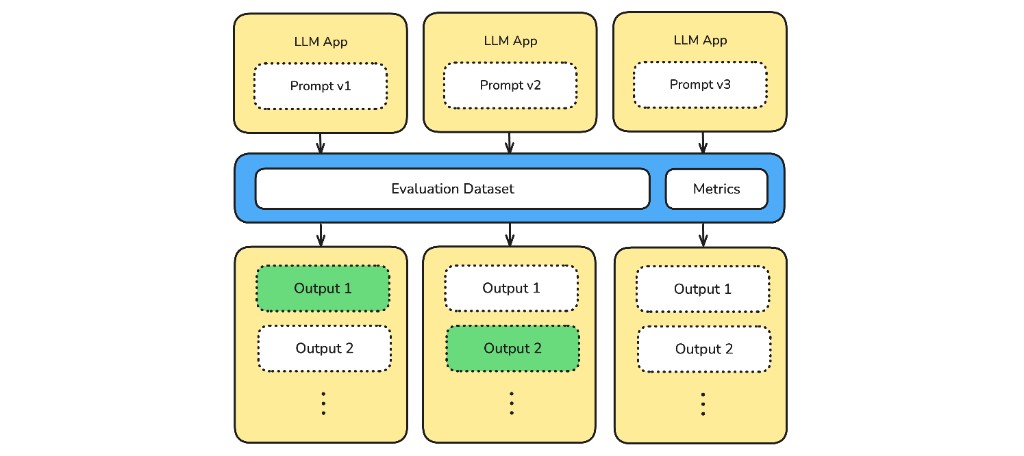
Three prompt variants are evaluated against the same dataset and metrics so their outputs can be compared fairly.
The basic experimentation process looks like this:
- Pick the parameter you want to optimize: prompt, model, tool set, retrieval config (top-k, chunking, reranker), agent architecture (planner, memory, reflection loop), etc.
- Choose a fixed dataset that represents the use case.
- Prepare a collection of metrics that evaluate what you care about.
- Run every variant against the same dataset and metric collection.
- Compare aggregate scores, inspect failures, and decide what to ship or investigate next.
That sounds obvious, but even small setup mistakes can make experiment results hard to trust. If each variant changes more than one parameter, if you optimize too many metrics at once, or if the main metric does not match the product goal, it becomes difficult to know what actually improved.
Choosing a winner is also not always straightforward. If version A performs better on 50% of test cases and version B wins on the other 50%, you need to inspect the trade-offs before deciding what to ship.
LLM Experimentation vs LLM Evaluation
Think of it this way:
- An eval tells you whether one version passed your quality bar.
- An experiment tells you which version performed best against one or more alternatives.
That distinction matters because evals are easy to mistake for experiments. If you run prompt A today, prompt B tomorrow, compare the pass rates, and call it a decision, the comparison is noisy unless both versions ran on the same dataset, with the same metrics, under the same conditions.
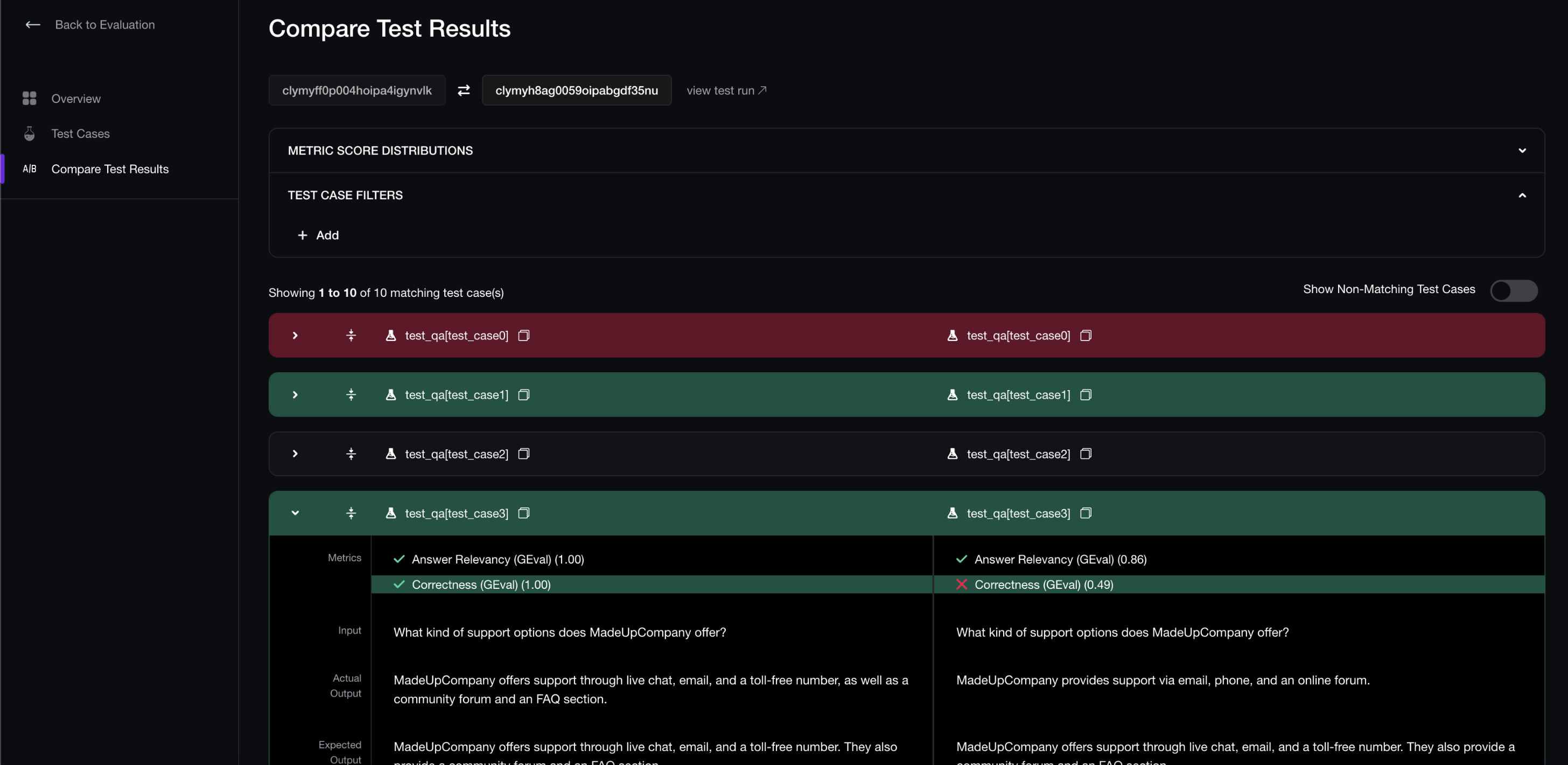
Confident AI regression tests make sure prompt, model, and agent changes are compared against the same examples before release.
An evaluation is still the atomic unit of experimentation. You cannot compare two versions unless each version was evaluated. The difference is that experimentation adds the comparison layer: same inputs, same metric collection, same runtime assumptions, and a decision about which version should move forward.
LLM Experiments vs A/B Tests
An LLM experiment is usually done offline in development or staging. You can compare many prompt, model, tool, retrieval, or agent variants against the same dataset and evaluation metrics. Think: "Prompt v4 performed better than prompt v3 and v2 on task completion, but lost on faithfulness."
An A/B test compares two versions, usually A vs B. In development, that might mean an A/B-style comparison on a fixed dataset. In production, it usually means splitting live traffic across two LLM app versions and measuring product outcomes. For example: "Prompt v4 improved support resolution compared to prompt v3, but produced more user-reported hallucinations."
In practice, offline experiments and A/B tests in production are usually used together to continuously improve an LLM app or agent:
- Offline experiments help you eliminate bad variants before users see them.
- Production A/B tests help you confirm that a strong offline winner still wins under real traffic.
Running an LLM Experiment
Running an LLM experiment should be easy once you have the right setup. A good setup is controlled in the right ways: clear baseline, clear variants, fixed dataset, and fixed metrics.
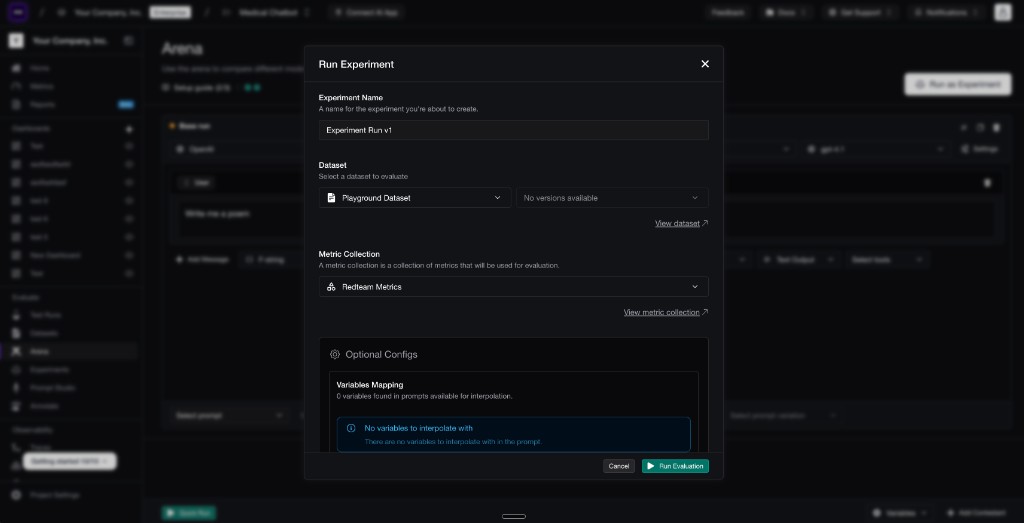
Confident AI lets you run an LLM experiment by selecting the dataset and metric collection that every variant will use.
The minimum workflow for an LLM app or agent looks like this:
- Choose what to optimize. Decide whether the experiment is about the prompt, model, tool set, retrieval config, agent architecture, or another parameter.
- Choose a baseline app or agent version. This is usually the current production version of the LLM app or agent.
- Create one or more app or agent variants. These are the proposed versions you want to compare against the baseline. Ideally, only the parameter you want to optimize should change.
- Run every version on the same evaluation dataset. Every variant should see the same inputs.
- Score every version with the same metric collection. Every variant should be judged by the same quality bar.
This lets you answer the practical question: if we swapped production to this version, what would likely get better and what would likely get worse?
Choosing What to Optimize
Most LLM apps have a lot of knobs. Prompts, models, tools, retrieval, temperature, memory, response format, and planner instructions can all change behavior.
Like any controlled experiment, you should start by choosing one independent variable. If you change five knobs at once and the result improves, you might have a better app, but you will not know which change helped or whether another change introduced a regression.
Parameter | When to Optimize | What You Compare |
|---|---|---|
Prompt | You want better wording, instructions, examples, formatting, or refusal behavior | Two different task prompts, such as a concise instruction prompt vs a few-shot prompt |
System prompt | You want to change the app's role, policy, tone, or global constraints | Two different system prompts, such as a strict policy-first prompt vs a more conversational prompt |
Model | You want to trade off quality, cost, latency, or reliability | Different models, such as GPT-4o vs Claude vs Gemini |
Tool set | You want to know whether an agent can complete tasks more reliably with different tools | Different tool configurations, such as the current tools vs a version with a refund lookup tool added |
Retrieval config | You want better grounding or context selection in a RAG workflow | Different retrieval settings, such as top-k 3 vs top-k 8, or no reranker vs reranker |
Temperature / decoding | You want to test creativity, determinism, or consistency | Different decoding settings, such as temperature 0 vs 0.3 vs 0.7 |
Memory strategy | You want a multi-turn agent to remember useful context without drifting | Different memory approaches, such as no memory vs short-term memory vs summarized memory |
Agent planning | You want to reduce loops, wrong tool calls, or unnecessary reasoning | Different planning instructions, such as a direct tool-use planner vs a step-by-step planner |
The point is not that you can never run multi-variable experiments. You can, especially for exploratory work. But if multiple variables change at once, you should not treat the result as proof that any one variable caused the improvement.
For most teams, one-variable experiments are the most effective path to better release decisions.
Curating Your Evaluation Dataset
Your dataset is the test bed your variants have to run across. If it is too easy, every version wins. If it is random, the result is noisy. If it is not representative, you optimize for a fake product.
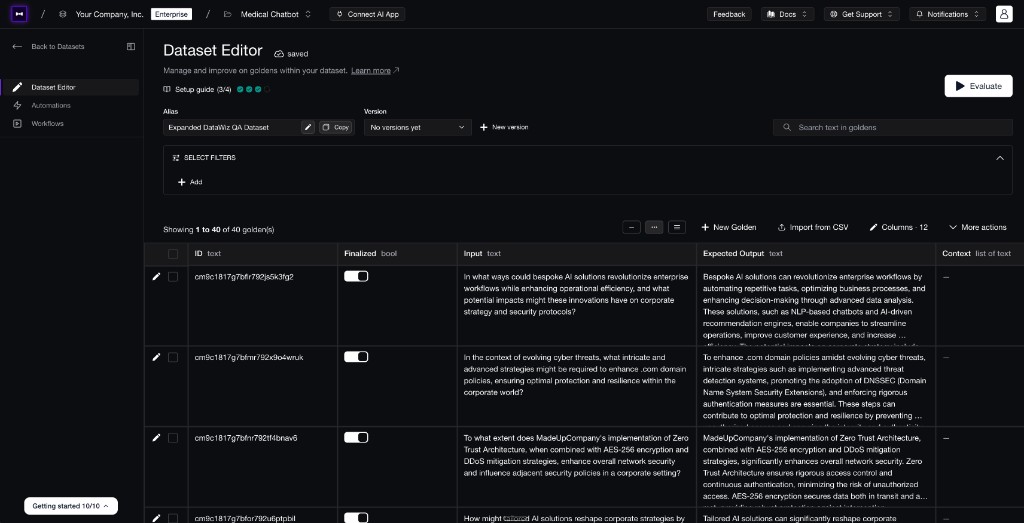
Confident AI datasets give every prompt, model, or agent variant the same test cases to run against.
For each use case, I recommend starting with roughly 100 test cases. That is enough to include happy paths, edge cases, ambiguous inputs, long-tail failures, and high-value customer scenarios without making every experiment painfully slow.
A good experiment dataset usually includes a few general categories, plus use-case-specific cases for the kind of LLM app you are testing:
- Common successful workflows so you do not regress the core behavior.
- Known failure cases from production, logs, support tickets, or manual review.
- Ambiguous inputs where the app should ask for clarification or avoid over-assuming.
- Policy-sensitive cases if the app handles security, compliance, safety, escalation, or other strict rules.
- RAG cases if the app uses retrieval and needs expected context or grounding requirements.
- Agentic tasks if the app uses tools, multi-step sequencing, or final-answer quality depends on intermediate actions.
Do not build one giant generic dataset and call it a day. Instead, create separate datasets for each use case, such as billing support, onboarding, sales email generation, medical intake summarization, or internal knowledge search.
This matters because a prompt can be great for one workflow and weak for another. The same is true for metrics: Faithfulness might matter for an internal knowledge search workflow, while Tool Correctness might matter more for an agent that updates records. Even within the same dataset, not every metric needs to apply to every test case, because different examples may be testing different behaviors. If your dataset and metric suite blend every workflow together, the aggregate score can hide the exact slice you need to improve.
Choosing Your Metrics
Your metrics are the scoreboard. If the scoreboard is wrong, the experiment is wrong.
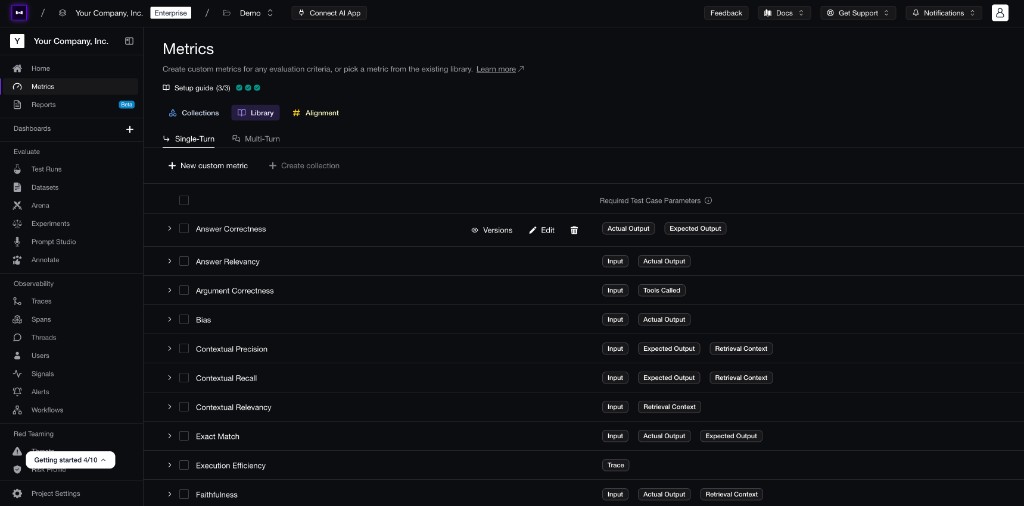
Confident AI lets you start with reusable metrics, then add custom metrics for the product-specific behavior your experiment needs to measure.
For most LLM experiments, start with the 2 + 3 rule: use 2 out-of-the-box metrics for common failure modes and 3 custom metrics for the use-case-specific behavior that makes your app good or bad. This gives you broad coverage without turning the experiment into a dashboard with 20 competing scores.
For example, a RAG support assistant might use Answer Relevancy and Faithfulness as the two general metrics, then add custom metrics for refund policy compliance, clarifying question quality, and customer tone.
The exact suite depends on the app. A RAG workflow might care most about grounding and retrieval quality, while an agentic workflow might need trace-level metrics for tool correctness, task completion, memory, and unnecessary loops. Not every metric needs to apply to every test case.
Not every signal should be an LLM-as-a-judge score either:
Signal | Why It Matters |
|---|---|
Latency | A higher-quality answer can still be unusable if it is too slow |
Cost | A variant can win on quality but be too expensive to ship broadly |
Tool retries | The final answer may look correct while the trace shows instability |
Escalation rate | A prompt that sounds better may still fail to resolve the task |
Abstention or refusal rate | The variant may become too cautious or not cautious enough |
Together, these metrics and signals tell you whether a variant is accurate, useful, efficient, and safe to ship.
Before you run big experiments, align your LLM-as-a-judge metrics against a small set of examples you understand. If your metric says a bad response is good, the experiment will optimize in the wrong direction very confidently.
Comparing Prompts Side by Side
Prompt experiments deserve their own workflow because prompts are uniquely open-ended. Model choice is constrained by the models available to you. Prompt design is not. There are effectively infinite ways to rewrite instructions, add examples, change tone, specify output format, or emphasize policy.
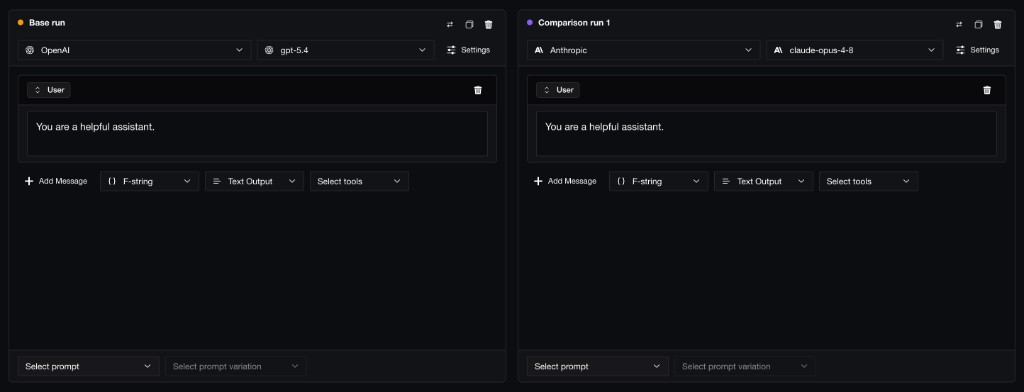
Confident AI lets you compare prompt variants side by side before running the full experiment.
That is why you usually should not send every prompt idea straight into a full experiment. Before scoring 100+ test cases, run each candidate prompt on one representative test case and inspect the answer it generates. The goal is not to declare a winner yet. The goal is to catch prompts that are not worth evaluating at scale.
Prompt versioning makes this much easier. If each prompt candidate is saved as a version, you can run experiments without losing track of which wording, examples, or output format produced each result.
For prompt variants, a clean setup looks like this:
- Use the current production prompt as the baseline.
- Add 2-4 candidate prompts that represent meaningfully different strategies.
- Keep the model, tools, retrieval config, and metrics fixed.
- Run a quick one-test-case check to see what each prompt actually generates.
- Remove prompts that fail basic formatting, tone, refusal, or instruction-following expectations.
- Run the strongest prompt candidates on the full dataset.
That quick run is important. You do not need to spend time scoring 100+ examples for a prompt that fails basic formatting, ignores the task, or refuses every request because you over-tightened the policy language.
Interpreting Experiment Results
A good experiment report does more than tell you "B scored higher." It shows whether B is better in the ways that matter.
When you read the report, look for:
- Clear winners: one variant wins across the metrics and test cases that matter most.
- Close calls: the difference is small enough that you should collect more test cases before shipping.
- Trade-offs: one prompt improves relevance but hurts concision, tone, faithfulness, cost, or latency.
- Failure clusters: the average looks fine, but one slice fails, such as billing, long conversations, retrieval-heavy cases, or tool-calling tasks.
- Outliers: a narrow but important failure could be worse than a small aggregate improvement.
The mistake is treating experimentation like a leaderboard. If prompt B improves average Answer Relevancy by 4% but fails three high-value enterprise billing cases that prompt A handled correctly, B is probably not the version to ship. The report should show where variants diverge, because that is usually where the decision lives.
Running Experiments in Production
Offline experiments should catch obvious regressions. Production experiments tell you whether the strongest candidate still works under real traffic, real retrieval data, and real business constraints.
The relationship should look like this:
- Use offline experiments to eliminate weak variants.
- Ship the strongest candidate behind versioning.
- Run a canary, shadow deployment, or A/B test if the change is meaningful.
- Monitor online evals and product metrics.
- Feed production failures back into the next offline experiment.
This is what turns experimentation from a pre-deployment checklist into a continuous improvement loop.
A/B Testing Prompts and Models
Use offline experiments to eliminate bad candidates, then use shadow traffic, canaries, or production A/B tests to confirm the strongest version under real traffic.
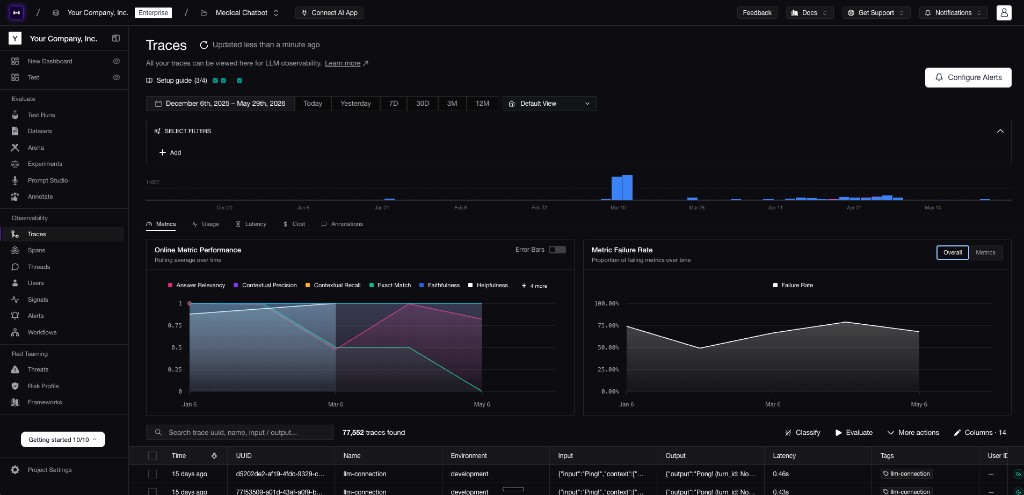
Confident AI lets you monitor production traces, online evaluation metrics, and failure rates after an A/B test or rollout.
The setup should look a lot like the offline experiment: keep the independent variable clear, release two versions such as prompt v3 and prompt v4, and monitor the same target metrics. The difference is that production can surface new issues, so watch traces, user feedback, online evals, latency, and cost while the test is running.
Those production signals should feed the next round of experimentation. If production teaches you where the dataset is thin or where the metrics are incomplete, the next step is to improve the experiment itself.
Improving Your Experiments
The best LLM experiments get more useful over time. Each production run should teach you what to add to the evaluation dataset, what to measure next, and which metrics need sharper criteria.
There are two main ways to improve the next experiment: expand the dataset with higher-value examples, and expand the metric suite so it measures the quality dimensions production exposed.
Expanding Your Evaluation Dataset for Experiments
Your evaluation dataset should get better every time production teaches you something.
The highest-value test cases usually come from:
- Failed online evals where the shipped version violated a metric in production.
- User-reported issues from support tickets, thumbs-down feedback, or sales calls.
- Automatically surfaced issues that your metrics did not catch, such as hallucinations, tool errors, retrieval misses, and repeated retries surfaced by Confident AI's trace analysis.
- Human-in-the-loop review queues where reviewers marked responses as low quality.
- High-impact business failures such as missed escalations, incorrect refund guidance, or broken onboarding flows.
When one of these issues appears, do not just fix the prompt. Add the input, context, expected behavior, metadata, and failure reason back into your dataset so every future prompt, model, or agent variant has to handle that case.
Expanding Your Metric Suite
Production should also teach you when your metrics are incomplete or misaligned.
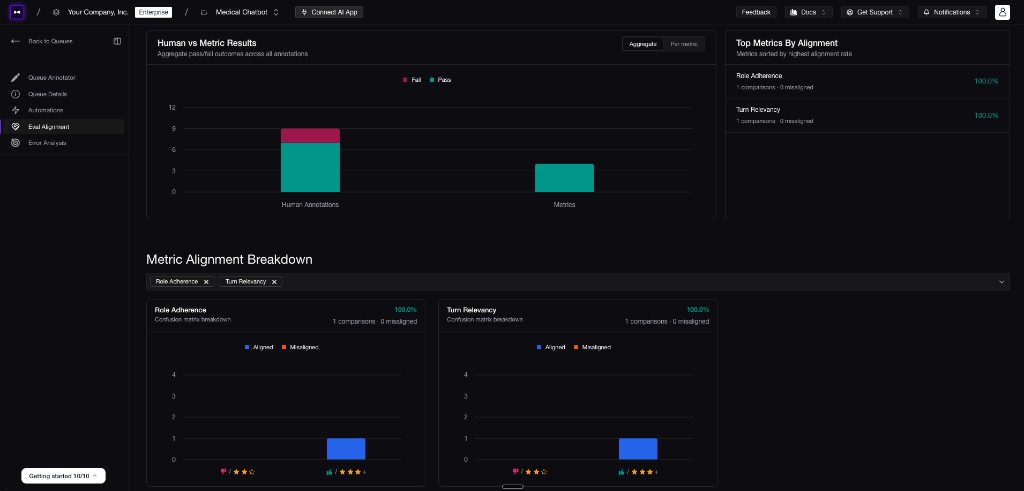
Confident AI metric alignment shows where automated metrics agree or disagree with human annotations.
For example, maybe your LLM-as-a-judge metric says a support response is relevant and faithful, but human reviewers keep flagging it because it sounds too cold. That does not always mean you need a brand-new metric; it might mean your existing tone metric needs better criteria. Maybe the agent completes the task, but only after five unnecessary tool calls. Maybe answers are correct, but too slow for the UX. These are metric gaps or metric-alignment problems.
The best way to expand your metric suite is through a human-in-the-loop evaluation workflow:
- Sample production traces and outputs.
- Have humans review quality, failure type, and severity.
- Compare human labels against your automated metrics.
- Identify where automated metrics disagree with humans.
- Add new metrics, revise existing criteria, or tune thresholds to capture the missing judgment.
- Re-run historical examples to make sure the new metric behaves correctly.
This matters most for subjective criteria like tone, helpfulness, escalation quality, and policy nuance. LLM-as-a-judge metrics are powerful, but the criteria behind custom metrics still need to be tuned against the way your team actually judges quality.
Common LLM Experimentation Pitfalls
Most LLM experimentation failures come from bad experimental design.
- Changing too many variables at once. If prompt, model, temperature, tools, and retrieval all change together, you will not know what caused the result.
- Using different datasets per variant. Every variant must run on the same inputs.
- Optimizing for one metric only. A variant can improve relevance while hurting faithfulness, safety, cost, or latency.
- Trusting averages too much. Aggregate scores hide catastrophic failures in narrow but important slices.
- Skipping the smoke test. A quick run on 10-20 cases can catch broken formatting, bad tool schemas, or obviously weak prompts before the full experiment.
- Ignoring close calls. If the difference is tiny, collect more test cases before declaring a winner.
- Forgetting cost and latency. A better answer that is too slow or too expensive might be a worse product.
- Not versioning the experiment. If you cannot trace the winner back to a prompt, model, dataset, metric collection, and app release, you cannot reproduce the decision.
Another common pitfall is assuming every change needs a full experiment. Fast-moving teams may not run a complete prompt-vs-prompt or model-vs-model experiment for every small update, but they should still run scheduled evals. Experiments tell you which version performed best at one point in time; scheduled evals tell you whether the shipped version keeps passing the same quality bar as prompts, models, retrieval indexes, tools, and traffic change.
Why Confident AI Is the Best Platform to Run LLM Experiments
A useful LLM experimentation platform is not just a playground. A playground helps you brainstorm; an experimentation platform helps you make a decision you can defend.
Confident AI lets teams compare prompts, models, AI connections, and agent configurations against the same dataset and metric collection. You can version prompts, run quick checks in Arena, launch full experiments, and inspect the winning and losing examples from the same workflow.
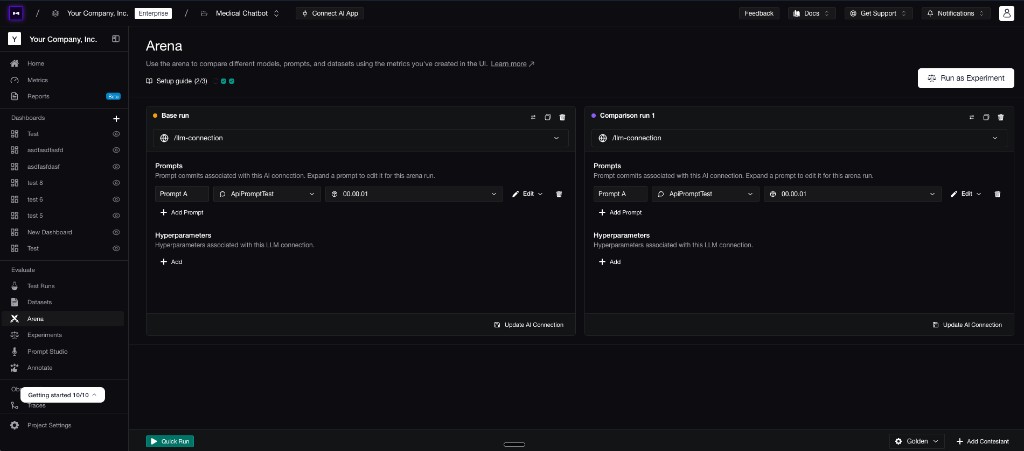
Confident AI Arena lets teams compare real AI app connections, prompt versions, and hyperparameters before running the full experiment.
The workflow difference is that Confident AI can evaluate outputs from your actual AI app endpoint. You do not have to rebuild your prompts, chains, tools, and retrieval flow inside the platform just to run an experiment. If your app can return an output, Confident AI can score it against your dataset and metrics, which means you can test the hyperparameters you actually care about: prompts, models, retrieval config, tool sets, agent architecture, and more.
After deployment, Confident AI keeps the loop going with production A/B testing, online evals, automatic issue surfacing from traces, metric recommendations, human-in-the-loop workflows, and custom dashboards for quality, cost, latency, and failure rates. Experiments should not end as static reports. They should become the next release decision, production monitor, and dataset update.
Conclusion
LLM experimentation is not complicated, but it does require discipline. Compare variants against the same dataset. Score them with the same metrics. Change one variable at a time. Read both the aggregate scores and the individual failures. Then choose the version that wins on the quality bar you actually care about.
That is how you compare prompts side by side, test GPT-4o against Claude, and evaluate agent configurations without touching production. More importantly, it gives your team a shared way to decide what improved, what regressed, and what is ready to move forward.
The next time a prompt, model, or agent change looks better in a few examples, turn it into an experiment before treating it like a release decision. If it wins, you have evidence. If it loses, you found the regression before users did.
Thanks for reading. When you are ready to run this workflow on your own AI app, get started with Confident AI for free.
Frequently Asked Questions
What is LLM experimentation?
How do I compare two prompts side by side against the same test dataset?
How do you A/B test LLM prompts?
What is the difference between prompt testing and prompt experimentation?
What is the best platform for running side-by-side LLM experiments with evaluation metrics?
How many test cases should I use for an LLM experiment?
What metrics should I use for LLM experimentation?
What is the best workflow for iterating on prompts with evaluation data instead of gut feel?
How do I compare prompt variants and know which one is actually better?
What's the best way to A/B test different LLM models before deploying?
Should I A/B test LLM models in production or offline first?
How do I test whether GPT-4o or Claude is better for my use case?
How do I run experiments to compare agent configurations like different tools or system prompts?
How do I run controlled experiments on my LLM app without changing production?
What is the difference between LLM evaluation and LLM experimentation?
Do you want to brainstorm how to evaluate your LLM (application)? Ask us anything in our discord. I might give you an "aha!" moment, who knows?
Standardize AI Quality for the entire org, not just individual teams
Give all AI use cases the same quality bar with all-in-one evals, observability, and red teaming, and enforce them at scale.